
Product Overview
This manual provides detailed instructions for the Lamicall 3-in-1 Car Phone Holder and Tablet Stand. This versatile product offers solutions for securely mounting your phone or tablet in your vehicle or on a desktop. It includes a car mount with both suction cup and air vent clip options, and a separate desktop tablet stand.

Image: Overview of the Lamicall 3-in-1 product, showing the car phone holder with suction cup and vent clip, and the separate desktop tablet stand.
Setup and Installation
Car Phone Holder Installation
The car phone holder offers two primary installation methods: suction cup for dashboard/windshield and a vent clip for air vents.
1. Suction Cup Mount (Dashboard/Windshield)
- Clean the Surface: Ensure the dashboard or windshield surface is clean and dry.
- Attach the Suction Cup: Press the suction cup firmly onto the desired flat surface.
- Engage the Lock: Flip the locking lever down to create a vacuum seal, securing the mount.
- Adjust Angle: Loosen the adjustment knob to position the phone holder arm and cradle to your preferred viewing angle, then tighten the knob.

Image: Visual guide demonstrating the car phone holder mounted on a dashboard, windshield, and air vent.
2. Air Vent Clip Mount
- Attach the Vent Clip: Slide the vent clip onto one of your vehicle's air vent blades.
- Secure the Hook: Ensure the hook on the clip is securely engaged with the vent blade. The 4-lock protection system provides stability.
- Adjust Angle: Position the phone holder cradle to your preferred viewing angle.

Image: Close-up of the air vent clip's 4-lock protection mechanism, highlighting silicone anti-slip, anti-overtightening knob, and hook vent blade. Also shows compatibility with horizontal and vertical vents, and incompatibility with circular vents.
Desktop Tablet Stand Setup
The desktop tablet stand requires no assembly. Simply place it on a flat, stable surface.
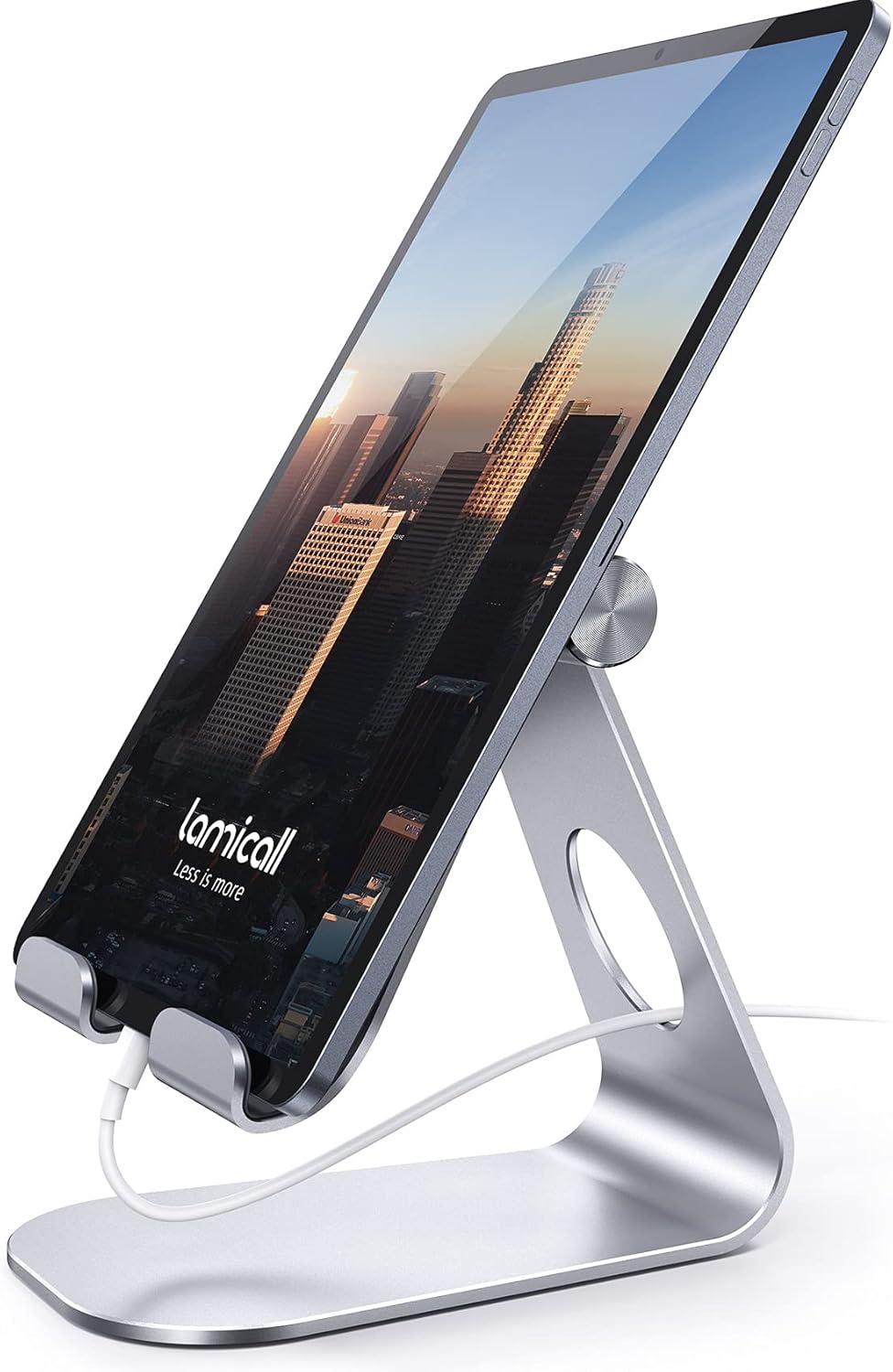
Image: The Lamicall desktop tablet stand holding a tablet, showcasing its design and functionality.
Operating Instructions
Using the Car Phone Holder
- Insert Device: Gently open the adjustable arms of the phone cradle and place your smartphone inside. The arms will automatically secure the device.
- Adjust Viewing Angle: The car mount features a 360-degree rotatable ball joint. Loosen the collar behind the cradle to adjust the angle and orientation (portrait or landscape) as needed, then tighten to secure.
- Extend/Retract Arm: If using the suction cup mount, the telescopic arm can be extended or retracted for optimal reach.

Image: The car phone holder demonstrating its 360-degree rotation feature, allowing for flexible viewing adjustments without removing the device.
Using the Desktop Tablet Stand
- Place Device: Position your tablet or phone onto the stand's hooks.
- Adjust Angle: The stand allows for easy adjustment of the viewing angle, supporting both vertical and horizontal orientations.
- Compatibility: This stand is compatible with tablets and phones ranging from 4 to 13 inches. The hook width is 18mm (0.71 in); ensure your device with its case does not exceed this thickness. For tablets larger than 12 inches, placing them horizontally may provide greater stability.

Image: The tablet stand in a home setting, showcasing its use as a convenient accessory for viewing content.

Image: The tablet stand in an office setting, demonstrating its utility as a desktop partner for productivity.
Maintenance
Cleaning the Suction Cup
If the suction cup's adhesion weakens over time or due to dust, it can be restored:
- Remove the Mount: Detach the suction cup from its surface.
- Wash with Water: Rinse the suction cup thoroughly with lukewarm water.
- Air Dry: Allow the suction cup to air dry completely. Do not wipe with a cloth, as this can leave lint and reduce adhesion.
The suction cup is designed to maintain its grip in temperatures ranging from -4°F to 194°F. Avoid applying the suction cup to genuine leather, coated faux leather, suede, uneven, dirty, or soiled surfaces, as it may not adhere properly or could cause damage.

Image: Infographic detailing the suction cup's features: 70LBS strong nano-grade adhesion, temperature resistance (-4°F to 194°F), 3-layer gel construction, and reusability after washing.
Troubleshooting
- Suction Cup Not Sticking:
- Ensure the mounting surface is clean, dry, and smooth. Avoid porous or textured surfaces.
- Wash the suction cup with water and air dry to restore adhesion (refer to Maintenance section).
- Confirm the locking lever is fully engaged after pressing the suction cup firmly onto the surface. - Tablet Stand Instability with Large Tablets:
- For tablets larger than 12 inches, try positioning the tablet horizontally on the stand to improve stability. - Device Not Fitting in Tablet Stand:
- Verify that the thickness of your tablet or tablet with its case does not exceed 18mm (0.71 inches).
Specifications
- Brand: Lamicall
- Model: 3-in-1 Car Phone Holder and Tablet Stand
- Car Phone Holder Mounting Options: Suction Cup (Dashboard/Windshield), Air Vent Clip
- Suction Cup Adhesion: Up to 70 LBS (with vacuum locking mechanism)
- Suction Cup Temperature Resistance: -4°F to 194°F
- Car Phone Holder Rotation: 360-degree adjustable
- Tablet Stand Compatibility: 4 - 13 inch tablets and phones (e.g., iPad Pro, iPad Air, iPad mini, Kindle, Surface Pro, Galaxy Tab, iPhone models)
- Tablet Stand Hook Width: 18mm (0.71 inches)
- ASIN: B0DTYB5QYM
- Date First Available: January 24, 2025

