
1. Introduction
This manual provides instructions for the ECONTROLLY RC-974R replacement infrared remote control. This remote is designed to be compatible with various Pioneer AV Receiver models, offering a straightforward solution for controlling your audio-video system without the need for complex programming.
Compatible Pioneer AV Receiver Models:
- VSX-LX504
- VSX-LX104
- VSX-LX304
- VSX-935
- VSX-934
- VSX-LX504-S
- VSX-LX504-B
- VSX-LX304-B
The RC-974R operates using infrared technology and is pre-programmed for immediate use with the listed models. No additional setup or code entry is required.
2. Setup
2.1 Battery Installation
The remote control requires two AAA ALKALINE batteries for operation. Batteries are not included with the remote control.
- Locate the battery compartment on the back of the remote control.
- Slide the battery compartment cover downwards or in the direction indicated by an arrow to open it.
- Insert two AAA ALKALINE batteries, ensuring the positive (+) and negative (-) terminals align correctly with the markings inside the compartment.
- Close the battery compartment cover by sliding it back into place until it clicks securely.
Important: Do not use rechargeable batteries. Only AAA ALKALINE batteries are recommended for optimal performance and to prevent potential damage to the remote control.

Image: Rear view of the RC-974R remote control, illustrating the location of the battery compartment for battery insertion.
3. Operating the Remote Control
To operate your Pioneer AV Receiver, point the RC-974R remote control directly at the receiver's infrared sensor. Ensure there are no obstructions between the remote and the receiver.
3.1 Key Functions Overview
The RC-974R remote control features a comprehensive set of buttons for various functions. Refer to the image below for a visual guide to the button layout.
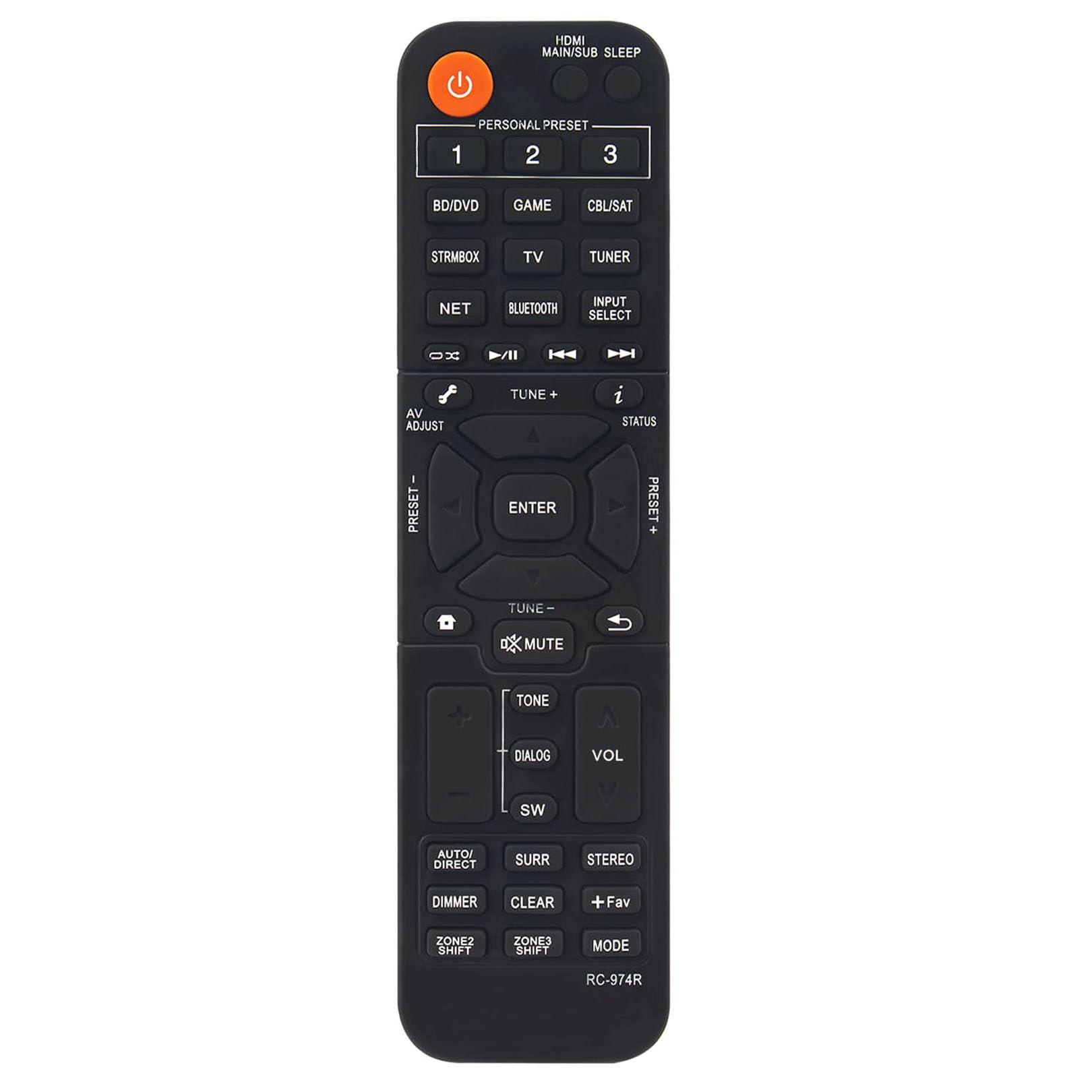
Image: Front view of the ECONTROLLY RC-974R remote control, displaying the full button layout and labels.
- Power Button (Orange): Turns the AV Receiver on or off.
- HDMI MAIN/SUB SLEEP: Controls HDMI output and sleep timer functions.
- PERSONAL PRESET (1, 2, 3): Accesses stored personal settings or favorite configurations.
- Input Select Buttons (BD/DVD, STRMBOX, TV, NET, BLUETOOTH, GAME, CBL/SAT, TUNER): Selects the desired input source for the AV Receiver.
- Navigation Cluster (Up, Down, Left, Right, ENTER): Used for menu navigation and selection.
- AV ADJUST: Adjusts audio/video settings.
- TUNE +/-: Adjusts radio frequencies or other tuning parameters.
- STATUS: Displays current status information on the receiver's display.
- MUTE: Mutes or unmutes the audio output.
- TONE: Accesses tone control settings (bass/treble).
- DIALOG: Enhances dialogue clarity.
- SW (Subwoofer): Adjusts subwoofer level.
- VOL +/-: Increases or decreases the master volume.
- AUTO/DIRECT: Switches between automatic sound modes and direct audio playback.
- SURR (Surround): Cycles through various surround sound modes.
- STEREO: Selects stereo audio mode.
- DIMMER: Adjusts the brightness of the receiver's display.
- CLEAR: Clears current selections or settings.
- +Fav: Adds or accesses favorite settings.
- MODE: Cycles through different operational modes.
- ZONE2 SHIFT / ZONE3 SHIFT: Controls multi-zone audio output if supported by your receiver.
4. Maintenance
4.1 Cleaning
To clean the remote control, use a soft, dry cloth. For stubborn dirt, slightly dampen the cloth with water or a mild, non-abrasive cleaner. Do not use harsh chemicals, solvents, or abrasive materials, as these can damage the remote's surface or internal components.
4.2 Battery Replacement
Replace the batteries when the remote control's response becomes sluggish or stops working. Always replace both AAA ALKALINE batteries at the same time. Do not mix old and new batteries, or different types of batteries.
4.3 Storage
When not in use for extended periods, remove the batteries from the remote control to prevent leakage and potential damage. Store the remote in a cool, dry place away from direct sunlight and extreme temperatures.
5. Troubleshooting
If you experience issues with your RC-974R remote control, please refer to the following common problems and solutions:
- Remote Control Not Responding:
- Check if the batteries are inserted correctly with the correct polarity (+/-).
- Replace the batteries with fresh AAA ALKALINE batteries.
- Ensure there is a clear line of sight between the remote control and the AV Receiver's infrared sensor. Remove any obstructions.
- Make sure you are within the effective operating range of the remote control (typically up to 20 feet).
- Intermittent Operation:
- This often indicates low battery power. Replace the batteries.
- Ensure no strong light sources (like direct sunlight or fluorescent lights) are interfering with the infrared signal.
6. Specifications
| Model Number | RC-974R |
| Product Dimensions | 6.95 x 1.79 x 0.56 inches |
| Item Weight | 1.76 ounces |
| Special Feature | Pre-Programmed (No programming required) |
| Color | Black |
| Max Number of Supported Devices | 1 (Pioneer AV Receiver) |
| Compatible Devices | Pioneer Home Theater AV Receivers |

Image: RC-974R remote control with its approximate length (6.9 inches) and width (1.77 inches) indicated.
7. Warranty and Support
For warranty information or technical support regarding your ECONTROLLY RC-974R remote control, please contact the seller or manufacturer directly through your purchase platform. Keep your purchase receipt or order details handy as proof of purchase.