
1. Introduction
This manual provides essential information for the safe and efficient operation of the DELTA VFD2A8ME21ANNAA Motor Drive. This Variable Frequency Drive (VFD) is designed for controlling the speed and torque of AC induction motors, offering precise control and energy efficiency. Please read this manual thoroughly before installation, operation, or maintenance to ensure proper usage and prevent potential hazards.
2. Safety Information
WARNING: Failure to follow these safety instructions could result in serious injury or death.
- Read the user manual completely before attempting any operation or installation.
- Risk of electrical shock: Always wait at least 10 minutes after removing power before servicing the unit. This allows residual voltage to dissipate.
- Do not connect AC power to the output terminals (U/T1, V/T2, and W/T3). These terminals are for motor connection only.
- Ensure proper grounding of the VFD and the motor.
- Only qualified personnel should perform installation, wiring, and maintenance.
- Verify that the supply voltage matches the VFD's rated input voltage.
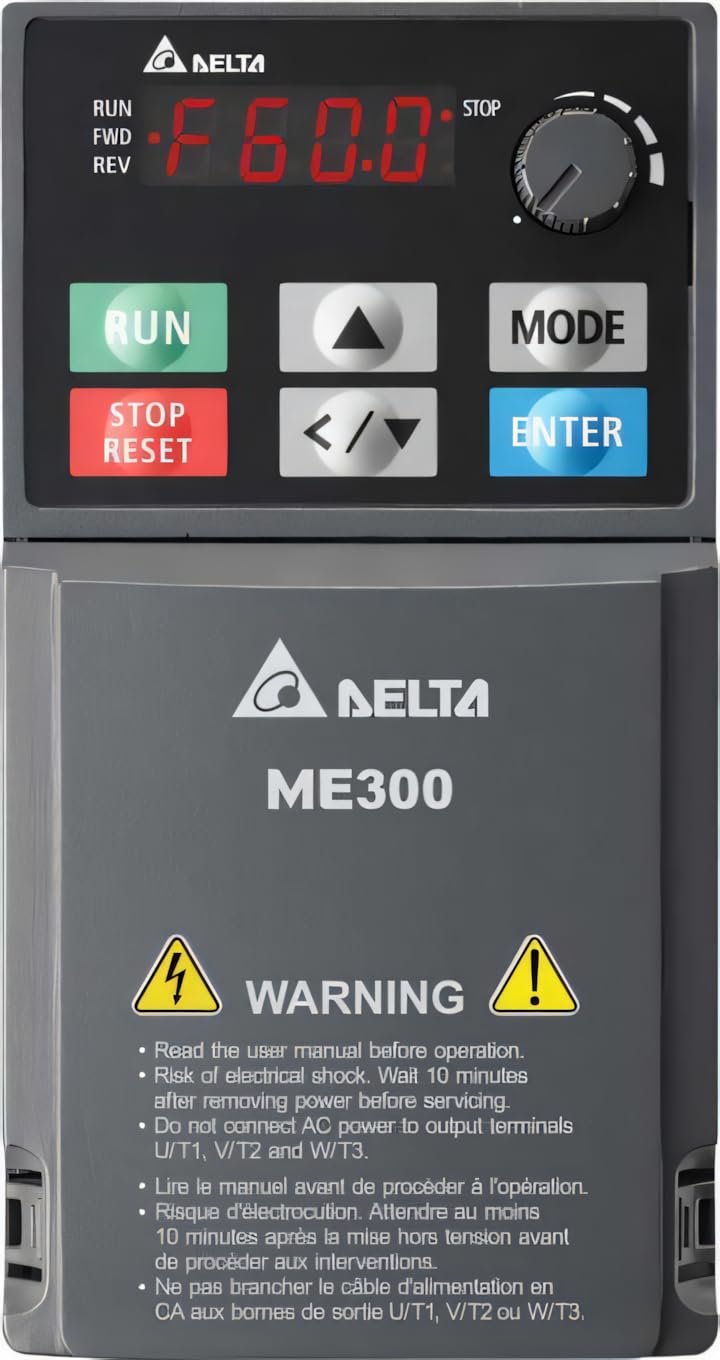
Figure 1: DELTA ME300 Series VFD showing the control panel with RUN, STOP/RESET, MODE, and ENTER buttons, a frequency display, and a rotary knob. The lower section displays the DELTA ME300 logo and critical safety warnings regarding electrical shock and proper wiring.
3. Setup and Installation
3.1 Unpacking and Inspection
Upon receiving the VFD, carefully inspect the packaging for any signs of damage. Open the package and verify that all components are present and undamaged. If any damage is found, contact your supplier immediately.
3.2 Mounting
The DELTA VFD2A8ME21ANNAA is designed for chassis mounting. Ensure the mounting surface is stable and capable of supporting the VFD's weight (approximately 7 pounds). Allow adequate clearance around the unit for proper ventilation and heat dissipation. Mount the VFD vertically to optimize cooling.
3.3 Wiring
All wiring must comply with local and national electrical codes. Use appropriate wire gauges for the VFD's current rating.
- Power Input: Connect the single-phase 230VAC power supply to the designated input terminals.
- Motor Output: Connect the motor to the output terminals U/T1, V/T2, and W/T3. Do not connect AC power to these terminals.
- Grounding: Ensure the VFD is properly grounded to a reliable earth ground.
- Control Wiring: For external control, connect USB or RS-485 interface cables as required. Refer to the detailed wiring diagrams in the full manual for specific connections.
4. Operating Instructions
4.1 Control Panel Overview
The VFD features an integrated control panel for local operation and parameter setting. Key components include:
- Digital Display: Shows operating frequency, parameters, and error codes (e.g., "F60.0" for 60.0 Hz).
- RUN Button (Green): Initiates motor operation.
- STOP/RESET Button (Red): Stops motor operation and resets fault conditions.
- MODE Button: Used to switch between display modes and enter parameter setting menus.
- ENTER Button: Confirms parameter selections or values.
- Up/Down Arrows (▲/▼): Navigate through menus and adjust parameter values.
- Left/Right Arrows (</>): Shift cursor position during parameter editing.
- Rotary Knob: Adjusts frequency or parameter values quickly.
4.2 Basic Operation
- Power On: Apply 230VAC power to the VFD. The display will illuminate.
- Set Frequency: Use the Up/Down arrows or the rotary knob to set the desired output frequency.
- Start Motor: Press the RUN button. The motor will accelerate to the set frequency.
- Stop Motor: Press the STOP/RESET button. The motor will decelerate and stop.
For advanced operation, including parameter programming and external control, refer to the detailed programming guide in the complete user manual.
5. Maintenance
Regular maintenance ensures the longevity and reliable operation of your VFD. Always disconnect power and wait 10 minutes before performing any maintenance.
- Cleaning: Periodically clean the VFD's exterior and ventilation openings to prevent dust accumulation, which can hinder cooling. Use a soft, dry cloth. Do not use liquid cleaners.
- Inspection: Regularly inspect wiring connections for tightness and signs of wear or damage. Check for any unusual noises or odors during operation.
- Fan Check: Ensure cooling fans are operating correctly and are free from obstructions.
- Environmental Conditions: Verify that the operating environment remains within the specified temperature range (-20°C to 60°C) and humidity levels.
6. Troubleshooting
This section provides basic troubleshooting steps for common issues. For complex problems or persistent faults, contact technical support.
| Problem | Possible Cause | Solution |
|---|---|---|
| VFD does not power on | No input power; Blown fuse; Incorrect wiring | Check power supply; Inspect fuses; Verify wiring connections. |
| Motor does not run | STOP/RESET button pressed; Fault condition; Incorrect frequency setting | Press RUN; Check for fault codes on display and clear; Adjust frequency. |
| Overcurrent fault | Motor overload; Short circuit in motor wiring; Incorrect VFD parameters | Reduce motor load; Check motor and wiring; Verify motor parameters. |
| Overvoltage fault | High input voltage; Regenerative braking without braking resistor | Check input voltage; Consider adding a braking resistor if applicable. |
7. Specifications
| Parameter | Value |
|---|---|
| Model | VFD2A8ME21ANNAA (ME300 Series) |
| Brand | DELTA |
| Power Rating | 0.5 HP (0.4 kW) |
| Input Voltage | 230VAC, 1-phase |
| Output Current (Heavy Duty) | 2.8A |
| Output Current (Normal Duty) | 3.2A |
| Output Frequency | Up to 599 Hz |
| Enclosure Rating | IP20 |
| Mounting Type | Chassis Mount |
| Interface | USB, RS-485 |
| Operating Temperature | -20°C to 60°C |
| Item Weight | 7 Pounds (approx. 3.18 kg) |
8. Warranty and Support
8.1 Warranty Information
This DELTA VFD product is covered by a standard manufacturer's warranty against defects in materials and workmanship. The specific terms and duration of the warranty may vary by region and purchase date. Please retain your proof of purchase for warranty claims. For detailed warranty information, refer to the official DELTA website or contact your authorized distributor.
8.2 Technical Support
For technical assistance, troubleshooting beyond this manual, or service inquiries, please contact DELTA technical support or your local authorized service center. Have your product model number (VFD2A8ME21ANNAA) and serial number ready when contacting support.
You can often find contact information on the official DELTA website or through your product supplier.


