
1. Introduction
The ANENG DM3004A is a portable, handheld metal detector designed for quickly locating small metal objects. Its compact design and simple operation make it suitable for various applications requiring metal detection. This manual provides essential information for the safe and effective use of your device.
2. Safety Information
Please read all safety instructions before operating the device to ensure safe and proper use.
- Battery Safety: Use only the specified DC9V 6F22 battery. Ensure correct polarity when inserting. Remove the battery if the device will not be used for an extended period to prevent leakage.
- Environmental Conditions: Do not expose the device to extreme temperatures, humidity, or corrosive environments. Operating temperature range is -10℃ to 50℃.
- Handling: Handle the device with care. Avoid dropping or subjecting it to strong impacts.
- Cleaning: Clean the device with a soft, dry cloth. Do not use abrasive cleaners or solvents.
3. Package Contents
Verify that all items listed below are included in your package:
- 1 x ANENG DM3004A Metal Detector
- 1 x User Manual
- 1 x Lanyard
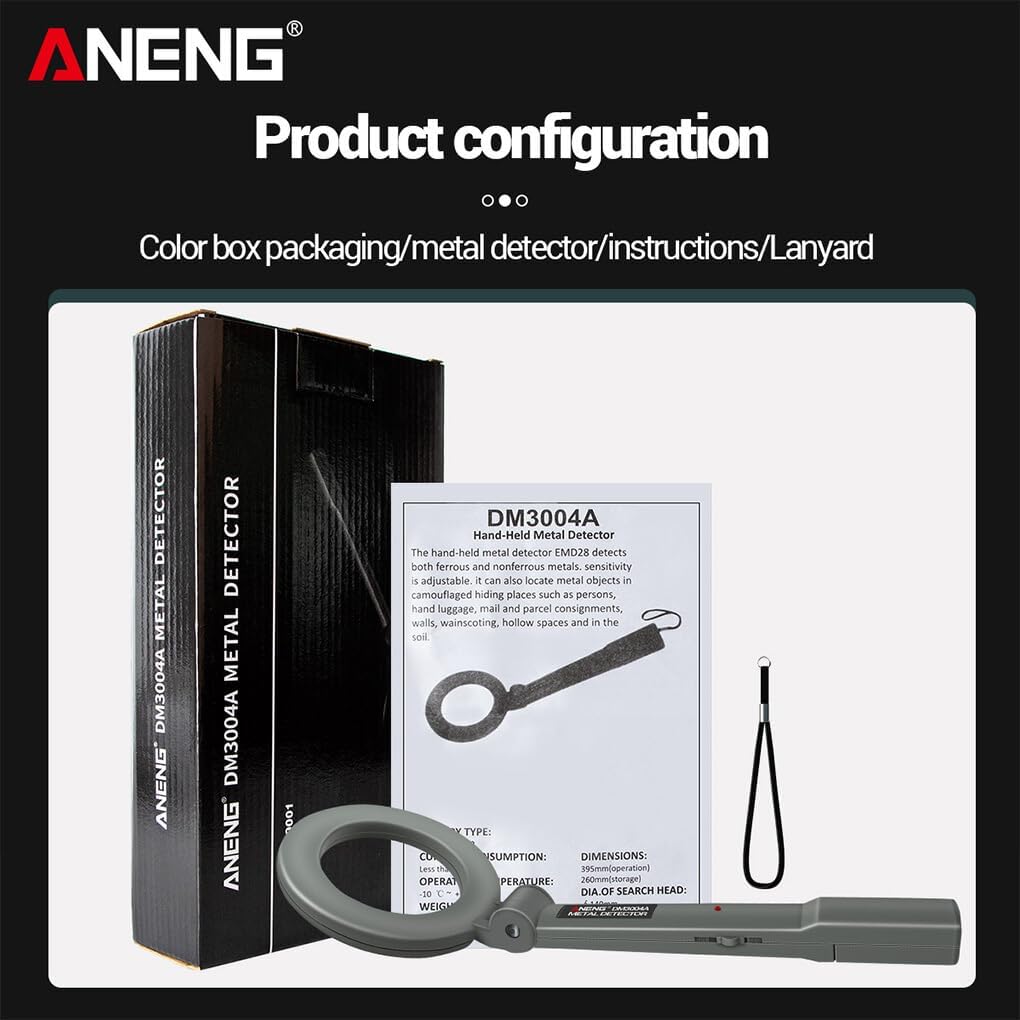
Figure 3.1: Contents of the ANENG DM3004A package, showing the metal detector, user manual, and lanyard.
4. Product Overview
Familiarize yourself with the components of your ANENG DM3004A metal detector.

Figure 4.1: Labeled components of the ANENG DM3004A Metal Detector.
- Probe: The circular part responsible for detecting metal objects.
- Rotary Joint: Allows the probe to be rotated up to 180 degrees for flexible scanning.
- Indicator Light: Illuminates red when metal is detected.
- Handle: Ergonomic grip for comfortable use.
- Lanyard: For secure carrying and to prevent accidental drops.
- Battery Compartment: Located at the end of the handle, houses the 9V battery.
- ON/OFF Switch: Controls power to the device.
5. Setup
5.1 Battery Installation
The ANENG DM3004A requires one DC9V 6F22 battery (not included).
- Locate the battery compartment cover at the end of the handle.
- Gently slide open the battery compartment cover.
- Connect a DC9V 6F22 battery to the battery terminals, ensuring correct polarity (+ to + and - to -).
- Carefully place the battery into the compartment.
- Slide the battery compartment cover back into place until it clicks securely.
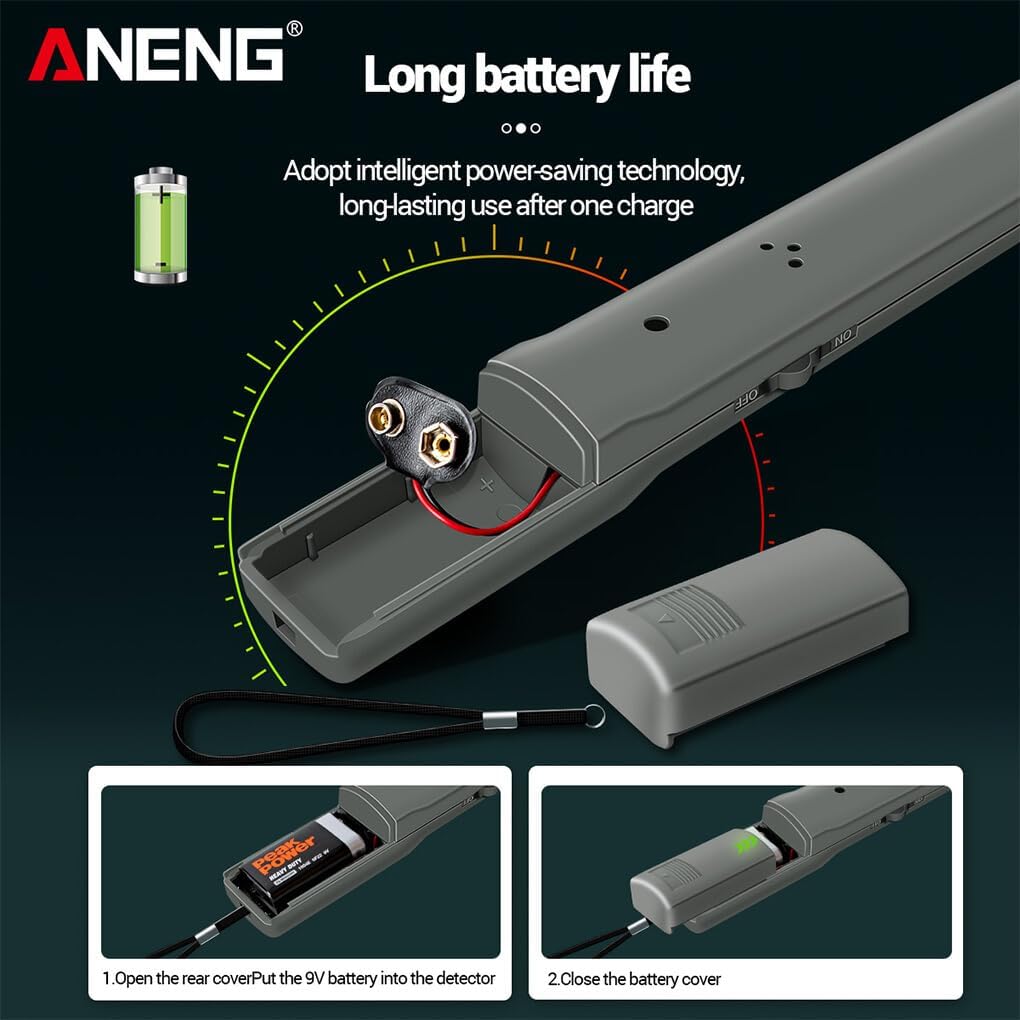
Figure 5.1: Battery installation steps for the metal detector.
6. Operating Instructions
6.1 Powering On/Off
To turn on the device, slide the ON/OFF switch to the "ON" position. To turn off, slide the switch to the "OFF" position.
6.2 Metal Detection
- Hold the metal detector by the handle, ensuring the probe is clear of any metal objects.
- Move the probe slowly and steadily over the area you wish to scan.
- When a metal object is detected, the device will emit an audible alarm, and the red indicator light will illuminate.
- The alarm sound and light intensity may vary depending on the size, proximity, and type of metal detected.
6.3 Probe Angle Adjustment
The probe head can be rotated up to 180 degrees using the rotary joint. This allows for flexible scanning in various positions and hard-to-reach areas.

Figure 6.1: Indicator light and adjustable probe angle features.
7. Maintenance
- Cleaning: Wipe the detector with a soft, dry cloth after each use. Do not use water or chemical cleaners.
- Storage: Store the device in a cool, dry place away from direct sunlight and extreme temperatures.
- Battery Replacement: Replace the battery when the detection sensitivity decreases or the alarm becomes weak. Always remove the battery if storing the device for extended periods.
8. Troubleshooting
| Problem | Possible Cause | Solution |
|---|---|---|
| Device does not turn on. | Battery is dead or incorrectly installed. | Check battery polarity and replace with a new 9V battery if necessary. |
| Weak or no detection. | Low battery power. | Replace the 9V battery. |
| False alarms or inconsistent detection. | Interference from other electronic devices or large metal objects nearby. | Move away from sources of interference. Ensure the probe is not too close to your body or other metal items during scanning. |
9. Specifications
Technical specifications for the ANENG DM3004A Metal Detector:
- Model: DM3004A
- Battery Type: DC9V 6F22 (Not Included)
- Operating Temperature: -10℃ ~ 50℃ (14°F ~ 122°F)
- Current Consumption: <3mA
- Dimensions (Stretch): Approx. 394 x 140 mm (15.51 x 5.51 inches)
- Weight (without battery): Approximately 230g
- Search Head Diameter: Approximately 140mm

Figure 9.1: Product and specification overview.
10. Warranty and Support
For warranty information and customer support, please refer to the contact details provided by your retailer or the manufacturer's official website. Keep your purchase receipt as proof of purchase for any warranty claims.
