
Introduction
This manual provides essential information for the safe and efficient operation of your Hisense Easy Smart Inverter Air Conditioner. Please read it thoroughly before installation and use, and keep it for future reference.

Image: Hisense Easy Smart Inverter Air Conditioner indoor unit.
Safety Information
Important Safety Instructions:
- Always ensure the unit is properly grounded.
- Do not attempt to repair or modify the unit yourself. Contact qualified service personnel.
- Keep children and pets away from the outdoor unit.
- Ensure proper ventilation around the outdoor unit.
- Do not insert objects into the air outlet or inlet.
- Turn off the power supply before cleaning or maintenance.
Product Overview
The Hisense Easy Smart Inverter Air Conditioner is designed for efficient cooling and heating, featuring advanced functionalities for enhanced comfort and control.
Key Features:
- WIFI INCLUDED: Remote control via the Connect Life app on your smartphone.
- Sleep Function: Automatically adjusts temperature for comfortable sleep.
- 24-hour Timer: Schedule climate control on/off times.
- i-FEEL Function: Remote control sensor detects ambient temperature for precise comfort.
- Anti-mildew: Indoor fan continues operation after shutdown to dry condensation and prevent mildew.
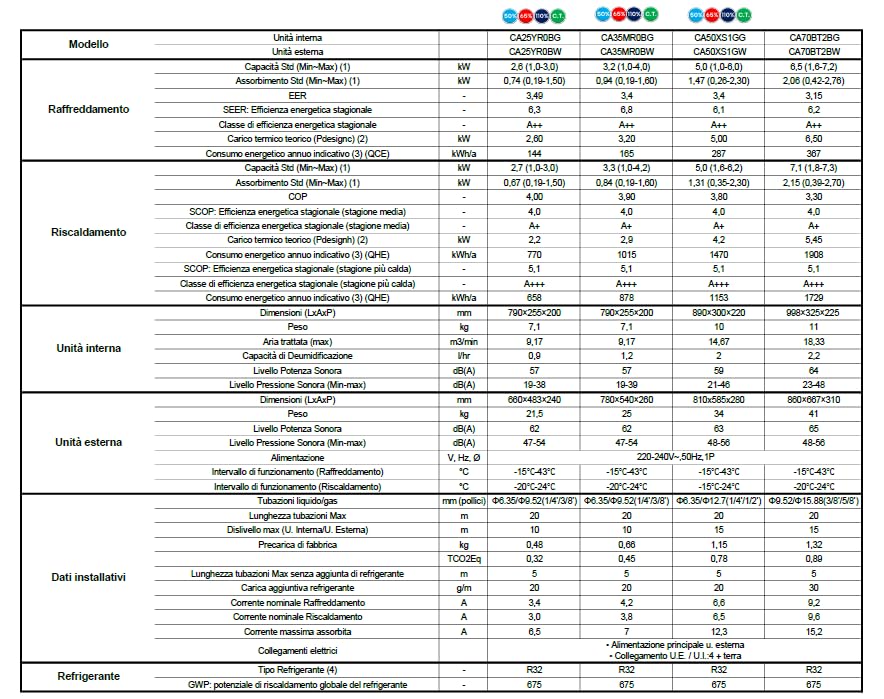
Image: Hisense Easy Smart Inverter Air Conditioner outdoor unit.
Setup and Installation
Installation of this split-system air conditioner requires professional assistance. Ensure all components are handled carefully and installed according to local regulations and the provided technical specifications.
Pre-installation Checks:
- Verify power supply matches unit requirements (220-240V~50Hz, 1P).
- Ensure adequate space for both indoor and outdoor units for proper airflow and maintenance.
- Confirm correct refrigerant type (R-32) and charge.
Tubing and Connections:
- Liquid/Gas Tubing: Refer to specifications for appropriate diameters (e.g., φ6.35/φ9.52 for 1/4"/3/8").
- Maximum Tubing Length: Up to 20 meters.
- Maximum Elevation Difference (Indoor/Outdoor Unit): Up to 10 meters.
- Electrical Connections: Main power to outdoor unit, connection between indoor and outdoor units (U.E/U.I:4 + earth).
Operating Instructions
Your Hisense air conditioner can be operated via the included remote control or the Connect Life smartphone app.
Remote Control Operation:
- Power On/Off: Press the power button to start or stop the unit.
- Mode Selection: Choose between Cooling, Heating, Fan, or Dehumidifier modes.
- Temperature Adjustment: Use the up/down arrows to set your desired temperature.
- Fan Speed: Adjust fan speed (Auto, Low, Medium, High).
- Sleep Mode: Activate for quiet operation and optimized temperature adjustments during sleep.
- Timer: Set the 24-hour timer for automatic on/off scheduling.
- i-FEEL: Activate this function to use the remote control's sensor for more accurate room temperature sensing.
Wi-Fi and App Control:
Download the Hisense Connect Life app from your smartphone's app store. Follow the in-app instructions to connect your air conditioner to your home Wi-Fi network. Once connected, you can control all functions remotely.
Maintenance
Regular maintenance ensures optimal performance and longevity of your air conditioner. Always disconnect power before performing any maintenance.
Indoor Unit:
- Air Filter Cleaning: Clean air filters every two weeks or more frequently if used heavily. Wash with mild detergent and water, then dry thoroughly before reinstallation.
- Anti-mildew Function: This feature helps prevent mold growth by drying the indoor coil after operation. Ensure it is enabled for best results.
- Surface Cleaning: Wipe the indoor unit's surface with a soft, damp cloth. Do not use harsh chemicals or abrasive cleaners.
Outdoor Unit:
- Coil Cleaning: Periodically check and clean the outdoor unit's coil to remove dust, leaves, and debris. This should ideally be done by a professional.
- Clear Obstructions: Ensure no objects block the airflow around the outdoor unit.
Troubleshooting
Before contacting service, refer to the following common issues and solutions:
- Unit does not turn on: Check power supply, circuit breaker, and remote control batteries.
- Insufficient cooling/heating: Ensure air filters are clean, doors/windows are closed, and temperature settings are correct. Check for obstructions around outdoor unit.
- Unusual noises: Minor noises during operation are normal. If loud or unusual, contact service.
- Water leakage: Check drainage hose for blockages or improper installation.
- Wi-Fi connection issues: Ensure router is working, unit is within Wi-Fi range, and app settings are correct.
If problems persist, contact Hisense customer support or a qualified technician.
Technical Specifications
Below are the detailed technical specifications for the Hisense Easy Smart Inverter Air Conditioner, including various models. The CA35MR0BG model is highlighted.

Image: Technical specifications table for Hisense Easy Smart Air Conditioners. This table provides detailed performance data for various models, including cooling and heating capacities, power consumption, dimensions, and refrigerant information.
| Category | Parameter | Unit | CA25YR0BG / CA25YR0BW | CA35MR0BG / CA35MR0BW | CA50XS1GG / CA50XS1GW | CA70BT2BG / CA70BT2BW |
|---|---|---|---|---|---|---|
| Cooling | Standard Capacity (Min-Max) (1) | kW | 2.6 (1.0-3.0) | 3.2 (1.0-4.0) | 5.0 (1.0-6.0) | 6.5 (1.6-7.2) |
| Standard Absorption (Min-Max) (1) | kW | 0.74 (0.19-1.50) | 0.94 (0.19-1.60) | 1.47 (0.26-2.30) | 2.06 (0.42-2.76) | |
| EER | - | 3.49 | 3.4 | 3.4 | 3.15 | |
| SEER: Seasonal Energy Efficiency | - | 6.3 | 6.8 | 6.1 | 6.2 | |
| Seasonal Energy Efficiency Class | - | A++ | A++ | A++ | A++ | |
| Theoretical Thermal Load (Pdesignc) (2) | kW | 2.60 | 3.20 | 5.00 | 6.50 | |
| Indicative Annual Energy Consumption (3) (QCE) | kWh/a | 144 | 165 | 287 | 367 | |
| Heating | Standard Capacity (Min-Max) (1) | kW | 2.7 (1.0-3.0) | 3.3 (1.0-4.2) | 5.0 (1.6-6.2) | 7.1 (1.8-7.3) |
| Standard Absorption (Min-Max) (1) | kW | 0.67 (0.19-1.50) | 0.84 (0.19-1.60) | 1.31 (0.35-2.30) | 2.15 (0.39-2.70) | |
| COP | - | 4.00 | 3.90 | 3.80 | 3.30 | |
| SCOP: Seasonal Energy Efficiency (Average Season) | - | 4.0 | 4.0 | 4.0 | 4.0 | |
| Seasonal Energy Efficiency Class (Average Season) | - | A+ | A+ | A+ | A+ | |
| Theoretical Thermal Load (Pdesignh) (2) | kW | 2.2 | 2.9 | 4.2 | 5.45 | |
| Indicative Annual Energy Consumption (3) (QHE) | kWh/a | 770 | 1015 | 1470 | 1908 | |
| SCOP: Seasonal Energy Efficiency (Warmer Season) | - | 5.1 | 5.1 | 5.1 | 5.1 | |
| Seasonal Energy Efficiency Class (Warmer Season) | - | A+++ | A+++ | A+++ | A+++ | |
| Indicative Annual Energy Consumption (3) (QHE) | kWh/a | 658 | 878 | 1153 | 1729 | |
| Indoor Unit | Dimensions (LxWxH) | mm | 790×255×200 | 790×255×200 | 800×300×220 | 998×325×225 |
| Weight | kg | 7.1 | 7.1 | 10 | 11 | |
| Treated Air (max) | m³/min | 9.17 | 9.17 | 14.67 | 18.33 | |
| Dehumidification Capacity | l/hr | 0.9 | 1.2 | 2 | 2.2 | |
| Sound Power Level | dB(A) | 57 | 57 | 59 | 64 | |
| Sound Pressure Level (Min-Max) | dB(A) | 19-38 | 19-39 | 21-46 | 23-48 | |
| Outdoor Unit | Dimensions (LxWxH) | mm | 660×483×240 | 780×540×260 | 810×585×280 | 860×667×310 |
| Weight | kg | 21.5 | 25 | 34 | 41 | |
| Sound Power Level | dB(A) | 62 | 62 | 63 | 65 | |
| Sound Pressure Level (Min-Max) | dB(A) | 47-54 | 47-54 | 48-56 | 48-56 | |
| General Data | Power Supply | V, Hz, Ø | 220-240V~50Hz, 1P | |||
| Operating Range (Cooling) | °C | -15°C - 43°C | ||||
| Operating Range (Heating) | °C | -20°C - 24°C | -20°C - 24°C | -15°C - 24°C | -20°C - 24°C | |
| Installation Data | Liquid/Gas Piping | mm (inches) | φ6.35/φ9.52 (1/4"/3/8") | φ6.35/φ9.52 (1/4"/3/8") | φ6.35/φ12.7 (1/4"/1/2") | φ9.52/φ15.88 (3/8"/5/8") |
| Max Piping Length | m | 20 | 20 | 20 | 20 | |
| Max Elevation Difference (Indoor/Outdoor) | m | 10 | 10 | 15 | 15 | |
| Factory Pre-charge | kg | 0.48 | 0.66 | 1.15 | 1.32 | |
| TCO2Eq | - | 0.32 | 0.45 | 0.78 | 0.89 | |
| Max Piping Length without additional refrigerant | m | 5 | 5 | 5 | 5 | |
| Additional Refrigerant Charge | g/m | 20 | 20 | 20 | 30 | |
| Electrical Connections | - | Main power to outdoor unit, connection U.E/U.I:4 + earth | ||||
| Currents | Nominal Cooling Current | A | 3.4 | 4.2 | 6.6 | 9.2 |
| Nominal Heating Current | A | 3.0 | 3.8 | 6.5 | 9.6 | |
| Maximum Absorbed Current | A | 6.5 | 7 | 12.3 | 15.2 | |
| Refrigerant | Refrigerant Type (4) | - | R32 | R32 | R32 | R32 |
| GWP: Global Warming Potential | - | 675 | 675 | 675 | 675 | |
Warranty and Support
For warranty information, technical support, or service requests, please refer to the warranty card included with your product or visit the official Hisense website. Keep your purchase receipt as proof of purchase.
Hisense Customer Service: www.hisense.com/support