Introduction
This manual provides essential information for the safe and efficient operation, installation, and maintenance of your AMZCHEF 24-inch Electric Wall Oven. Please read all instructions carefully before using the appliance and retain this manual for future reference.
Important Safety Instructions
Always follow basic safety precautions when using electrical appliances to reduce the risk of fire, electric shock, or injury to persons.
- Ensure the oven is properly installed and grounded by a qualified technician.
- Do not touch hot surfaces. Use oven mitts or pot holders.
- Never use the oven for storage.
- Keep flammable materials away from the oven.
- Supervise children when the oven is in use. This oven includes a child lock function for added safety.
- Do not clean the oven door gasket. The gasket is essential for a good seal.
- Always disconnect power before servicing the oven.
Setup and Installation
Proper installation is crucial for the performance and safety of your AMZCHEF wall oven. Refer to the following guidelines and consult a professional for installation if you are unsure.
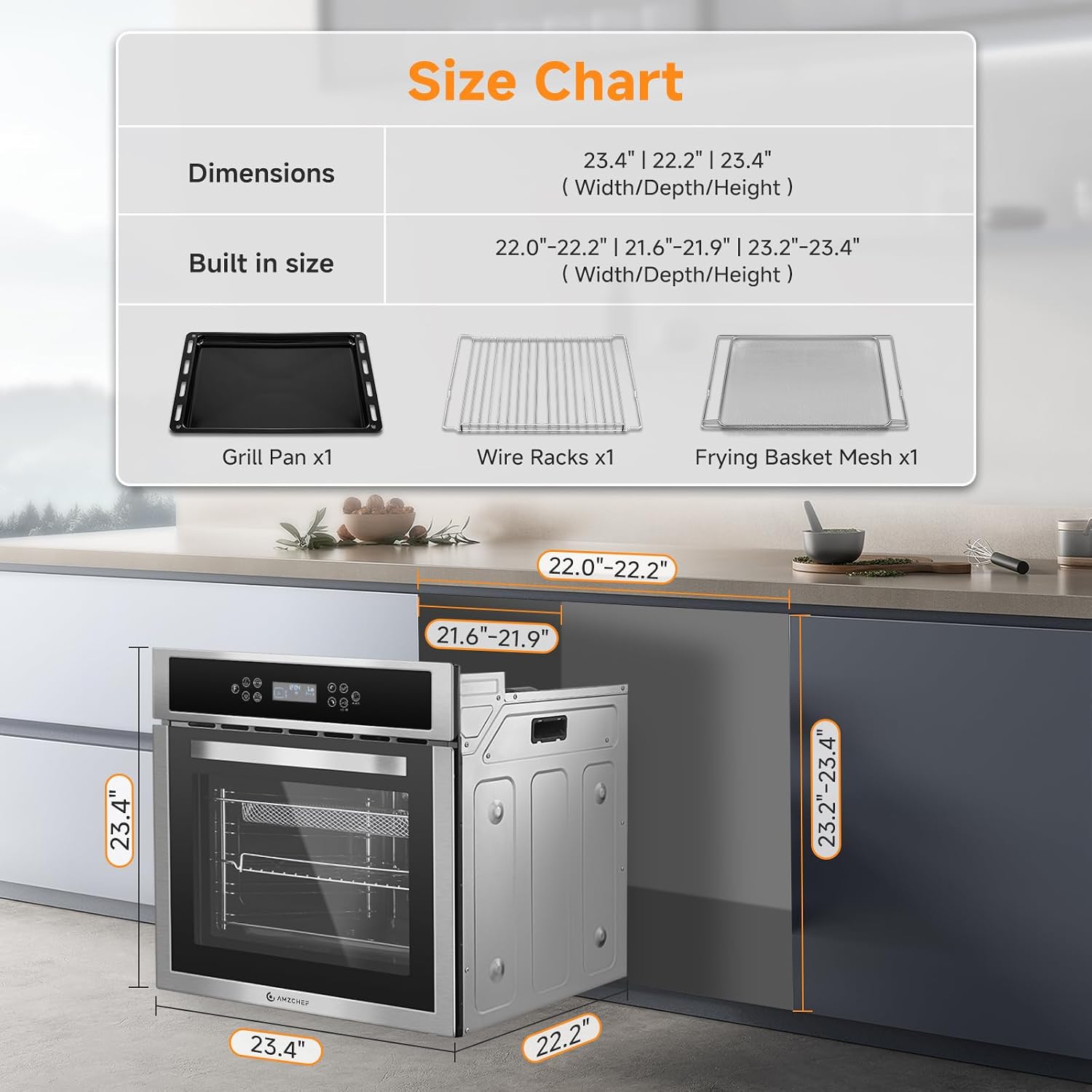
Dimensions
- Product Dimensions (W x D x H): 23.5 inches x 22.3 inches x 23.4 inches
- Recommended Built-in Dimensions (W x D x H): 22.0-22.2 inches x 21.6-21.9 inches x 23.2-23.4 inches
Ensure adequate clearance and ventilation around the oven. The oven operates on AC power.

Operating Instructions
Your AMZCHEF wall oven features a user-friendly touch control panel and multiple cooking functions to enhance your culinary experience.
Control Panel Overview

Setting the Clock
- When connected to power, the screen displays "12:00" and the clock icon flashes.
- Touch the clock icon for 3 seconds to enter time setting mode.
- Use the up/down arrows to adjust the hour. Touch the clock icon to confirm.
- Use the up/down arrows to adjust the minute. Touch the clock icon to confirm.
Selecting a Heating Mode
The oven offers 10 versatile cooking functions and a temperature range from 95℉ to 482℉ (35℃ to 250℃).
- Touch the function icon to cycle through available heating modes.
- Once the desired mode is displayed, touch the temperature icon to set the temperature.
- Use the up/down arrows to adjust the temperature. The setting will confirm automatically after 3 seconds.
- To switch between Celsius and Fahrenheit, touch and hold the F/C button for 3 seconds.

Using Shortcut Menus
The oven includes 8 shortcut menus for common dishes:
- Warm
- Ferment
- Toast
- Pizza
- Grilled Poultry
- Bread
- Cake
- Steak
Simply select the desired shortcut menu from the control panel, and the oven will automatically set the optimal temperature and time.

Convection Cooking and Frying Basket
The convection fan ensures even heat distribution for faster and more uniform cooking. When using the included frying basket, hot air circulates around food, creating a crispy texture with less oil than traditional frying methods.


Child Lock Function
To activate the child lock, touch and hold the lock icon for 3 seconds. The lock indicator will appear on the screen. To deactivate, touch and hold the lock icon again for 3 seconds.
Care and Maintenance
Regular cleaning and maintenance will ensure the longevity and optimal performance of your oven.
Cleaning the Oven Interior
The oven features a premium enamel liner designed for easy cleaning. Allow the oven to cool completely before cleaning.
- Wipe spills and food residue with a damp cloth and mild detergent.
- For stubborn stains, use a non-abrasive oven cleaner specifically designed for enamel surfaces. Follow the cleaner's instructions carefully.
- Do not use abrasive pads or harsh chemicals that could damage the enamel.

Cleaning the Exterior
The stainless steel and tempered glass exterior can be cleaned with a soft cloth and a non-abrasive cleaner suitable for these materials. Avoid spraying cleaners directly onto the control panel.
Replacing the Oven Light
Ensure the oven is unplugged or the power supply is disconnected before attempting to replace the oven light bulb. Refer to the detailed instructions in the full product manual for specific bulb type and replacement steps.
Troubleshooting Guide
If you encounter issues with your oven, refer to the following common problems and solutions. If the problem persists, contact customer support.
| Problem | Possible Cause | Solution |
|---|---|---|
| Oven does not heat or cuts off mid-cooking. | Power supply issue, tripped circuit breaker, internal fault. | Check circuit breaker. Ensure oven is properly plugged in. If problem persists, disconnect power for 5 minutes, then reconnect. Contact customer support if issue continues. |
| Food cooks unevenly. | Incorrect rack position, improper preheating, overloaded oven, issue with convection fan. | Ensure oven is fully preheated. Use recommended rack positions. Avoid overcrowding. Verify convection fan is operating. |
| Control panel displays errors or behaves erratically. | Temporary electronic glitch, power fluctuation. | Turn off power to the oven at the circuit breaker for 1-2 minutes, then restore power. If the issue persists, contact customer support. |
| Oven rack is difficult to slide. | Rack not properly aligned, food debris on runners, lack of lubrication. | Ensure racks are inserted correctly. Clean oven runners. Apply a small amount of food-grade lubricant to rack glides if necessary. |
| Temperature display shows Celsius or military time. | Default setting or accidental change. | Refer to the "Operating Instructions" section for changing temperature units (F/C button) and setting the clock (12/24 hour format). |
Specifications
- Brand: AMZCHEF
- Model: B0DTTYQRWF
- Color: Stainless Steel
- Capacity: 2.5 Cu.Ft. (70 Liters)
- Product Dimensions (D x W x H): 22.3" x 23.5" x 23.4"
- Control Type: Touch
- Power Source: AC
- Number of Shelves: 2
- Item Weight: 72.8 pounds
- Temperature Range: 95℉ to 482℉ (35℃ to 250℃)
- Cooking Functions: 10 (including Convection)
- Shortcut Menus: 8

Warranty and Customer Support
AMZCHEF is committed to providing quality products and customer satisfaction.
Customer Service
If you have any questions, require assistance, or need to inquire about warranty details, please contact our dedicated customer service team. We guarantee a prompt response within 24 hours.
For support, please refer to the contact information provided with your purchase documentation or visit the official AMZCHEF website.


