
RedLemon SDPC70FP36-DWT
RedLemon SDPC70FP36-DWT Fireplace TV Stand Instruction Manual
Model: SDPC70FP36-DWT
Introduction
This manual provides essential information for the safe assembly, operation, and maintenance of your RedLemon Fireplace TV Stand. Please read all instructions carefully before beginning assembly or use.

Image: The RedLemon Fireplace TV Stand, model SDPC70FP36-DWT, in a dark walnut finish. It features a central electric fireplace, open shelving, and slatted sliding doors on either side, with a television placed on its top surface.
Safety Information
WARNING: Failure to follow these safety instructions may result in fire, electric shock, or injury.
- Do not place heavy objects on the fireplace insert.
- Secure the entertainment center to the wall to prevent tip-over. Wall anchoring hardware is recommended.
- Keep children and pets away from the fireplace insert to prevent burns.
- Be cautious of sharp edges and small parts during assembly.
- Do not exceed the weight capacity of the tabletop (150 lbs) or drawers (30 lbs).
- Ensure the power cord is not pinched or routed under the unit.
- Do not operate the fireplace if the cord is damaged or if the unit malfunctions.
Package Contents
Your RedLemon Fireplace TV Stand is delivered in two packages. Please ensure all components are present before beginning assembly. Refer to the included assembly instructions for a detailed list of parts and hardware.

Image: A diagram illustrating the dimensions of the TV stand (70" W x 15.6" D x 34" H) and indicating that the item is delivered in two packages (Box A and Box B).
Setup and Assembly
Assembly is required for this product. Detailed, step-by-step instructions and all necessary hardware are included in the packaging. It is recommended to have two people for assembly.
- Unpack all components and verify against the parts list in the included manual.
- Assemble the main frame of the TV stand according to the provided diagrams.
- Install the electric fireplace insert into the designated central compartment.
- Attach the slatted sliding doors and ensure they operate smoothly.
- Place the adjustable shelves in the side compartments as desired.
- Secure the unit to the wall using the provided anti-tip hardware to prevent accidental tipping.
For detailed assembly steps, please refer to the separate assembly instruction booklet provided with your product.
Operating Instructions
Electric Fireplace Operation
The 36-inch electric fireplace insert features realistic 3D flame effects and glowing logs. It can be operated with or without heat.

Image: A detailed view of the electric fireplace's control panel and remote, highlighting options for flame color, heat settings, and timer functions.
- Power On/Off: Use the power button on the remote control or the control panel to turn the fireplace on or off.
- Flame Color: Cycle through 7 flame color options using the dedicated button on the remote or control panel.
- Heat Settings: Adjust the temperature (65-82°F) using the temperature control buttons. The fireplace can heat up to 400 sq. ft.
- Timer Function: Set the operational timer for 1-8 hours.
- Overheat Protection: The unit is equipped with overheat protection for safety.
Note: The fireplace operates quietly, providing ambiance without noise.
LED Lighting (Side Compartments)
The side compartments feature integrated LED lights with 7 color options, customizable to match the fireplace flames or your preference.
- The LED lights in the side compartments synchronize with the flame color settings of the electric fireplace.
- To disable the side LED lights, you can disconnect them from the back of the unit. Refer to the detailed assembly manual for specific instructions on disconnecting the LED light cables.
Remote Control
The included remote control allows for convenient adjustment of all fireplace and LED light settings from a distance.
- Ensure batteries are correctly installed in the remote control.
- Point the remote directly at the fireplace unit for optimal response.
Video: A demonstration of the RedLemon Fireplace TV Stand's features, including the electric fireplace and LED lights, operated via remote control. The video highlights the various color options and the overall aesthetic of the console.
Storage Features
The RedLemon Fireplace TV Stand offers versatile storage solutions:
- Tabletop: The 70-inch wide tabletop can accommodate TVs up to 80 inches, with a weight capacity of 150 lbs.
- Slatted Sliding Doors: Two slatted sliding doors conceal spacious compartments, ideal for media consoles, records, or books.
- Adjustable Shelves: The shelves within the side compartments are adjustable, allowing for customized storage configurations.
- Drawers: Two small drawers provide additional flexible storage space for smaller items, with a weight capacity of 30 lbs per drawer.
- Open Shelf: A central open shelf above the fireplace offers convenient access for frequently used items.
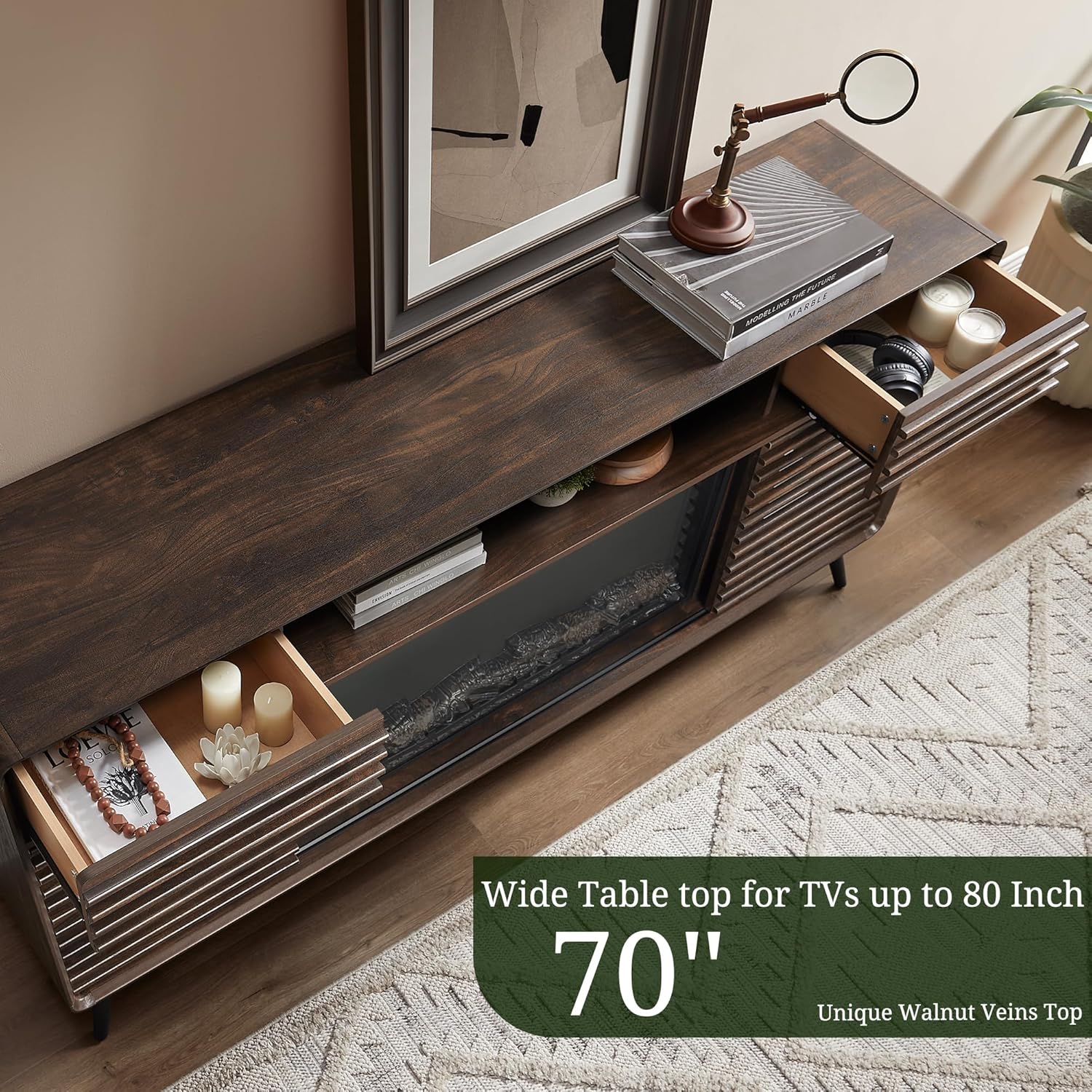
Image: An aerial view of the TV stand, showing the two small drawers pulled out to reveal their storage capacity. The 70-inch wide tabletop is also visible.

Image: A close-up of the unique slatted panel design of the sliding doors, highlighting the craftsmanship and aesthetic appeal.
Maintenance
- Cleaning: Wipe surfaces with a soft, damp cloth. Avoid harsh chemicals or abrasive cleaners.
- Dusting: Regularly dust the unit to prevent buildup, especially around the fireplace vents.
- Fireplace Care: Ensure the fireplace vents are clear of obstructions for proper heat dissipation.
- Hardware Check: Periodically check all assembly hardware to ensure it remains tight. Retighten if necessary.
Troubleshooting
| Problem | Possible Cause | Solution |
|---|---|---|
| Fireplace not turning on. | No power, remote batteries dead, unit overheated. | Check power connection, replace remote batteries, allow unit to cool down. |
| No heat output. | Heat function not activated, temperature set too low. | Activate heat function via remote/panel, increase temperature setting. |
| LED lights not changing color. | Remote signal obstruction, internal connection issue. | Ensure clear line of sight to unit, check internal LED connections (refer to assembly manual). |
| Sliding doors are stiff. | Dust/debris in tracks, misaligned. | Clean tracks, check alignment and adjust if necessary. |
Specifications
- Model Number: SDPC70FP36-DWT
- Brand: RedLemon
- Material: Engineered Wood (MDF/particleboard/plywood)
- Color: Dark Walnut
- Product Dimensions (L x W x H): 15.6 x 70 x 34 inches
- Item Weight: 130.1 pounds
- Fireplace Size: 36 inches
- TV Size Compatibility: Up to 80 inches
- Tabletop Weight Capacity: 150 lbs
- Drawer Weight Capacity: 30 lbs
- Special Features: 36 Inch Fireplace, 70 Inch TV Stand, LED Light, Sliding Barn Door
Warranty and Support
For warranty information, product support, or to purchase replacement parts, please contact RedLemon customer service. Refer to your purchase documentation for specific warranty terms and contact details.
You can also visit the official RedLemon store for more information: RedLemon Store
Ask a question about this manual
Ask about setup, troubleshooting, compatibility, parts, safety, or missing instructions. Manuals+ will review the question and use this page’s manual context to help answer it.