
Langsdom B0DTT1PFRW
Contents
Langsdom AirWave & AirSwim Wireless Sports Headphones User Manual
Model: B0DTT1PFRW
Introduction
This manual provides comprehensive instructions for the Langsdom AirWave & AirSwim Wireless Sports Headphones. Designed for both land and underwater use, these headphones offer a versatile audio experience. Please read this manual carefully to ensure proper use and maintenance of your device.
The Langsdom AirWave & AirSwim bundle combines superior performance with convenience, making it ideal for various activities from swimming to hiking.

Figure 1: Langsdom AirWave (white) and AirSwim (black) Wireless Sports Headphones.
Package Contents
Please verify that all items are present in your package:
- Langsdom AirWave & AirSwim Wireless Sports Headphones
- Magnetic Charging/Data Cable
- User Manual (this document)
- OTG Adapter (for music transfer)
Setup
1. Charging the Headphones
Before first use, fully charge the headphones. Use the provided magnetic charging/data cable. Connect the magnetic end to the charging port on the headphones and the USB end to a power source (e.g., computer USB port or wall adapter).
Video 1: Demonstrates the magnetic charging process for the AirSwim headphones. The video shows the magnetic cable connecting to the charging pins on the headphones, indicating a secure and easy connection for power transfer.
A full charge provides approximately 8 hours of power. The LED indicator on the headphones will change to indicate charging status (e.g., red for charging, blue for fully charged).
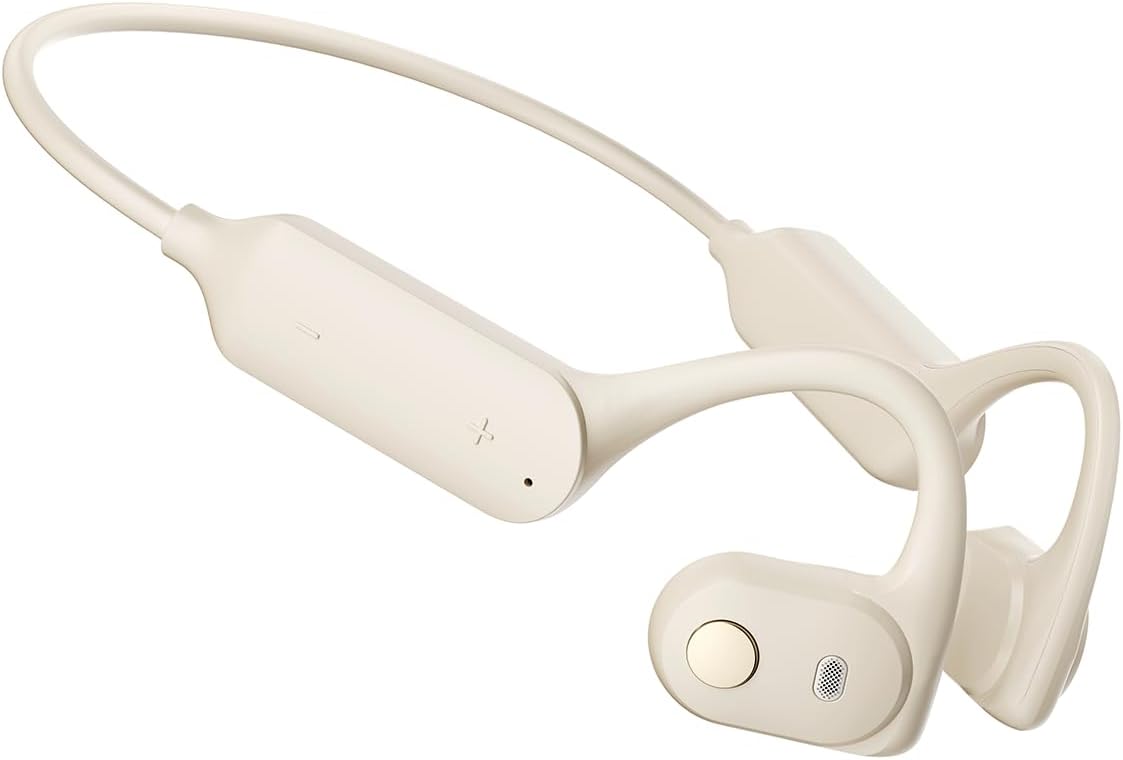
Figure 2: Close-up view of the headphone controls and magnetic charging pins.
2. Bluetooth Pairing (AirWave & AirSwim)
- Ensure the headphones are charged and powered off.
- Press and hold the power button until the LED indicator flashes blue and red, indicating pairing mode.
- On your device (smartphone, tablet, etc.), enable Bluetooth and search for available devices.
- Select "Langsdom AirWave" or "Langsdom AirSwim" from the list.
- Once connected, the LED indicator will flash blue slowly.
The upgraded Bluetooth 5.4 chip ensures fast, stable connectivity and superior anti-interference capabilities.
Operating Instructions
1. Basic Controls
| Button/Action | Function |
|---|---|
| Power Button (Long Press) | Power On/Off |
| Power Button (Short Press) | Play/Pause, Answer/End Call |
| Volume Up (+) | Increase Volume, Next Track (Long Press) |
| Volume Down (-) | Decrease Volume, Previous Track (Long Press) |
| Mode Button (if applicable) | Switch between Bluetooth and MP3 modes |
2. Bluetooth & MP3 Dual Modes
The headphones support both Bluetooth streaming and offline MP3 playback. They come with 32GB of built-in memory, capable of storing thousands of songs.

Figure 3: Headphones featuring 32GB built-in memory for MP3 playback.
Switching Modes:
Press the dedicated Mode button (if available) or refer to the specific button combination in your quick start guide to switch between Bluetooth and MP3 modes.
Transferring Music (MP3 Mode):
Connect the headphones to your computer using the magnetic charging/data cable and the provided OTG adapter. The headphones will appear as a removable disk. Drag and drop your music files (MP3, WMA, WAV, APE, FLAC formats supported) directly into the headphone's storage.
3. Waterproof Functionality (AirSwim)
The AirSwim model features IPX8 waterproofing, allowing for use in water depths up to 2 meters. This makes them suitable for swimming and other water-based activities. Ensure the charging port is dry before charging.

Figure 4: The AirSwim headphones are designed for underwater use with IPX8 waterproofing.
For optimal sound quality underwater, it is recommended to use the MP3 mode as Bluetooth signals do not transmit effectively through water.
4. Open-Ear Design
Both AirWave and AirSwim models feature an open-ear design, which allows you to hear your surroundings while enjoying audio. This enhances safety during outdoor activities such as running, cycling, or hiking.

Figure 5: The open-ear design provides comfort and allows awareness of surroundings during activities.
Maintenance
1. Cleaning
Wipe the headphones with a soft, damp cloth after each use, especially after exposure to sweat or water. Do not use harsh chemicals or abrasive cleaners. Ensure the charging pins are clean and dry.
2. Storage
Store the headphones in a cool, dry place away from direct sunlight and extreme temperatures. Avoid placing heavy objects on top of the headphones.
3. Battery Care
To prolong battery life, avoid fully discharging the headphones frequently. Charge them regularly, even if not in use for extended periods.
Troubleshooting
| Problem | Possible Solution |
|---|---|
| Headphones won't turn on | Ensure the headphones are fully charged. Try resetting by holding the power button for 10 seconds. |
| Cannot pair via Bluetooth | Make sure headphones are in pairing mode (flashing blue/red). Turn off and on Bluetooth on your device. Move closer to the headphones. Forget the device on your phone and re-pair. |
| No sound from headphones | Check volume levels on both headphones and connected device. Ensure headphones are connected via Bluetooth or in MP3 mode. Try playing a different audio file. |
| Music transfer issues | Ensure the magnetic cable and OTG adapter are securely connected. Try a different USB port on your computer. Verify music files are in supported formats (MP3, WMA, WAV, APE, FLAC). |
| Sound quality is poor | Ensure the headphones are positioned correctly on your cheekbones. Check for interference from other wireless devices. For underwater use, ensure you are in MP3 mode. |
Specifications
- Model: B0DTT1PFRW (AirWave & AirSwim)
- Connectivity: Bluetooth 5.4
- Internal Storage: 32GB (supports MP3, WMA, WAV, APE, FLAC)
- Waterproof Rating: IPX8 (AirSwim model, up to 2 meters)
- Design: Open-Ear, Bone Conduction (AirSwim)
- Material: Skin-friendly silicone
- Charging: Magnetic Charging
- Weight: Approximately 26 grams (AirWave)
- Audio: Customized bio-diaphragm for balanced and dynamic sound.

Figure 6: Key features and technologies of the Langsdom headphones.

Figure 7: Illustration of the internal audio components for a powerful audio experience.
Warranty and Support
For warranty information and technical support, please refer to the warranty card included with your product or visit the official Langsdom website. Contact details for customer service are typically found on the product packaging or the manufacturer's support page.
You can also visit the Langsdom Store on Amazon for more product information and support resources.
Documents and downloads
Ask a question about this manual
Ask about setup, troubleshooting, compatibility, parts, safety, or missing instructions. Manuals+ will review the question and use this page’s manual context to help answer it.