
1. Introduction
Thank you for choosing the Parkside Performance PPWSFA 20-Li B3 Cordless Angle Grinder. This manual provides essential information for the safe and efficient operation, setup, and maintenance of your tool. Please read these instructions carefully before first use and keep them for future reference. This angle grinder is designed for powerful metal cutting, grinding, and deburring tasks, and can also be used with pot or disc brushes.
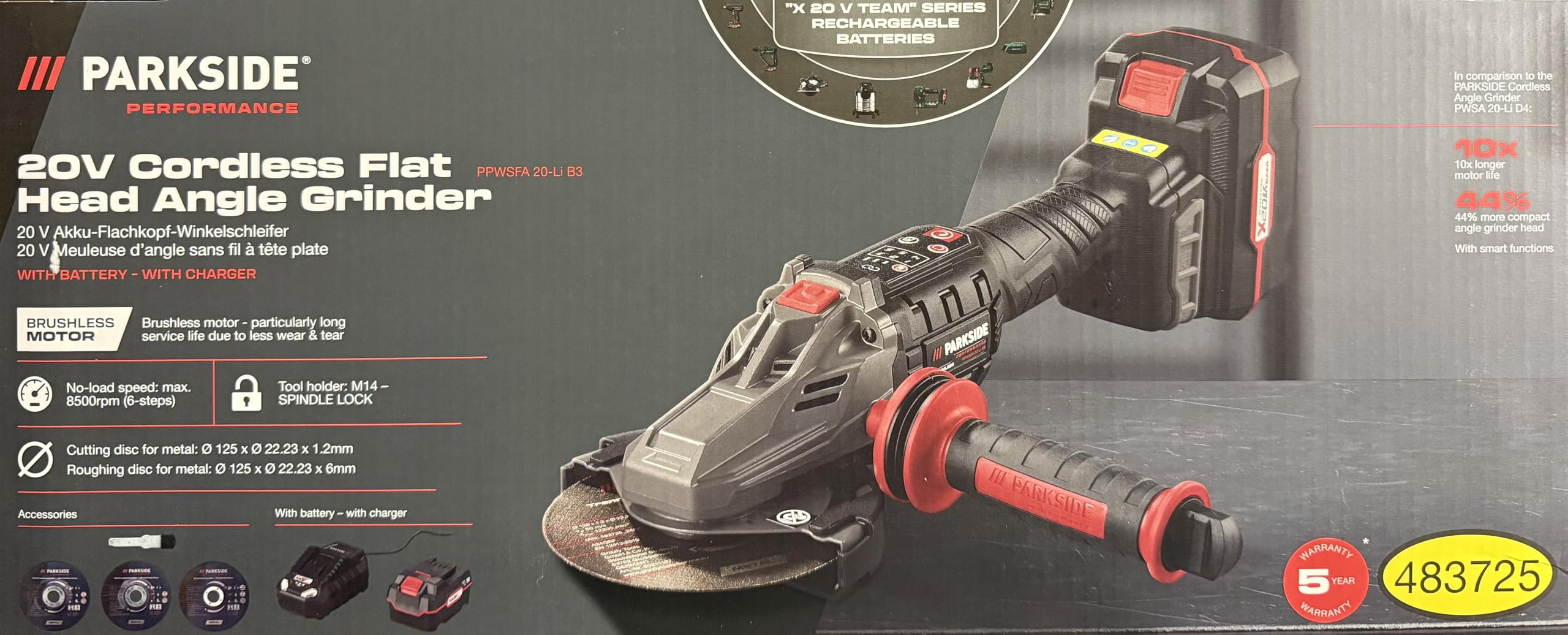
Image: Parkside Performance PPWSFA 20-Li B3 Cordless Angle Grinder with included battery and charger.
2. Safety Instructions
Always observe general power tool safety warnings and specific angle grinder safety guidelines to prevent serious injury or damage. Keep this manual accessible for all users.
2.1 General Power Tool Safety
- Work Area Safety: Keep the work area clean and well-lit. Cluttered or dark areas invite accidents. Do not operate power tools in explosive atmospheres, such as in the presence of flammable liquids, gases, or dust.
- Electrical Safety: Avoid body contact with earthed or grounded surfaces (e.g., pipes, radiators, ranges, refrigerators). There is an increased risk of electric shock if your body is earthed or grounded.
- Personal Safety: Always wear eye protection. Use hearing protection when operating for extended periods. Wear a dust mask in dusty conditions. Dress properly; avoid loose clothing or jewelry.
- Tool Use and Care: Do not force the power tool. Use the correct power tool for your application. Disconnect the battery pack from the power tool before making any adjustments, changing accessories, or storing power tools.
2.2 Angle Grinder Specific Safety
- Guard Protection: Always use the protective cover. Ensure it is correctly fitted and adjusted for maximum safety during grinding or cutting operations.
- Disc Selection: Use only discs that are correctly rated for the grinder's speed and intended application (grinding or cutting). Ensure the disc diameter and bore size are compatible.
- Starting the Tool: Ensure the disc is clear of the workpiece before starting the tool. Allow the tool to reach full speed before applying it to the workpiece.
- Kickback Prevention: Be aware of potential kickback. Always hold the tool firmly with both hands. Position your body and arm to resist kickback forces.
- Sparks and Debris: Grinding and cutting operations produce sparks. Keep bystanders and flammable materials away from the work area.
- Overload Protection: The tool features automatic overload protection. If the tool stops due to overload, release the trigger, allow it to cool, and reduce the load during subsequent use.
2.3 Battery and Charger Safety
- Use only the specified charger for the battery pack.
- Do not expose battery packs to heat or fire. Avoid direct sunlight.
- Do not short-circuit a battery pack.
- Do not open the battery pack.
3. Product Overview
3.1 Components Included
The Parkside Performance PPWSFA 20-Li B3 Cordless Angle Grinder package includes:
- 1 x PPWSFA 20-Li B3 Cordless Angle Grinder
- 1 x 20V (4 Ah) Lithium-ion Battery
- 1 x 4.5 A Charger
- 2 x Grinding Discs for Metal
- 2 x Cutting Discs for Metal (1 pre-mounted)
- 1 x Anti-vibration Front Handle (pre-mounted)
- 1 x Clamping Wrench (stored in the front handle)
- 1 x 2-in-1 Protective Cover (pre-mounted)
- 1 x Parkside Performance Folding Rule (2 m, black)
- 1 x Storage Case
3.2 Key Features
- Brushless Motor: Provides extended service life due to reduced wear.
- Compact Design: Particularly slim construction, ideal for working in inaccessible areas.
- Electronic Soft Start & Quick-Stop: Ensures smooth startup and rapid shutdown for enhanced safety.
- Robust Gear Housing: Made from die-cast aluminum for durability, with two positions for the anti-vibration front handle.
- Spindle Lock: Facilitates easy and quick tool (disc) changes.
- 2-in-1 Protective Cover: Tool-free adjustable for both cutting and grinding applications.
- Constant Power Control: Automatic power supply for consistent performance under load.
- Automatic Overload Protection: Safeguards the motor from damage during heavy use.
- Interchangeable Dust Protection Grille: Prevents dirt ingress, extending machine life.
- Tool-free Disc Change: Achieved via a quick clamping nut.
- Smart App Compatibility: When used with Parkside X 20 V PAPS Smart batteries, allows for individual device configuration and data monitoring via the Parkside app.
- Battery Cell Balancing: Ensures longer battery life and increased service life by uniformly stressed cells.
4. Setup
4.1 Charging the Battery
- Connect the 4.5 A charger to a suitable power outlet. The LED indicator on the charger will illuminate.
- Slide the 20V (4 Ah) battery pack onto the charger until it clicks into place.
- The charger's LED will indicate the charging status. Once fully charged, the charger will automatically stop charging.
- Remove the battery from the charger once charging is complete. The battery features a 3-level LED indicator for its charge status.
4.2 Attaching the Front Handle
The anti-vibration front handle is pre-mounted. It can be repositioned into one of the two available slots on the gear housing for optimal comfort and control, depending on your working position.
4.3 Installing/Changing Grinding or Cutting Discs
- Ensure the battery is removed from the angle grinder for safety.
- Press and hold the spindle lock button.
- If a disc is already installed, use the clamping wrench (stored in the front handle) to loosen the quick clamping nut counter-clockwise and remove the old disc.
- Place the new grinding or cutting disc onto the spindle, ensuring it is correctly seated. The disc diameter should be 125 mm.
- Tighten the quick clamping nut clockwise by hand, then firmly with the clamping wrench while still holding the spindle lock button.
- Adjust the 2-in-1 protective cover without tools to ensure it provides maximum protection for your specific application (grinding or cutting).
5. Operating Instructions
5.1 Powering On/Off
- To Turn On: Insert the charged battery. Hold the angle grinder firmly with both hands. Engage the safety switch (if present) and press the power switch. The electronic soft start will ensure a gradual ramp-up to the selected speed.
- To Turn Off: Release the power switch. The quick-stop function will rapidly bring the disc to a halt.
5.2 Speed Settings
The angle grinder offers 6 speed levels, with a maximum no-load speed of 8500 rpm. Adjust the speed according to the material and the type of operation (grinding or cutting) for optimal results and safety. Refer to the control field on the device for speed level indication.
5.3 Using the Smart App (with PAPS Smart Batteries)
If you are using Parkside X 20 V PAPS Smart batteries, you can connect your angle grinder to the Parkside app via Bluetooth. This allows for:
- Individual device configuration (e.g., fine-tuning speed settings).
- Monitoring battery status and other operational data.
Refer to the Parkside app's instructions for detailed connection and usage information.
5.4 Grinding and Cutting Techniques
- Always ensure the workpiece is securely clamped.
- For grinding, hold the disc at a slight angle (15-30 degrees) to the workpiece. Apply moderate pressure and move the tool smoothly across the surface.
- For cutting, hold the disc perpendicular to the workpiece. Apply light, even pressure and allow the disc to cut through the material. Avoid twisting or bending the disc.
- Do not apply excessive pressure, as this can lead to overheating, disc damage, or activation of the automatic overload protection.
6. Maintenance
Regular maintenance ensures the longevity and safe operation of your angle grinder.
6.1 Cleaning
- Always remove the battery before cleaning.
- Clean the tool's ventilation slots regularly to prevent overheating.
- The interchangeable dust protection grille should be cleaned or replaced periodically to prevent dirt ingress into the motor.
- Wipe the tool housing with a soft, damp cloth. Do not use harsh cleaning agents or solvents.
6.2 Battery Care
- Store batteries in a cool, dry place, away from direct sunlight and extreme temperatures.
- For long-term storage, charge the battery to approximately 50-70% capacity.
- Do not allow batteries to fully discharge for extended periods.
6.3 General Inspection
- Regularly check all screws and fasteners for tightness.
- Inspect the power tool, battery, and charger for any signs of damage before each use. Do not use damaged components.
7. Troubleshooting
This section addresses common issues you might encounter with your angle grinder.
| Problem | Possible Cause | Solution |
|---|---|---|
| Tool does not start | Battery not charged or incorrectly inserted. | Ensure battery is fully charged and correctly inserted. |
| Tool stops during operation | Overload protection activated. | Release the power switch, allow the tool to cool down, and reduce the load during operation. |
| Reduced performance | Worn or incorrect disc; battery low. | Replace disc if worn or unsuitable. Recharge battery. |
| Excessive vibration | Disc incorrectly mounted or damaged. | Check disc mounting. Replace damaged disc immediately. |
| Overheating | Blocked ventilation slots; continuous heavy load. | Clean ventilation slots. Allow tool to cool down. Reduce load. |
8. Specifications
| Feature | Detail |
|---|---|
| Model | PPWSFA 20-Li B3 |
| Operating Mode | Battery-powered |
| No-load Speed | Max. 8500 rpm (6 levels) |
| Battery Voltage | 20 V |
| Battery Capacity (Included) | 4 Ah |
| Charger Output (Included) | 4.5 A |
| Charging Time (approx.) | 2 Ah: 35 min / 4 Ah: 60 min / 8 Ah: 120 min |
| Grinding Disc Diameter | Ø 125 mm |
| Grinding Disc Bore Diameter | Ø 22.23 mm |
| Spindle Thread | M14 - SPINDLE LOCK |
| Material | Plastic (housing) |
| Angle Grinder Dimensions (approx.) | 345 x 135 x 93 mm |
| Angle Grinder Weight (approx.) | 1.4 kg |
| Battery Weight (approx.) | 712 g |
| Charger Weight (approx.) | 430 g |
9. Warranty & Support
This product is manufactured under strict quality guidelines. While specific warranty details are not provided in this manual, please retain your proof of purchase for any warranty claims.
9.1 Spare Parts Availability
Information regarding the availability of spare parts for this model is currently unavailable. Please contact your retailer or the manufacturer's customer service for inquiries.
9.2 Customer Support
For technical assistance, troubleshooting beyond this manual, or service inquiries, please contact the customer support of the brand PSIDE or your authorized retailer. Contact information can typically be found on the product packaging or the brand's official website.