
Introduction
The HamiltonBuhl Smart-Trek Deluxe Over-Ear Headphones (ST1BKU) are designed for reliable audio performance in educational and professional environments. Featuring 40 mm drivers for clear stereo sound and comfortable, noise-isolating leatherette ear cushions, these headphones are built for extended use.
Key features include:
- Durable Construction: Engineered for daily use with a rugged design and a Dura-Cord that resists damage.
- Comfortable Fit: Soft leatherette ear cushions and an adjustable padded headband ensure comfort for various users.
- Convenient Controls: In-line volume control allows for quick sound adjustments without interacting with the connected device.
- Universal Connectivity: USB plug provides compatibility with Chromebooks, Windows PCs, Mac computers, and other devices supporting USB audio.
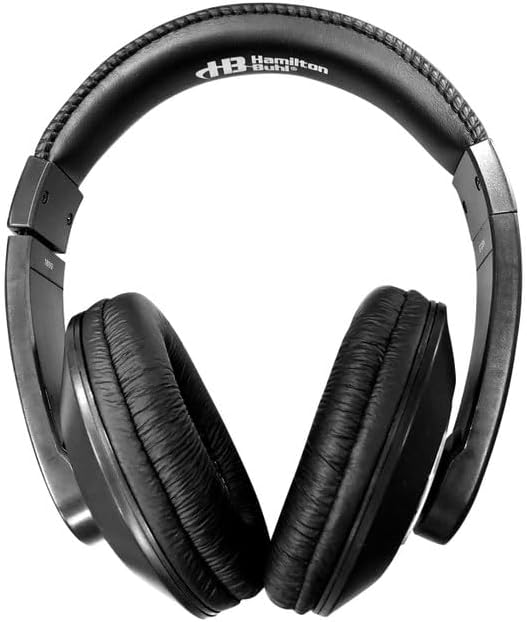
An angled view of the HamiltonBuhl Smart-Trek Deluxe Over-Ear Headphones, highlighting the over-ear design.
Setup Instructions
- Unpack Headphones: Carefully remove the headphones from their packaging.
- Connect USB Plug: Insert the USB plug into an available USB port on your computer (Chromebook, Windows PC, Mac) or compatible device. The device should automatically recognize the headphones.
- Adjust Headband: Gently extend or retract the adjustable headband to fit comfortably over your head. The earcups should fully cover your ears.
- Position Earcups: Ensure the soft leatherette ear cushions sit comfortably around your ears for optimal sound and passive noise cancellation.

The HamiltonBuhl Smart-Trek Deluxe Over-Ear Headphones with its durable Dura-Cord, featuring an in-line volume control and a USB plug for connectivity.
Operating Instructions
- Volume Control: Use the in-line volume control wheel located on the Dura-Cord to adjust the audio output level. Rotate the wheel upwards to increase volume and downwards to decrease it.
- Audio Playback: Once connected, audio from your device will automatically route through the headphones. Ensure your device's audio settings are configured to output sound via the USB audio device if not automatic.
- Comfort Adjustment: For prolonged use, periodically adjust the headband and earcup position to maintain comfort and prevent fatigue.
Maintenance
- Cleaning Ear Cushions: The leatherette ear cushions can be wiped clean with a damp cloth and mild soap or a non-abrasive disinfectant wipe. Ensure they are completely dry before next use. Avoid harsh chemicals.
- Cord Care: The Dura-Cord is designed for durability. Avoid excessive pulling, twisting, or sharp bending of the cord to maintain its integrity. Store the headphones neatly to prevent tangling.
- Storage: When not in use, store the headphones in a clean, dry place away from extreme temperatures and direct sunlight.

Close-up view of the soft leatherette ear cushions and the adjustable, padded headband of the HamiltonBuhl Smart-Trek headphones.
Troubleshooting
- No Sound:
- Ensure the USB plug is fully inserted into the device's USB port.
- Check the in-line volume control wheel and turn it up.
- Verify your device's master volume is not muted or set too low.
- Confirm that your device's audio output settings are configured to use the USB headphones. This may be found in your operating system's sound settings.
- Try connecting the headphones to a different USB port or another device to rule out a port or device issue.
- Low Volume:
- Increase the volume using the in-line control wheel.
- Increase the volume on your connected device.
- Check if any application-specific volume settings are low.
- Headphones are uncomfortable:
- Adjust the headband length to ensure a proper fit.
- Reposition the earcups so they sit evenly and comfortably over your ears.
Specifications
| Feature | Detail |
|---|---|
| Brand | HamiltonBuhl |
| Model Name | Smart-Trek |
| Model Number | ST1BKU |
| Color | Black |
| Ear Placement | Over Ear |
| Form Factor | Over Ear |
| Impedance | 32 Ohms |
| Built-In Media | Ear Cushions |
| Noise Control | Passive Noise Cancellation |
| Enclosure Material | Faux Leather |
| Headphone Jack | USB |
| Connectivity Technology | Wired |
| Compatible Devices | Chromebooks, Windows PCs, Mac computers, desktops, laptops |
| UPC | 681181629541 |
Warranty Information
HamiltonBuhl products are manufactured to high-quality standards. For specific warranty details regarding your Smart-Trek Deluxe Over-Ear Headphones (ST1BKU), please refer to the warranty card included with your purchase or visit the official HamiltonBuhl website. Keep your proof of purchase for warranty claims.
Customer Support
If you encounter any issues or have questions not covered in this manual, please contact HamiltonBuhl customer support. You can find contact information, including phone numbers and email addresses, on the official HamiltonBuhl website (www.hamiltonbuhl.com). Please have your product model number (ST1BKU) and purchase details ready when contacting support.


