1. Introduction
This manual provides detailed instructions for the installation, operation, and maintenance of your Bolide BTG-1909-8MP (4K) H.265 IR Eyeball Camera. Please read this manual thoroughly before using the product to ensure proper setup and functionality. This camera is designed for high-performance surveillance, offering ultra-high-definition video, advanced AI detection, and robust weather resistance.
2. Safety Information
- Ensure all power connections are secure and meet the camera's specifications (POE or 12VDC).
- Do not expose the camera to extreme temperatures outside its operating range.
- Avoid direct exposure of the lens to strong light sources, such as the sun, as this may damage the image sensor.
- Handle the camera with care to prevent physical damage.
- Installation should be performed by qualified personnel if working with electrical wiring.
3. Package Contents
Verify that all items are present in your package:
- Bolide BTG-1909-8MP (4K) H.265 IR Eyeball Camera
- Mounting Screws and Wall Plugs
- Quick Start Guide (if applicable)
4. Product Overview
The Bolide BTG-1909 is an 8MP (4K) IR Eyeball Camera featuring a 2.8mm fixed lens for wide-angle coverage. It supports H.265 compression for efficient data management and includes advanced AI capabilities for human and vehicle detection. The camera is equipped with a built-in microphone for audio monitoring and an IR illuminator for night vision up to 82 feet. Its IP67 weatherproof rating ensures durability in various outdoor conditions.
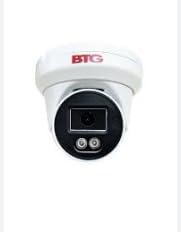
Image: Front view of the Bolide BTG-1909-8MP Eyeball Camera, showing the lens and IR illuminators.
5. Setup
5.1 Mounting the Camera
The BTG-1909 is designed for ceiling mount installation. Choose a suitable location that provides the desired viewing angle and is within reach of power and network connections.
- Secure the mounting template (if provided) or mark the drill holes on the ceiling.
- Drill pilot holes according to the marks.
- Insert wall plugs into the drilled holes.
- Align the camera base with the holes and secure it using the provided screws.
- Adjust the camera's angle for optimal coverage.
5.2 Power and Network Connection
The camera supports Power over Ethernet (PoE) or 12VDC power.
- PoE Connection: Connect an Ethernet cable from a PoE-enabled switch or NVR directly to the camera's RJ45 port. This provides both power and data.
- 12VDC Connection: If not using PoE, connect a 12VDC power adapter (not included) to the camera's power input port. Then, connect an Ethernet cable from your network router/switch to the camera's RJ45 port for data.
- Wi-Fi Connection: For wireless connectivity, ensure the camera is initially connected via Ethernet for configuration. Access the camera's web interface or app to configure Wi-Fi settings.
5.3 Micro SD Card Installation
The camera features a micro SD slot for local storage.
- Locate the micro SD card slot on the camera (refer to the product diagram if available).
- Gently insert a compatible micro SD card (up to 512GB) into the slot until it clicks into place.
- Format the SD card via the camera's web interface or mobile application for proper recording.
6. Operating
6.1 Initial Configuration
After connecting the camera, use the manufacturer's provided software or mobile application to discover and perform initial setup. This typically involves setting a strong password, configuring network settings, and updating firmware.
6.2 Accessing the Camera
- Mobile App: Download the official Bolide surveillance app to your smartphone. Add the camera using its QR code or IP address.
- Web Browser: Enter the camera's IP address into a web browser on a computer connected to the same network. Log in with your credentials.
- NVR/VMS: Integrate the camera with a compatible Network Video Recorder (NVR) or Video Management System (VMS) for centralized monitoring and recording.
6.3 Key Features and Functions
- 8MP (4K) Resolution: View and record ultra-high-definition video. Adjust resolution settings in the camera's interface if needed.
- AI Human/Vehicle Detection: Enable and configure AI detection zones and sensitivity settings to receive accurate alerts for human and vehicle presence.
- IR Night Vision: The camera automatically switches to infrared mode in low-light conditions, providing clear black-and-white video up to 82 feet.
- Built-in Microphone: Enable audio recording in the camera settings to capture sound within the camera's vicinity.
- H.265 Compression: This advanced compression technology optimizes storage and bandwidth usage without compromising video quality.
7. Maintenance
- Cleaning: Use a soft, dry cloth to clean the camera lens and body. For stubborn dirt, a slightly damp cloth can be used, but avoid harsh chemicals.
- Firmware Updates: Regularly check the manufacturer's website for firmware updates. Updating firmware can improve performance, add new features, and enhance security.
- Storage Management: Periodically review recorded footage and manage storage on the micro SD card or NVR to ensure continuous recording.
- Physical Inspection: Periodically inspect the camera's mounting and cables for any signs of wear or damage, especially for outdoor installations.
8. Troubleshooting
- No Power: Check power connections (PoE or 12VDC adapter). Ensure the power source is active.
- No Video/Offline: Verify network cable connection. Check IP address settings. Ensure the camera is powered on. Restart the camera and network devices.
- Poor Image Quality: Clean the lens. Check for obstructions. Ensure sufficient lighting. Adjust resolution settings in the camera interface.
- AI Detection Not Working: Verify AI detection settings are enabled and configured correctly (detection zones, sensitivity). Ensure firmware is up to date.
- Cannot Access SD Card: Ensure the SD card is inserted correctly and formatted. Try a different compatible SD card.
9. Specifications
| Feature | Specification |
|---|---|
| Model | BTG-1909 |
| Resolution | 8MP (4K) |
| Lens | 2.8mm Fixed Lens |
| Video Compression | H.265/H.264 |
| Power Source | PoE, 12VDC |
| AI Features | Human/Vehicle Detection |
| IR Distance | Up to 82ft |
| Audio | Built-in Mic |
| Storage | Micro SD Slot (up to 512GB) |
| Weather Resistance | IP67 |
| Connectivity | Wired (Ethernet), Wi-Fi |
| Mounting Type | Ceiling Mount |
| Dimensions (L x W x H) | 4.1 x 3.3 x 3.3 inches |
| Weight | 1 pound |
10. Warranty and Support
For warranty information and technical support, please refer to the documentation included with your purchase or visit the official Bolide website. Keep your purchase receipt as proof of purchase for warranty claims.


