Introduction
Thank you for choosing the Gourmia 5 Quart 10-Speed Electric Stand Mixer, Model GSM408. This appliance is designed to simplify your baking and cooking tasks with its versatile functionality and robust performance. Please read this manual thoroughly before initial use to ensure safe operation and optimal performance. Keep this manual for future reference.
Important Safeguards
Always follow basic safety precautions when using electrical appliances to reduce the risk of fire, electric shock, and injury.
- Read all instructions before operating the stand mixer.
- Do not immerse the motor base, cord, or plug in water or other liquids.
- Close supervision is necessary when any appliance is used by or near children.
- Unplug from outlet when not in use, before assembling or disassembling parts, and before cleaning.
- Avoid contact with moving parts. Keep hands, hair, clothing, as well as spatulas and other utensils away from beaters during operation to prevent injury and/or damage to the mixer.
- Do not operate any appliance with a damaged cord or plug, or after the appliance malfunctions or has been dropped or damaged in any manner.
- The use of attachments not recommended or sold by the manufacturer may cause fire, electric shock, or injury.
- Do not use outdoors.
- Do not let cord hang over edge of table or counter or touch hot surfaces.
- Do not place on or near a hot gas or electric burner, or in a heated oven.
- Always ensure the mixer head is locked down before operation.
- Ensure the bowl is securely locked into the base before starting the mixer.
Components and Features
Your Gourmia Stand Mixer comes with the following components:
- Motor Base with Tilt-Head
- 5 Quart Stainless Steel Mixing Bowl
- Dough Hook
- Flat Beater
- Whisk
- Splash Guard
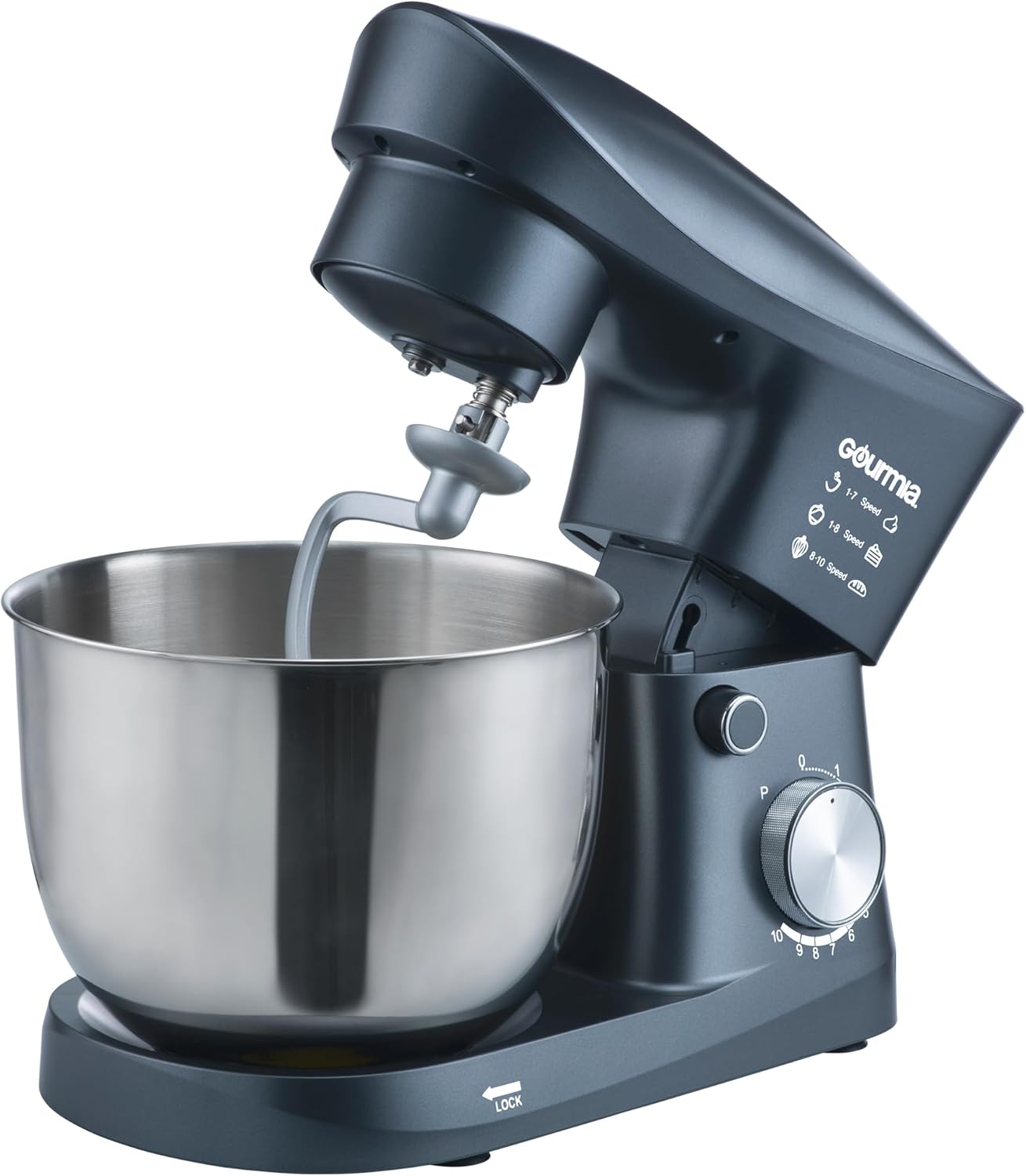
Image: The Gourmia 5 Quart 10-Speed Electric Stand Mixer, showcasing the motor base, stainless steel bowl, and the dough hook attachment.
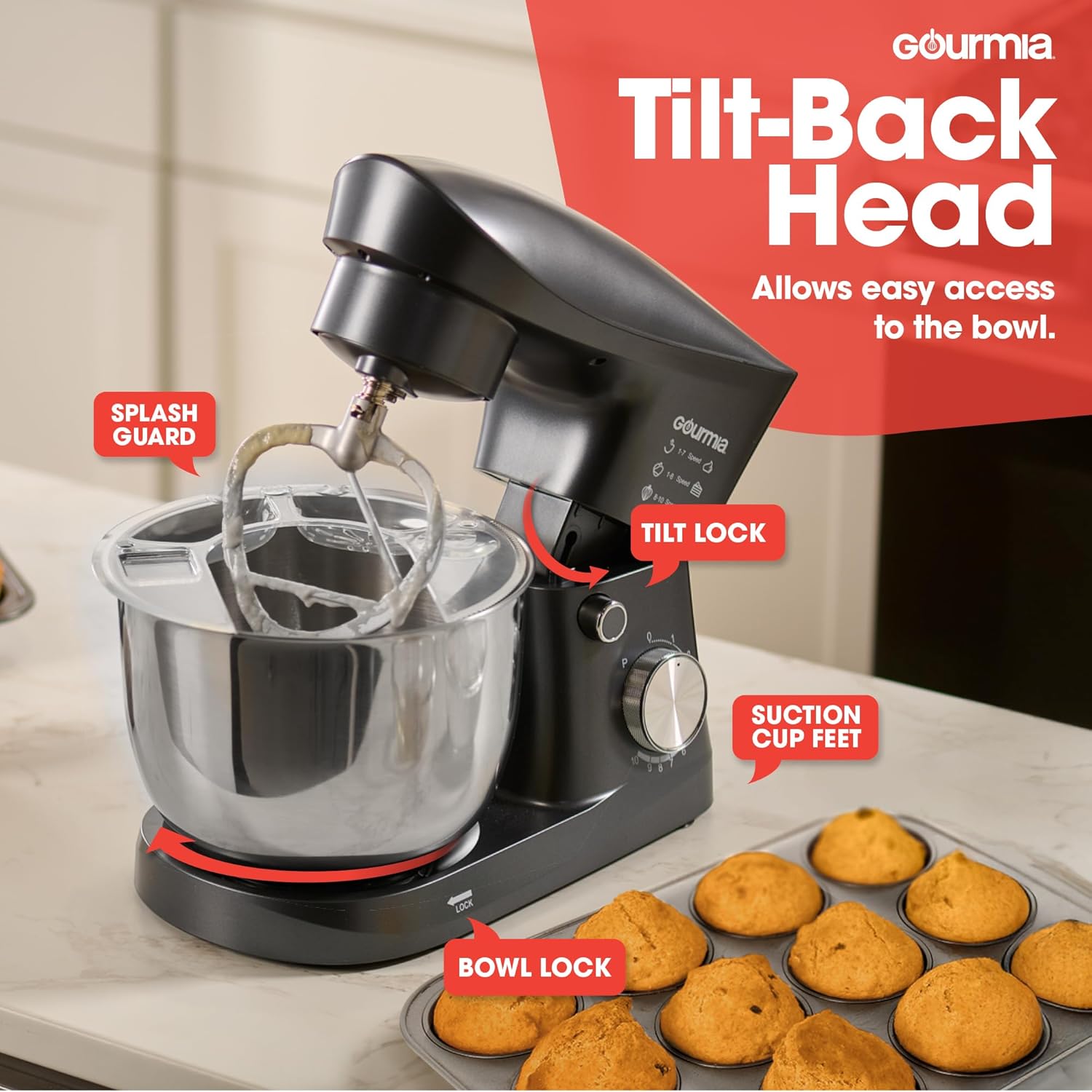
Image: Detailed view of the mixer's features, including the tilt-back head mechanism, the splash guard, the tilt lock button, suction cup feet for stability, and the bowl lock indicator.
Setup
Follow these steps for initial setup:
- Unpack: Carefully remove all components from the packaging.
- Clean: Before first use, wash the mixing bowl, dough hook, flat beater, whisk, and splash guard in warm, soapy water. Rinse thoroughly and dry. The bowl and attachments are dishwasher safe. Wipe the motor base with a damp cloth.
- Position: Place the mixer on a clean, dry, and stable surface. Ensure the suction cup feet are firmly attached to the countertop for stability.
- Attach Bowl: Place the mixing bowl onto the base and turn it clockwise until it locks securely into place.
- Lift Head: Press the tilt-head release button (usually located on the side of the motor base) and lift the motor head until it clicks into the tilted position.
- Attach Accessory: Insert the desired attachment (dough hook, flat beater, or whisk) into the attachment shaft. Push upwards and turn clockwise until it locks.
- Lower Head: Press the tilt-head release button again and gently lower the motor head until it locks into the operating position.
Operating Instructions
Attaching Accessories
The mixer includes three primary attachments for various mixing needs:
- Dough Hook: Ideal for kneading yeast doughs like bread, pizza, and pasta.
- Flat Beater: Suitable for medium to heavy mixtures such as cakes, cookies, frostings, and mashed potatoes.
- Whisk: Best for incorporating air into ingredients, such as whipping cream, egg whites, and light batters.
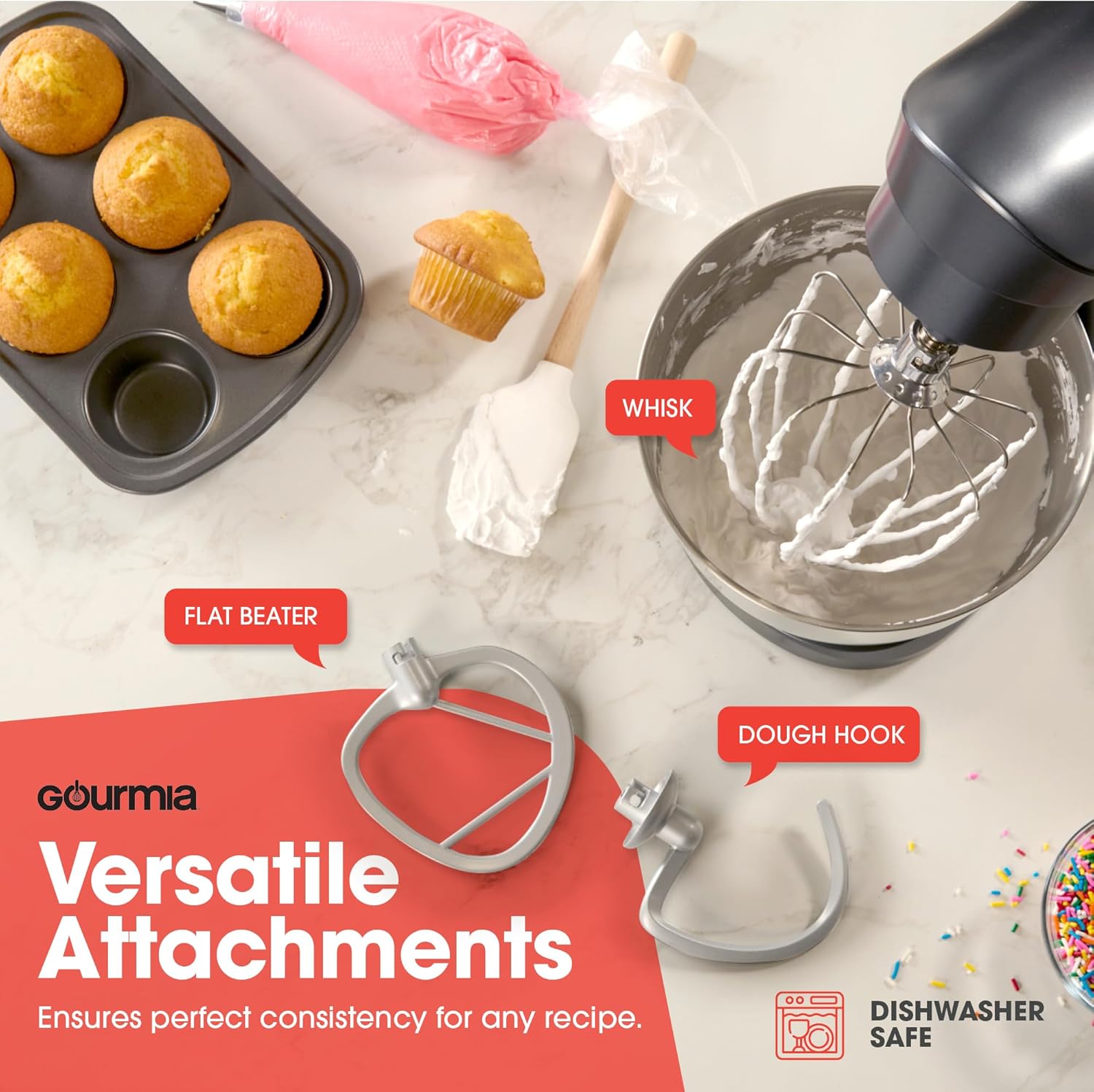
Image: The three versatile attachments for the Gourmia Stand Mixer: the whisk for aerating, the flat beater for general mixing, and the dough hook for kneading.
Using the Mixer
- Ensure the mixer is unplugged before adding ingredients or attachments.
- Follow the setup steps to attach the bowl and desired accessory.
- Add your ingredients to the mixing bowl.
- Attach the splash guard by sliding it onto the mixer head, if desired, to prevent splattering.
- Plug the mixer into a standard electrical outlet.
- Turn the speed dial to the desired setting. Start at a lower speed and gradually increase to avoid splashing.
- For pulse operation, turn the dial to 'P' and release.
- When finished, turn the speed dial to '0' (off) and unplug the mixer.
- Press the tilt-head release button to lift the head, remove the attachment, and then remove the mixing bowl.
Speed Control Guide
The Gourmia Stand Mixer features 10 speeds plus a pulse function for precise control over your mixing tasks.
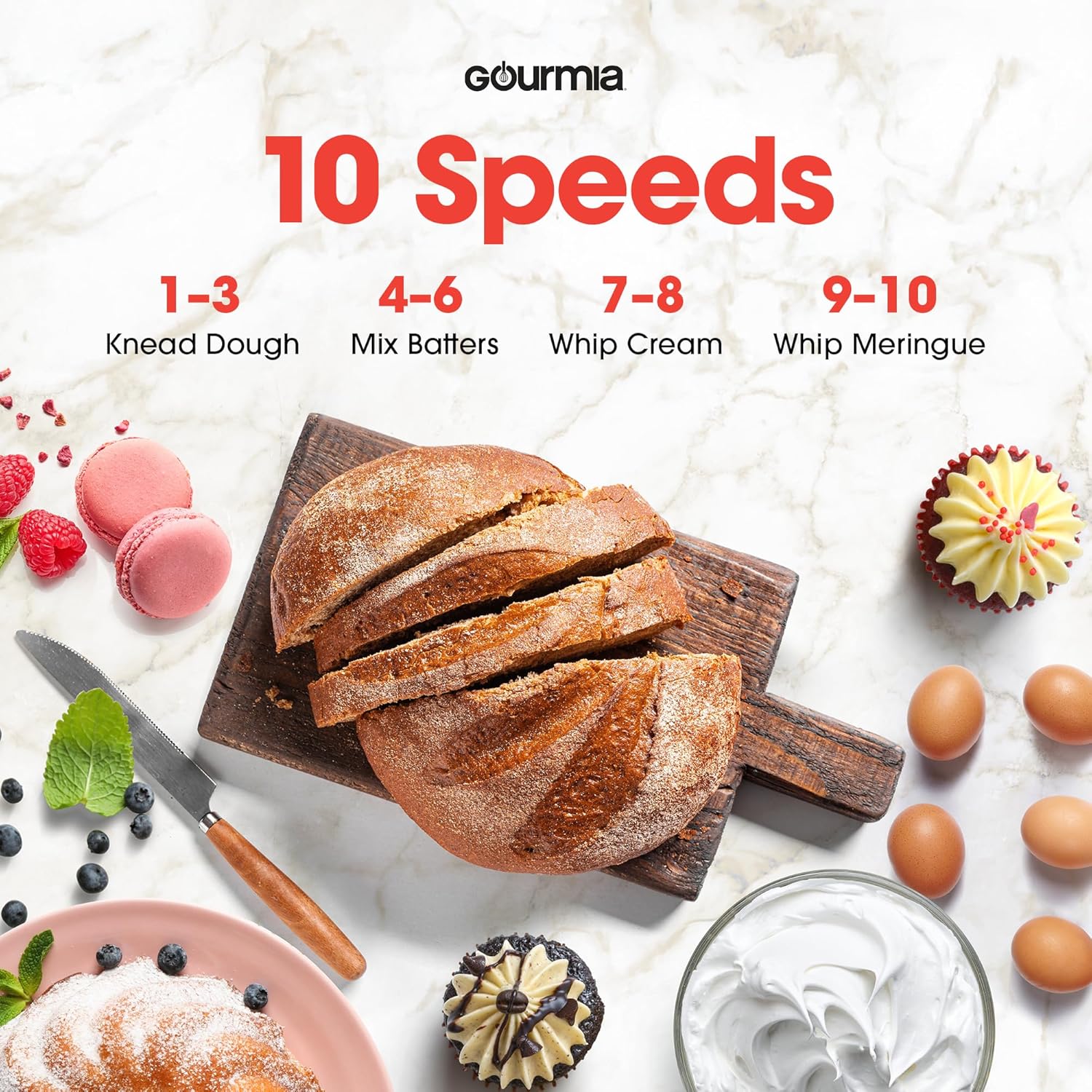
Image: Visual guide illustrating the recommended speed settings for various tasks: 1-3 for kneading dough, 4-6 for mixing batters, 7-8 for whipping cream, and 9-10 for whipping meringue.
| Speed Setting | Recommended Use |
|---|---|
| P (Pulse) | Quick bursts for chopping or combining ingredients. |
| 1-3 (Low) | Kneading dough, mixing heavy batters, mashing potatoes. |
| 4-6 (Medium) | Mixing batters for cakes, cookies, and quick breads. |
| 7-8 (Medium-High) | Whipping cream, preparing frostings. |
| 9-10 (High) | Whipping egg whites for meringues, aerating light mixtures. |
Care and Maintenance
Proper care ensures the longevity and performance of your stand mixer.
- Always unplug the mixer before cleaning.
- Motor Base: Wipe the motor base with a soft, damp cloth. Do not immerse the motor base in water or any other liquid.
- Mixing Bowl: The stainless steel mixing bowl is dishwasher safe. For hand washing, use warm, soapy water and a non-abrasive sponge.
- Attachments (Dough Hook, Flat Beater, Whisk): These attachments are dishwasher safe. For best results and to prolong their life, hand washing is preferred. Avoid using abrasive cleaners or scouring pads.
- Splash Guard: The splash guard is dishwasher safe. Hand wash with warm, soapy water.
- Storage: Store the mixer and its attachments in a dry place. Ensure all parts are clean and dry before storing.
Troubleshooting
If you encounter any issues with your Gourmia Stand Mixer, refer to the table below for common problems and solutions.
| Problem | Possible Cause | Solution |
|---|---|---|
| Mixer does not turn on. | Not plugged in; power outlet issue; mixer head not locked. | Ensure the mixer is securely plugged into a working outlet. Check if the mixer head is fully lowered and locked. |
| Attachment not mixing ingredients properly. | Attachment not fully engaged; incorrect attachment for task. | Ensure the attachment is pushed up and twisted clockwise until it locks. Use the appropriate attachment for the mixture consistency. |
| Mixer is shaking excessively. | Unstable surface; heavy load; suction cups not engaged. | Place the mixer on a flat, stable surface. Ensure suction cups are firmly attached. Reduce the amount of ingredients if overloading. |
| Loud noise during operation. | Normal operation for heavy loads; internal issue. | Some noise is normal, especially with thick doughs. If the noise is unusual or excessive, discontinue use and contact customer support. |
| Motor smells burnt. | Overheating due to prolonged use or heavy load. | Turn off and unplug the mixer immediately. Allow it to cool down completely. Reduce load or operating time. If the smell persists, contact customer support. |
Specifications
Technical details for your Gourmia Stand Mixer, Model GSM408.
| Feature | Detail |
|---|---|
| Brand | Gourmia |
| Model Name | GSM408 |
| Capacity | 5 Quarts |
| Speeds | 10-Speed Dial with Pulse Control |
| Controls Type | Knob |
| Special Feature | Tilt Head |
| Product Dimensions | 9"D x 14"W x 10.5"H |
| Item Weight | 6 pounds |
| Color | Grey |
| Dishwasher Safe Parts | Bowl and Attachments |
| UPC | 810002866760 |
Warranty and Support
Your Gourmia 5 Quart 10-Speed Electric Stand Mixer is backed by a 1-Year Gold Standard Warranty. Additionally, you can extend your warranty by 2 more years upon product registration.
For technical assistance, troubleshooting not covered in this manual, or warranty claims, please contact Gourmia Customer Support. Refer to the contact information provided with your product packaging or visit the official Gourmia website for the most up-to-date support details.
Please have your model number (GSM408) and proof of purchase ready when contacting support.


