
Raycon RBO725-24E-MIN
Contents
Raycon Everyday Open Earbuds User Manual
Model: RBO725-24E-MIN | Brand: Raycon
Introduction
Discover a new level of freedom with the Raycon Everyday Open Earbuds, designed for those who demand high-quality audio and unbeatable comfort without compromising on awareness. These innovative wireless earbuds are perfect for everyday use, whether you’re working out, commuting, or just relaxing at home.
What's in the Box
- Raycon Everyday Open Earbuds
- Charging Case
- Charging Cable
Setup
1. Charging Your Earbuds
Before first use, fully charge your Raycon Everyday Open Earbuds and their charging case. The earbuds hold an 8-hour charge, and the case provides an additional 40 hours of battery life, allowing for multiple recharges on the go.
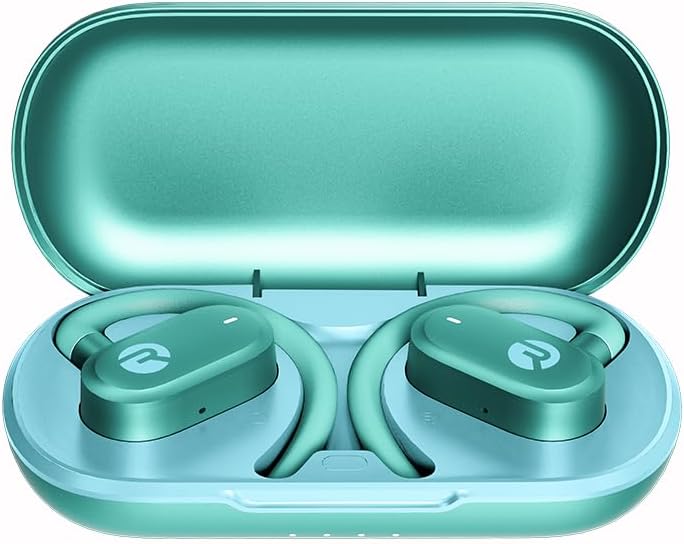
Image: Raycon Everyday Open Earbuds resting in their open charging case, ready for charging or use.
2. Bluetooth Pairing
The earbuds utilize Bluetooth 5.2 for stable and easy pairing. To pair, remove the earbuds from the charging case. They will automatically enter pairing mode. On your device (smartphone, tablet, laptop), go to Bluetooth settings and select "Raycon Everyday Open Earbuds" from the list of available devices. A voice prompt will confirm successful pairing.
3. Finding Your Best Fit
The Everyday Open Earbuds feature rotating hooks for a secure and comfortable fit. Place the earbud into your ear, then gently rotate the hook to rest comfortably over your ear. The earbud should be positioned slightly above your ear canal. Adjust by rotating the earbud gently back and forth until you achieve the most comfortable and stable fit. This ergonomic design ensures the earbuds stay in place during various activities.

Image: A pair of Raycon Everyday Open Earbuds, highlighting their unique open-ear hook design.
Video: This short video demonstrates how to properly fit the Raycon Everyday Open Earbuds for optimal comfort and stability.
Operating Your Earbuds
Controls
The Raycon Everyday Open Earbuds feature intuitive controls, including voice control and touch-sensitive areas on the earbuds. These allow for seamless switching between music playback, managing calls, and activating voice assistants. Refer to the quick start guide included with your product for specific touch commands.
Sound Quality
Equipped with advanced audio technology, these earbuds deliver crisp, clear sound with rich bass and balanced tones. The open-ear design allows you to enjoy your audio while maintaining awareness of your surroundings, making them ideal for various environments.
Water Resistance
The earbuds are IPX5 water resistant, meaning they can withstand splashes and sweat. This makes them suitable for workouts and outdoor activities. However, they are not designed for submersion in water.
Maintenance
Cleaning
To maintain optimal performance and hygiene, regularly clean your earbuds. Use a soft, dry, lint-free cloth to wipe down the earbuds and charging case. Avoid using abrasive materials or harsh chemicals.
Storage
When not in use, store your earbuds in their charging case to protect them from dust and damage. Store the case in a cool, dry place away from extreme temperatures.
Troubleshooting
- No Sound: Ensure earbuds are charged and properly paired. Check volume levels on both the earbuds and your connected device.
- Pairing Issues: Turn off Bluetooth on your device, then turn it back on. Forget the device in your Bluetooth settings and attempt to re-pair. Ensure earbuds are out of the case and in pairing mode.
- Intermittent Connection: Move closer to your connected device. Avoid environments with significant wireless interference.
- Earbuds Not Charging: Ensure the charging cable is securely connected to both the case and a power source. Check for debris in the charging ports.
- Uncomfortable Fit: Re-adjust the rotating ear hooks as described in the "Finding Your Best Fit" section. Experiment with slight rotations to find the most comfortable position.
Specifications
| Feature | Detail |
|---|---|
| Model Name | RBO725 |
| Connectivity Technology | Wireless (Bluetooth) |
| Bluetooth Version | 5.0 |
| Earbud Battery Life | 8 hours |
| Case Battery Life | 40 hours (additional) |
| Water Resistance Level | IPX5 (Water Resistant) |
| Earpiece Shape | Hook |
| Control Method | Voice |
| Frequency Range | 20 Hz - 20,000 Hz |
| Compatible Devices | Smartphones, Tablets, Laptops |
| Manufacturer | Raycon Global |
| Color | Mint |
Warranty and Support
For warranty information, product support, or to contact customer service, please visit the official Raycon website or refer to the warranty card included with your purchase. You can also visit the Raycon Store on Amazon for additional resources.
Documents and downloads
Ask a question about this manual
Ask about setup, troubleshooting, compatibility, parts, safety, or missing instructions. Manuals+ will review the question and use this page’s manual context to help answer it.