
Pulsar Thermion 2 XG50
Pulsar Thermion 2 XG50 Thermal Riflescope User Manual
Model: Thermion 2 XG50
1. Introduction
This manual provides detailed instructions for the proper use, setup, and maintenance of your Pulsar Thermion 2 XG50 Thermal Riflescope. Designed for serious hunters, this device offers cutting-edge thermal imaging technology for ultimate precision and reliability in various environmental conditions. Please read this manual thoroughly before operating the device to ensure safe and effective use.

Figure 1: Pulsar Thermion 2 XG50 Thermal Riflescope
2. Safety Information
Always adhere to the following safety guidelines to prevent injury or damage to the device:
- Do not look directly at intense light sources through the riflescope, as this may damage the sensor.
- Keep the device away from extreme temperatures and direct sunlight for prolonged periods.
- Ensure the device is securely mounted before use to prevent accidental drops or movement during recoil.
- Do not attempt to disassemble or modify the riflescope. Refer all servicing to authorized personnel.
- Store the device in a dry, cool place when not in use.
- EXPORT CONTROL NOTICE: This product is controlled for export and in-country transfer under the International Traffic in Arms Regulations (ITAR). Diversion contrary to U.S. law is prohibited.
3. Components Overview
The Pulsar Thermion 2 XG50 package includes the following components:
- Thermal Imaging Riflescope
- Rechargeable APS2 Battery Pack
- APS battery charger
- USB cable
- Carrying case
- Lens-cleaning cloth
- Quick User Manual (this document)
- Warranty card
- APS3 battery cover
4. Setup
4.1. Battery Installation and Charging
The Thermion 2 XG50 is powered by two rechargeable batteries, providing up to 10 hours of operation. Ensure batteries are fully charged before first use.
- Insert the rechargeable APS2 Battery Pack into the designated compartment on the riflescope.
- Use the provided APS battery charger and USB cable to charge the battery packs.
- Monitor the charging indicator on the charger; it will change color when fully charged.
4.2. Mounting the Riflescope
The riflescope is designed for Ring Mount systems. Follow these steps for secure mounting:
- Attach appropriate mounting rings (not included) to your firearm's rail system.
- Carefully place the Thermion 2 XG50 into the rings, ensuring proper eye relief and alignment.
- Tighten the ring screws according to the mounting ring manufacturer's specifications, ensuring the riflescope is level and secure.
4.3. Initial Power On and Basic Settings
After mounting and battery installation, power on the device and configure basic settings:
- Press and hold the power button until the display illuminates.
- Navigate through the menu using the control buttons to adjust brightness, contrast, and color palettes to your preference.
- The riflescope supports five zeroing profiles, each with ten zeroing distances. Access the zeroing menu to set up your preferred profiles for different firearms or distances.

Figure 2: The Thermion 2 XG50 allows storing up to 5 zeroing profiles, each with 10 distance coordinates.
5. Operating Instructions
5.1. Thermal Imaging Capabilities
The Thermion 2 XG50 features a high-quality 1024x768 AMOLED display and a 640x480 microbolometer resolution, ensuring a sharp and detailed thermal image even when targets are in motion.
- Detection Range: Capable of detecting heat signatures up to 2,500 yards (approximately 2300 meters).
- Magnification: Offers a variable magnification range of 3-24x for precise targeting.
- Field of View (FOV): An 8.8° field of view provides excellent situational awareness.
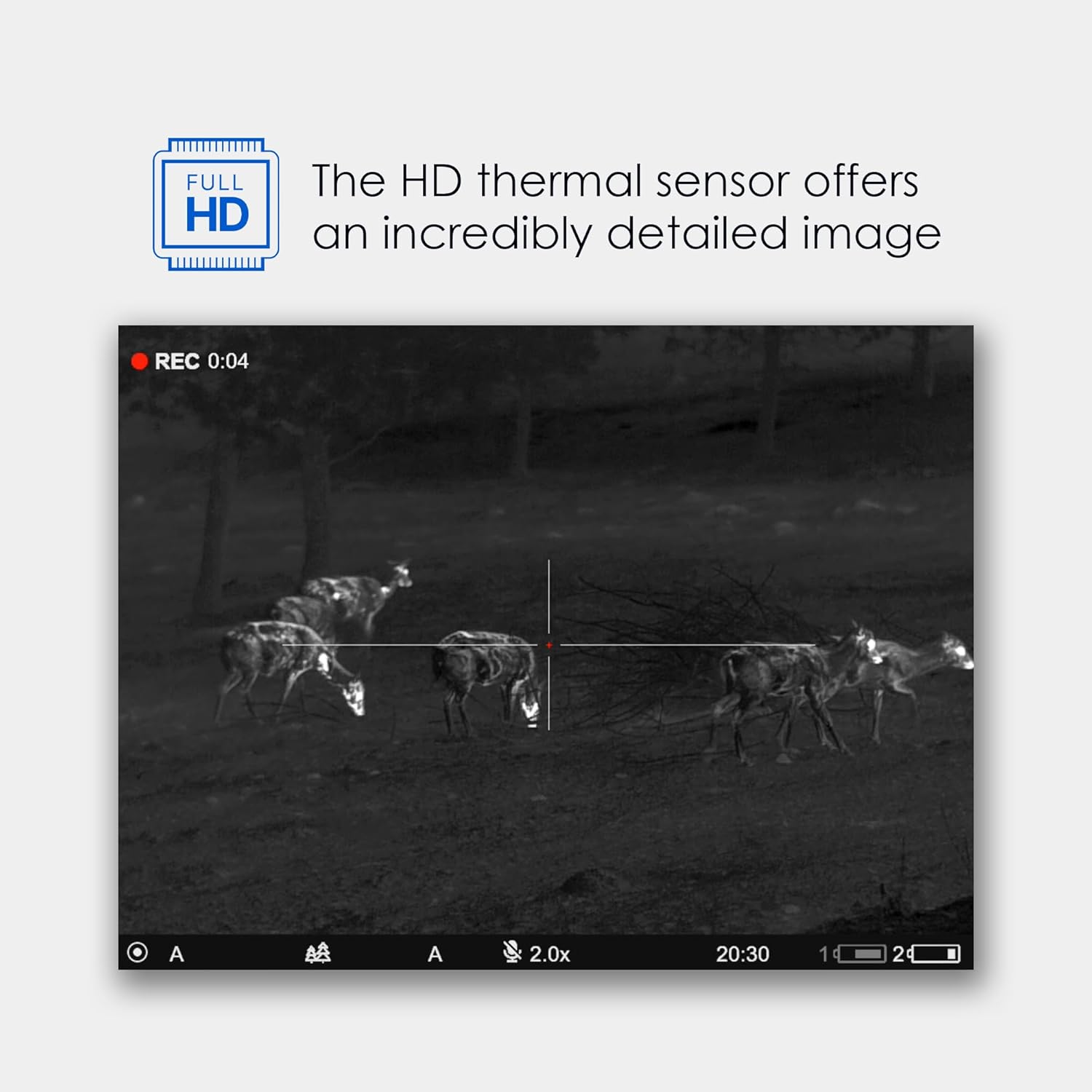
Figure 3: The HD thermal sensor provides an incredibly detailed image.

Figure 4: An 8.8° field of view allows for better situational awareness.

Figure 5: Ability to detect a heat signature up to 2300m.
5.2. Multimedia Features
The riflescope is equipped with built-in video recording and Wi-Fi streaming capabilities, allowing you to capture and share your observations.
- Video Recording: Press the record button to start/stop video capture. Recordings are stored internally.
- Wi-Fi Streaming: Connect the riflescope to your smartphone or tablet via Wi-Fi using the dedicated Pulsar Stream Vision app to view live feed, control settings, and manage media files.
- Ballistic Calculations: The Stream Vision Ballistics feature allows for ballistic calculations to be displayed directly on the scope's screen, aiding in shot placement.

Figure 6: Stream Vision Ballistics displays ballistic calculations right on the scope's screen.
5.3. Environmental Resilience
The Thermion 2 XG50 is built to perform in challenging conditions:
- Waterproof Rating: Features an IPX7 waterproof rating, making it suitable for use in wet environments.
- Temperature Resistance: Operates effectively in a wide temperature range from -13 to +122 °F (-25 to +50 °C).
6. Maintenance
6.1. Cleaning the Riflescope
Regular cleaning ensures optimal performance and longevity of your device:
- Use the provided lens-cleaning cloth to gently wipe the objective and eyepiece lenses. Avoid abrasive materials.
- For the body of the riflescope, use a soft, damp cloth to remove dirt and debris. Do not use harsh chemicals or solvents.
- Ensure all caps and covers are in place when not in use to protect lenses and ports.
6.2. Battery Care and Storage
- Store batteries in a cool, dry place. For long-term storage, charge batteries to approximately 50% capacity.
- Avoid fully discharging batteries frequently, as this can reduce their lifespan.
- If the device will not be used for an extended period, remove the batteries.
7. Troubleshooting
This section addresses common issues you might encounter with your Thermion 2 XG50. For problems not listed here, please contact customer support.
| Problem | Possible Cause | Solution |
|---|---|---|
| Device does not power on. | Low or depleted battery. Incorrect battery installation. | Charge batteries fully. Ensure batteries are inserted correctly. |
| Image is blurry or unclear. | Lens is dirty. Focus adjustment needed. | Clean lenses with the provided cloth. Adjust the focus ring until the image is sharp. |
| Wi-Fi connection issues. | Incorrect Wi-Fi settings. Device too far from smartphone/tablet. | Ensure Wi-Fi is enabled on both devices. Check network settings. Move closer to the device. |
8. Specifications
| Feature | Detail |
|---|---|
| Brand | Pulsar |
| Model Name | Thermion 2 |
| Color | XG50 |
| Item Weight | 1.8 Pounds |
| Material | Aluminum |
| Objective Lens Diameter | 50 Millimeters |
| Compatible Devices | Handgun |
| Mounting Type | Ring Mount |
| Night Vision | No |
| UPC | 812495029615 |
| Item Package Dimensions L x W x H | 19.53 x 9.02 x 5.08 inches |
| Package Weight | 1.97 Kilograms |
| Item Dimensions L x W x H | 16.22 x 3.07 x 3.27 inches |
| Manufacturer | Sellmark Corporation |
| Suggested Users | unisex-adult |
| Date First Available | February 3, 2024 |
9. Warranty Information
The Pulsar Thermion 2 XG50 Thermal Riflescope comes with a 5 Year Limited Warranty. Please refer to the included warranty card for full terms and conditions, including details on coverage, limitations, and how to make a claim. Retain your proof of purchase for warranty service.
10. Customer Support
For technical assistance, service, or additional information regarding your Pulsar Thermion 2 XG50, please visit the official Pulsar website or contact their customer support team. Contact details can typically be found on the manufacturer's website or on the warranty card provided with your product.
Ask a question about this manual
Ask about setup, troubleshooting, compatibility, parts, safety, or missing instructions. Manuals+ will review the question and use this page’s manual context to help answer it.