
1. Introduction
This manual provides essential information for the installation, operation, maintenance, and troubleshooting of your GIGABYTE GeForce RTX 5070 Eagle OC ICE SFF 12G Graphics Card. Please read this manual thoroughly before using the product to ensure optimal performance and longevity.

Image 1.1: Front view of the GIGABYTE GeForce RTX 5070 Eagle OC ICE SFF 12G Graphics Card.
2. Product Features
The GIGABYTE GeForce RTX 5070 Eagle OC ICE SFF 12G Graphics Card is engineered for high performance in compact systems. Key features include:
- NVIDIA Blackwell Architecture and DLSS 4: Delivers advanced graphics and AI acceleration for demanding applications and games.
- GeForce RTX 5070 GPU: Provides powerful processing capabilities.
- 12GB GDDR7 192-bit Memory: High-speed memory for complex textures and large datasets.
- PCIe 5.0 Interface: Ensures high bandwidth for data transfer.
- WINDFORCE Cooling System: Efficient thermal management for stable performance.
- NVIDIA SFF Ready: Optimized for small form factor PC builds.
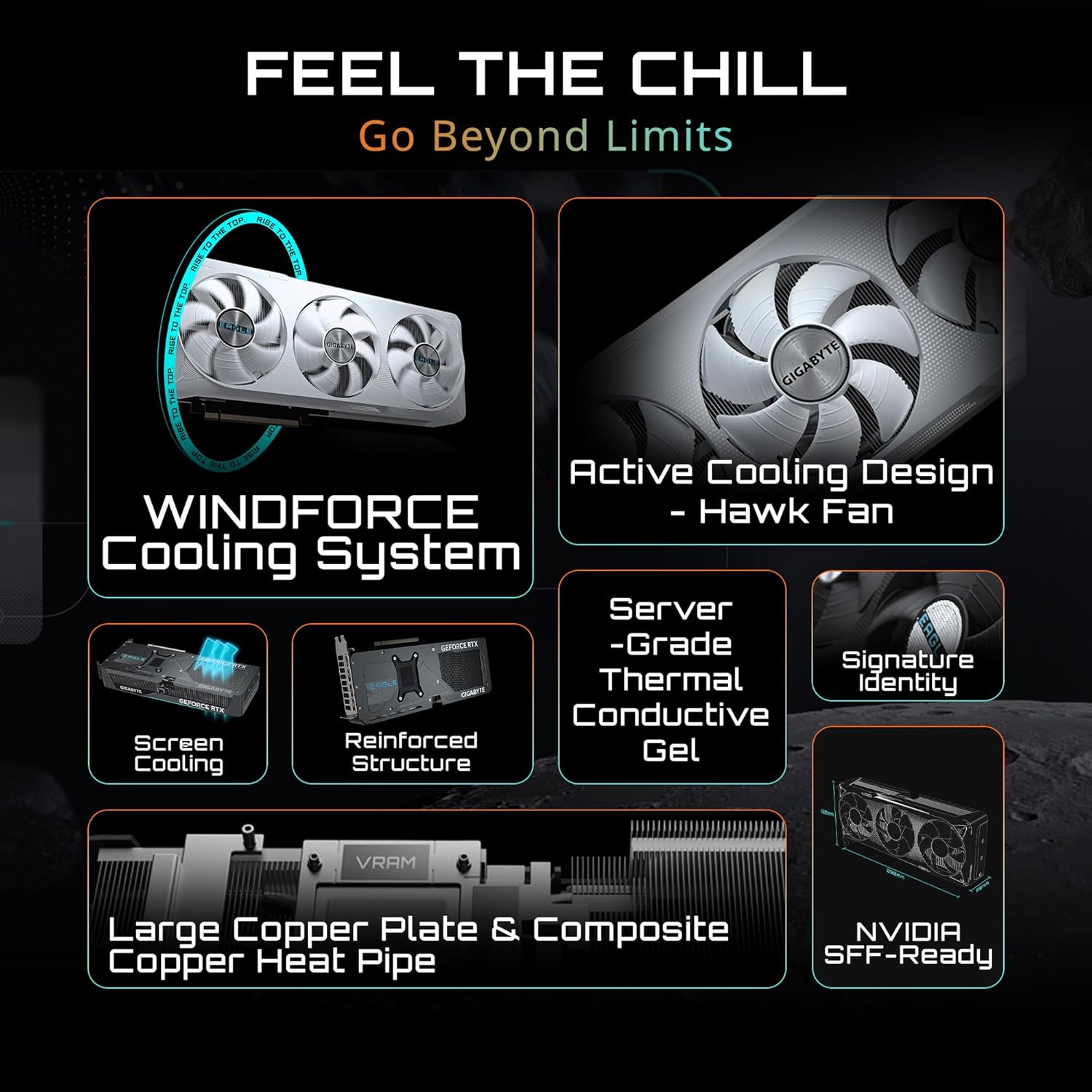
Image 2.1: Overview of the WINDFORCE Cooling System, featuring active cooling design, reinforced structure, server-grade thermal conductive gel, large copper plate, and composite copper heat pipe.

Image 2.2: Details on NVIDIA Blackwell Architecture, highlighting Fifth-Gen Tensor Cores, New Streaming Multiprocessors, and Fourth-Gen Ray Tracing Cores.
Video 2.3: Official GIGABYTE GeForce RTX 50 Series Trailer. This video provides a general overview of the graphics card series and its visual capabilities.
3. Setup and Installation
Before installing your new graphics card, ensure your system's power supply meets the recommended wattage (750W for this model) and that your motherboard has a compatible PCIe 5.0 x16 slot. Always power off your PC and disconnect it from the power source before beginning installation.
What's in the Box:
- GIGABYTE GeForce RTX 5070 Eagle OC ICE SFF 12G Graphics Card
Installation Steps:
- Prepare Your System: Turn off your computer and unplug the power cord. Open your PC case.
- Remove Old Graphics Card (if applicable): Unscrew and carefully remove any existing graphics card.
- Insert New Graphics Card: Align the graphics card with the PCIe 5.0 x16 slot on your motherboard. Press down firmly until it clicks into place. Secure the card with screws to the PC case.
- Connect Power Cables: Connect the necessary PCIe power cables from your power supply to the graphics card. Ensure all connections are secure.
- Close Case and Power On: Close your PC case, reconnect the power cord, and turn on your computer.
- Install Drivers: Once your operating system loads, install the latest NVIDIA drivers from the official GIGABYTE or NVIDIA website.
Video 3.1: This video demonstrates the unboxing and installation process of a GIGABYTE GeForce RTX 5070 AERO OC 12G Graphics Card. While the model shown is AERO, the installation steps are generally applicable to the Eagle OC ICE model.
4. Operating the Graphics Card
After successful installation and driver setup, your GIGABYTE GeForce RTX 5070 graphics card is ready for use. The card automatically adjusts its performance based on the demands of your applications and games.
- Driver Updates: Regularly check for and install the latest NVIDIA GeForce drivers to ensure optimal performance, stability, and access to new features.
- NVIDIA GeForce Experience: Utilize the GeForce Experience software for game optimization, driver updates, and recording gameplay.
- GIGABYTE Control Center: For advanced users, GIGABYTE Control Center allows monitoring of card statistics, fan speed control, and RGB lighting customization.
- Display Connectivity: Connect your display(s) using the available DisplayPort 2.1a or HDMI 2.1b ports. The card supports a maximum resolution of 7680x4320 pixels.

Image 4.1: Close-up view of the graphics card's output ports, including DisplayPort 2.1a and HDMI 2.1b.
5. Maintenance
Proper maintenance ensures the longevity and consistent performance of your graphics card.
- Dust Removal: Periodically clean dust from the fans and heatsink using compressed air. Ensure the PC is powered off and unplugged before cleaning.
- Driver Maintenance: Keep your graphics drivers updated. New drivers often include performance improvements and bug fixes.
- Temperature Monitoring: Use monitoring software (e.g., GIGABYTE Control Center, MSI Afterburner) to keep an eye on GPU temperatures, especially during heavy loads. Ensure adequate airflow within your PC case.
6. Troubleshooting
If you encounter issues with your graphics card, consider the following troubleshooting steps:
- No Display Output:
- Ensure the monitor cable is securely connected to both the graphics card and the display.
- Verify that the graphics card is properly seated in the PCIe slot.
- Check that all PCIe power cables are correctly connected to the graphics card.
- Test with a different display cable or monitor if possible.
- Performance Issues (Low FPS, Stuttering):
- Ensure your graphics drivers are up to date.
- Check for background applications consuming system resources.
- Monitor GPU temperature to ensure it's not overheating. Improve case airflow if necessary.
- Verify that your power supply unit (PSU) meets the recommended wattage.
- System Crashes or Freezes:
- Update your motherboard BIOS to the latest version.
- Perform a clean installation of graphics drivers.
- Check system memory (RAM) for errors.
7. Specifications
Detailed technical specifications for the GIGABYTE GeForce RTX 5070 Eagle OC ICE SFF 12G Graphics Card:

Image 7.1: Visual representation of key specifications for the GIGABYTE GeForce RTX 5070 Eagle OC ICE SFF 12G Graphics Card.
| Feature | Specification |
|---|---|
| Graphics Coprocessor | NVIDIA GeForce RTX 5070 |
| Memory Size | 12 GB GDDR7 |
| Memory Interface | 192-bit |
| Memory Speed | 2600 MHz (Effective 28 Gbps) |
| GPU Clock Speed | 2600 GHz (Boost Clock) |
| PCIe Interface | PCIe 5.0 |
| Max Screen Resolution | 7680x4320 Pixels |
| Video Output Interface | DisplayPort 2.1a x 3, HDMI 2.1b x 1 |
| Recommended PSU | 750W |
| Item Weight | 3.32 pounds |
| Product Dimensions (LxWxH) | 11.4 x 4.7 x 0.1 inches (290 x 120 x 50 mm) |

Image 7.2: Dimensional drawing of the graphics card, showing length and width.
8. Warranty and Support
GIGABYTE products are designed for reliability and performance. This graphics card may come with a manufacturer's warranty. Please refer to the warranty information included with your product packaging or visit the official GIGABYTE website for detailed warranty terms and conditions.
Some users have reported a 4-year protection plan being available for this product. Please check with your retailer or GIGABYTE for specific warranty details applicable to your purchase.
For technical support, driver downloads, and further product information, please visit the official GIGABYTE support website: www.gigabyte.com/support