1. Introduction
This manual provides comprehensive instructions for the safe and efficient operation of your Roxel RFM01 Retro FM Radio. Please read this manual thoroughly before using the device and retain it for future reference.
The Roxel RFM01 combines classic design with modern audio functionalities, including FM radio, Bluetooth wireless streaming, and MP3 playback from USB or SD cards. Its portable design allows for versatile use in various environments.
2. Product Overview
2.1 Key Features
- Timeless Retro Design: Classic aesthetic with a polished tuning dial and faux leather handle.
- Multiple Connectivity Options: Bluetooth wireless streaming, AUX input, USB, and SD card MP3 playback.
- FM Radio: Integrated FM tuner with a retro-style tuning dial.
- Portable Design: Lightweight with an easy-to-carry handle.
- Rich Sound Quality: Delivers clear audio with resonant bass.
- User-Friendly Controls: Intuitive dials and buttons for easy operation.
- Energy-Efficient: Operates on corded electric power or a rechargeable battery.
2.2 Package Contents
Upon unpacking, ensure all items listed below are present:
- Roxel RFM01 Retro FM Radio Unit
- Charging USB-C Type Cord
- Faux Leather Carrying Strap (pre-attached or separate)
- Owner's Manual (this document)
2.3 Product Components

Figure 1: Front View. Shows the speaker grille on the left, the large circular tuning dial on the right, and the volume knob with power indicator below the dial.
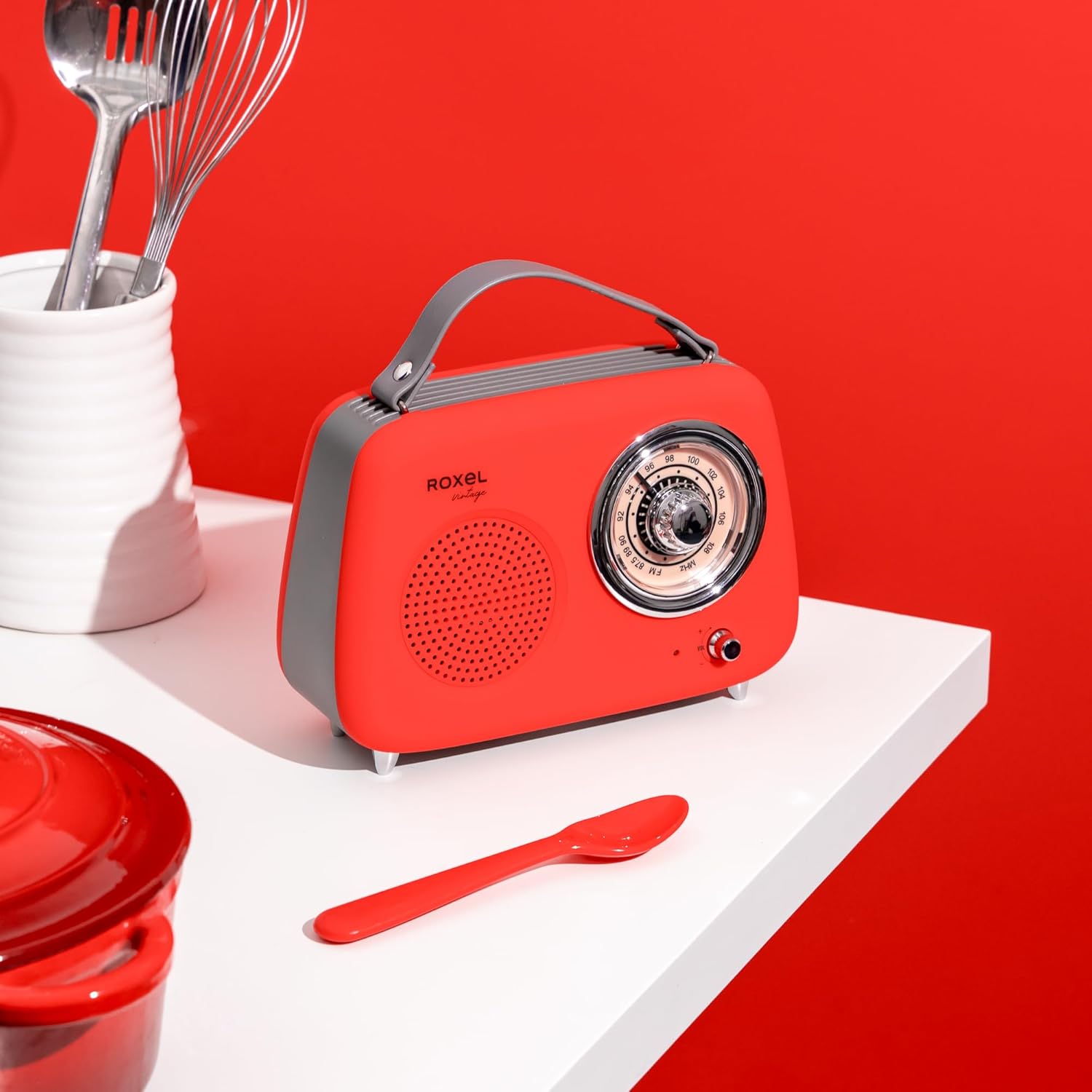
Figure 2: Rear View. Displays the telescopic antenna, power switch (OFF/ON/DC 5V), USB-C charging port, USB-A port, SD card slot, and AUX input. A circular subwoofer cover is also visible.

Figure 3: Tuning Dial and Controls. A detailed view of the large circular FM tuning dial (87.5-108 MHz) and the smaller volume knob with an integrated power/mode indicator light.
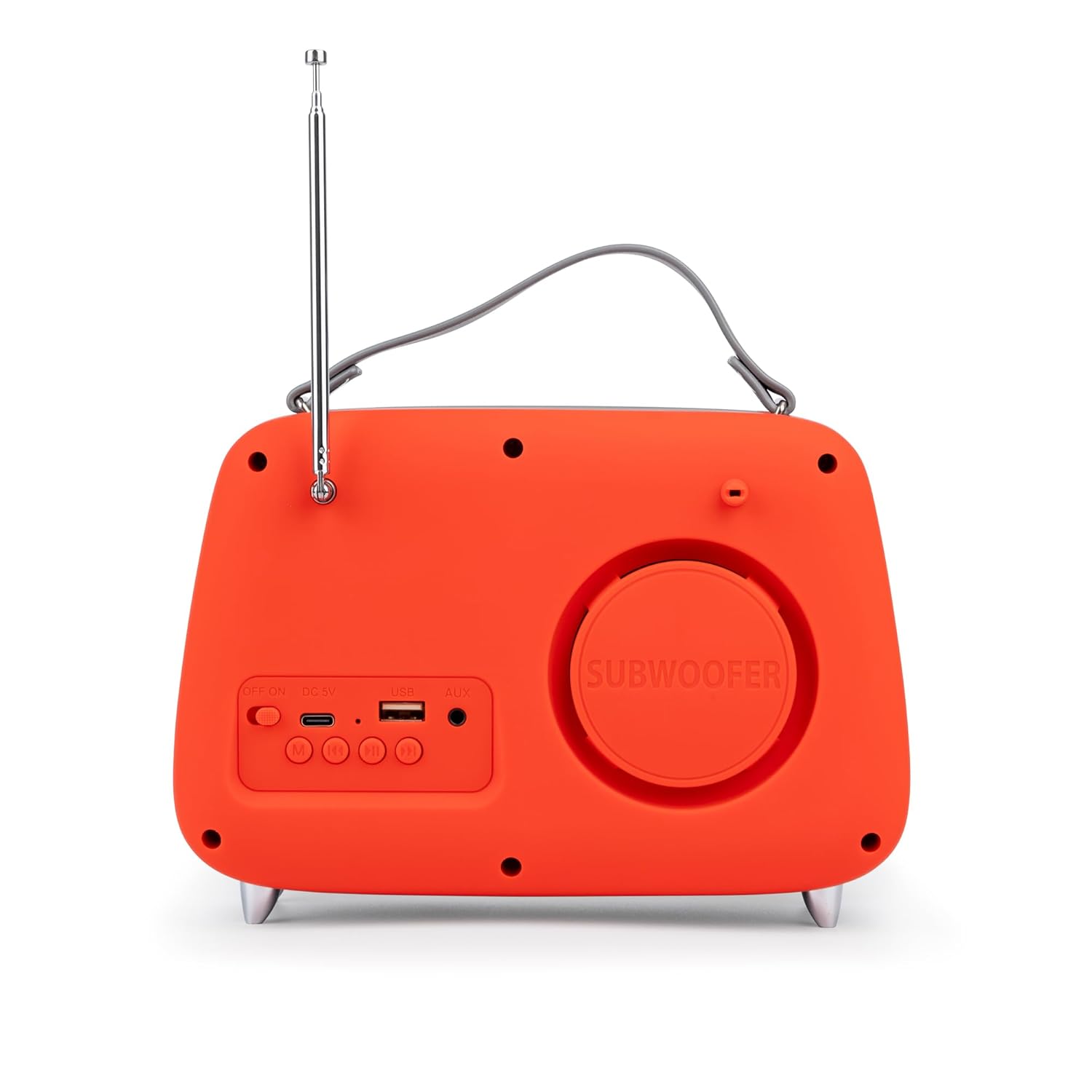
Figure 4: Speaker and Branding. Close-up of the perforated speaker grille and the "Roxel Vintage" logo on the front panel.
3. Setup
3.1 Charging the Battery
- Locate the USB-C charging port on the rear of the unit (refer to Figure 2).
- Connect the provided USB-C cable to the radio and the other end to a standard USB power adapter (not included) or a computer's USB port.
- The power indicator light (near the volume knob) will illuminate to indicate charging. It will change color or turn off when fully charged.
- A full charge typically takes a few hours.
3.2 Initial Power On
- Ensure the unit is charged or connected to power.
- Locate the power switch on the rear panel (refer to Figure 2).
- Slide the switch to the "ON" position for battery operation or "DC 5V" for continuous power via USB-C.
- The power indicator light will turn on.
4. Operating Instructions
4.1 Power and Volume Control
- Power On/Off: Use the switch on the rear panel.
- Volume Adjustment: Rotate the volume knob on the front panel clockwise to increase volume and counter-clockwise to decrease it.
4.2 FM Radio Mode
- Extend the telescopic antenna on the rear of the unit for optimal reception.
- Ensure the radio is powered on.
- Rotate the large circular tuning dial on the front panel to scan for FM stations. The frequency range is 87.5-108 MHz.
- Adjust the antenna position for the clearest signal.
4.3 Bluetooth (BT) Mode
- Power on the radio. The unit will automatically enter Bluetooth pairing mode, indicated by a flashing light (if applicable, not explicitly stated but common).
- On your mobile device (smartphone, tablet, laptop), enable Bluetooth and search for available devices.
- Select "RFM01" from the list of devices to pair.
- Once paired, the indicator light will become solid, and you can stream audio from your device to the radio.
4.4 MP3 Playback (USB/SD Card)
- Insert a USB drive into the USB-A port or an SD card into the SD card slot on the rear panel (refer to Figure 2).
- The radio should automatically detect the storage device and begin playing MP3 files.
- Use the control buttons (if present, not explicitly detailed in product info, assuming basic playback controls) to navigate tracks.
4.5 AUX Input Mode
- Connect a 3.5mm audio cable (not included) from your external audio device to the AUX input port on the rear panel (refer to Figure 2).
- The radio should automatically switch to AUX mode, or you may need to cycle through modes using a dedicated button (if present).
- Control playback and volume from your connected external device.
5. Maintenance
5.1 Cleaning
- Always power off the device and disconnect it from any power source before cleaning.
- Use a soft, dry cloth to wipe the exterior surfaces.
- Do not use abrasive cleaners, waxes, or solvents, as these may damage the finish.
5.2 Battery Care
- To prolong battery life, avoid fully discharging the battery frequently.
- If storing the unit for an extended period, charge the battery to approximately 50% and recharge every 3-6 months.
- Do not expose the battery to extreme temperatures.
6. Troubleshooting
| Problem | Possible Cause | Solution |
|---|---|---|
| No power | Battery discharged; Power switch in OFF position; USB-C cable not connected properly. | Charge the battery; Slide power switch to ON or DC 5V; Ensure USB-C cable is securely connected. |
| Poor FM reception | Antenna not extended; Weak signal area; Interference. | Fully extend the telescopic antenna; Reposition the radio; Move away from electronic devices causing interference. |
| Bluetooth not pairing | Radio not in BT mode; Device Bluetooth off; "RFM01" not selected. | Ensure radio is powered on (it should enter BT mode automatically); Enable Bluetooth on your device; Select "RFM01" from your device's Bluetooth list. |
| No sound from USB/SD | No MP3 files on device; Incorrect file format; Device not inserted correctly. | Ensure USB/SD contains MP3 files; Check file format compatibility; Reinsert USB drive or SD card firmly. |
7. Specifications
- Model: RFM-01
- Brand: Roxel
- Dimensions (LxWxH): 20.5 x 8 x 15 cm
- Weight: 600 g
- Power Source: Corded Electric (DC 5V via USB-C), Rechargeable Lithium-Ion Battery
- Speaker Output Power: 5 Watts
- Tuner Technology: FM
- FM Frequency Range: 87.5 - 108 MHz
- Hardware Interface: Bluetooth 5, USB 2.0
- Connectivity: Auxiliary (3.5mm), Bluetooth, USB, SD Card
- Compatible Devices: Smartphone, Laptop, Tablet
- Material: Faux Leather, Plastic, Metal
8. Safety Information
- Do not expose the unit to rain, moisture, or extreme temperatures.
- Avoid placing the unit near heat sources or in direct sunlight.
- Do not disassemble or attempt to repair the unit yourself. Refer all servicing to qualified personnel.
- Keep out of reach of children.
- Use only the provided charging cable or a certified equivalent.
- Dispose of batteries responsibly according to local regulations.
9. Warranty and Support
For warranty information or technical support, please refer to the warranty card included with your purchase or visit the official Roxel website. Please have your model number (RFM-01) and purchase details available when contacting support.
For further assistance, please contact Roxel customer service.


