
Memorex MX-SDV07
Memorex Portable DVD Player User Manual
Model: MX-SDV07
Introduction
This user manual provides comprehensive instructions for the operation and maintenance of your Memorex MX-SDV07 Portable DVD Player. Please read this manual thoroughly before using the device to ensure proper function and to maximize your viewing and listening experience. Keep this manual for future reference.
What's in the Box
Verify that all items listed below are included in your package:
- Memorex MX-SDV07 Portable DVD Player
- AC/DC Adaptor (for home charging)
- A/V Cable (for connecting to external displays)
- Earphones
- Remote Control
- Car Adaptor (for in-car charging)
- Instruction Manual (this document)
Product Overview
The Memorex MX-SDV07 Portable DVD Player features a 7-inch TFT LCD swivel screen, offering versatile viewing angles and clear visuals. It supports various media formats and provides multiple connectivity options for enhanced entertainment.
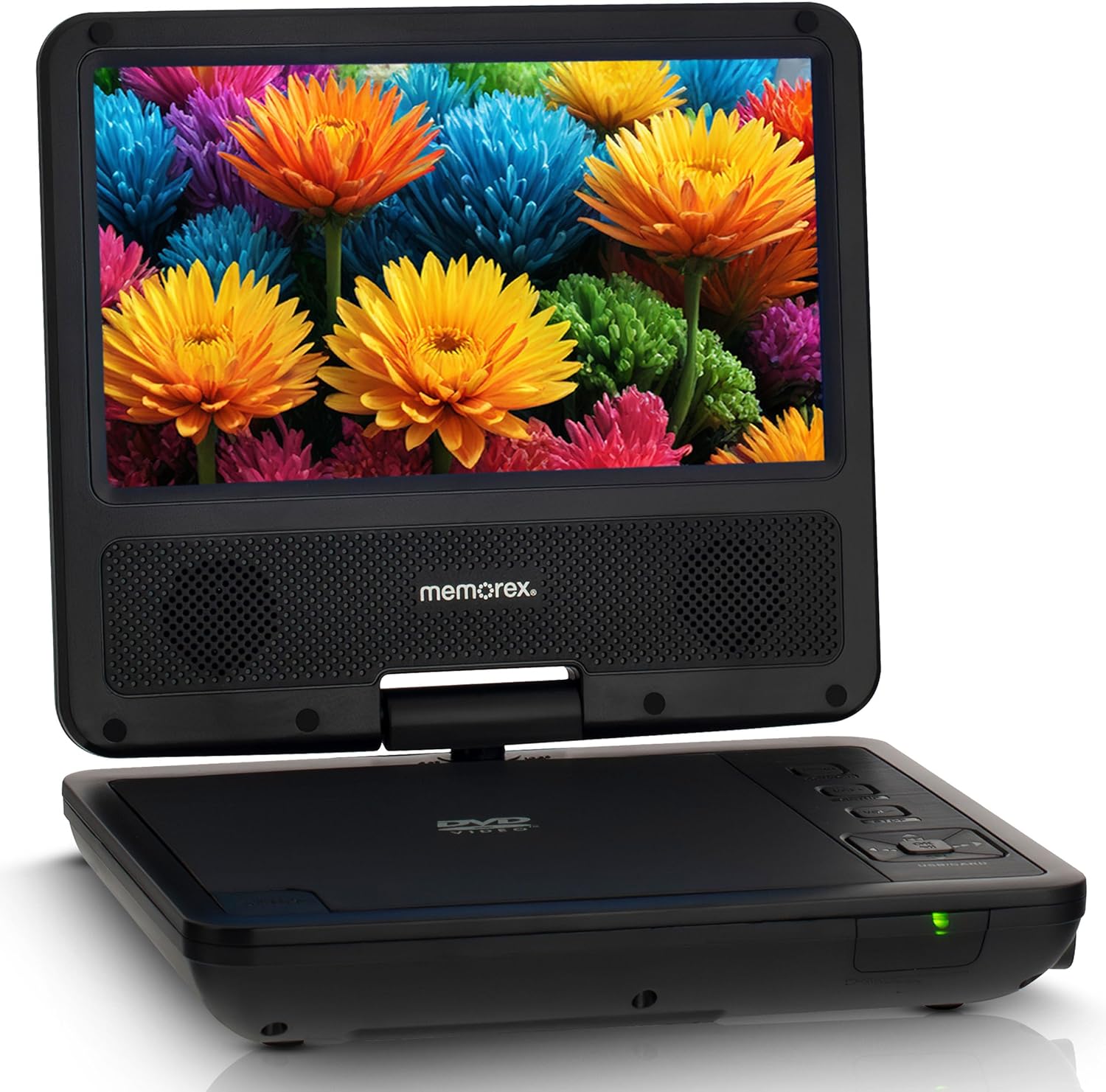
Figure 1: Front view of the Memorex Portable DVD Player with the screen open, displaying a vibrant image of flowers.
Key Features:
- 7-Inch TFT LCD Swivel Screen: Provides clear, vibrant visuals and can swivel for optimal viewing comfort.
- Multi-Format Compatibility: Supports DVD, CD, DVD±R, DVD±RW, MP3, and JPEG formats.
- USB and SD Card Slots: Allows direct playback of digital media files.
- Rechargeable Battery: Built-in Li-Ion Polymer battery offers up to 3 hours of playback.
- Dual Speakers: Integrated speakers for audio playback.
- AV Output/Input: Connect to an external TV or other AV devices.
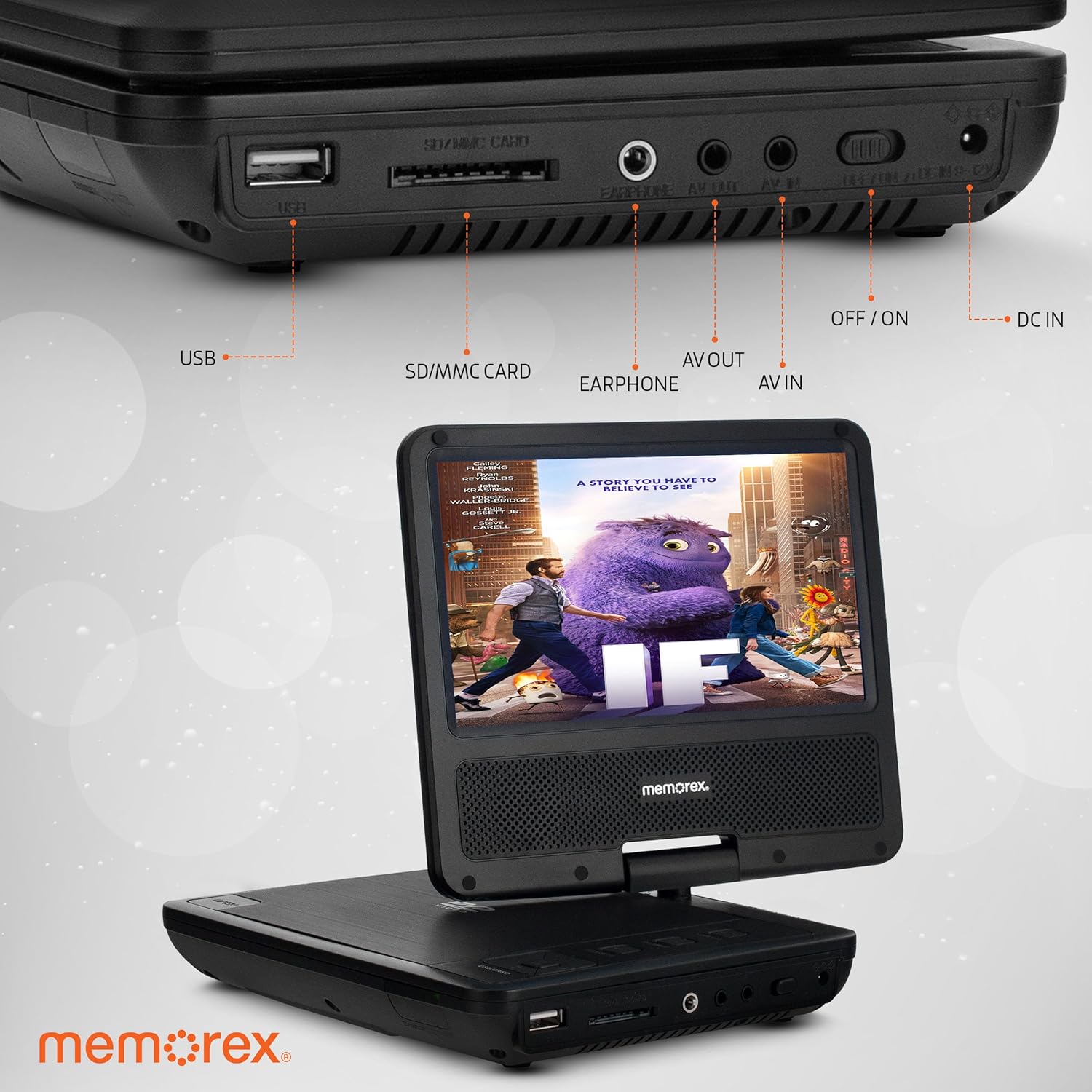
Figure 2: Detailed view of the side panel, highlighting the USB, SD/MMC card, Earphone, AV Out, AV In, Off/On switch, and DC In ports.

Figure 3: Demonstrates the 180-degree and 360-degree swivel capabilities of the screen for flexible viewing.
Setup
1. Charging the Battery:
Before first use, fully charge the internal Li-Ion Polymer battery. This typically takes several hours.
- Connect the AC/DC adaptor to the DC IN port on the side of the DVD player.
- Plug the AC/DC adaptor into a standard wall outlet.
- The charging indicator light will illuminate. It will change color or turn off when charging is complete.
- For car use, connect the car adaptor to the DC IN port and plug it into your vehicle's 12V power outlet.
2. Powering On/Off:
Locate the OFF/ON switch on the side of the player. Slide it to the ON position to power on the device. Slide it to OFF to power off.
Video Description: This video demonstrates the process of powering on the Memorex Portable DVD Player, inserting a DVD, and navigating the DVD menu. It shows the initial boot screen, the disc loading, and playback of a movie.
Note: The video provided is from a customer and is included for illustrative purposes of the device's operation. Official seller videos were not available for this specific demonstration.
Operating Instructions
1. Playing a DVD/CD:
- Ensure the player is powered on.
- Press the OPEN button to open the disc cover.
- Carefully place a DVD or CD onto the disc spindle with the label side facing up.
- Gently press down on the center of the disc until it clicks into place.
- Close the disc cover firmly. The player will automatically begin reading the disc.
- Use the navigation buttons (Up, Down, Left, Right, OK) and PLAY/PAUSE, STOP, FF/REW buttons on the player or remote control to manage playback.

Figure 4: The portable DVD player shown with its remote control, illustrating its compatibility with DVD, CD, CD-R, CD-RW, DVD+R, DVD+RW, MP3, and JPEG formats.
2. Using USB/SD Card:
The player supports direct playback from USB drives and SD/MMC cards.
- Insert your USB drive into the USB port or your SD/MMC card into the SD/MMC CARD slot.
- Press the SOURCE button on the player or remote to select the desired input (USB or Card).
- Navigate through your files using the directional buttons and press OK to select and play.
3. Connecting to a TV (AV Out):
You can connect your portable DVD player to a larger display using the included A/V cable.
- Connect one end of the A/V cable to the AV OUT port on the DVD player.
- Connect the other end of the A/V cable to the corresponding AV input ports (Yellow for Video, Red/White for Audio) on your television.
- Select the correct AV input source on your television.
4. Using Earphones:
For private listening, plug the included earphones into the EARPHONE jack.
5. Adjusting Volume:
Use the VOL+ and VOL- buttons on the player or remote control to adjust the audio volume.
Maintenance
Cleaning:
- Always power off and unplug the device before cleaning.
- Use a soft, dry cloth to wipe the exterior of the player.
- For the screen, use a soft, lint-free cloth specifically designed for LCD screens. Do not use abrasive cleaners or solvents.
- Keep the disc compartment free of dust and debris.
Storage:
- Store the player in a cool, dry place away from direct sunlight and extreme temperatures.
- If storing for an extended period, ensure the battery is partially charged (around 50%) to prolong its lifespan.
Troubleshooting
| Problem | Possible Cause | Solution |
|---|---|---|
| Player does not power on. | Battery is depleted. Power switch is OFF. | Connect the AC/DC adaptor and charge the battery. Slide the power switch to ON. |
| No picture on screen. | Disc is dirty or scratched. Incorrect input source selected (for TV connection). Screen swivel position. | Clean the disc or try another disc. Ensure TV is on correct AV input. Adjust the screen to a proper viewing angle. |
| No sound. | Volume is too low or muted. Earphones are plugged in. | Increase volume using VOL+ button. Unplug earphones if using internal speakers. |
| Disc skipping or freezing. | Disc is dirty or damaged. Player is unstable or vibrating. | Clean the disc. Try another disc. Place the player on a stable, flat surface. |
| USB/SD card not recognized. | Incorrect format. Card/drive not inserted correctly. | Ensure files are compatible (MP3, JPEG). Re-insert the card/drive firmly. |
Specifications
- Model: MX-SDV07
- Screen Size: 7-inch TFT LCD (Visible screen diagonal: 7" / 18 cm)
- Supported Media Types: DVD, CD, DVD±R, DVD±RW, MP3, JPEG
- Connectivity: USB, SD/MMC Card Slot, AV Out, AV In, Earphone Jack, DC In
- Battery: Built-in Li-Ion Polymer rechargeable battery (up to 3 hours playback)
- Power Input: AC/DC Adaptor, Car Adaptor
- Item Weight: Approximately 1.2 pounds
- Package Dimensions: 10.67 x 7.87 x 3.03 inches
Warranty and Support
Memorex products are designed for reliability and performance. For specific warranty details, please refer to the warranty card included with your purchase or visit the official Memorex website. If you encounter any issues not covered in this manual, please contact Memorex customer support for assistance.
Manufacturer: Memorex
Date First Available: January 22, 2025
Related documentsMX-SDV07


Ask a question about this manual
Ask about setup, troubleshooting, compatibility, parts, safety, or missing instructions. Manuals+ will review the question and use this page’s manual context to help answer it.