
1. Product Overview
The REEOOH Hydrogen Oxygen 7-in-1 Facial Care Machine Model RM is a multifunctional device designed for comprehensive skin care. It integrates seven distinct functions to address various skin concerns, providing a versatile solution for facial treatments.

Image 1: Front view of the REEOOH Hydrogen Oxygen 7-in-1 Facial Care Machine, showcasing the main unit, control screen, solution bottles, and LED mask.
2. Safety Information
Before operating the device, please read and understand all safety instructions. Ensure the device is used in a clean, dry environment. Do not use on broken or irritated skin. Consult a healthcare professional if you have any pre-existing skin conditions or concerns. Keep out of reach of children.
3. Components and Accessories
The REEOOH Facial Care Machine includes the main unit and several specialized attachments:
- Main Control Unit with Touch Screen
- Solution Bottles (A, B, C)
- Scrubber Handle
- Ultrasound Handle
- RF (Radio Frequency) Handle
- LED Mask
- Abrasion Handle
- Cold Hammer Handle
- Spray Gun Handle
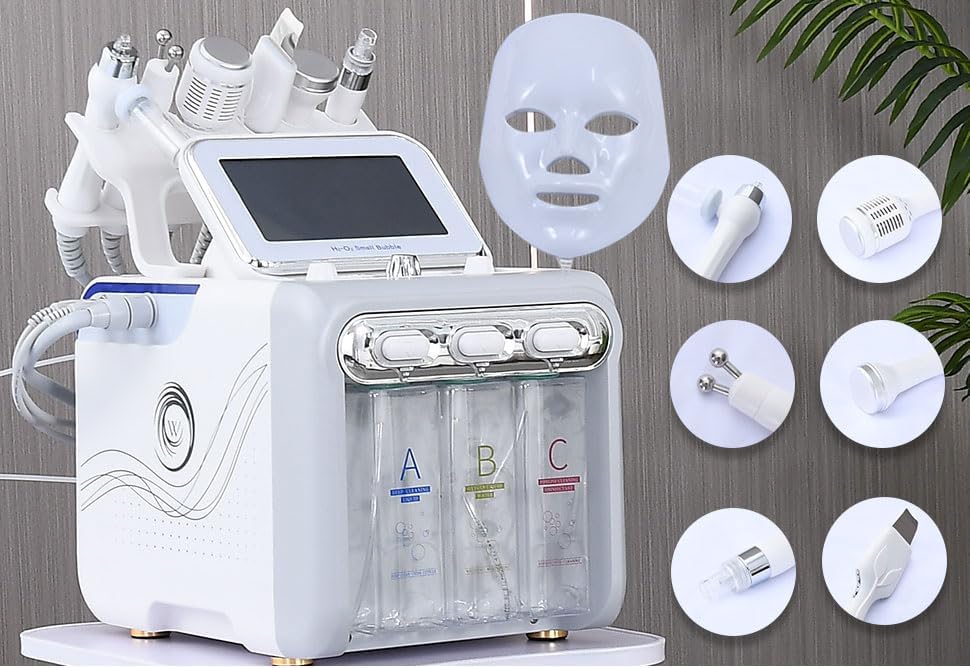
Image 2: The main unit of the facial care machine with its various attachments displayed, including the scrubber, ultrasound, RF, mask, abrasion, cold, and spray tools.
4. Setup Instructions
- Unpacking: Carefully remove all components from the packaging.
- Placement: Place the main unit on a stable, flat surface.
- Connecting Handles: Connect each treatment handle to its corresponding port on the main unit. Ensure connections are secure.
- Filling Solution Bottles:
- Bottle A: Fill with purified water.
- Bottle B: Fill with a moisturizing skin care product.
- Bottle C: Fill with a skin care product designed for cleansing effects.
- Power Connection: Plug the power cord into the machine and then into a suitable electrical outlet.

Image 3: Detailed view of the machine's connection ports for various handles and the control knobs for water and air flow.
5. Operating Instructions
5.1. Initial Power-On and Language Selection
- Turn on the main power switch.
- On the touch screen, select 'ENGLISH' for the operating language.
5.2. Using the Touch Screen Interface
The touch screen displays various functions. Tap on the desired function icon to activate it. Each function allows for adjustment of intensity (1-10) and mode (1/2/3/4) to customize your treatment.

Image 4: The machine's touch screen interface, showing options for Scrubber, Ultrasound, RF, Mask, Abrasion, Cold, and Spray functions, along with time and mode settings.
5.3. Function Specific Usage
- Scrubber: This tool vibrates to help dislodge blackheads, whiteheads, and other impurities from the skin.
- Ultrasound: Used for deeper penetration of skincare products and promoting circulation.
- RF (Radio Frequency): Designed for skin tightening and collagen stimulation. Use with caution and appropriate gel.
- Mask (LED Mask): The LED mask offers various light therapies for different skin benefits. Connect the mask and select the desired color on the screen. Recommended usage is 15-20 minutes per session, 2 times a week.
- Red Light: Whitening, lightening spots.
- Blue Light: Anti-acne, anti-inflammatory.
- Green Light: Maintain water and oil balance.
- Cyan Light: Improve fine lines.
- Purple Light: Whitening skin.
- Yellow Light: Replenishing energy.
- White Light: Firming skin.
- Abrasion: This function uses water and suction to gently exfoliate and cleanse pores, helping to remove blackheads and open pores.
- Cold Hammer: Provides a cooling effect to soothe skin, reduce redness, and shrink pores after treatments.
- Spray Gun: Delivers a fine mist of purified water or a relaxing cream to the skin, often used to hydrate or prepare the skin for moisturizer.

Image 5: Visual representation of skin cleansing effects, showing before and after comparisons for blackhead and grease removal.
6. Maintenance
Regular maintenance ensures optimal performance and longevity of your device.
- Cleaning: After each use, clean all handles and the main unit with a soft, damp cloth. Do not use abrasive cleaners.
- Solution Bottles: Empty and clean solution bottles A, B, and C regularly. Ensure the waste water bottle is emptied after each use to prevent overflow.
- Storage: Store the device in a cool, dry place away from direct sunlight and extreme temperatures.
7. Troubleshooting
If you encounter any issues with your REEOOH Facial Care Machine, please refer to the following common solutions:
- Device Not Powering On: Check if the power cord is securely connected to both the machine and the electrical outlet. Ensure the main power switch is in the 'On' position.
- No Suction/Spray: Verify that the solution bottles are correctly installed and contain sufficient liquid. Check for any blockages in the handle or tubing.
- Handle Malfunction: If a specific handle is not functioning as expected (e.g., RF not heating, scrubber not vibrating), ensure it is properly connected to its port. If the issue persists, discontinue use of that specific handle and contact customer support.
- Screen Unresponsive: Try restarting the machine. If the screen remains unresponsive, contact customer support.
8. Specifications
- Model Name: RM
- Brand: REEOOH
- Item Weight: 6.85 Kilograms (approximately 15.1 Pounds)
- Package Dimensions: 18 x 17 x 12.15 inches
- Material: Stainless Steel or Conductive Plastic
9. Warranty and Support
The REEOOH Hydrogen Oxygen 7-in-1 Facial Care Machine Model RM comes with a one-year warranty. We also offer free returns and refunds within 30 days of purchase. For technical support, warranty claims, or any inquiries, please contact our customer service team through the retailer where the product was purchased.