
1. Introduction
Welcome to the realme 14 Pro 5G user manual. This guide provides comprehensive instructions on how to set up, operate, and maintain your new smartphone. The realme 14 Pro 5G is designed to deliver exceptional performance, stunning photography, and robust durability, making it an ideal companion for your daily life.
2. What's in the Box
Upon unboxing your realme 14 Pro 5G, please ensure all the following items are present:
- realme 14 Pro 5G Smartphone
- USB Cable
- Phone Case
- Screen Protector (pre-applied or in box)
- SIM Tray Ejector
Note: The power adapter may not be included in all regional packages. Please check your specific product packaging.
3. Product Overview
Familiarize yourself with the physical components of your realme 14 Pro 5G.

Main view of the realme 14 Pro 5G smartphone, showcasing its elegant design and camera module.

Front view of the realme 14 Pro 5G, highlighting its curved display and punch-hole selfie camera.

Side view of the realme 14 Pro 5G, showing the power and volume buttons.

Back view of the realme 14 Pro 5G, featuring the unique pearl design and prominent camera array.
Key Features

An overview of the realme 14 Pro 5G's core features including camera, flash, battery, processor, design, display, and water resistance.

Summary of key features: Sony OIS Camera, MagicGlow Triple Flash, 5260mAh Titan Battery, Dimensity 7300 Energy 5G Processor, Unique Pearl Design, 120Hz Curved Vision Display, and IP69/IP68/IP66 water resistance.
4. Setup
4.1 Inserting the SIM Card
- Locate the SIM card tray on the side of your device.
- Insert the SIM ejector tool into the small hole next to the tray and press firmly until the tray pops out.
- Place your Nano-SIM card(s) and/or microSD card (if supported) into the tray with the gold contacts facing down.
- Carefully push the tray back into the slot until it clicks into place.
4.2 Initial Power On and Setup Wizard
- Press and hold the Power button until the realme logo appears.
- Follow the on-screen instructions to select your language, region, connect to Wi-Fi, and set up your Google account.
- You can also transfer data from your old device during this process.
5. Operating Instructions
5.1 Power On/Off and Restart
- Power On: Press and hold the Power button for a few seconds.
- Power Off: Press and hold the Power button and Volume Up button simultaneously, then tap 'Power off' on the screen.
- Restart: Press and hold the Power button and Volume Up button simultaneously, then tap 'Restart' on the screen.
5.2 Screen Gestures
- Home: Swipe up from the bottom of the screen.
- Back: Swipe inward from the left or right edge of the screen.
- Recent Apps: Swipe up from the bottom of the screen and hold.
5.3 Volume and Notifications
- Use the Volume Up/Down buttons on the side to adjust media volume, call volume, and alarm volume.
- Access the notification panel by swiping down from the top of the screen.
6. Camera Features
The realme 14 Pro 5G boasts an advanced camera system for capturing stunning photos and videos.

Detailed view of the realme 14 Pro 5G's camera module, highlighting the 50MP Sony OIS Camera and 16MP Ultra-clear Selfie Camera.

Visual representation of the 50MP Sony OIS Camera (IMX882, 1/1.95" large sensor, F/1.8, 4K video support) and the 16MP Ultra-clear Selfie Camera with AI Beauty Algorithm.

The MagicGlow Triple Flash system, designed to provide optimal lighting for every portrait with intelligent color temperature adjustment and professional-level fill light.

Showcasing impressive night portraits, aquatic mode for clear underwater shots with IP69 resistance, and Livephoto for dynamic memories.

Demonstration of portable professional lighting with the triple flash, ensuring realistic portraits in any light without environmental interference.

AI Ultra Clarity 2.0 for incredible clarity with one touch, and AI Snapshot Mode to preserve fleeting moments.

AI Eraser 2.0 allows easy removal of unwanted objects from photos by simply circling them, ensuring the perfect shot even after it's taken.
7. Display Features
Experience immersive visuals with the realme 14 Pro 5G's advanced display.

The realme 14 Pro 5G offers unlimited vision and superior eye care, providing a comfortable viewing experience.

Details of the 120Hz curved vision display, offering a flagship visual experience with integrated fluidity for perfect images. Features include 120Hz refresh rate, 1070 million True Colors, 4500 nit local peak brightness, 2392x1080 FHD resolution, 5,000,000:1 contrast ratio, and a large 6.77-inch (17.2 cm) screen.

AI eye protection provides an excellent visual experience in any lighting. The realme 14 Pro uses the same AI eye protection algorithm as the GT 7 Pro, intelligently detecting eye fatigue and adjusting screen color temperature for smart eye care.
8. Performance and Gaming
The realme 14 Pro 5G is engineered for powerful and efficient performance.

The Dimensity 7300 Energy 5G Processor offers ultra-fast and ultra-efficient performance for all-day use, built on a 4nm high-efficiency process with an AnTuTu benchmark score of over 750,000. It supports up to 26GB dynamic RAM and 512GB storage, allowing 26 applications to run simultaneously.

Enjoy smooth gaming at 120 fps. The realme 14 Pro 5G is among the first in its class to support 120 FPS in 3 major global games, offering an e-sports level gaming experience.

GT Mode enhances your gaming experience, deploying maximum performance with the same personalized gaming features as the realme GT 7 Pro, allowing you to enjoy games at full performance anywhere.

The 6000mm vapor chamber cooling system keeps the device cool during intense gaming sessions, offering 33% more VC cooling area and 30% more than the segment average, along with a 13,487 mm graphite sheet for efficient heat dissipation.
9. Battery and Charging
Your realme 14 Pro 5G is equipped with a high-capacity battery for extended usage.

Visual representation of the realme 14 Pro 5G's internal battery, emphasizing its high capacity.

The 5260 mAh Titan Battery, the industry's highest energy density graphite battery. Supports 45W SUPERVOOC Charge, reaching 1-50% in 36 minutes. Offers up to 29 days standby, 25.3 hours YouTube, 90.1 hours music, and 10.2 hours gaming. Includes a 4-year battery health warranty.
10. Durability and Water Resistance
The realme 14 Pro 5G is built to withstand various environmental challenges.
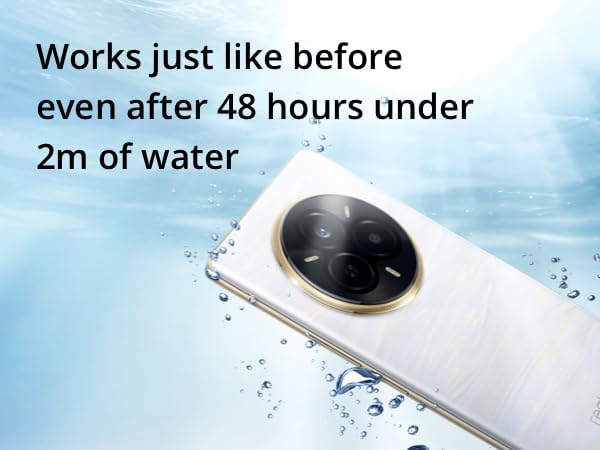
The realme 14 Pro 5G demonstrating its water resistance capabilities.

The device works just like before, even after 48 hours under 2m of water, thanks to its IP69 (protection against high-pressure, high-temperature dust and water entry), IP68 (protection against continuous water immersion), and IP66 (protection against high-pressure water jets) ratings.

The realme 14 Pro offers improved resistance and excellent fall protection, surpassing TÜV shock-resistant smartphone certification and military-grade drop resistance testing.
11. Software Features
The realme 14 Pro 5G runs on realme UI 6.0, based on Android 15, offering a smooth and intuitive user experience.

An overview of realme UI 6.0, based on Android 15, featuring Flux Theme for personalized aesthetics, Tap to Share for easy content sharing, and Live Alerts for real-time notifications.
12. Maintenance
- Cleaning: Use a soft, lint-free cloth to clean the screen and body. Avoid abrasive materials or harsh chemicals.
- Software Updates: Regularly check for and install system updates to ensure optimal performance and security. Go to Settings > About phone > realme UI version.
- Battery Care: Avoid extreme temperatures. Do not let the battery drain completely often, and avoid overcharging for extended periods.
- Storage Management: Periodically clear cache, delete unnecessary files, and uninstall unused apps to free up storage space and maintain performance.
13. Troubleshooting
| Problem | Possible Solution |
|---|---|
| Phone not turning on | Ensure the battery is charged. Connect to a charger for at least 10 minutes. If still unresponsive, perform a forced restart (hold Power button and Volume Up button for 10-15 seconds). |
| Apps crashing or freezing | Clear the app's cache and data (Settings > Apps > [App Name] > Storage). If the issue persists, uninstall and reinstall the app. Ensure your phone's software is up to date. |
| Poor battery life | Check battery usage in Settings to identify power-hungry apps. Reduce screen brightness, disable unnecessary features (GPS, Bluetooth, Wi-Fi when not in use), and enable power-saving mode. |
| Network connectivity issues | Toggle Airplane Mode on and off. Restart the phone. Check if your SIM card is properly inserted. Reset network settings (Settings > System > Reset options > Reset Wi-Fi, mobile & Bluetooth). |
| Fingerprint sensor not working | Ensure your finger is clean and dry. Re-register your fingerprints in Settings > Fingerprint. If the issue persists, perform a factory reset (backup data first). |
14. Specifications
Detailed technical specifications for the realme 14 Pro 5G.
| Feature | Detail |
|---|---|
| Model Name | realme 14 Pro 5G |
| Operating System | Android |
| CPU Model | Mediatek Dimensity 1100 |
| RAM Size | 26 GB (Installed) |
| Memory Storage Capacity | 512 GB |
| Battery Capacity | 5260 mAh |
| Display Resolution | 1080 x 2340 |
| Connectivity Technology | 5G |
| Wireless Carrier | All carriers |
| Color | White |
| Product Dimensions | 18.1 x 9.5 x 3.9 cm; 360 g |
| Item Model Number | 6941764456587 |
| Included Components | Screen Protector, SIM Tray Ejector, USB Cable, Phone Case |
| First Available Date | March 3, 2025 |
15. Warranty and Support
Your realme 14 Pro 5G comes with a manufacturer's warranty. For specific warranty terms and conditions, please refer to the warranty card included in your product packaging or visit the official realme website.
Battery Warranty: The device includes a 4-year warranty for battery health.
For technical support, troubleshooting assistance, or service inquiries, please contact realme customer service through their official channels. You can find contact information on the realme website or in your product documentation.
realme Official Website: www.realme.com