
1. Introduction
Thank you for choosing the SUNKTA Smartwatch EF9-A. This device is designed to enhance your daily life with advanced health monitoring, extensive sports tracking, convenient communication features, and robust durability. Please read this manual carefully to ensure proper use and optimal performance of your smartwatch.
2. Package Contents
Upon unboxing, please verify that all items listed below are present:
- 1 x SUNKTA Smartwatch EF9-A
- 1 x Magnetic USB Charging Cable
- 1 x User Manual
3. Product Overview

The SUNKTA Smartwatch EF9-A, showcasing its large display, integrated LED flashlight, and various health metrics.
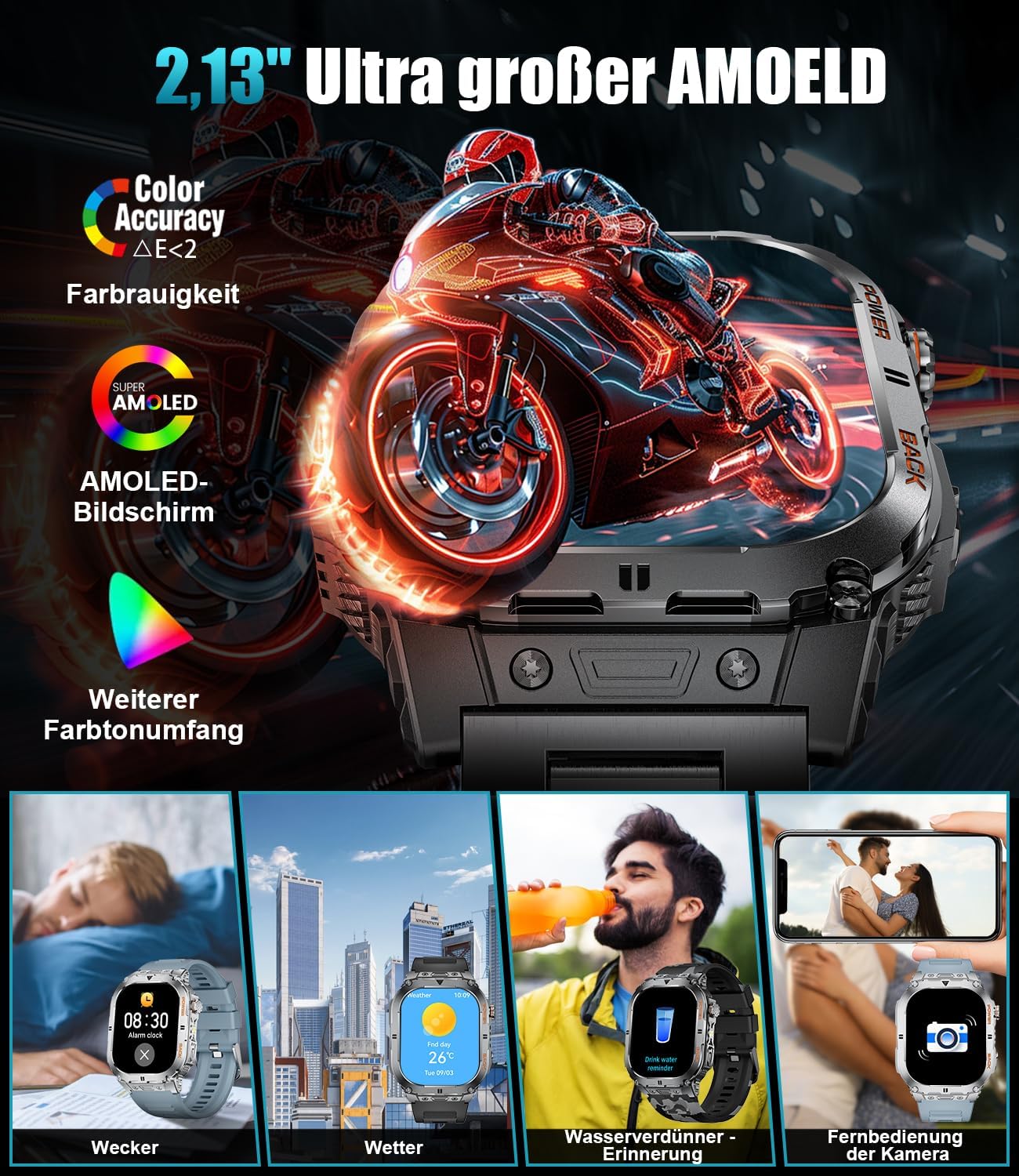
Detailed view of the 2.13-inch AMOLED display, emphasizing its vibrant colors and various functional watch faces.
Key Features:
- Large 2.13" AMOLED Display: Crystal-clear visuals with 466x466px resolution and always-on capability.
- Integrated LED Flashlight: Powerful light with a range of up to 20 meters, featuring Bright, Strobe, and SOS modes.
- 24/7 Health Monitoring: Continuous tracking of heart rate, blood pressure, blood oxygen (SpO2), and sleep patterns. Includes breath training.
- 113+ Sport Modes: Comprehensive tracking for a wide range of activities, including jogging, hiking, cycling, and more.
- Bluetooth Calls & Notifications: Make and receive calls directly from your watch with a built-in HD microphone and speaker. Receive instant message alerts.
- Military-Grade Durability: Meets MIL-STD-810H standards for shock resistance, 5 ATM waterproof rating, and resistance to extreme temperatures and dust.
- Extended Battery Life: Equipped with a 450mAh battery, offering 7-30 days of typical use and up to 60 days in standby mode.
- Customizable Watch Faces: Choose from over 200 online UI designs or upload your own photos.
- Smart Assistant Functions: Includes AI voice assistant, weather forecasts, alarm clock, calculator, stopwatch, timer, sedentary reminder, and remote camera control.
4. Setup Guide
4.1 Charging the Smartwatch
Before first use, fully charge your smartwatch. Use the provided magnetic USB charging cable. Align the magnetic pins on the cable with the charging contacts on the back of the watch. A full charge typically takes approximately 2 hours.

The smartwatch charging with its magnetic cable, highlighting its 450mAh battery capacity.
4.2 App Installation and Pairing
To unlock the full potential of your smartwatch, download the companion application on your smartphone. The app is compatible with iOS 8.4+ and Android 4.4+ devices.
- Scan the QR code in the manual or on the watch screen (if available) or search for the app name (usually mentioned in the quick start guide or product packaging) in your phone's app store.
- Install the application.
- Open the app and follow the on-screen instructions to create an account or log in.
- Enable Bluetooth on your smartphone.
- In the app, search for your device (SUNKTA EF9-A) and initiate the pairing process. Confirm the pairing request on both your phone and the smartwatch.
5. Operating the Smartwatch
5.1 Basic Navigation
- Touch Screen: Swipe left/right, up/down to navigate through menus and functions. Tap to select.
- Side Buttons: Typically, one button serves as a power/back button, and another for quick access to sports modes or flashlight. Refer to the watch's interface for specific button functions.
5.2 Bluetooth Calls and Notifications
Once paired with your smartphone, you can manage calls and receive notifications directly on your watch.

The smartwatch's interface for making/receiving calls, interacting with the voice assistant, and viewing message notifications.
- Making Calls: Access the dial pad or contact list on your watch to initiate calls.
- Receiving Calls: Answer or reject incoming calls directly from your wrist.
- Notifications: Messages from various apps (SMS, social media) will be displayed on your watch. You can adjust vibration and ringtone modes in the app.
- Do Not Disturb Mode: Activate this mode with a single gesture to silence notifications during specific times.
5.3 Using the LED Flashlight
The integrated LED flashlight offers powerful illumination for various situations.

The smartwatch's powerful LED flashlight, illustrating its three distinct modes for different lighting needs.
- Access the flashlight function from the watch's menu.
- Toggle between Bright Light, Strobe, and SOS modes as needed.
6. Health Monitoring
The SUNKTA Smartwatch provides comprehensive health data to help you stay informed about your well-being.

The smartwatch's health monitoring capabilities, including heart rate, blood oxygen, and breath training.
- Heart Rate Monitoring: Tracks your heart rate continuously throughout the day.
- Blood Oxygen (SpO2) Monitoring: Measures your blood oxygen saturation levels.
- Blood Pressure Monitoring: Provides estimates of your blood pressure.
- Sleep Monitoring: Analyzes your sleep stages (deep sleep, light sleep, REM, awake time) to help you understand and improve your sleep quality.
- Breath Training: Guided breathing exercises to help reduce stress and improve relaxation.
Note: Health monitoring data is for reference only and should not be used for medical diagnosis. Consult a healthcare professional for any health concerns.

The smartwatch's 5ATM waterproof feature and detailed real-time sleep monitoring display.
7. Sport Modes
The smartwatch supports over 113 sport modes, accurately recording your workout duration, heart rate, and calories burned.

The smartwatch tracking various sport activities, showing real-time data and progress.
- Navigate to the 'Sport' section on your watch.
- Select your desired activity from the extensive list.
- The watch will begin tracking your performance. Review your workout summary on the watch or in the companion app after completion.
8. Durability and Battery Life
The SUNKTA Smartwatch is built to withstand challenging environments and offers impressive battery longevity.

The smartwatch's military-grade durability, highlighting its resistance to shock, water, temperature, and dust.
- Military-Grade Robustness: Certified with MIL-STD-810H, ensuring high resistance to shocks and drops.
- 5 ATM Waterproof: Suitable for daily use, including hand washing, rain, and shallow swimming. Not recommended for hot water, diving, or high-pressure water activities.
- Battery Performance: The 450mAh cobalt battery provides 7-30 days of active use and up to 60 days on standby, depending on usage patterns.
9. Maintenance
To ensure the longevity and optimal performance of your smartwatch, follow these maintenance guidelines:
- Cleaning: Regularly wipe the watch screen and body with a soft, dry cloth. For stubborn dirt, use a slightly damp cloth and dry thoroughly.
- Charging Contacts: Keep the charging contacts on the back of the watch clean and free of debris to ensure efficient charging.
- Avoid Extreme Conditions: While durable, avoid exposing the watch to extreme temperatures (hot or cold) or harsh chemicals.
- Water Exposure: After exposure to saltwater or chlorinated water, rinse the watch with fresh water and dry it thoroughly.
10. Troubleshooting
If you encounter any issues with your smartwatch, refer to the following common problems and solutions:
| Problem | Possible Solution |
|---|---|
| Watch does not turn on | Ensure the watch is fully charged. Connect it to the magnetic charging cable and leave it for at least 30 minutes. |
| Unable to pair with smartphone | Ensure Bluetooth is enabled on your phone. Restart both the watch and your phone. Make sure the watch is within Bluetooth range. Check the app for pairing instructions. |
| Inaccurate health data | Ensure the watch is worn snugly on your wrist, not too loose or too tight. Clean the sensor on the back of the watch. Avoid excessive movement during measurements. |
| Notifications not received | Check app notification settings on your phone and in the smartwatch app. Ensure the watch is connected via Bluetooth. Disable 'Do Not Disturb' mode on the watch. |
| Short battery life | Reduce screen brightness. Limit continuous heart rate monitoring. Turn off unnecessary features like 'Always-On Display' if not needed. Ensure background app usage is optimized on your phone. |
If the problem persists, please contact customer support for further assistance.
11. Specifications
| Feature | Detail |
|---|---|
| Brand | SUNKTA |
| Model Number | EF9-A |
| Display | 2.13" AMOLED Touch Screen |
| Resolution | 466 x 466 px |
| Battery Capacity | 450 mAh Lithium-Polymer |
| Charging Time | Approx. 2 hours |
| Operating Time | 5-7 days (typical use), up to 30 days (efficient use), 60 days (standby) |
| Waterproof Rating | 5 ATM |
| Bluetooth Version | 5.0 |
| Compatibility | iOS 8.4+ / Android 4.4+ |
| Special Features | LED Flashlight, Bluetooth Call, Heart Rate, Blood Oxygen, Blood Pressure, Sleep Monitor, 113+ Sport Modes, AI Voice Assistant, Message Reminder, Remote Camera |
| Durability Standard | MIL-STD-810H |
12. Warranty and Support
Your SUNKTA Smartwatch EF9-A comes with a standard manufacturer's warranty. Please refer to the warranty card included in your package for specific terms and conditions.
For technical support, troubleshooting assistance, or warranty claims, please contact SUNKTA customer service through the contact information provided on the product packaging or the official SUNKTA website. When contacting support, please have your product model number (EF9-A) and purchase details ready.