
Memorex MX-PS802 Rechargeable Party Speaker User Manual
Model: MX-PS802
1. Introduction
Thank you for purchasing the Memorex MX-PS802 Rechargeable Party Speaker. This manual provides essential information for the safe and efficient operation of your device. Please read it thoroughly before use and retain it for future reference.
2. Safety Information
- Do not expose the speaker to water, moisture, or extreme temperatures.
- Avoid placing the speaker near heat sources or in direct sunlight.
- Do not attempt to disassemble or modify the speaker. Refer all servicing to qualified personnel.
- Use only the provided charging cable and adapter.
- Keep the speaker away from children and pets.
- Ensure proper ventilation around the speaker during use.
3. Package Contents
Verify that all items are present in your package:
- Memorex MX-PS802 Party Speaker
- Charging Cable
- User Manual (this document)
4. Product Overview
The Memorex MX-PS802 is an 8-inch rechargeable party speaker featuring Bluetooth 5.3, LED flame lighting, TWS pairing, and multiple input options.
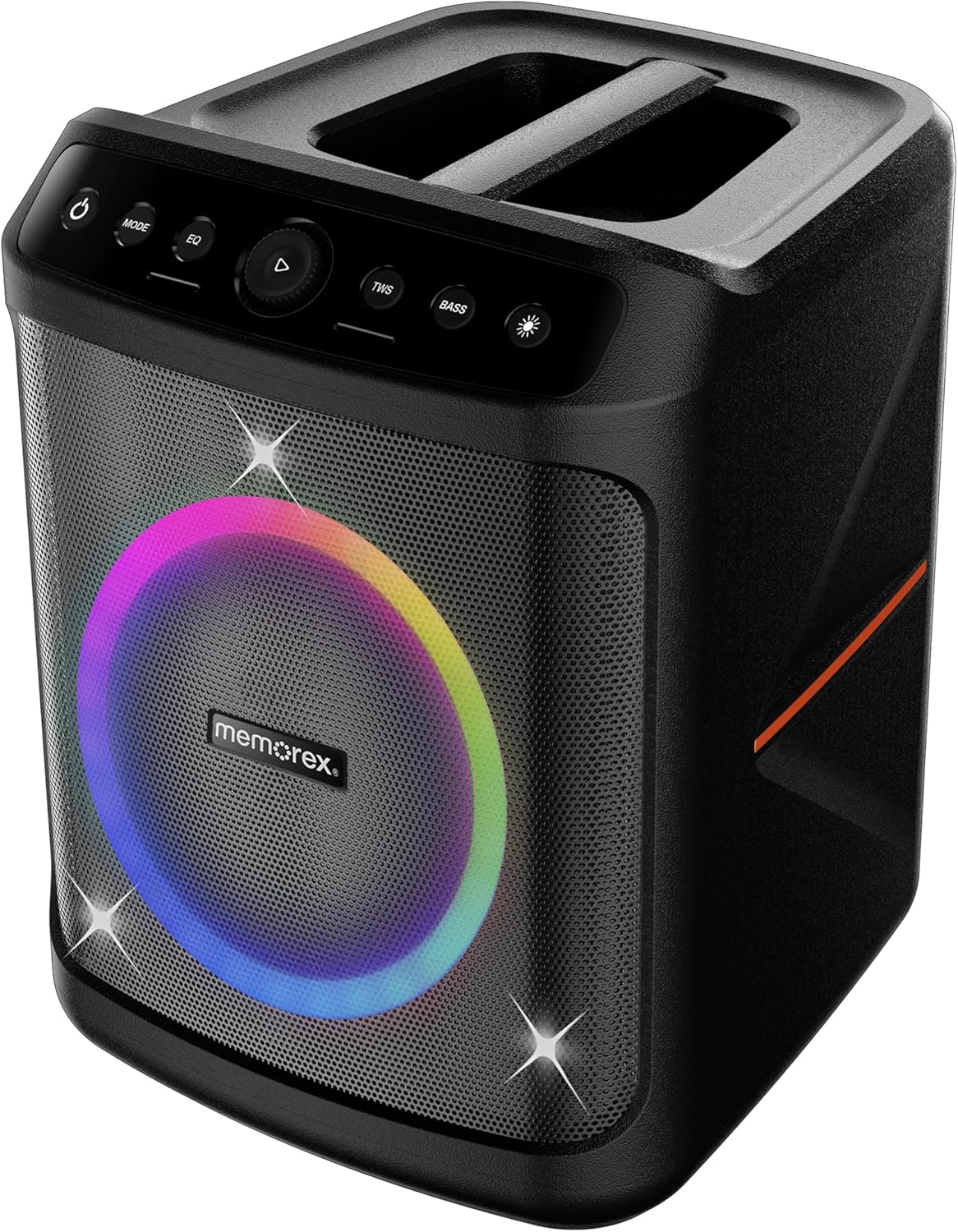
Front view of the Memorex MX-PS802 speaker, showcasing the illuminated woofer and the top-mounted control panel.
Control Panel Functions
- Power Button (⏻): Press and hold to turn the speaker ON/OFF.
- MODE Button: Short press to switch between input modes (Bluetooth, USB, SD).
- EQ Button: Short press to cycle through equalizer presets.
- Play/Pause/Volume Knob (▶): Press to play or pause audio. Rotate to adjust volume.
- TWS Button: Press to initiate True Wireless Stereo pairing.
- BASS Button: Press to activate or deactivate bass boost.
- Light Mode Button (☀): Press to cycle through LED lighting modes or turn lights ON/OFF.
5. Setup
5.1 Charging the Speaker
- Connect the charging cable to the speaker's charging port.
- Plug the other end of the cable into a suitable power outlet.
- The charging indicator will illuminate. Allow the speaker to fully charge before first use (approximately 3-4 hours).
- The indicator will change or turn off once charging is complete.
5.2 Powering On/Off
- To power ON, press and hold the Power Button (⏻) for 2-3 seconds.
- To power OFF, press and hold the Power Button (⏻) again for 2-3 seconds.
6. Operating Instructions
6.1 Bluetooth Pairing
- Turn on the speaker. It will automatically enter Bluetooth pairing mode, indicated by a flashing LED.
- On your mobile device, enable Bluetooth and search for available devices.
- Select "Memorex MX-PS802" from the list.
- Once paired, the speaker will emit a confirmation sound, and the LED will stop flashing.
6.2 USB/SD Card Playback
- Insert a USB flash drive or SD card (with MP3 files) into the corresponding port.
- The speaker will automatically switch to USB/SD mode and begin playback. If not, press the MODE button to select the correct input.
- Use the Play/Pause/Volume knob to control playback and volume.
6.3 True Wireless Stereo (TWS) Pairing
To pair two MX-PS802 speakers for stereo sound:
- Ensure both MX-PS802 speakers are powered on and in Bluetooth mode, but not connected to any device.
- On one speaker (this will be the primary speaker), press the TWS button. It will emit a pairing tone.
- The two speakers will automatically connect to each other. A confirmation tone will sound once paired.
- Now, connect your mobile device to the primary speaker via Bluetooth as described in section 6.1.
6.4 Microphone and Guitar Input
- Connect a microphone or guitar to the respective input jacks on the speaker.
- Adjust the volume of the connected instrument/microphone using its own controls or the speaker's main volume knob.
6.5 LED Flame Lighting
- Press the Light Mode Button (☀) to cycle through various LED lighting effects.
- Continue pressing to turn the lights off.
6.6 EQ and Bass Boost
- Press the EQ button to select different equalizer presets for optimized sound.
- Press the BASS button to toggle the bass boost feature ON or OFF.
7. Maintenance
- Cleaning: Use a soft, dry cloth to clean the speaker's exterior. Do not use abrasive cleaners or solvents.
- Storage: Store the speaker in a cool, dry place away from direct sunlight when not in use for extended periods.
- Battery Care: To prolong battery life, fully charge the speaker before storing it for long periods and recharge it every 3-6 months.
8. Troubleshooting
- No Power: Ensure the speaker is charged. Connect to a power source and try again.
- No Sound: Check the volume level on both the speaker and your connected device. Ensure the correct input mode is selected.
- Bluetooth Not Connecting: Ensure the speaker is in pairing mode. Turn off and on Bluetooth on your device. Forget the speaker from your device's Bluetooth list and try pairing again. Ensure no other devices are connected to the speaker.
- TWS Pairing Failure: Ensure both speakers are MX-PS802 models and are not connected to any other Bluetooth device before initiating TWS pairing.
- Distorted Sound: Reduce the volume on both the speaker and your device. Check for interference from other electronic devices.
9. Specifications
| Feature | Specification |
|---|---|
| Model Name | MX-PS802 |
| Speaker Type | Mono (can be paired for Stereo via TWS) |
| Speaker Size | 8 Inches |
| Speaker Maximum Output Power | 800 Watts PMPO (80W RMS) |
| Wireless Communication Technology | Bluetooth 5.3 |
| Power Source | Battery Powered (Rechargeable Li-ion) |
| Product Dimensions | 11.33 x 10.78 x 16.57 inches |
| Item Weight | 12.12 pounds |
| Included Components | Party Speaker |
10. Warranty and Support
The Memorex MX-PS802 Party Speaker comes with a Limited Warranty. Please refer to the warranty card included in your package for specific terms and conditions. For technical support or service inquiries, please contact Memorex customer service through their official website or the contact information provided with your purchase documentation.
