
ABBREE AR-M9
ABBREE GMRS Mobile Radio Instruction Manual
Model: AR-M9
1. Introduction
The ABBREE AR-M9 is a 20-watt GMRS mobile radio designed for reliable long-range communication. It features 500 programmable memory channels, VHF/UHF scanning, a 1.44-inch TFT display, VOX function, and noise reduction. This manual provides detailed instructions for the proper setup, operation, and maintenance of your AR-M9 radio.

Image 1.1: The ABBREE AR-M9 GMRS Mobile Radio, including the main unit, speaker microphone, programming cable, and cigar DC adapter.
2. Safety Information
Please read and understand all safety precautions before operating the radio. Failure to do so may result in injury or damage to the device.
- Power Source: Use only the specified 12V DC power source.
- Antenna: Do not operate the radio without a properly connected antenna.
- Heat: The radio unit may become warm during extended transmission. Ensure adequate ventilation.
- Environment: Avoid exposing the radio to extreme temperatures, direct sunlight, dust, or moisture. This device is not water resistant.
- Driving Safety: Operate the radio responsibly while driving. Prioritize road safety.
3. Package Contents
Verify that all items listed below are included in your package:
- 1 x ABBREE GMRS Mobile Radio (AR-M9)
- 1 x Speaker Microphone
- 1 x 12V Cigar DC Adapter
- 1 x Programming Cable
- 1 x Screw and Accessories / Mounting Bracket
- 1 x User Manual

Image 3.1: All components included in the ABBREE AR-M9 GMRS Mobile Radio package.
4. Product Overview and Components
Familiarize yourself with the various parts and controls of your AR-M9 radio.

Image 4.1: Labeled components of the AR-M9 radio and speaker microphone.
- Main Unit: Houses the radio's core electronics, display, and primary controls.
- Speaker Microphone: Features a PTT (Push-To-Talk) button, numeric keypad, and function buttons for convenient operation.
- Display (1.44-inch TFT): Shows channel information, frequency, battery voltage, and other operational data.
- Power On/Volume Switch: Rotary knob on the right side to turn the radio on/off and adjust volume.
- Antenna Jack: Connects to your external GMRS antenna.
- Programming Port/Microphone Jack: Located on the front, used for connecting the speaker mic and the programming cable.
5. Setup
5.1 Mounting the Radio
Use the included mounting bracket and screws to securely install the radio in your vehicle or desired location. Ensure the mounting location allows for adequate ventilation and easy access to controls.
5.2 Power Connection
Connect the 12V Cigar DC Adapter to the radio's power input and then into your vehicle's 12V accessory socket. Ensure a secure connection.
5.3 Antenna Connection
Connect your GMRS antenna to the antenna jack on the rear of the radio. Ensure the antenna is properly tuned for GMRS frequencies for optimal performance and to prevent damage to the radio.
6. Operating Instructions
6.1 Basic Operation
- Power On/Off: Rotate the VOL knob clockwise to turn the radio on. Rotate counter-clockwise until it clicks to turn off.
- Volume Adjustment: Rotate the VOL knob to adjust the audio output level.
- Channel Selection: Use the UP/DOWN arrow buttons on the radio or speaker mic to navigate through channels.
- Transmit (PTT): Press and hold the PTT button on the speaker microphone to transmit. Release to receive.
6.2 Channel Management
The AR-M9 comes pre-programmed with 30 default channels, including 22 GMRS channels and 8 GMRS repeater channels. It supports up to 500 programmable memory channels.
6.2.1 GMRS Repeater Channels
The radio is equipped with 9 additional empty customizable repeater channels. These can be programmed with different CTCSS/DCS tones to expand communication range. Refer to the programming section for details.
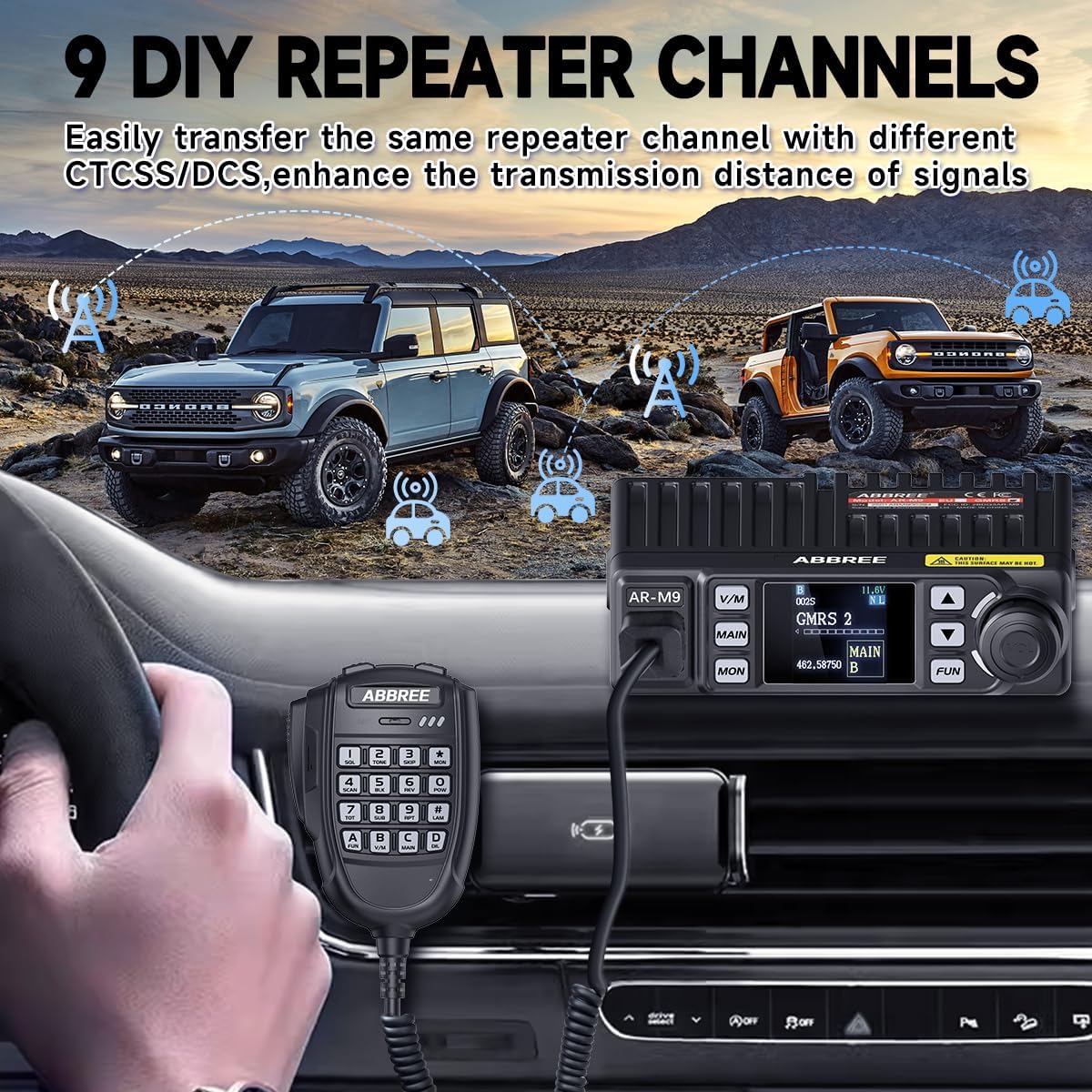
Image 6.1: The use of repeater channels can significantly enhance communication distance.
6.3 VOX Function (Voice Operated Transmit)
The VOX function allows for hands-free transmission. When enabled, the radio will automatically transmit when it detects your voice, eliminating the need to press the PTT button.
- Activation: Consult the radio's menu system or the speaker mic's function keys for VOX activation.
- Sensitivity: Adjust VOX sensitivity to prevent accidental transmissions or missed voice detection.

Image 6.2: The VOX function enables hands-free communication, improving safety during activities like driving.
6.4 NOAA Weather Channels
The AR-M9 provides 24-hour real-time access to 7 NOAA weather channels, allowing you to receive weather alerts and forecasts.
- Access: Navigate to the dedicated NOAA weather channels using the channel selection buttons.
- Alerts: The radio can be set to monitor for weather alerts, providing timely notifications of severe weather conditions.

Image 6.3: The AR-M9 provides access to NOAA weather channels for real-time updates.
6.5 Scanning
The radio supports VHF/UHF scanning, allowing you to monitor multiple channels for activity.
- Initiate Scan: Press the SCAN button (usually labeled 'SCAN' or a dedicated function key) to start scanning.
- Stop Scan: Press the SCAN button again or the PTT button to stop scanning.
6.6 Programming
The AR-M9 can be programmed via a computer using the included programming cable. This allows for customization of channels, frequencies, CTCSS/DCS tones, and other advanced settings.
- Software: Obtain the appropriate programming software from the ABBREE official website or authorized distributors.
- Connection: Connect the programming cable to the radio's programming port and your computer's USB port.
- Procedure: Follow the instructions provided with the programming software to read from, write to, and manage your radio's settings.
7. Maintenance
- Cleaning: Use a soft, damp cloth to clean the radio's exterior. Do not use harsh chemicals or abrasive cleaners.
- Storage: When not in use for extended periods, store the radio in a cool, dry place away from direct sunlight.
- Connections: Periodically check all cable connections (power, antenna, microphone) for security and signs of wear.
8. Troubleshooting
| Problem | Possible Cause | Solution |
|---|---|---|
| Radio does not power on | No power connection; Faulty power cable; Blown fuse | Check power cable connection; Test with another 12V source; Check vehicle's fuse box. |
| Poor reception/transmission range | Antenna not connected; Incorrect antenna; Obstructions; Low power setting | Ensure antenna is securely connected; Use a GMRS-specific antenna; Move to an open area; Check power output setting. |
| No audio from speaker | Volume too low; Speaker mic not connected; Faulty speaker mic | Increase volume; Reconnect speaker mic; Test with another speaker mic if available. |
| Cannot program radio | Incorrect software; Driver issues; Cable not connected properly | Ensure correct programming software for AR-M9; Install necessary USB drivers; Verify cable connection. |
9. Specifications
| Feature | Detail |
|---|---|
| Model Number | AR-M9 |
| Brand | ABBREE |
| Item Weight | 1.85 pounds |
| Package Dimensions | 7.36 x 5.87 x 3.11 inches |
| Country of Origin | China |
| Number of Channels | 500 |
| Special Features | Long Range, Lightweight, NOAA, GMRS, Noise Reduction |
| Frequency Range | 462MHz-467MHz |
| Talking Range Maximum | 20 Kilometer (approx. 12.4 miles) |
| Tuner Technology | GMRS |
| Voltage | 12 Volts (DC) |
| Water Resistance Level | Not Water Resistant |
10. Warranty and Support
According to product information, there is no explicit warranty provided for this product.
For technical support, programming assistance, or any other inquiries, please contact ABBREE customer service through their official website or the retailer from whom you purchased the product.
Note: No official product videos were available from the seller for inclusion in this manual.
Related documentsAR-M9

Ask a question about this manual
Ask about setup, troubleshooting, compatibility, parts, safety, or missing instructions. Manuals+ will review the question and use this page’s manual context to help answer it.