1. Introduction
This manual provides comprehensive instructions for the setup, operation, and maintenance of your CHUNGHOP ZX-LG1012 Universal A/C Remote Control. This remote is designed to be compatible with various LG air conditioner models, offering a convenient replacement for your original remote.
Please read this manual carefully before using the remote control to ensure proper functionality and to maximize its lifespan.
2. Battery Installation
The remote control requires two AAA batteries (not included). Follow these steps to install them:
- Locate the battery compartment cover on the back of the remote control.
- Slide the cover downwards to open the compartment.
- Insert two AAA batteries, ensuring the positive (+) and negative (-) terminals match the markings inside the compartment.
- Slide the battery compartment cover back into place until it clicks securely.

Figure 1: Battery compartment open, showing battery placement.

Figure 2: Battery compartment closed after installation.
Note: Remove batteries if the remote control will not be used for an extended period to prevent leakage.
3. Setup and Pairing
Most LG air conditioner models can be operated directly without any setup. If the remote does not function immediately after battery installation, please use one of the following pairing methods:
Method 1: Manual Code Adjustment
- Long press the [On/Off] key for approximately 6 seconds. The code on the remote's display will begin to flash.
- Release the [On/Off] button.
- Point the remote control towards your air conditioner.
- Press the Temperature +/- buttons to adjust the code. Observe your air conditioner for a reaction (e.g., a beep or a change in status).
- Once the air conditioner responds, press the [On/Off] button to confirm the code.
- Setup is complete.
Method 2: Automatic Code Search
- Long press the [On/Off] button for approximately 10 seconds.
- While holding the button, aim the remote control directly at your air conditioner.
- The remote will automatically cycle through codes. When your air conditioner starts or responds, immediately release the [On/Off] button.
- Setup is complete.

Figure 3: Visual guide for remote control setting methods.
4. Operating Instructions
Familiarize yourself with the buttons and their functions on your CHUNGHOP ZX-LG1012 remote control.
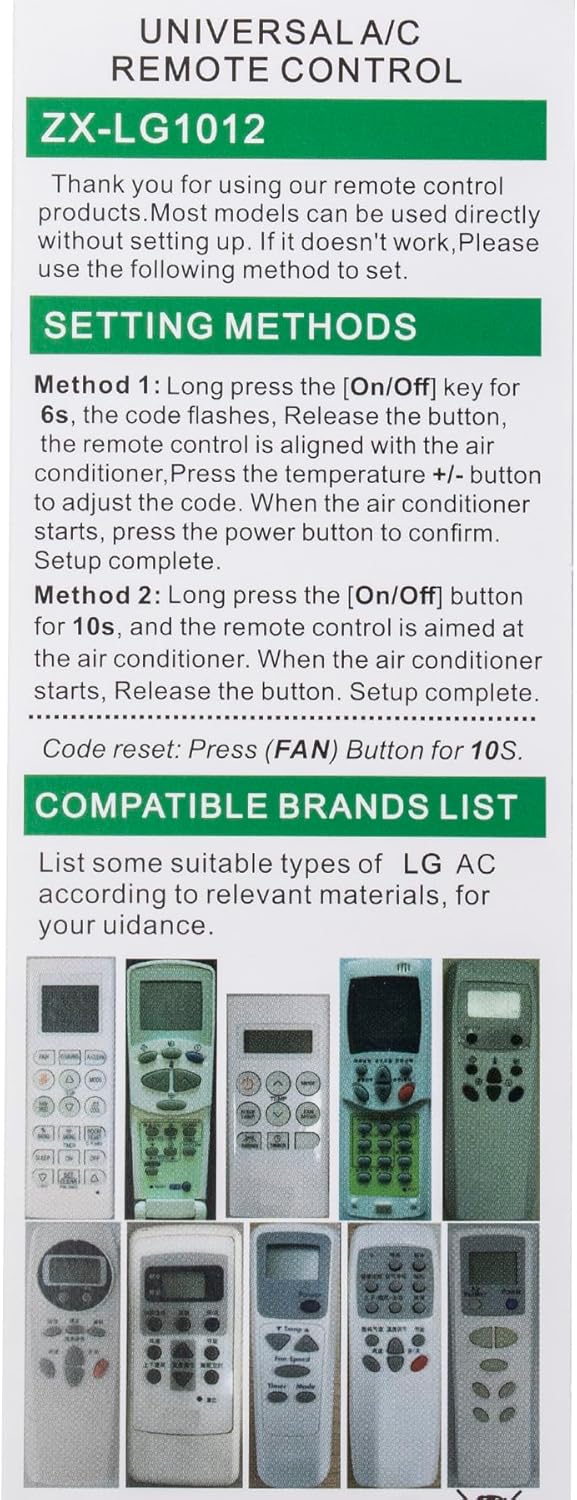
Figure 4: Front view of the remote control with button layout.
| Button | Function |
|---|---|
| ON/OFF | Powers the air conditioner on or off. |
| TEMP +/- | Adjusts the desired temperature. |
| MODE | Cycles through operating modes (e.g., Cool, Heat, Fan, Dry, Auto). |
| FAN | Activates or deactivates the fan. |
| FAN SPEED | Adjusts the fan speed (e.g., Low, Medium, High, Auto). |
| SWING | Controls the louver swing function for air distribution. |
| LIGHT | Turns the display light on or off (if applicable to your A/C unit). |
| SLEEP | Activates or deactivates sleep mode for energy-efficient operation. |
| TIMER ON/OFF | Sets the timer for automatic power on or off. |
| SET/CLEAR (TIME[3SEC]) | Used to set or clear timer settings. Press for 3 seconds to clear. |
| E/SAVING | Activates or deactivates energy-saving mode. |
| A/CLEAN | Activates or deactivates the auto-clean function (if available). |
| JET COOL | Activates rapid cooling mode. |
| ROOM TEMP (°C/°F [5SEC]) | Displays the current room temperature. Long press for 5 seconds to switch between Celsius (°C) and Fahrenheit (°F). |
5. Troubleshooting
Remote Not Responding / Incorrect Operation
- Ensure batteries are correctly installed and not depleted. Replace if necessary.
- Verify that the remote control is aimed directly at the air conditioner's receiver.
- Confirm there are no obstructions between the remote and the air conditioner.
- Re-attempt the setup and pairing process (Section 3).
Code Reset
If the remote control is not functioning as expected or you wish to reset its programming, follow these steps:
- Press and hold the [FAN] button for 10 seconds.
- The remote's internal code will reset. You may then need to perform the setup and pairing process again (Section 3).
6. Specifications
| Feature | Detail |
|---|---|
| Model Number | ZX-LG1012 |
| Brand | CHUNGHOP |
| Compatible Devices | LG Air Conditioners (All Models) |
| Connectivity Technology | Infrared |
| Power Source | 2 x AAA Batteries (not included) |
| Color | White |
| Item Weight | 2.88 ounces |
| Package Dimensions | 6 x 2 x 1 inches |
| Special Features | Ergonomic, No Programming Required (for most models), Universal |
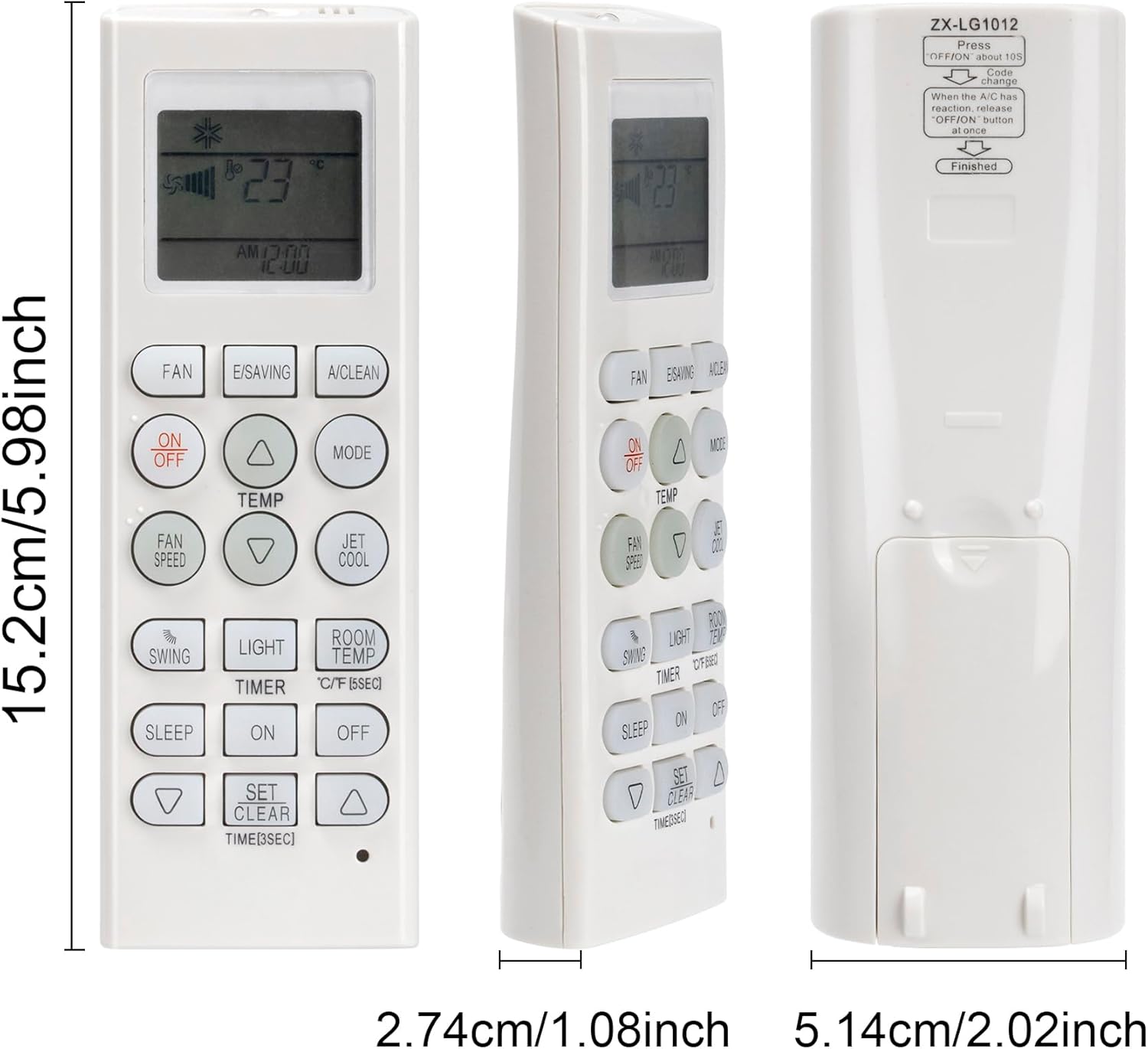
Figure 5: Remote control dimensions.
7. Maintenance
- Clean the remote control regularly with a soft, dry cloth. Do not use liquid cleaners or abrasive materials.
- Avoid exposing the remote control to direct sunlight, high temperatures, or high humidity.
- Do not drop or subject the remote control to strong impacts.
- If the remote control will not be used for an extended period, remove the batteries to prevent corrosion.
8. Customer Support
For any questions, concerns, or assistance with your CHUNGHOP ZX-LG1012 Universal A/C Remote Control, please contact CHUNGHOP customer support through the retailer where you purchased the product or visit the official CHUNGHOP store on Amazon:
Visit the CHUNGHOP Store on Amazon
We are committed to providing prompt and helpful responses to ensure your satisfaction.


