
1. Safety Information
Operating any generator requires adherence to strict safety guidelines to prevent injury or property damage. Please read and understand all safety warnings before operating this unit.
Carbon Monoxide (CO) Safety
This generator is equipped with a CO Sentry sensor, which automatically shuts off the engine if harmful levels of carbon monoxide are detected. While this feature enhances safety, it is not a substitute for proper ventilation.
- NEVER operate the generator indoors, in a garage, shed, or any enclosed or partially enclosed space.
- Always operate the generator outdoors in an open area, away from windows, doors, and vents.
- Ensure exhaust fumes are directed away from occupied areas.

Image: The CO Sentry feature provides protection against carbon monoxide by alerting and auto-shutting off the generator. Economy Mode helps save fuel.
Fuel Safety
- Gasoline is highly flammable. Store gasoline in approved containers in a well-ventilated area.
- Propane is also flammable. Ensure propane tanks are securely connected and free of leaks.
- Never refuel a hot or running engine. Allow the generator to cool before adding fuel.
- Do not smoke or allow open flames near the generator or fuel storage areas.
2. Product Overview
The Pulsar NE40BiSRCO is a 4000 Watt portable inverter generator designed for versatility and efficiency. It features dual fuel capability (gasoline and propane), multiple starting options, and a CO Sentry for enhanced safety.
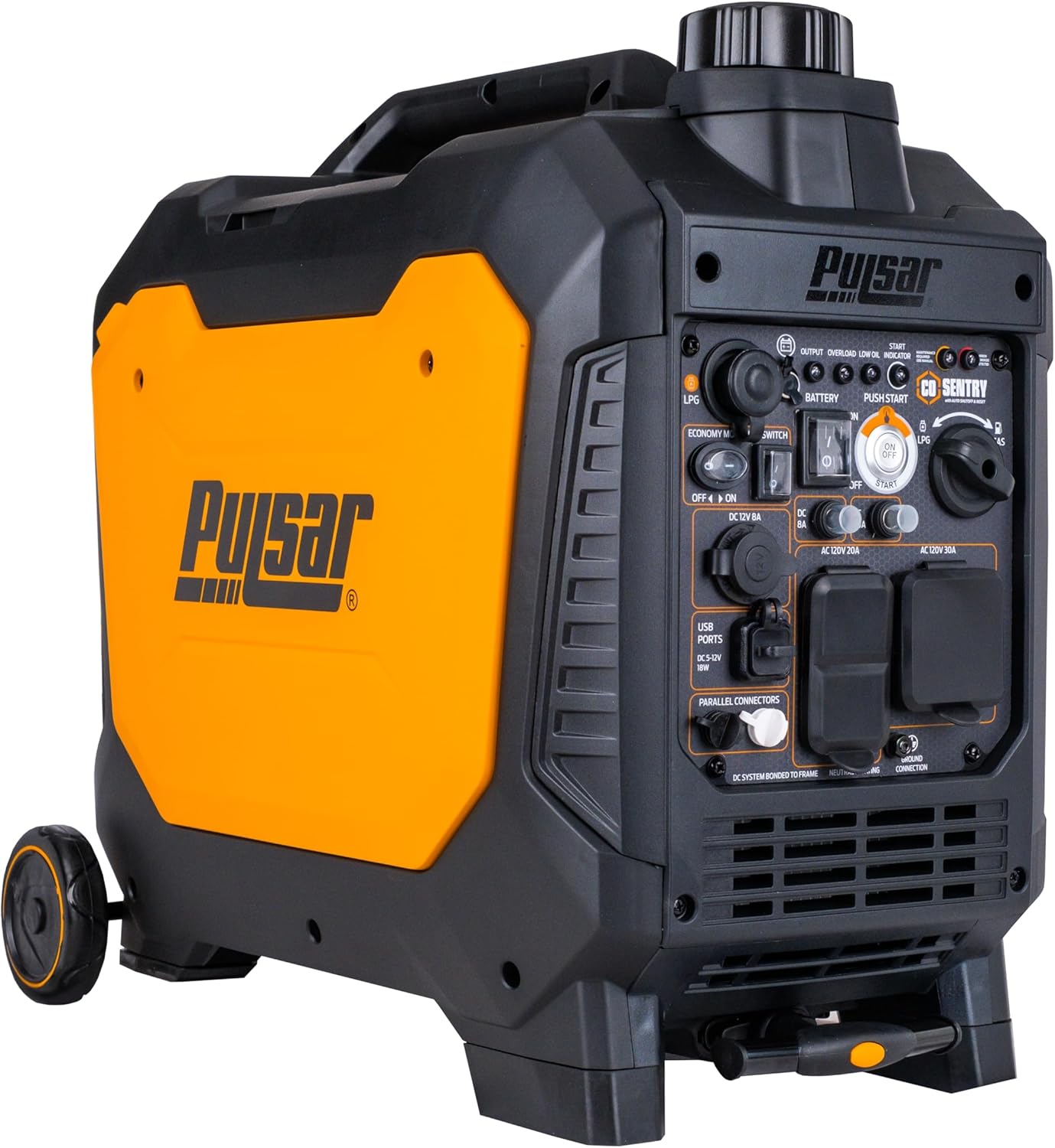
Image: Front-side view of the Pulsar NE40BiSRCO portable inverter generator, showcasing its compact design and control panel.
Key Features
- Dual Fuel Capability: Operates on both gasoline and propane for flexible power options.
- Inverter Technology: Provides clean, stable power suitable for sensitive electronics.
- Multiple Start Options: Includes remote start, push-button electric start, and recoil start.
- CO Sentry: Automatically shuts off the generator if carbon monoxide levels become unsafe.
- Economy Mode: Reduces engine speed to conserve fuel and lower noise during light loads.
- Parallel Capable: Allows connection with another compatible unit to double power output.
- Mobility Kit: Integrated handle and wheels for easy transport.
- Digital Hour Meter: Tracks operating hours for maintenance scheduling.

Image: Visual representation of key features including parallel readiness, electric start button, and the super quiet operation of the generator.
Control Panel Components
Familiarize yourself with the control panel before operation. Refer to the diagram below for component identification.

Image: Detailed diagram of the generator's control panel, labeling components such as Battery Switch, CO Sentry indicator, Electric Start, Fuel Source Switch, Economy Mode, LCD Switch, DC 12V 8A outlet, USB-A/USB-C ports, Parallel connectors, 20A AC120V outlets, 30A AC120V outlet, and Ground connection.
- Battery Switch: Controls power to the electric start system.
- CO Sentry Indicator: Illuminates when CO levels are detected.
- Electric Start Button: Initiates engine start.
- Fuel Source Switch: Selects between gasoline and LPG (propane).
- Economy Mode Switch: Activates or deactivates economy mode.
- LCD Switch: Controls the digital display.
- DC 12V 8A Outlet: For 12V DC appliances.
- USB-A & USB-C Ports: For charging small electronic devices.
- Parallel Connectors: For connecting two compatible generators.
- AC 120V Outlets (20A & 30A): For standard AC appliances.
- Ground Terminal: For grounding the generator.
3. Setup
Before first use, the generator requires some initial setup steps.
Unpacking and Inspection
- Remove the generator and all accessories from the packaging.
- Inspect for any shipping damage. Contact customer support if damage is found.
- Ensure all included components are present: Handle & Wheels, Remote Control, Power Cord, User Manual.
Adding Engine Oil
The generator is shipped without engine oil. It is crucial to add the correct type and amount of oil before starting.
- Place the generator on a level surface.
- Remove the oil fill cap/dipstick.
- Add the recommended engine oil (refer to specifications for type and capacity) until it reaches the upper mark on the dipstick. Do not overfill.
- Securely replace the oil fill cap/dipstick.
Fuel Connection
This generator operates on either gasoline or propane.
Gasoline
- Ensure the generator is off and cool.
- Open the fuel tank cap.
- Fill with fresh, unleaded gasoline (minimum 87 octane) up to the fill neck, but do not overfill.
- Securely close the fuel tank cap.
Propane (LPG)
- Connect the propane hose from the generator to a standard propane tank.
- Ensure all connections are tight and free of leaks. Use a soapy water solution to check for bubbles, indicating a leak.
- Open the valve on the propane tank.
4. Operating Instructions
Follow these steps for safe and effective operation of your generator.
Starting the Generator
The NE40BiSRCO offers three starting methods: Electric Start, Remote Start, and Recoil Start.

Image: Close-up of the electric start button and the remote start key fob, illustrating the convenient starting options.
General Starting Procedure (All Methods)
- Ensure the generator is on a level surface and in a well-ventilated outdoor area.
- Check oil and fuel levels.
- Turn the Battery Switch to the 'ON' position. (Required for Electric and Remote Start).
- Select the desired fuel source (Gasoline or LPG) using the Fuel Source Switch.
- Ensure no electrical loads are connected to the generator.
Electric Start
- Follow General Starting Procedure steps 1-5.
- Press and hold the Electric Start button until the engine starts. Release immediately once started.
Remote Start
- Follow General Starting Procedure steps 1-5.
- Press the 'ON' button on the remote control. The generator will attempt to start.
Recoil Start
- Follow General Starting Procedure steps 1-5.
- Grasp the recoil starter handle firmly.
- Pull the handle slowly until resistance is felt, then pull quickly and smoothly to start the engine. Repeat if necessary.
Connecting Electrical Loads
- Once the engine is running and stable, you can connect your electrical devices.
- Always ensure the total wattage of connected devices does not exceed the generator's running wattage.
- For sensitive electronics, the inverter technology provides clean power.
Economy Mode
Activate Economy Mode by switching the Economy Mode switch to 'ON'. This reduces engine speed when loads are light, saving fuel and reducing noise. The engine will automatically rev up when more power is required.
Parallel Operation
The generator is parallel capable. To connect two compatible Pulsar inverter generators for increased power output, refer to the dedicated parallel kit instructions (sold separately).
Stopping the Generator
- Disconnect all electrical loads.
- Turn the engine switch to the 'OFF' position.
- If using propane, close the valve on the propane tank.
- Turn the Battery Switch to the 'OFF' position.
5. Maintenance
Regular maintenance ensures optimal performance and extends the lifespan of your generator. The digital hour meter helps track operating hours for scheduled maintenance.
Maintenance Schedule
| Item | Interval | Action |
|---|---|---|
| Engine Oil | First 20 hours, then every 50 hours or annually | Check level, change oil |
| Air Filter | Every 50 hours or annually | Clean/Inspect |
| Spark Plug | Every 100 hours or annually | Inspect, clean, or replace |
| Fuel Filter | Every 100 hours or annually | Inspect, replace if necessary |
Low Oil Shutdown
The generator is equipped with a low oil shutdown feature that automatically turns off the engine when oil levels are too low. This prevents engine damage. If the generator shuts down unexpectedly, check the oil level and refill if necessary.
Storage
For extended storage, especially when using gasoline, it is recommended to drain the fuel tank and carburetor or use a fuel stabilizer to prevent fuel degradation. Propane does not degrade over time, making it a suitable long-term fuel option.
6. Troubleshooting
This section provides solutions for common operational issues.
Engine Will Not Start
- No Fuel: Check gasoline and propane levels. Ensure the correct fuel source is selected.
- Low Oil: Check engine oil level and add if low.
- Battery Dead (Electric/Remote Start): Ensure the 12V battery for electric start is charged.
- Spark Plug: Inspect the spark plug for fouling or damage. Clean or replace if needed.
- Fuel Valve: Ensure the fuel valve (if applicable) is open. For propane, ensure the tank valve is open.
No Power Output
- Overload: The generator may have been overloaded. Disconnect devices, turn off the generator, and restart. Reduce the load.
- Circuit Breaker: Check if any circuit breakers on the control panel have tripped. Reset if necessary.
- Economy Mode: Ensure Economy Mode is not causing insufficient power for starting high-demand devices.
Engine Runs Poorly
- Stale Fuel: Use fresh gasoline. Drain old fuel if necessary.
- Air Filter: A dirty air filter can restrict airflow. Clean or replace.
- Spark Plug: Inspect and clean or replace the spark plug.
7. Specifications
Detailed technical specifications for the Pulsar NE40BiSRCO generator.

Image: Diagram showing the dimensions of the Pulsar NE40BiSRCO generator: 23 inches (L), 14.6 inches (W), and 20.9 inches (H).
| Specification | Value |
|---|---|
| Model Name | NE40BiSRCO |
| Brand | Pulsar |
| Fuel Type | Gasoline, Liquefied Petroleum Gas (Propane) |
| Gasoline Peak Watts | 4000W |
| Gasoline Running Watts | 3200W |
| Propane Peak Watts | 3600W |
| Propane Running Watts | 2800W |
| Engine Displacement | 141 cc |
| Fuel Capacity (Gasoline) | 1.66 Gallons |
| Runtime (Half Load) | Up to 6 hours |
| Voltage | 120 Volts (AC) |
| Total Power Outlets | 2 (AC 120V 20A, AC 120V 30A) + DC 12V 8A + USB-A/USB-C |
| Noise Level | 64 dB |
| Item Weight | 54.4 Pounds |
| Product Dimensions (L x W x H) | 24" x 15" x 22" |
| Special Features | CO Sentry, Dual Fuel, Portable, Remote Control, Super Quiet |
Reference Wattage for Appliances

Image: A table illustrating the typical running and starting wattages for various common household appliances, useful for load planning.
8. Why Dual Fuel and Inverter Technology

Image: Explanations of the advantages of dual fuel operation (security, longer service intervals with propane, propane bypasses carburetor, no expiration date for propane, quieter operation) and inverter technology (fuel efficiency, cleaner power, low noise level, portability).
Dual Fuel Advantages
- Fuel Flexibility: Use gasoline or propane based on availability or preference.
- Propane Storage: Propane has no expiration date, unlike gasoline, making it ideal for long-term storage.
- Cleaner Burning: Propane burns cleaner, leading to longer service intervals and less residue.
- Reduced Carburetor Issues: Propane bypasses the carburetor, reducing common fuel-related maintenance.
Inverter Technology Advantages
- Clean Power: Produces a pure sine wave output, safe for sensitive electronics like laptops and smartphones.
- Fuel Efficiency: Automatically adjusts engine speed to match the load, consuming less fuel.
- Quiet Operation: Generally quieter than conventional generators due to variable engine speed.
- Portability: Often results in a more compact and lighter design.
9. Warranty and Support
Warranty Information
This Pulsar generator comes with a 3-Year Manufacturer Warranty. Please retain your proof of purchase for warranty claims. For specific terms and conditions, refer to the warranty card included with your product or visit the official Pulsar website.
Customer Support
For technical assistance, parts, or warranty inquiries, please contact Pulsar customer support. You can find contact information in your included user manual or by visiting the Pulsar Store on Amazon or the official Pulsar website.


