
1. Introduction and Overview
This manual provides comprehensive instructions for the VILTROX 28mm F4.5 Ultra-Thin Pancake Lens, designed for Fujifilm X-mount cameras. This lens is notable for its compact size, lightweight construction, and wide-angle perspective, making it suitable for various photographic applications, including street photography and landscape imaging.
The VILTROX 28mm F4.5 lens is engineered to deliver clear and detailed images, featuring an efficient autofocus system and a durable metal construction.

Figure 1.1: The VILTROX 28mm F4.5 lens showcasing its ultra-thin profile (15.3mm) and lightweight design (approximately 60g).
2. Setup and Installation
2.1 Mounting the Lens
- Ensure your camera is powered off before attaching or detaching the lens.
- Align the white dot on the lens barrel with the white dot on your Fujifilm X-mount camera body.
- Gently insert the lens into the camera mount and rotate it clockwise until it clicks into place, indicating it is securely locked.
- To remove the lens, press the lens release button on the camera body and rotate the lens counter-clockwise until it detaches.

Figure 2.1: The VILTROX 28mm F4.5 lens shown attached to a Fujifilm X-mount camera, with additional views of the lens from various angles.
2.2 Toggle-Opening Lens Cap
The lens features an innovative toggle-opening cap design. To open the lens cap, simply slide the toggle switch. This integrated design eliminates the need to worry about misplacing a separate lens cap.

Figure 2.2: Illustration of the toggle-opening lens cap, demonstrating the 'ON' and 'OFF' positions for lens protection and readiness.
3. Operating the Lens
3.1 Autofocus System
The VILTROX 28mm F4.5 lens incorporates an efficient and precise autofocus (AF) system. This system allows for quick and accurate focusing, supporting advanced features such as eye and face detection autofocus on compatible camera bodies. This ensures sharp focus on subjects without complex manual adjustments.

Figure 3.1: Visual representation of the lens's eye and face autofocus capabilities, highlighting its precision in subject tracking.
3.2 Fixed F4.5 Aperture
This lens features a fixed aperture of F4.5. This aperture setting provides a consistent depth of field and exposure characteristics, particularly beneficial for wide-angle photography where a larger depth of field is often desired.
3.3 Optical Design and Image Quality
The lens's optical construction includes multiple elements, such as aspherical and ED (Extra-low Dispersion) lenses, designed to minimize aberrations and ensure high image quality across the frame. A multi-layer coating is applied to reduce flare and ghosting, enhancing contrast and color accuracy.

Figure 3.2: Diagram illustrating the internal optical elements of the lens, including aspherical and ED lenses, alongside an MTF (Modulation Transfer Function) graph indicating image sharpness performance.
3.4 Unique Starburst Effect
The lens's front element design can produce a distinctive starburst effect when capturing images with strong backlit point light sources. This adds a creative visual element to photographs, particularly in night scenes or urban environments.

Figure 3.3: An image showcasing the unique starburst effect produced by the lens when photographing point light sources.
4. Maintenance
4.1 Cleaning the Lens
To maintain optimal performance and image quality, keep the lens elements clean. Use a soft, lint-free microfiber cloth specifically designed for optics. For stubborn smudges, a small amount of lens cleaning solution applied to the cloth (not directly to the lens) can be used. The front element features a waterproof and anti-fouling coating for easier cleaning.
4.2 Storage
When not in use, store the lens with its cap attached in a dry, dust-free environment. Avoid extreme temperatures and high humidity, which can affect lens performance and longevity.
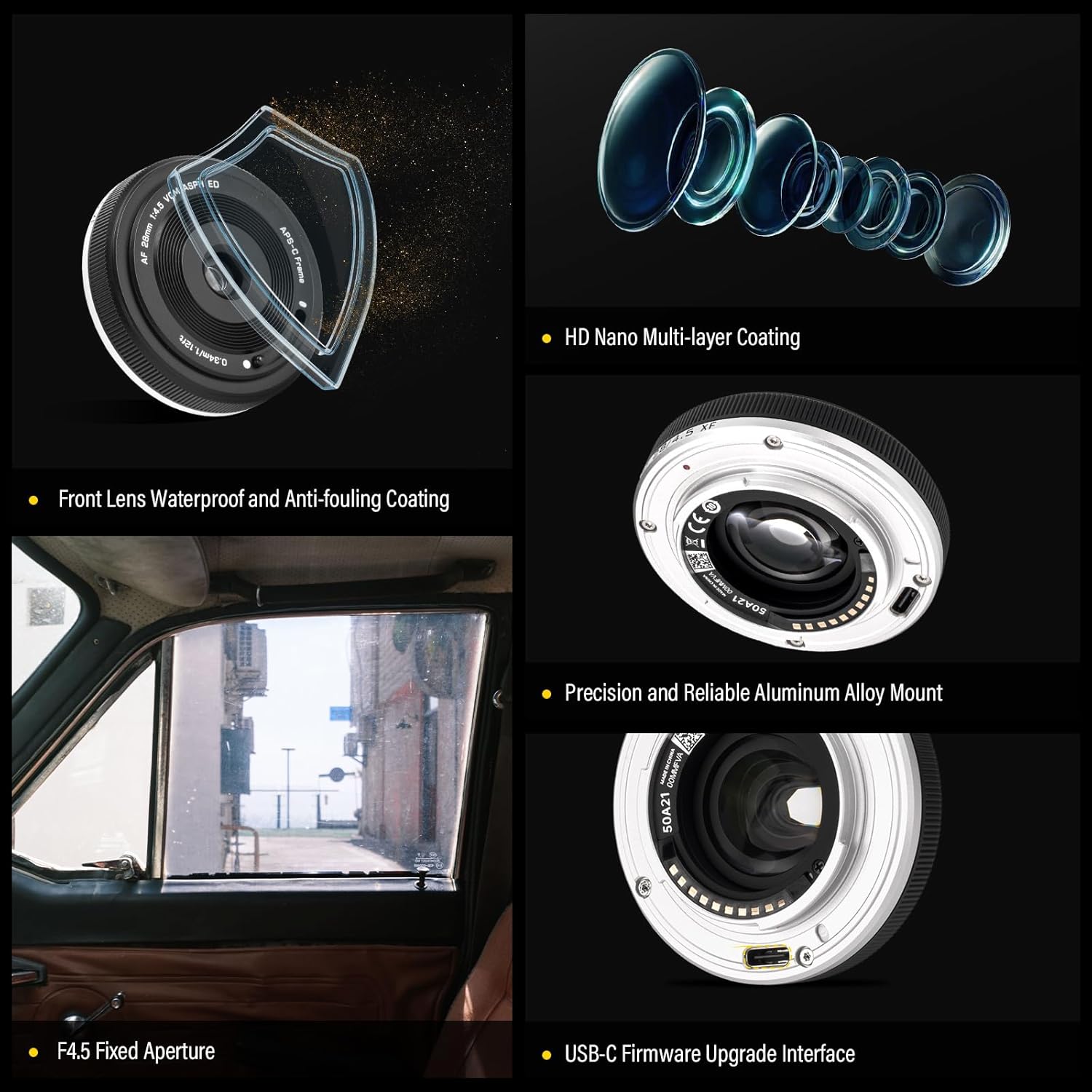
Figure 4.1: Detailed view of the lens highlighting features such as the front lens waterproof and anti-fouling coating, precision aluminum alloy mount, HD Nano multi-layer coating, and the USB-C firmware upgrade interface.
5. Troubleshooting
5.1 Autofocus Issues
- Lens not focusing: Ensure the lens is securely mounted to the camera body. Check camera settings to confirm autofocus is enabled. In very low light conditions, autofocus performance may be reduced; try using a brighter light source or manual focus.
- Noisy autofocus: A slight motor noise during autofocus is normal for some lenses. If the noise is excessive or accompanied by focusing errors, ensure the lens firmware is up to date.
5.2 Lens Not Recognized by Camera
- Ensure the lens contacts on both the lens and camera body are clean and free of dust or debris.
- Power off the camera, remove the lens, and reattach it firmly.
- Check for available firmware updates for both the lens and your camera model.
5.3 Firmware Updates
The VILTROX 28mm F4.5 lens is equipped with a USB-C port for firmware upgrades. Regularly checking for and installing the latest firmware can improve lens performance, compatibility, and address potential issues. Visit the official VILTROX website for firmware download and instructions.
6. Specifications
| Feature | Specification |
|---|---|
| Brand | VILTROX |
| Model | 28mm F4.5 |
| Focal Length | 28mm (Ultra wide Angle) |
| Maximum Aperture | F4.5 |
| Lens Type | Wide Angle |
| Compatible Mountings | Fujifilm X |
| Product Dimensions | 0.6 x 2.37 x 2.37 inches |
| Item Weight | 6.4 ounces |
| Manufacturer | VILTROX |
7. Package Contents
Upon opening the product packaging, please verify that all the following items are included:
- VILTROX 28mm F4.5 Lens
- Lens Cap
- User Manual
- Warranty Card
- Packing Box

Figure 7.1: An illustration of the items included in the VILTROX 28mm F4.5 lens package: the lens, lens cap, user manual, warranty card, and packing box.
8. Warranty and Support
VILTROX products typically come with a manufacturer's warranty. Please refer to the included warranty card for specific terms, conditions, and duration of your product's warranty. For technical support, firmware updates, or service inquiries, please visit the official VILTROX website or contact their customer service.

Figure 8.1: Information regarding the VILTROX eight-year warranty, indicating authorized dealer support.


