
1. Introduction
Thank you for choosing Auxbeam LED Offroad Lights. This manual provides essential information for the safe installation, operation, and maintenance of your Auxbeam Cube-Z Series 4-inch LED Pods with Amber Covers and the Auxbeam 7-inch 228W Round LED Offroad Light Pods. These lights are designed to provide superior illumination for various off-road applications, featuring multiple lighting modes including white main light, amber DRL, and turn signal functions.
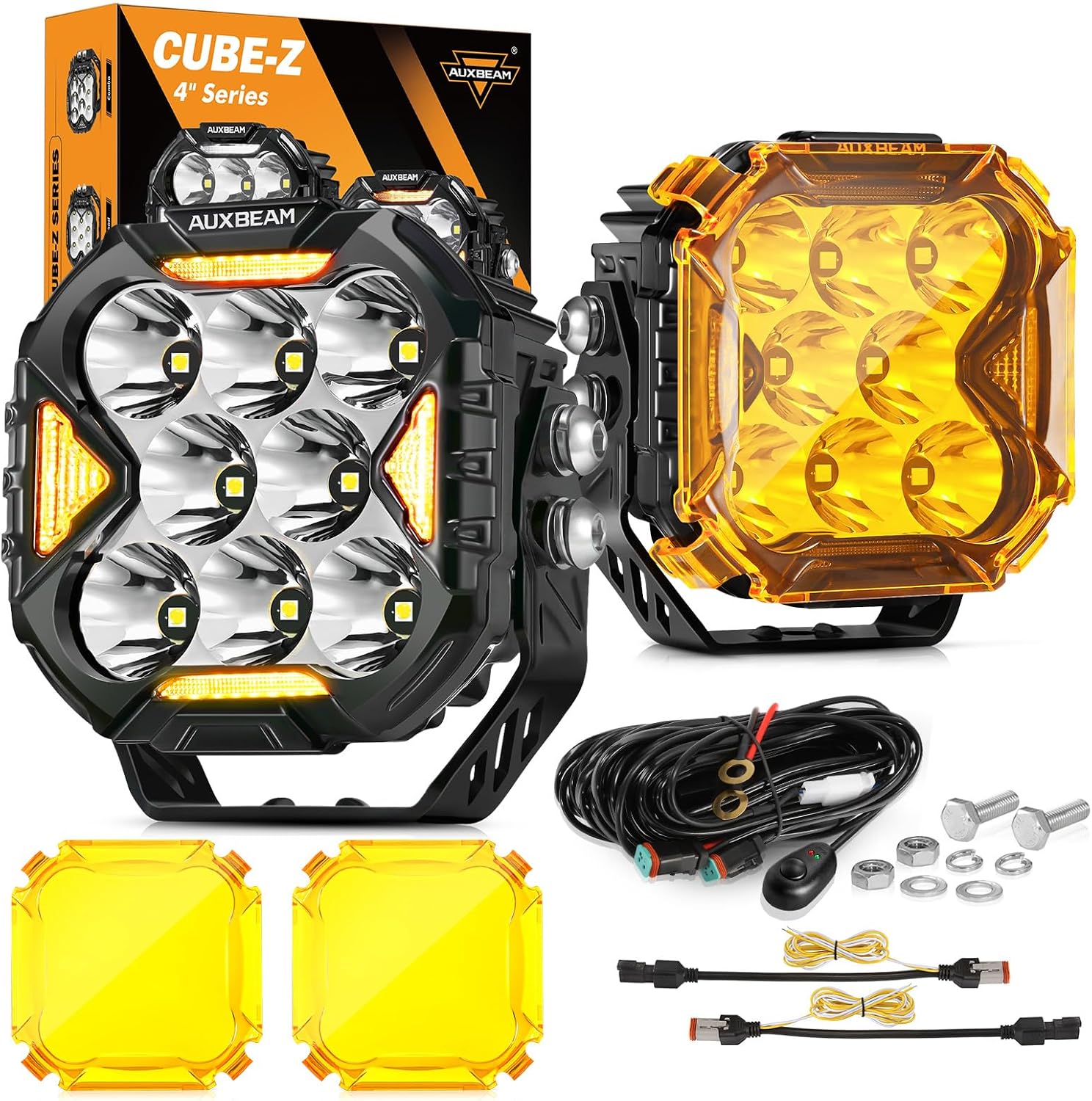
Image 1.1: Auxbeam Cube-Z Series 4-inch LED Pods and 7-inch 228W Round LED Offroad Lights with amber covers and wiring harness.
2. Safety Information
Please read all safety instructions before installation and operation. Failure to follow these instructions may result in electrical shock, fire, or serious injury.
- Always disconnect the vehicle's battery before performing any electrical work.
- Ensure all wiring connections are secure and properly insulated to prevent short circuits.
- Do not look directly into the light when it is operating, as it can cause eye damage.
- Install lights in a location that does not obstruct the driver's view or interfere with vehicle safety systems.
- Consult local regulations regarding auxiliary lighting installation and use.
- Use appropriate personal protective equipment (PPE) during installation.
3. Package Contents
Verify that all components are present before beginning installation. Based on the product title, this bundle includes both 4-inch and 7-inch lights. The following list details the contents typically included for the 4-inch LED Pods:
- 2 x Auxbeam Cube-Z Series 4-inch LED Driving Lights (with DT Plug)
- 2 x Amber Covers for 4-inch Pods
- 1 x Wiring Harness (with DT Plug)
- Mounting Brackets and Screw Accessories
- User Manual
Note: The 7-inch 228W Round LED Offroad Light Pods, if included in your specific bundle, will have their own mounting hardware.

Image 3.1: Diagram showing product dimensions and included accessories for the 4-inch LED Pods.
4. Specifications
| Feature | Description |
|---|---|
| Brand | Auxbeam |
| Model | Cube-Z Series 4-inch LED Pods & 7-inch 228W Round LED Offroad Light Pods |
| ASIN | B0DTJXHW2M |
| Color | Amber (with covers) |
| Shape | Rectangular (4-inch pods); Round (7-inch pods) |
| Finish Type | Painted |
| Light Source Type | Light Emitting Diode (LED) |
| Power Source | Battery Powered (Vehicle 12V/24V DC) |
| Light Source Wattage | 4-inch Pods: 150 Watts; 7-inch Pods: 228 Watts |
| Mounting Type | Flush Mount |
| Special Features | Switching Modes (White Main, Amber DRL, DRL+White, White DRL, Amber Turn Signal), 270° Side Shooter Design, IP68 Waterproof, Built-in EMC, Efficient Heat Dissipation |
| Lifespan | 50,000+ Hours |
5. Setup and Installation
The Auxbeam LED Offroad Lights are designed for straightforward installation. A DT Plug Wiring Harness is included for convenience.
5.1 Mounting the Lights
- Choose a suitable mounting location on your vehicle (e.g., bumper, A-pillar, roof rack) that provides clear light projection and does not obstruct visibility.
- Secure the mounting brackets to the desired location using the provided hardware. Ensure the brackets are firmly attached.
- Attach the LED light pods to the mounting brackets. Adjust the angle as needed for optimal light coverage.
5.2 Wiring Diagram
Follow the wiring diagram below for proper electrical connection. It is recommended to use the included DT Plug Wiring Harness for a secure and reliable connection.

Image 5.1: Wiring diagram showing connections for the offroad light bar, blade fuse, automotive relay, and switch.
- Connect the positive (+) wire from the wiring harness to the vehicle's battery positive terminal.
- Connect the negative (-) wire from the wiring harness to the vehicle's chassis ground or battery negative terminal.
- Connect the DT plugs from the light pods to the corresponding connectors on the wiring harness.
- Install the switch in a convenient location within the vehicle's cabin.
- Ensure all connections are tight and protected from moisture and abrasion.
6. Operating Instructions
The Auxbeam LED Offroad Lights offer multiple lighting modes for various driving conditions.
6.1 Lighting Modes (4-inch Pods)
The 4-inch Cube-Z Series pods feature 3 basic lighting modes and 5 combined modes:
- White Main Light: Provides powerful forward illumination.
- White Daytime Running Light (DRL): Enhances vehicle visibility during the day.
- Amber Turn Signal Light: Functions as a directional indicator.
- Amber DRL Function: Can be used with or without the main white light. Improves safety in foggy or rainy conditions.
- Amber Covers: The included amber covers can be clipped onto the 4-inch pods to change the white driving light into an amber light, suitable for adverse weather conditions.

Image 6.1: Illustration of the three unique lighting modes: Amber DRL light, White driving light, and White driving light + DRL light.

Image 6.2: Demonstrates switching between white and amber lights using the amber covers.
6.2 270° Side Shooter Design
Both the 4-inch and 7-inch light pods feature a 270° side shooter design, providing a wide beam pattern that illuminates the sides of the road or trail, enhancing peripheral visibility.

Image 6.3: Illustration of the 270° side shooter design for wider light coverage.
7. Maintenance
Regular maintenance ensures optimal performance and longevity of your Auxbeam LED Offroad Lights.
- Cleaning: Periodically clean the lens with a soft cloth and mild soap solution to remove dirt, mud, or debris that may obstruct light output. Avoid abrasive cleaners.
- Inspection: Regularly check wiring connections for corrosion, fraying, or loose terminals. Ensure mounting hardware remains tight.
- Waterproof Seal: While the lights are IP68 waterproof, avoid directing high-pressure water jets directly at the seals for extended periods.
8. Troubleshooting
If you encounter issues with your Auxbeam LED Offroad Lights, refer to the following common troubleshooting steps:
| Problem | Possible Cause | Solution |
|---|---|---|
| Lights do not turn on | No power, loose connection, blown fuse, faulty switch. | Check battery connections, inspect wiring harness for loose connections, check the fuse in the wiring harness, test the switch. |
| Lights flicker | Loose connection, insufficient power, voltage fluctuations. | Ensure all connections are secure. Verify vehicle's electrical system is providing stable voltage. |
| Reduced light output | Dirty lens, damaged LEDs. | Clean the light lens. If LEDs are damaged, contact customer support. |
| Moisture inside lens | Seal compromise. | Ensure proper installation and check for any physical damage to the housing or seals. Contact customer support if issue persists. |
9. Warranty and Support
Auxbeam products are manufactured to high-quality standards. For warranty information, technical support, or assistance with any issues not covered in this manual, please contact Auxbeam customer service through their official website or the retailer where the product was purchased. Please have your product model and purchase date available when contacting support.