
Introduction
Thank you for purchasing the Memorex MX-SBDA220 32-inch Bluetooth Dolby Atmos Soundbar. This soundbar is designed to enhance your home audio experience with immersive Dolby Atmos sound, delivering powerful and clear audio for movies, music, and gaming. This manual provides essential information for setting up, operating, and maintaining your new soundbar. Please read it thoroughly before use and retain it for future reference.
Important Safety Instructions
- Read all instructions before operating the soundbar.
- Keep this manual for future reference.
- Do not use this apparatus near water.
- Clean only with a dry cloth.
- Do not block any ventilation openings. Install in accordance with the manufacturer's instructions.
- Do not install near any heat sources such as radiators, heat registers, stoves, or other apparatus (including amplifiers) that produce heat.
- Protect the power cord from being walked on or pinched, particularly at plugs, convenience receptacles, and the point where they exit from the apparatus.
- Only use attachments/accessories specified by the manufacturer.
- Unplug this apparatus during lightning storms or when unused for long periods of time.
- Refer all servicing to qualified service personnel. Servicing is required when the apparatus has been damaged in any way, such as power-supply cord or plug is damaged, liquid has been spilled or objects have fallen into the apparatus, the apparatus has been exposed to rain or moisture, does not operate normally, or has been dropped.
What's in the Box
Carefully unpack your soundbar and ensure all items are present:
- Memorex MX-SBDA220 Soundbar
- Remote Control
- Power Cable
- Quick Start Guide

Image: The Memorex MX-SBDA220 soundbar displayed with various connection cables including Optical, HDMI, and USB, alongside the Bluetooth logo, illustrating the multiple connectivity options.
Product Overview
Front View
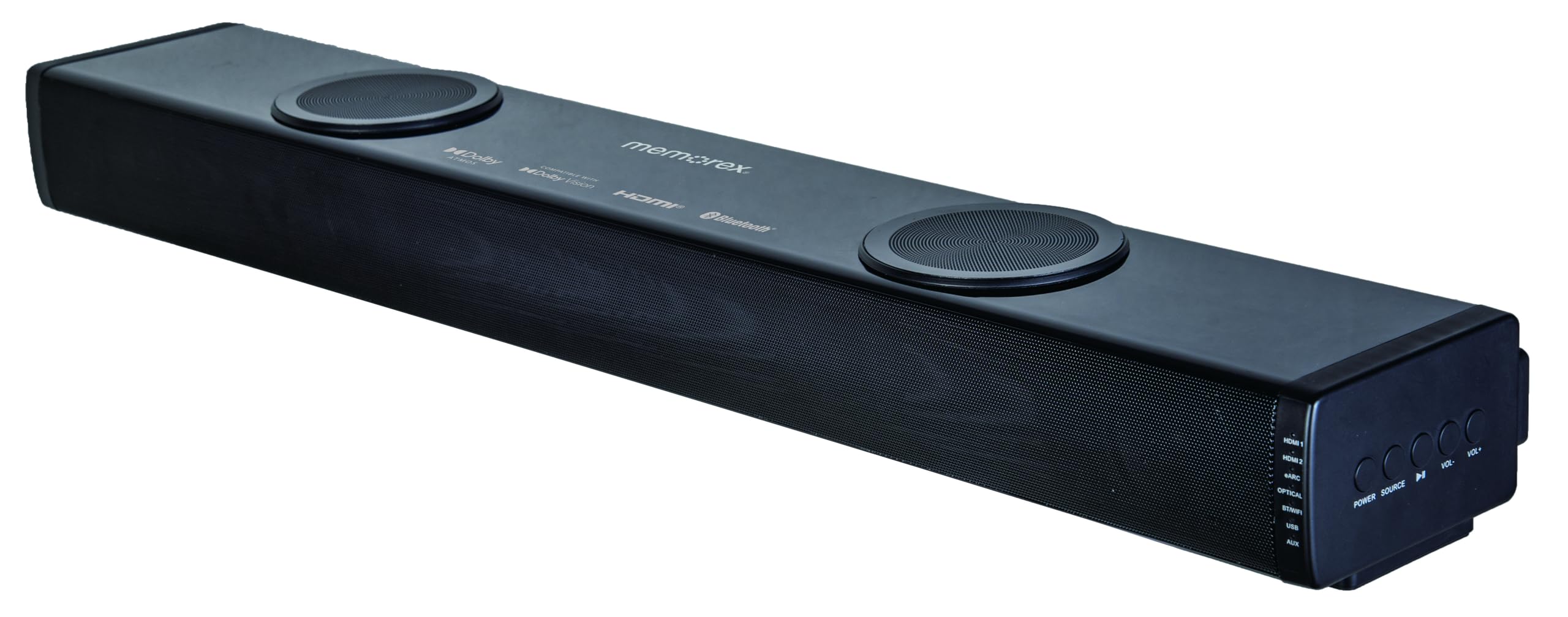
Image: A direct front view of the Memorex MX-SBDA220 soundbar, highlighting its sleek design, front speaker grille, and the two circular top-firing speakers for Dolby Atmos effects.
Side Panel Controls

Image: An angled view of the Memorex MX-SBDA220 soundbar, revealing the control panel on the right side. Buttons for Power, Source selection, Play/Pause, Volume Down, and Volume Up are visible, along with input indicators.
Remote Control

Image: The Memorex MX-SBDA220 soundbar shown with its full-function remote control positioned above it. The remote features buttons for power, input selection, sound modes, volume, bass, and treble adjustments.
Setup Guide
1. Physical Placement
Place the soundbar on a stable, flat surface directly in front of your television. Ensure there are no obstructions blocking the front or top-firing speakers for optimal sound delivery, especially for Dolby Atmos effects.
2. Connecting to Your TV/Devices
The MX-SBDA220 offers multiple connectivity options:
- HDMI ARC (Audio Return Channel): For the best audio quality and control, connect an HDMI cable from the soundbar's HDMI ARC output to your TV's HDMI ARC input. This allows your TV remote to control the soundbar's volume.
- Optical Input: Connect an optical cable from the soundbar's OPTICAL input to your TV's optical digital audio output.
- HDMI IN (x2): Connect external devices like Blu-ray players or gaming consoles to the soundbar's HDMI IN ports. Then, connect the soundbar's HDMI ARC output to your TV's HDMI ARC input.
- Bluetooth: For wireless audio streaming from smartphones or tablets, select the Bluetooth input on the soundbar and pair your device.
- USB Player: Insert a USB drive with audio files into the USB port for direct playback.
- AUX Input: Use a 3.5mm audio cable to connect devices with an analog audio output to the soundbar's AUX input.
3. Power Connection
Connect the provided power cable to the soundbar's power input and then plug it into a wall outlet. The soundbar will enter standby mode.
Operating Instructions
Power On/Off
Press the POWER button on the soundbar or remote control to turn the unit on or off.
Input Selection
Press the SOURCE button on the soundbar or the corresponding input button (HDMI1, HDMI2, eARC, OPT, BT, USB, AUX) on the remote control to switch between audio sources. The LED display will indicate the active input.
Volume Control
Press VOL+ or VOL- buttons on the soundbar or remote control to adjust the master volume.
Sound Modes
The soundbar features 5 optimized sound modes. Press the corresponding button on the remote control to select:
- Movie: Enhances cinematic audio with dynamic range.
- Music: Optimizes sound for music playback.
- Night: Reduces dynamic range for quieter listening, ideal for late-night viewing.
- Voice: Enhances vocal clarity for dialogue-heavy content.
- Game: Provides an immersive audio experience for gaming.
Bass and Treble Adjustment
Use the BASS+ / BASS- and TREBLE+ / TREBLE- buttons on the remote control to fine-tune the low and high frequencies to your preference.
Bluetooth Pairing
- Select the BT input on the soundbar. The LED display will flash, indicating pairing mode.
- On your mobile device, enable Bluetooth and search for "MX-SBDA220".
- Select the soundbar to pair. Once connected, the LED display will stop flashing.
USB Playback
Insert a USB flash drive into the USB port. The soundbar will automatically switch to USB input and begin playing compatible audio files. Use the remote control for playback functions (Play/Pause, Skip Track).
Care and Maintenance
- Cleaning: Use a soft, dry cloth to clean the surface of the soundbar. Do not use liquid cleaners or aerosol sprays.
- Ventilation: Ensure the ventilation openings are not blocked to prevent overheating.
- Storage: If storing the soundbar for an extended period, unplug it from the power outlet and store it in a cool, dry place.
- Avoid Moisture: Keep the soundbar away from water, rain, and excessive humidity.
Troubleshooting Guide
| Problem | Possible Solution |
|---|---|
| No power |
|
| No sound |
|
| Remote control not working |
|
| Bluetooth pairing issues |
|
Technical Specifications
| Feature | Specification |
|---|---|
| Model Number | MX-SBDA220 |
| Speaker Type | Atmospheric (Dolby Atmos 2.0.2CH) |
| Total Output Power | 100 Watts (20W x 2 front + 30W x 2 top) |
| Connectivity Technology | Bluetooth 5.0, HDMI (ARC x1, IN x2), Optical, USB, AUX |
| Bluetooth Range | Up to 10 meters (33 feet) |
| Product Dimensions (D x W x H) | 5.93" x 8.1" x 37.57" (approximate) |
| Item Weight | 2.2 Pounds |
| Included Components | Soundbar, Remote Control, Power Cable, Quick Start Guide |
| UPC | 838689000208 |
Warranty Information
Memorex products are manufactured to the highest quality standards. For specific warranty details, including coverage period and terms, please refer to the warranty card included with your product or visit the official Memorex website. Keep your purchase receipt as proof of purchase for any warranty claims.
Customer Support
If you encounter any issues or have questions regarding your Memorex MX-SBDA220 Soundbar that are not covered in this manual, please contact Memorex customer support. Contact information can typically be found on the official Memorex website or in the Quick Start Guide provided with your product.