
Memorex MX-SB270
Memorex MX-SB270 Bluetooth Soundbar Speaker
User Manual
Model: MX-SB270 | Brand: Memorex
Introduction
Thank you for purchasing the Memorex MX-SB270 27.5” Bluetooth Soundbar Speaker. This manual provides important information regarding the setup, operation, and maintenance of your new soundbar. Please read this manual thoroughly before using the product to ensure proper functionality and safety. This soundbar is designed to enhance your audio experience for TV, gaming, and music with its 24W output, versatile connectivity options including HDMI ARC, Optical, and 3.5mm Aux, and customizable EQ modes.
Important Safety Information
- Power Source: Use only the power adapter supplied with the unit. Ensure the voltage matches your local power supply.
- Ventilation: Do not block any ventilation openings. Install in accordance with the manufacturer's instructions.
- Water and Moisture: Do not expose this appliance to rain or moisture. Do not place objects filled with liquids, such as vases, on the apparatus.
- Heat: Do not install near any heat sources such as radiators, heat registers, stoves, or other apparatus (including amplifiers) that produce heat.
- Cleaning: Clean only with a dry cloth.
- Servicing: Do not attempt to service this product yourself. Refer all servicing to qualified service personnel.
- Placement: Place the soundbar on a stable, flat surface or mount it securely to a wall using the provided bracket.
What's in the Box
Please check that all items listed below are included in your package:
- Memorex MX-SB270 Soundbar Speaker
- Remote Control
- AUX Cable
- Wall-mount Bracket
- Quick Start Guide (This User Manual)
- Power Adapter
Product Overview
Front and Side Views
The Memorex MX-SB270 soundbar features a sleek, compact design that blends seamlessly with any home entertainment setup. Its front grille protects the internal speakers, while the minimalist aesthetic ensures it complements your television.

Figure 1: Front view of the Memorex MX-SB270 Soundbar.

Figure 2: Angled front view showcasing the soundbar's profile.
Top Panel Controls
The top panel of the soundbar houses essential control buttons for quick access to power, volume, and input mode selection.

Figure 3: Top panel controls including Power, Volume, and Mode buttons.
- Power Button: Turns the soundbar on or off.
- Volume Up/Down Buttons: Adjusts the audio volume.
- Mode Button: Cycles through input sources (HDMI ARC, Optical, AUX, Bluetooth).
Rear Panel Connections
The rear panel provides various input ports for connecting your soundbar to different audio sources, ensuring versatile compatibility.
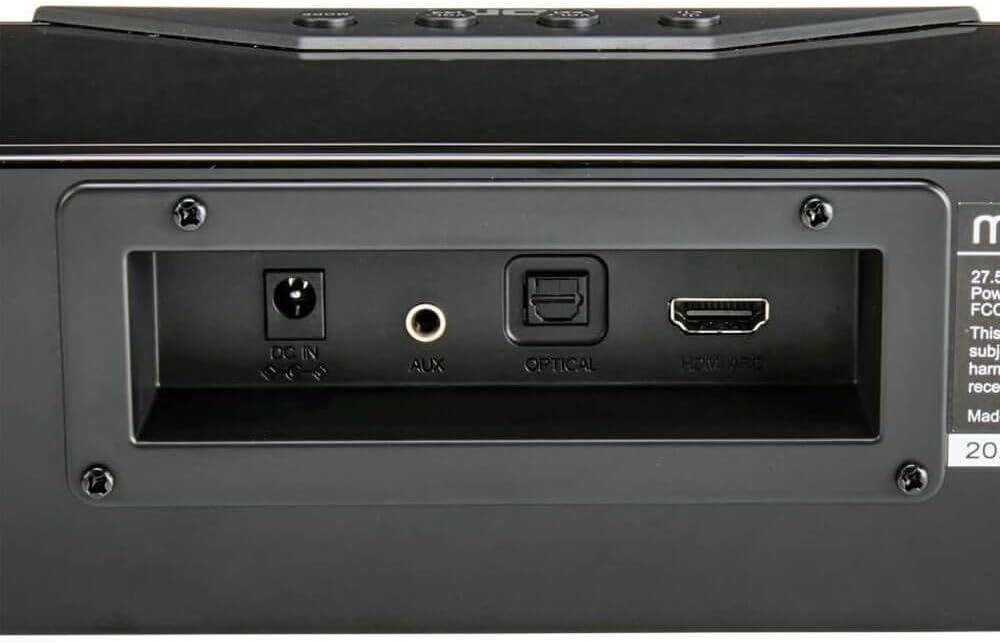
Figure 4: Rear panel with DC IN, AUX, Optical, and HDMI ARC ports.
- DC IN: Connect the power adapter here.
- AUX: 3.5mm auxiliary input for connecting devices with an analog audio output.
- OPTICAL: Optical digital audio input for high-quality audio from compatible devices.
- HDMI ARC: HDMI Audio Return Channel for simplified connection and control with ARC-enabled TVs.
Remote Control
The included remote control allows for convenient operation of all soundbar functions from a distance.

Figure 5: Remote control for the Memorex MX-SB270 Soundbar.
- Power Button: Turns the soundbar on or off.
- Mode Button: Selects input source.
- Volume +/-: Adjusts volume.
- Mute Button: Mutes or unmutes the sound.
- EQ Button: Cycles through preset equalizer modes.
- Unpair Button: Disconnects current Bluetooth device.
- Playback Controls: (Play/Pause, Skip Forward/Backward) for Bluetooth mode.
Setup
Connecting to Power
- Connect the power adapter to the DC IN port on the rear of the soundbar.
- Plug the other end of the power adapter into a wall outlet.
- The soundbar will enter standby mode.
Connecting to Audio Sources
Choose one of the following connection methods based on your TV or audio device's available ports:
HDMI ARC Connection (Recommended)
HDMI ARC (Audio Return Channel) allows audio to be sent from your TV to the soundbar using a single HDMI cable, and often allows your TV remote to control the soundbar's volume.
- Ensure your TV has an HDMI port labeled "ARC" or "HDMI ARC".
- Connect one end of an HDMI cable (not included) to the HDMI ARC port on the soundbar.
- Connect the other end of the HDMI cable to the HDMI ARC port on your TV.
- On your TV's settings, enable HDMI ARC and select the soundbar as the audio output device. Refer to your TV's manual for specific instructions.
Optical Connection
The Optical connection provides high-quality digital audio, especially useful if your TV does not have an HDMI ARC port.
- Connect one end of an optical audio cable (not included) to the OPTICAL port on the soundbar.
- Connect the other end of the optical audio cable to the optical digital audio output port on your TV or audio device.
- On your TV's audio settings, select "Optical Out" or "Digital Audio Out" as the audio output.
AUX (3.5mm) Connection
The AUX connection is suitable for devices with a standard 3.5mm audio output, such as older TVs, computers, or MP3 players.
- Connect the included AUX Cable to the AUX port on the soundbar.
- Connect the other end of the AUX cable to the 3.5mm audio output (headphone jack) on your TV or audio device.
Operating Instructions
Power On/Off
- Press the Power button on the soundbar's top panel or on the remote control to turn the unit on or off.
Selecting Input Mode
- Press the Mode button on the soundbar's top panel or on the remote control to cycle through the available input sources: HDMI ARC, Optical, AUX, and Bluetooth.
- The LED indicator on the soundbar will change color or display to indicate the currently selected mode.
Adjusting Volume
- Press the Volume + button to increase the volume.
- Press the Volume - button to decrease the volume.
- Press the Mute button on the remote control to mute or unmute the sound.
Bluetooth Pairing
- Turn on the soundbar and switch to Bluetooth mode using the Mode button. The soundbar will enter pairing mode, indicated by a flashing LED.
- Enable Bluetooth on your mobile device (smartphone, tablet, computer).
- Search for "MX-SB270" in your device's Bluetooth settings and select it to pair.
- Once successfully paired, the LED indicator on the soundbar will stop flashing and remain solid.
- To disconnect a paired device, press the Unpair button on the remote control.
Using EQ Modes
The soundbar offers 5 preset EQ modes to optimize audio for different content types. These modes are primarily active in Bluetooth mode.
- Press the EQ button on the remote control to cycle through the available equalizer modes (e.g., Standard, Music, Movie, News, Game).
- Select the mode that best suits your listening preference or content.
Wall Mounting
The Memorex MX-SB270 soundbar can be wall-mounted for a clean and space-saving installation. Ensure you have the appropriate tools and fasteners for your wall type (e.g., drywall anchors, wood screws).
- Prepare the Wall: Choose a suitable location on the wall, preferably centered below your TV. Ensure there are no electrical wires or plumbing behind the drilling area.
- Mark Drilling Points: Hold the wall-mount bracket against the wall at the desired height and use a pencil to mark the drilling points through the bracket's screw holes. Ensure the bracket is level.
- Drill Holes: Drill pilot holes at the marked points. The size of the drill bit will depend on the type of wall anchors or screws you are using.
- Install Anchors (if needed): If drilling into drywall, insert appropriate wall anchors into the pilot holes.
- Secure Bracket: Align the wall-mount bracket with the drilled holes (and anchors) and secure it firmly to the wall using screws.
- Mount Soundbar: Carefully align the mounting slots on the back of the soundbar with the hooks or protrusions on the secured wall bracket. Gently lower the soundbar onto the bracket until it clicks into place or is securely seated.
- Connect Cables: Before fully securing or after mounting, connect all necessary audio and power cables to the soundbar's rear ports. Route cables neatly to maintain a clean appearance.
Note: If you are unsure about wall mounting, consult a qualified professional.
Maintenance and Care
- Cleaning: Disconnect the soundbar from the power outlet before cleaning. Use a soft, dry cloth to wipe the exterior surfaces. Do not use liquid cleaners, aerosols, or abrasive chemicals, as they may damage the finish.
- Ventilation: Ensure the ventilation openings are clear of dust and debris to prevent overheating.
- Storage: If storing the soundbar for an extended period, disconnect it from power and store it in a cool, dry place, away from direct sunlight and extreme temperatures.
Troubleshooting
| Problem | Possible Cause | Solution |
|---|---|---|
| No power | Power cable not connected; Power outlet not active. | Ensure the power cable is securely connected to the soundbar and a working power outlet. Try a different outlet. |
| No sound | Incorrect input mode selected; Volume too low or muted; Incorrect TV audio output settings; Loose audio cable connection. |
|
| Bluetooth pairing issues | Soundbar not in pairing mode; Device too far; Interference; Already paired to another device. |
|
| Remote control not working | Batteries are dead or incorrectly inserted; Obstruction between remote and soundbar; Remote sensor blocked. |
|
Specifications
| Feature | Detail |
|---|---|
| Model Number | MX-SB270 |
| Speaker Type | Soundbar |
| Total Output Power | 24 Watts (12W x 2 speakers) |
| Connectivity Technology | Bluetooth, HDMI ARC, Optical, 3.5mm AUX |
| Product Dimensions (D x W x H) | 5.11"D x 40.79"W x 5.82"H |
| Item Weight | 4.34 Pounds |
| EQ Modes | 5 (Customizable sound profiles) |
| Mounting Type | Wall Mount, Tabletop |
| Included Components | AUX Cable, Quick Start Guide, Remote, Wall-mount Bracket |
Warranty and Support
For warranty information and technical support, please refer to the warranty card included with your product or visit the official Memorex website. Keep your purchase receipt as proof of purchase for warranty claims.
For further assistance, you may contact Memorex customer service through their official channels.
Related documentsMX-SB270


Ask a question about this manual
Ask about setup, troubleshooting, compatibility, parts, safety, or missing instructions. Manuals+ will review the question and use this page’s manual context to help answer it.