1. Introduction
Thank you for purchasing the Philips TAM3505M2 Micro HiFi System. This system offers powerful stereo sound and versatile music playback options, including CD, FM/DAB radio, Bluetooth, USB, and Audio In. This manual provides essential information for the safe and efficient use of your device. Please read it thoroughly before operating the system and retain it for future reference.
2. Safety Information
Always follow basic safety precautions when using this equipment to reduce the risk of fire, electric shock, and personal injury.
- Power Source: Ensure the power voltage matches the rating label on the back of the unit.
- Ventilation: Do not block any ventilation openings. Allow sufficient space around the unit for proper airflow.
- Water and Moisture: Do not expose the unit to rain or moisture. Do not place objects filled with liquids, such as vases, on the unit.
- Heat: Keep the unit away from heat sources such as radiators, heat registers, stoves, or other apparatus (including amplifiers) that produce heat.
- Cleaning: Unplug the unit from the wall outlet before cleaning. Use a soft, dry cloth only.
- Servicing: Do not attempt to service this product yourself. Refer all servicing to qualified service personnel.
3. Package Contents
Please check that the following items are included in your package:
- Main Unit (Micro HiFi System)
- 2 x Bookshelf Speakers
- Remote Control (with 1 AAA battery)
- FM/DAB Antenna
- Power Cable
- User Manual (this document)
4. Product Overview
The Philips TAM3505M2 Micro HiFi System consists of a central unit and two separate bookshelf speakers, designed for optimal stereo sound reproduction. The central unit features a CD player, display, control buttons, and various input/output ports.
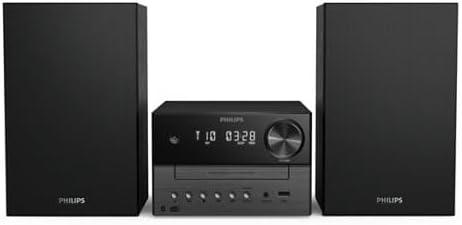
Image 4.1: The Philips TAM3505M2 Micro HiFi System, showing the central unit flanked by two black bookshelf speakers.

Image 4.2: The Philips TAM3505M2 Micro HiFi System positioned on a wooden cabinet, illustrating its compact and classic stereo design. The image highlights the subtle two-tone central unit and the matching speakers.
5. Setup
5.1 Connecting the Speakers
Connect the speaker wires from the bookshelf speakers to the corresponding speaker terminals on the back of the main unit. Ensure correct polarity (red to red, black to black) for optimal sound quality.
5.2 Power Connection
Plug the power cable into the AC IN socket on the main unit, then plug the other end into a wall power outlet.
5.3 Antenna Connection
Connect the supplied FM/DAB antenna to the appropriate antenna input on the rear of the main unit. Extend the antenna fully for best reception.
5.4 Initial Power On
Press the power button on the front panel or remote control to turn on the system. The display will illuminate, and the system will be ready for use.
6. Operating Instructions
6.1 Basic Controls
The system can be controlled using the buttons on the front panel or the included remote control. Common controls include Power, Volume Up/Down, Source Selection, Play/Pause, Skip, and Stop.
6.2 Source Selection
Press the 'Source' button on the unit or remote to cycle through available input sources: CD, FM, DAB, Bluetooth, USB, and Audio In.

Image 6.1: The Philips TAM3505M2 Micro HiFi System in a living space, emphasizing its ability to play 'All your music, simply'.
6.3 CD Playback
- Select the 'CD' source.
- Press the 'Open/Close' button to open the CD tray.
- Place a CD (audio CD or MP3 CD) with the label side up into the tray.
- Press the 'Open/Close' button again to close the tray.
- Playback will start automatically or by pressing the 'Play' button.

Image 6.2: A close-up of the Philips TAM3505M2 Micro HiFi System with its CD tray open, illustrating its capability to 'Play all your music' from physical media.
6.4 Radio Operation (FM/DAB)
- Select 'FM' or 'DAB' source.
- For FM, use the tuning buttons to manually tune or auto-scan for stations.
- For DAB, the system will automatically scan for available stations upon first use.
- To save a station as a preset, press and hold the 'Preset' button, then use the navigation buttons to select a preset number and confirm. The system supports 20 presets.
6.5 Bluetooth Pairing and Streaming
The system features Bluetooth 5.4 with LE Audio and Auracast for enhanced streaming.
- Select the 'Bluetooth' source. The system will enter pairing mode automatically or by pressing and holding the Bluetooth button.
- On your mobile device, enable Bluetooth and select 'Philips TAM3505M2' from the list of available devices.
- Once paired, you can stream audio from your device to the HiFi system.
- Auracast: For multi-speaker streaming, ensure other compatible Auracast speakers are within range and follow their instructions to connect to the TAM3505M2's Auracast broadcast.

Image 6.3: The Philips TAM3505M2 Micro HiFi System alongside a smartphone displaying the Philips Entertainment app interface, highlighting 'Bluetooth 5.4 for better sound and Auracast streaming'. This image demonstrates the system's advanced connectivity and app control capabilities.
6.6 USB Playback
Insert a USB flash drive containing audio files into the USB port on the front of the unit. Select the 'USB' source, and the system will begin playing compatible audio files.
6.7 Audio In Connection
Connect an external audio device (e.g., turntable, MP3 player) to the 'Audio In' jack on the front of the unit using a 3.5mm audio cable. Select the 'Audio In' source to listen to audio from the connected device.
6.8 Digital Sound Control
Use the Digital Sound Control feature to adjust the sound profile to your preference. This allows you to optimize audio for different types of content like music, podcasts, or radio plays.

Image 6.4: The Philips TAM3505M2 Micro HiFi System with abstract sound wave graphics, illustrating its 'Great stereo sound for all your favorites' feature, emphasizing its powerful audio output.
6.9 Using the Philips Entertainment App
Download the Philips Entertainment app to your smartphone to conveniently control your micro HiFi system. The app allows you to customize audio styles, change audio sources, and manage settings remotely.
7. Maintenance
7.1 Cleaning
To clean the unit, unplug it from the power outlet. Use a soft, dry, lint-free cloth. Do not use cleaning agents containing alcohol, ammonia, abrasives, or benzene as these may damage the finish.
7.2 Care for CDs
Handle CDs by their edges. Keep them clean and free from scratches. Store them in their cases when not in use.
7.3 Environmental Considerations
The Philips TAM3505M2 is designed with sustainability in mind, utilizing 85% Post-Consumer Recycled (PCR) plastic in its construction. The packaging is plastic-free and made from FSC-certified recycled cardboard. Please dispose of the product and its packaging responsibly according to local regulations.

Image 7.1: The Philips TAM3505M2 Micro HiFi System in a room, highlighting its construction from recycled plastic and responsible packaging. This image emphasizes the product's eco-friendly design.
8. Troubleshooting
If you encounter issues with your Philips TAM3505M2, refer to the following common problems and solutions:
| Problem | Possible Cause | Solution |
|---|---|---|
| No power | Power cable not connected securely. | Check power cable connection to the unit and wall outlet. |
| No sound | Volume too low; incorrect source selected; speaker wires loose. | Increase volume; select correct source; check speaker wire connections. |
| CD not playing | CD inserted incorrectly; CD is dirty or scratched; unsupported disc format. | Reinsert CD correctly; clean or replace CD; ensure it's an audio CD or MP3 CD. |
| Bluetooth pairing fails | Device too far; Bluetooth not enabled on source device; system not in pairing mode. | Move device closer; enable Bluetooth; put system into pairing mode. |
| Poor radio reception | Antenna not properly positioned or connected. | Adjust antenna position; ensure antenna is fully extended and connected. |
9. Specifications
| Feature | Specification |
|---|---|
| Brand | PHILIPS |
| Model Number | TAM3505M2 |
| Color | Black |
| Output Power | 20 Watts (RMS) |
| Speaker Type | Stereo Bookshelf Speakers with 3" Woofers and Bass-Reflex Ports |
| Connectivity | Bluetooth 5.4 (LE Audio, Auracast), USB, Audio In (3.5mm) |
| Radio Tuner | DAB+, FM Digital Tuner (20 Presets) |
| CD Player | Compatible with Audio CD, CD-R/RW, MP3-CD |
| Compatible Devices | Personal Computer, Smartphone, Tablet, Television |
| Power Source | AC Power Cable |
| Dimensions (L x W x H) | 23.8 x 48 x 24.7 cm |
| Item Weight | 3.36 Kilograms |
| Remote Control Battery | 1 x AAA (Alkaline, included) |
| Material | 85% Post-Consumer Recycled (PCR) Plastic |
| Packaging | Plastic-free, FSC-certified recycled cardboard |
| Manufacturer | TP Vision |
| Country of Origin | China |
10. Warranty and Support
For warranty information and customer support, please refer to the warranty card included with your product or visit the official Philips website for your region. You may also find additional support resources, FAQs, and contact details there.


