
1. Introduction and Overview
The Philips TAM3205M2/12 Micro Hi-Fi System is designed to provide clear stereo sound with deep bass. This system features a 20W RMS output, 3-inch woofers, and bass-reflex ports for an enhanced audio experience. It supports multiple audio sources including Bluetooth, CD playback, FM radio, USB input, and a 3.5mm audio input.
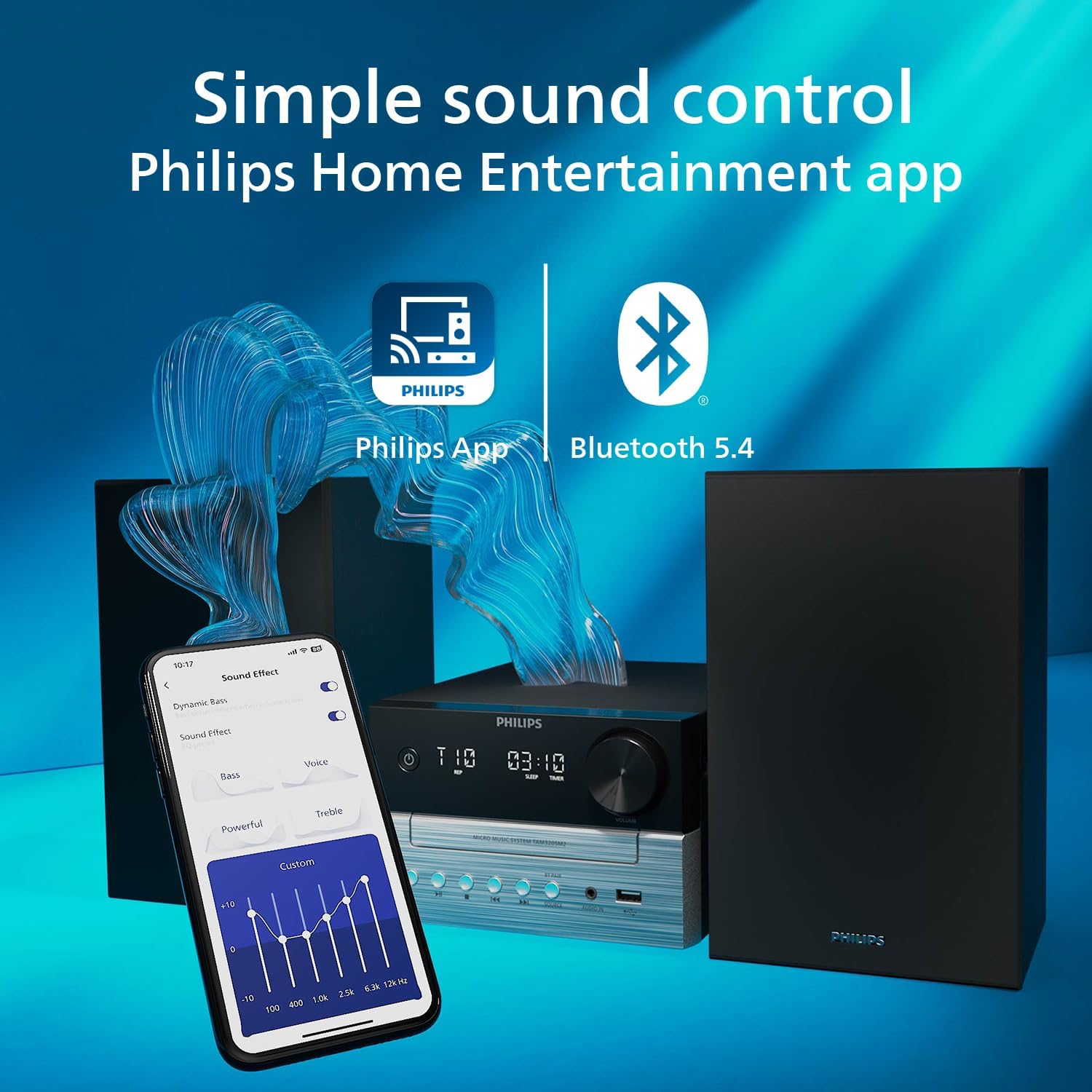
Advanced Bluetooth 5.4 technology with LE Audio and Auracast enables improved streaming quality and the ability to connect to multiple compatible speakers. The system can be conveniently controlled using the Philips Entertainment app on your smartphone. The design emphasizes sustainability, incorporating 85% PCR (post-consumer recycled) plastic and utilizing FSC-certified, plastic-free packaging.

2. Setup Guide
2.1 Unpacking
Carefully remove all components from the packaging. Ensure all parts are present: main unit, two speakers, FM antenna, power cable, and remote control (with 1 AAA battery included).
2.2 Connecting Speakers
Connect the speaker wires to the 'SPEAKER OUT (6Ω)' terminals on the rear of the main unit. Ensure correct polarity (red to red, black to black) for optimal sound quality. The left speaker connects to 'L' and the right speaker to 'R'.
2.3 Connecting FM Antenna
Insert the FM antenna plug into the 'FM ANTENNA' jack on the rear of the main unit. Extend the antenna fully and position it for best reception.
2.4 Power Connection
Connect the power cable to the 'AC MAINS' input on the rear of the main unit, then plug the other end into a wall outlet (100-240V~50/60Hz).

3. Operating Instructions
3.1 Power On/Off
Press the Power button on the main unit or remote control to turn the system on or off.
3.2 Source Selection
Press the SOURCE button on the main unit or remote control to cycle through available input sources: Bluetooth, CD, FM Radio, USB, and Audio In.
3.3 Bluetooth Pairing
- Select Bluetooth as the source. The display will show 'PAIRING'.
- On your Bluetooth device (smartphone, tablet), enable Bluetooth and search for 'Philips TAM3205M2'.
- Select the system to pair. Once connected, the display will show 'CONNECTED'.
- For Auracast functionality, ensure your device and other speakers are Auracast compatible and follow their respective pairing instructions.
3.4 CD Playback
- Select CD as the source.
- Press the Open/Close button to open the CD tray.
- Place a CD (audio CD or MP3-CD) with the label side up into the tray.
- Press the Open/Close button again to close the tray. Playback will start automatically.

3.5 FM Radio
- Select FM as the source.
- Press the Tune +/- buttons to manually tune to a station, or press and hold to auto-scan for the next available station.
- To save a preset, press PROGRAM, then use Tune +/- to select a preset number, and press PROGRAM again to confirm. Up to 20 stations can be preset.
3.6 USB Playback
Insert a USB flash drive into the USB port on the front of the main unit. Select USB as the source. The system will automatically detect and play compatible audio files.
3.7 Audio In
Connect an external audio device (e.g., MP3 player) to the AUDIO IN jack on the front of the main unit using a 3.5mm audio cable. Select AUDIO IN as the source.
3.8 Volume Control
Rotate the VOLUME knob on the main unit or use the Volume +/- buttons on the remote control to adjust the sound level.
3.9 Digital Sound Control (DSC)
Press the DSC button on the remote control to cycle through preset equalizer settings (e.g., Jazz, Rock, Pop, Classic, Custom) to optimize sound for different music genres.
3.10 Philips Entertainment App Control
Download the Philips Entertainment app from your device's app store. Connect your smartphone to the micro Hi-Fi system via Bluetooth. The app allows you to control various functions, including source selection, volume, and sound settings, directly from your smartphone.
4. Maintenance
4.1 Cleaning the Unit
Wipe the unit with a soft, dry cloth. Do not use abrasive cleaners, waxes, or polishing sprays as they can damage the cabinet. Ensure the unit is unplugged before cleaning.
4.2 CD Care
Handle CDs by their edges. Keep them clean and free from scratches. Store CDs in their cases when not in use.
4.3 Environmental Considerations
This product is manufactured using 85% PCR (recycled) plastic and comes in FSC-certified, plastic-free packaging. Please dispose of the product and its packaging responsibly according to local regulations.
5. Troubleshooting
| Problem | Possible Cause | Solution |
|---|---|---|
| No power | Power cable not connected securely. | Check power cable connection to the unit and wall outlet. |
| No sound | Volume too low; incorrect source selected; speaker wires loose. | Increase volume; select correct source; check speaker wire connections. |
| Bluetooth pairing fails | Device too far; Bluetooth not enabled on device; system not in pairing mode. | Move device closer; enable Bluetooth; select Bluetooth source on system to enter pairing mode. |
| CD not playing | CD inserted incorrectly; CD dirty or scratched; unsupported disc format. | Reinsert CD correctly; clean CD; ensure it's an audio CD or MP3-CD. |
| Poor FM reception | Antenna not extended or poorly positioned. | Extend and reposition the FM antenna for better signal. |
6. Specifications
- Brand: PHILIPS
- Model Number: TAM3205M2/12
- Color: Black
- Connectivity Technology: USB, Bluetooth 5.4
- Compatible Devices: Personal computer, Smartphone, Tablet, Television
- Speaker Type: Stereo
- Power Output: 20 Watts RMS
- Dimensions (L x W x H): 23.8 x 48 x 24.7 centimeters
- Item Weight: 3.36 Kilograms
- Power Source: Electric cable (AC Mains 100-240V~50/60Hz)
- Battery (for remote): 1 AAA (included)
- Material: 85% PCR (recycled) plastic
- Country of Origin: China
- Date First Available: January 14, 2025
7. Warranty Information
Information regarding the specific product warranty for the Philips TAM3205M2/12 Micro Hi-Fi System is not available in the provided data. Please refer to the warranty card included with your product packaging or visit the official Philips website for detailed warranty terms and conditions applicable to your region.
8. Support
For further assistance, technical support, or service inquiries regarding your Philips TAM3205M2/12 Micro Hi-Fi System, please visit the official Philips support website. You can typically find FAQs, software updates, and contact information for customer service there. Specific support contact details are not available in the provided data.


