
1. Introduction and Overview
The Airthereal AGH400-PET Pet Air Purifier is designed to improve indoor air quality, especially in homes with pets. It features advanced filtration technology to effectively remove pet odors, dander, hair, dust, and other airborne particles, ensuring a fresher and healthier environment.
- Advanced Odor Elimination: Equipped with a powerful HEPA Purple Filter to combat pet odors and lingering smells.
- Washable Pre-Filter: A removable surface pre-filter captures pet hair and large particles, extending the lifespan of the main filter.
- Pet-Friendly Design: Engineered to safely manage pet hair, cat urine odors, and dust, creating a healthier space for both pets and owners.
- Integrated PM 2.5 Sensor: Monitors and responds to changes in air quality in real-time, optimizing purification for any room size.
- 360° Air Intake: Provides comprehensive air purification by effectively capturing airborne particles from all directions.
- Whisper-Quiet Sleep Mode: Operates silently to ensure a peaceful and fresh environment without disturbance.
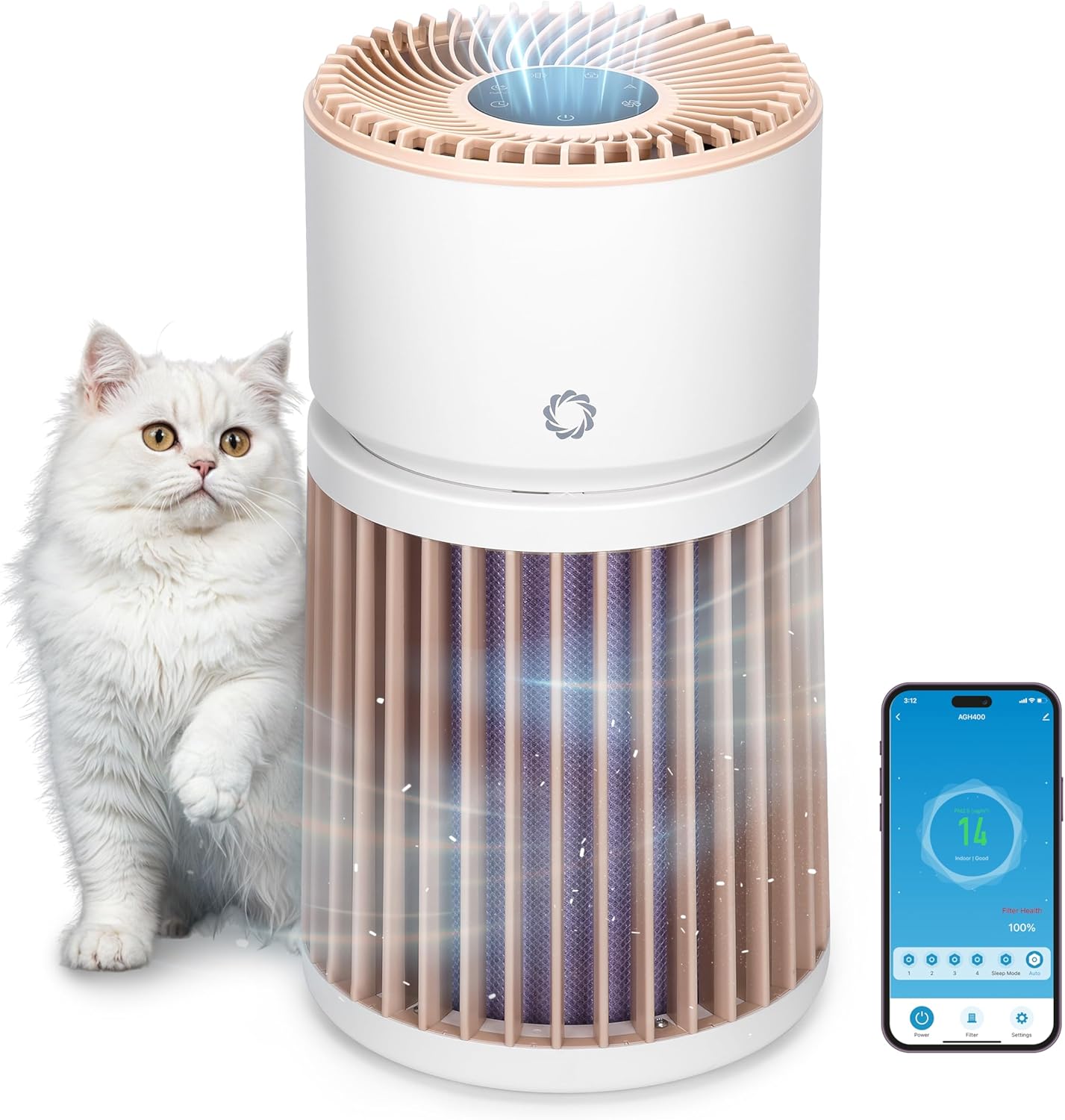
2. Setup Instructions
- Unpack the Purifier: Carefully remove the air purifier and all packaging materials from the box.
- Remove Filter Packaging: Twist the top section of the purifier counter-clockwise to unlock and lift it off. Remove the plastic packaging from the H13 Purple HEPA Filter.
- Install Filter: Place the unwrapped filter back into the base unit. Ensure it is seated correctly.
- Reassemble Unit: Align the top section with the base and twist clockwise to lock it securely in place.
- Placement: Place the air purifier on a flat, stable surface, ensuring at least 15 inches (38 cm) of clearance on all sides for optimal airflow. Avoid placing it near walls or furniture that could obstruct air intake.
- Power Connection: Plug the power adapter into the DC input port on the back of the unit, then plug the adapter into a standard electrical outlet.

3. Operating Instructions
Control Panel Overview
The control panel is located on the top of the air purifier and features touch-sensitive buttons and a digital display.

- Power Button (U): Press to turn the unit On or Off.
- Fan Speed Button (A): Cycle through 4 fan speed settings (F1-F4).
- Auto Mode Button (A): Activates automatic fan speed adjustment based on real-time air quality.
- Sleep Mode Button (C): Reduces fan speed to the lowest setting and dims/turns off display lights for quiet operation.
- Timer Button (L): Set the operating time (e.g., 1-12 hours).
- Child Lock Button (L): Press and hold for 3 seconds to activate/deactivate, preventing accidental changes to settings.
- Filter Reset Indicator: Lights up when the filter needs cleaning or replacement.
Air Quality Indicator
The LED light ring on the control panel changes color to indicate the current air quality:
- Green: Good air quality (PM2.5 < 50 µg/m³)
- Yellow: Moderate air quality (PM2.5 51-100 µg/m³)
- Red: Unhealthy air quality (PM2.5 > 101 µg/m³)

Mobile App Control
The AGH400-PET can be controlled remotely via a mobile application. Download the appropriate app (e.g., AIR.ai APP) from your smartphone's app store. Follow the in-app instructions to connect your device. The app allows you to:
- Turn the purifier On/Off.
- Adjust fan speeds and modes.
- Set timers and schedules.
- Monitor air quality and filter health.
- Activate Child Lock.

4. Maintenance
Filter Cleaning and Replacement
Regular maintenance of the filters ensures optimal performance and extends the life of your air purifier.
- Washable Pre-Filter: The outer pre-filter is designed to capture larger particles like pet hair. It can be removed and gently washed with water. Ensure it is completely dry before reattaching.
- H13 Purple HEPA Filter: This multi-layer filter is not washable and should be replaced every 6-8 months, or when the filter reset indicator lights up, depending on usage and air quality.
Replacing the Filter:
- Turn off and unplug the air purifier.
- Twist the top section counter-clockwise and lift it off.
- Carefully remove the old H13 Purple HEPA Filter.
- Insert the new filter into the base unit, ensuring proper orientation.
- Reattach the top section by aligning and twisting clockwise until locked.
- Plug in the unit and press and hold the Filter Reset button for 3 seconds to reset the filter life indicator.

5. Troubleshooting
| Problem | Possible Cause | Solution |
|---|---|---|
| Unit does not turn on | Not plugged in; power outage; unit not assembled correctly. | Check power connection; ensure top and base are locked; check household circuit breaker. |
| Reduced airflow or unusual noise | Clogged filter; foreign object in fan. | Clean/replace filters; check for obstructions (unplug first). |
| Air quality indicator always red/yellow | High pollution levels; sensor obstruction. | Allow time for purification; clean the PM2.5 sensor (refer to manual for location). |
| Cannot connect to mobile app | Incorrect Wi-Fi password; device too far from router; app issues. | Verify Wi-Fi credentials; move unit closer to router; restart app/device. |
6. Specifications
- Model Number: AGH400-PET
- Product Dimensions: 11.8 x 11.8 x 21.3 inches
- Item Weight: 13.34 Pounds
- Power Source: DC
- Wattage: 42 watts
- Control Method: App, Touch control
- Filter Type: Odor Decomposition Filter, HEPA and Activated Carbon
- Floor Area Coverage: Up to 3500 Square Feet
- Noise Level: 28 Decibels (in Sleep Mode)
- Particle Retention Size: 0.1 Micron
- Special Features: HEPA Purple Filter, Integrated PM 2.5 Air Quality Sensor
- Certification: CARB Certified
- Color: White

7. Warranty and Support
For warranty information, technical support, or any questions regarding your Airthereal Pet Air Purifier AGH400-PET, please refer to the official Airthereal website or contact their customer service directly. Keep your purchase receipt for warranty claims.
You can find more information and support at the Airthereal Official Website.


