
1. Important Safety Information
Please read all instructions carefully before using your Kenmore KW1090 SpotLite Go Cordless Portable Carpet Spot Cleaner. Failure to follow these instructions may result in electric shock, fire, or serious injury.
- Battery Safety: Use only the specified 24V Lithium-Ion battery and charger. Do not expose the battery to water, fire, or extreme temperatures. Do not attempt to open or modify the battery.
- Electrical Safety: Ensure the charger is connected to a properly grounded outlet. Do not handle the charger or appliance with wet hands.
- Liquid Use: Use only Kenmore approved cleaning solutions. Do not use flammable or combustible liquids. Always ensure tanks are properly sealed before operation.
- General Operation: Keep hair, loose clothing, fingers, and all parts of the body away from openings and moving parts. Do not use the appliance on wet surfaces unless specifically designed for it. Do not pick up hard or sharp objects.
- Children and Pets: Keep the appliance out of reach of children and pets.
2. Product Overview
The Kenmore KW1090 SpotLite Go is a 24V cordless portable carpet spot cleaner designed for deep cleaning and stain removal on carpets, stairs, furniture, and car interiors. It features powerful suction and a long-lasting battery for up to 55 minutes of runtime.
Key Features:
- Deep Cleaning Power: Effectively removes tough stains.
- Cordless Convenience: Offers freedom of movement without a power cord.
- Lightweight & Portable: Weighs approximately 12 lbs for easy transport.
- Extended Hose Length: 6 feet of hose for reaching various areas.
- Hose Cleaning Tool: Facilitates easy maintenance of the hose.
Components:
- Main Unit with Integrated Handle
- Clean Water Tank (0.4 gallons capacity)
- Dirty Water Tank (0.2 gallons capacity)
- Flexible Hose
- Cleaning Tool/Brush Attachment
- 24V Lithium-Ion Battery
- Battery Charger
- Sample Cleaning Solution
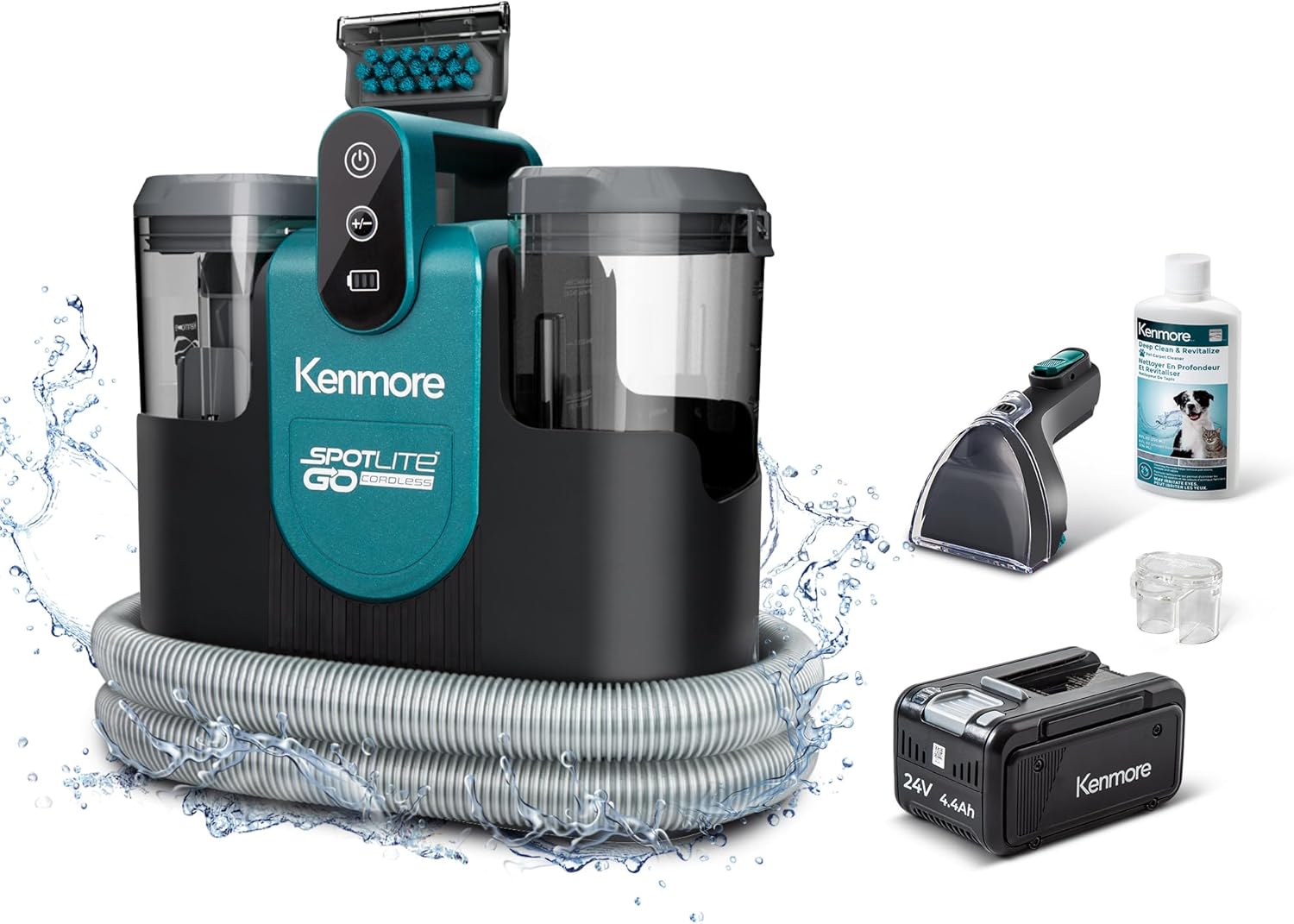
Image: The Kenmore KW1090 SpotLite Go cleaner shown with its main unit, flexible hose, cleaning tool, 24V battery, and a bottle of cleaning solution.
3. Setup Instructions
3.1 Charging the Battery
- Remove the 24V Lithium-Ion battery from its compartment.
- Connect the battery to the provided charger.
- Plug the charger into a standard electrical outlet. The indicator light on the battery or charger will show charging status.
- Allow the battery to fully charge before first use. A full charge provides up to 55 minutes of runtime.
3.2 Filling the Clean Water Tank
- Remove the clean water tank from the main unit.
- Unscrew the cap and fill the tank with warm tap water up to the indicated fill line.
- Add the recommended amount of Kenmore cleaning solution to the tank, following the solution's instructions.
- Securely replace the cap and reinsert the clean water tank into the main unit until it clicks into place.
3.3 Attaching the Cleaning Tool
- Connect the desired cleaning tool (e.g., brush attachment) to the end of the flexible hose.
- Ensure the attachment is securely fastened to prevent leaks and maintain suction.

Image: A woman kneeling on a rug, preparing the Kenmore KW1090 SpotLite Go cleaner for use, highlighting its cordless design and 55-minute runtime.
4. Operating Instructions
4.1 Powering On and Off
Press the power button located on the top of the unit to turn the cleaner on or off. The indicator lights will illuminate when the unit is powered on.
4.2 Spot Cleaning Procedure
- Pre-treat (Optional): For tough stains, pre-treat the area with a suitable spot cleaner according to its instructions.
- Spray: Hold the cleaning tool over the stained area. Press the trigger on the tool to spray cleaning solution onto the stain.
- Scrub: Gently scrub the stained area with the brush attachment to agitate the stain.
- Suction: Release the spray trigger and slowly pull the cleaning tool over the wet area to suction up the dirty solution. Repeat as necessary until the stain is removed and the area is as dry as possible.

Image: A woman cleaning the upholstery of a car seat with the Kenmore KW1090 SpotLite Go, demonstrating its powerful suction for spills and accidents.

Image: A woman cleaning a carpet with the Kenmore KW1090 SpotLite Go, utilizing its 6-foot extended hose for reaching distant areas and showing its dual suction control.
5. Maintenance and Cleaning
Regular maintenance ensures optimal performance and extends the life of your Kenmore KW1090 SpotLite Go cleaner.
5.1 Emptying and Cleaning the Dirty Water Tank
- After each use, remove the dirty water tank from the main unit.
- Carefully pour out the dirty water into a sink or drain.
- Rinse the dirty water tank thoroughly with clean water.
- Allow the tank to air dry completely before reattaching it to the unit.
5.2 Cleaning the Hose and Tools
- Use the integrated hose cleaning tool to flush out any remaining dirt or debris from the hose.
- Detach the cleaning tool/brush attachment and rinse it under running water.
- Ensure all parts are clean and free of residue.

Image: A woman demonstrating the use of the hose cleaning tool to flush out the machine's hose with clean water, ensuring no dirt is left behind.
5.3 Storage
Store the Kenmore KW1090 SpotLite Go in a cool, dry place. Ensure the hose and tools are neatly wrapped around the unit for compact storage.

Image: A woman easily storing the lightweight Kenmore KW1090 SpotLite Go cleaner in a kitchen cabinet, showcasing its portable and compact design.
6. Troubleshooting
If you encounter issues with your Kenmore KW1090 SpotLite Go, refer to the following common problems and solutions:
| Problem | Possible Cause | Solution |
|---|---|---|
| No suction or weak suction |
|
|
| Unit not turning on |
|
|
| Leaking from tanks or hose |
|
|
| Poor cleaning results |
|
|
7. Specifications
| Feature | Detail |
|---|---|
| Brand | Kenmore |
| Model Name | KW1090 |
| Style | 24V Cordless Carpet Cleaner |
| Power Source | DC (Battery Operated) |
| Battery Type | 1 Lithium Ion battery (included) |
| Runtime | Up to 55 minutes |
| Clean Water Tank Capacity | 0.4 gallons |
| Dirty Water Tank Capacity | 0.2 gallons |
| Item Weight | 10.2 pounds |
| Product Dimensions | 8.92"D x 12.8"W x 12.98"H |
| Color | Green |
| UPC | 810131261085 |
| Manufacturer | Cleva |
8. Warranty and Support
The Kenmore KW1090 SpotLite Go typically comes with a 1-year limited warranty from the date of purchase, covering defects in materials and workmanship under normal household use. Please retain your proof of purchase for warranty claims.
For technical assistance, warranty service, or to order replacement parts, please refer to the contact information provided in your product packaging or visit the official Kenmore website. When contacting support, please have your model number (KW1090) and purchase date available.

