
wheelfun TH24649-AMZUS2-S
HUINA 1575 RC 1/14 Timber Grab Truck Dumper Model
User Manual
Introduction
This manual provides detailed instructions for the operation, maintenance, and troubleshooting of your HUINA 1575 RC 1/14 Timber Grab Truck Dumper Model. Please read this manual thoroughly before operating the model to ensure safe and correct usage. This hobby-grade model features a 2.4G radio control system, a powerful 1200MAH battery, and realistic functions including a timber grab arm and dumping bed.
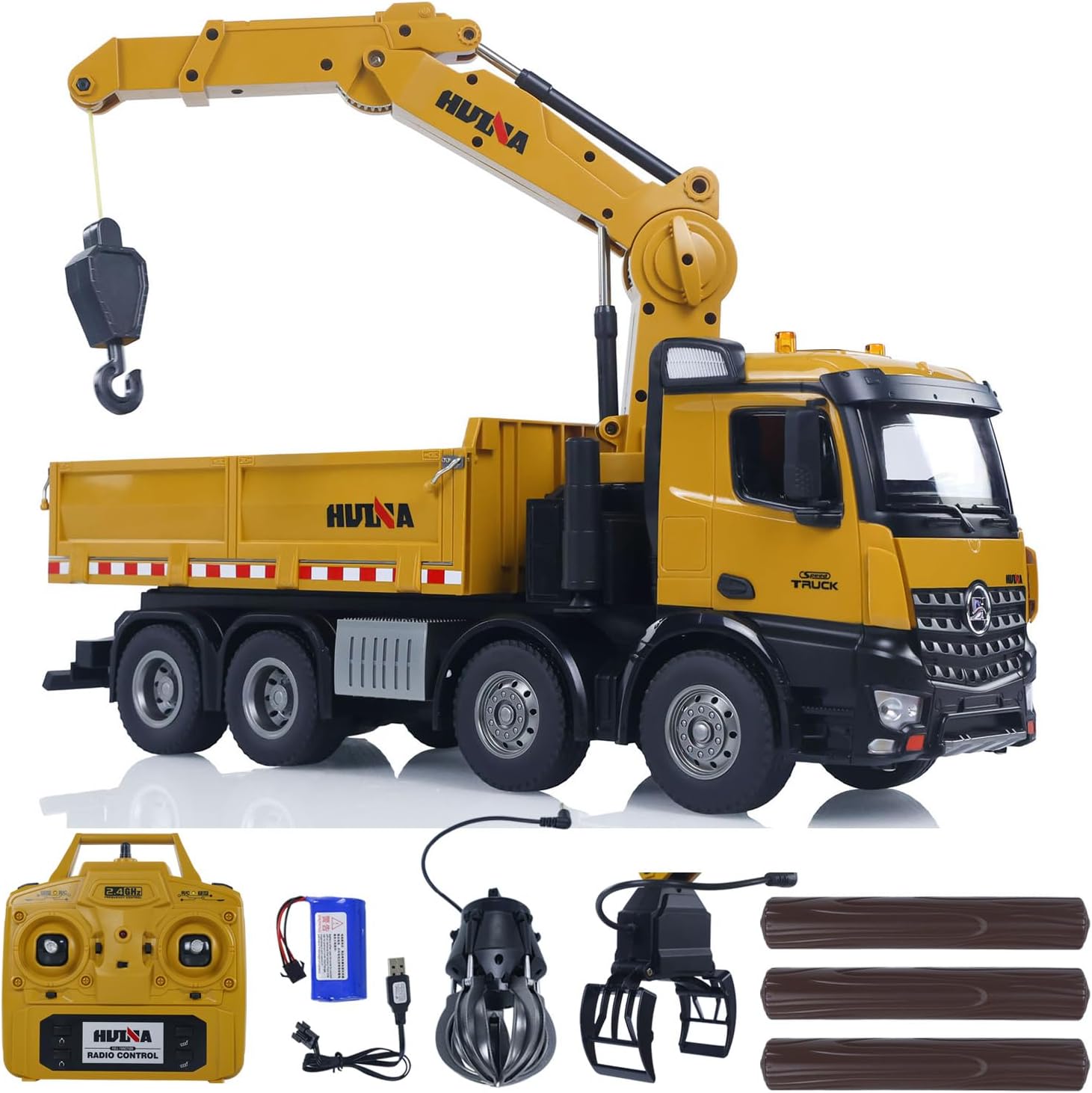
The HUINA 1575 RC Timber Grab Truck Dumper Model, showcasing the truck itself, the 2.4G radio controller, rechargeable battery, USB charging cable, and interchangeable grabber attachments including a timber grab and a standard bucket, along with simulated logs.
What's in the Box
Verify that all components listed below are included in your package:
- HUINA 1575 RC Timber Grab Truck Dumper Model
- 2.4G Radio Controller
- Rechargeable Lithium Battery (1200MAH)
- USB Charging Cable
- Timber Grab Attachment
- Shovel/Bucket Attachment
- Simulated Logs
- English Manual Book

A visual representation of the complete package contents, including the RC truck, remote control, battery, charging cable, and various attachments.
Specifications
| Model Number | TH24649-AMZUS2-S |
| Scale | 1:14 |
| Control Frequency | 2.4GHz |
| Battery | 1200MAH Lithium Battery (included) |
| Remote Control Channels | 10 Channels |
| Product Dimensions | 20 x 6.44 x 9.2 inches |
| Item Weight | 8 pounds |
| Material | Metal parts (axles, bucket, suspension) and durable plastic |

The HUINA 1575 RC truck demonstrating its 1:14 scale, positioned next to simulated logs, highlighting its realistic proportions and functionality.
Setup
1. Battery Installation and Charging
- Truck Battery: Locate the battery compartment on the underside of the truck. Open the compartment cover. Connect the included 1200MAH lithium battery to the truck's power connector. Securely place the battery inside and close the compartment.
- Charging the Truck Battery: Use the provided USB charging cable. Connect the battery to the USB cable, and then plug the USB cable into a standard USB power adapter (not included) or a computer USB port. The charging indicator light on the cable will show charging status (e.g., red for charging, green for fully charged). Charging typically takes 2-3 hours.
- Remote Controller Batteries: The remote controller requires 1 D battery (included). Open the battery compartment on the back of the remote controller. Insert the D battery, ensuring correct polarity (+/-). Close the compartment.
2. Power On/Off
- Truck: Locate the power switch on the truck (usually near the battery compartment). Slide it to the 'ON' position.
- Remote Controller: Slide the power switch on the remote controller to the 'ON' position.
3. Pairing (Binding)
The truck and remote controller are usually pre-paired. If they do not connect automatically:
- Ensure both the truck and remote controller are turned off.
- Turn on the truck. The truck's lights may flash, indicating it's waiting for a signal.
- Turn on the remote controller. The remote's indicator light should become solid, and the truck's lights should stop flashing, indicating a successful connection.
Operating Instructions
Familiarize yourself with the remote controller layout and functions before operating the truck.
Remote Controller Functions

A detailed front view of the HUINA 1575 RC truck, highlighting its realistic cab design, headlights, and grille.
- Left Joystick: Controls forward/backward movement and left/right steering.
- Right Joystick: Controls the main arm's up/down movement and the grabber's open/close function.
- Buttons: Specific buttons control additional functions such as:
- Dump Bed Up/Down: Raises and lowers the truck's dump bed.
- Grab Arm Rotation: Rotates the entire grab arm assembly (up to 600 degrees).
- Lights: Toggles the truck's headlights and taillights.
- Sound: Activates realistic engine sounds and horn.
Driving the Truck
- Forward/Backward: Push the left joystick forward to move the truck forward, pull it backward to move backward.
- Steering: While moving, push the left joystick left or right to steer the truck.
Operating the Grab Arm
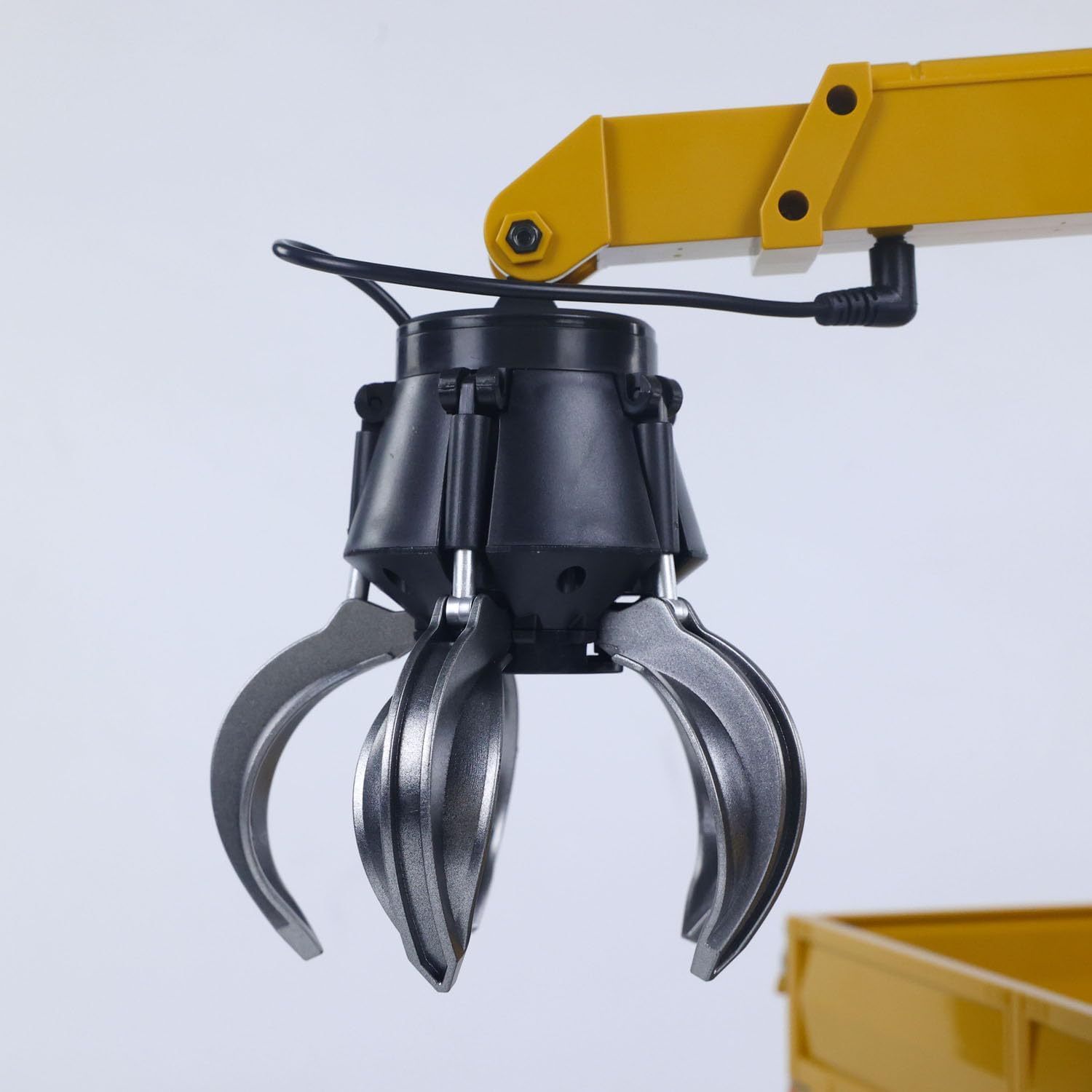
A detailed close-up of the timber grab attachment, showing its robust construction and articulated claws designed for gripping objects.
- Arm Up/Down: Use the right joystick to raise or lower the main grab arm.
- Grabber Open/Close: Use the right joystick to open or close the grabber claws.
- Arm Rotation: Press the dedicated button on the remote to rotate the entire grab arm assembly left or right. The arm can rotate up to 600 degrees for versatile operation.

The HUINA 1575 RC truck showcasing its grab arm's ability to rotate 600 degrees, providing extensive maneuverability for picking up objects like logs.
Operating the Dump Bed

The HUINA 1575 RC truck in action, demonstrating its hydraulic dumping functionality by unloading a pile of sand, showcasing the full range of motion of the dump bed.
- Raise Dump Bed: Press the designated button on the remote to raise the dump bed.
- Lower Dump Bed: Press the same button again or a separate button (refer to remote diagram) to lower the dump bed.
Maintenance
- Cleaning: After use, especially in dusty or dirty environments, wipe down the truck with a soft, dry cloth. Do not use water or harsh chemicals.
- Battery Care: Always fully charge the battery before first use. Do not overcharge or completely drain the battery. If storing for extended periods, charge the battery to about 50% and remove it from the truck.
- Storage: Store the model in a cool, dry place away from direct sunlight and extreme temperatures.
- Lubrication: Periodically check moving parts for smooth operation. If any joints or gears seem stiff, apply a small amount of RC-safe lubricant.
Troubleshooting
| Problem | Possible Cause | Solution |
| Truck does not respond to remote. | Low battery in truck or remote; Not paired; Power switch off. | Charge truck battery; Replace remote batteries; Ensure both are powered on; Re-pair the truck and remote. |
| Limited range or interference. | Environmental interference (other 2.4GHz devices); Obstacles. | Operate in an open area away from other electronic devices; Avoid operating near large metal structures. |
| Grab arm or dump bed not moving. | Low battery; Obstruction; Mechanical issue. | Charge truck battery; Check for any physical obstructions; If issue persists, contact support. |
| Lights or sounds not working. | Feature turned off; Low battery. | Ensure feature is activated via remote button; Charge truck battery. |
Warranty and Support
For warranty information or technical support, please refer to the contact details provided by your retailer or visit the official wheelfun website. Keep your purchase receipt as proof of purchase for any warranty claims.
Manufacturer: wheelfun
Recommended Age: 21 years and up
Ask a question about this manual
Ask about setup, troubleshooting, compatibility, parts, safety, or missing instructions. Manuals+ will review the question and use this page’s manual context to help answer it.