Product Overview
The ANCwear Cell Phone Stand with Wireless Bluetooth 5.4 Speaker is a versatile 2-in-1 device designed to enhance your audio and viewing experience. It combines a portable Bluetooth speaker with a foldable phone stand, offering convenience and high-quality sound for various uses.

The ANCwear speaker and phone stand in use, demonstrating its dual functionality.
What's in the Box
Your ANCwear Cell Phone Stand with Wireless Bluetooth 5.4 Speaker package includes the following items:
- Phone Stand Speaker x 1
- Power Cable x 1 (USB-C)
- Quick Start Guide x 1
- Hexagon Wrench x 1
- Portable Lanyard x 1

All components included in the product packaging.
Setup Guide
1. Initial Charging
Before first use, fully charge the device using the provided USB-C power cable. Connect the cable to the Type-C Charging Port (7) on the side of the speaker and plug the other end into a compatible USB power adapter (not included). The LED light (2) will indicate charging status.
2. Unfolding the Stand
Gently unfold the phone stand from its compact form. The dual-axis support structure allows for stable horizontal or vertical placement of your smartphone or tablet. Ensure the stand is fully extended and locked into position for stability.
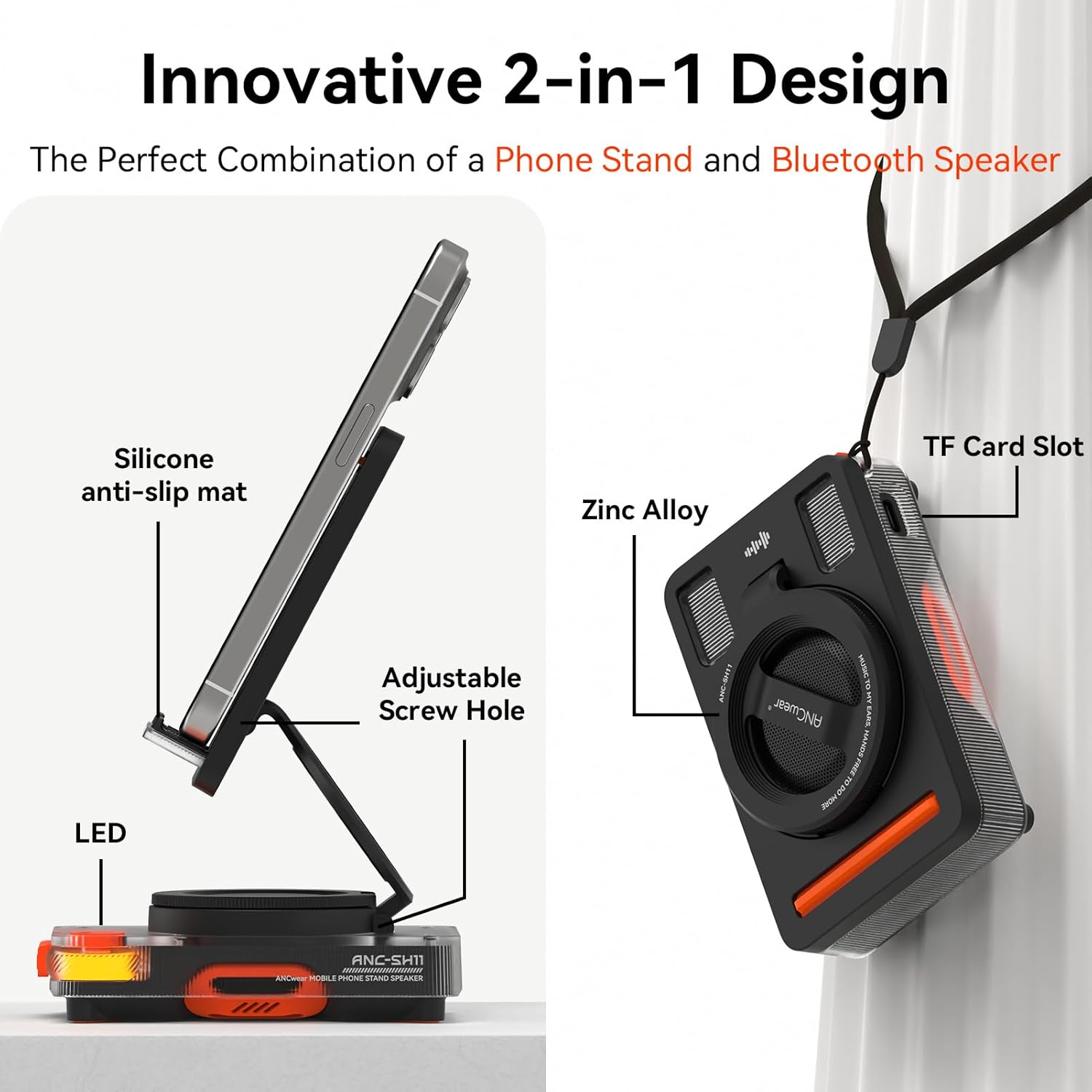
The phone stand unfolded, ready to hold a device.
3. Attaching the Portable Lanyard
Attach the portable lanyard to the designated slot on the speaker for easy carrying and portability.
Operating Instructions
1. Power On/Off
To power on the device, press and hold the Pause/Play button (4). The LED light will illuminate. To power off, press and hold the same button again.
2. Bluetooth Pairing
Once powered on, the speaker will automatically enter Bluetooth pairing mode. On your smartphone or tablet, enable Bluetooth and select "ANC-SH11" from the list of available devices. The LED light (2) will turn yellow when in BT Mode.
Demonstration of Bluetooth pairing and basic controls of the ANCwear speaker.
3. Volume Control
Adjust the volume by rotating the large rotary knob (1). Rotate clockwise for Volume + and counter-clockwise for Volume -.
4. Playback Control
- Pause/Play: Short press the Pause/Play button (4).
- Next Song: Short press the Next Song button (3).
- Previous Song: Short press the Previous Song button (5).
5. TF Card Mode
Insert a TF (microSD) card into the TF Card Slot (6) to play music directly from the card. Press and hold the Next Song button (3) to switch between Bluetooth and TF Card Mode. The LED light (2) will turn white when in TF Card Mode.

Detailed view of the speaker's controls and ports.
Maintenance
To ensure the longevity and optimal performance of your ANCwear speaker, follow these maintenance guidelines:
- Cleaning: Use a soft, dry cloth to wipe the surface of the speaker. Avoid using abrasive cleaners or solvents.
- Storage: Store the device in a cool, dry place away from direct sunlight and extreme temperatures.
- Handling: Handle the device with care. Avoid dropping it or subjecting it to strong impacts.
- Water Exposure: This device is not waterproof. Avoid exposure to water or high humidity.
Troubleshooting
| Problem | Possible Cause | Solution |
|---|---|---|
| Device does not power on. | Low battery. | Charge the device fully using the provided USB-C cable. |
| Cannot pair via Bluetooth. | Bluetooth not enabled on source device; speaker not in pairing mode; too far from device. | Ensure Bluetooth is enabled on your device. Power cycle the speaker to enter pairing mode. Move the speaker closer to your device. |
| No sound from speaker. | Volume too low; device not connected; incorrect mode (BT/TF Card). | Increase volume using the rotary knob. Verify Bluetooth connection or TF card insertion. Switch modes if necessary. |
| Phone stand is unstable. | Stand not fully unfolded or locked. | Ensure the dual-axis support structure is fully extended and locked into a stable position. |
Specifications
| Feature | Detail |
|---|---|
| Model Name | ANC-SH11 |
| Connectivity Technology | Bluetooth 5.4 |
| Speaker Type | Portable Bluetooth Speaker |
| Audio Driver Size | 45mm |
| Speaker Maximum Output Power | 3 Watts |
| Battery Life | Up to 6 hours (on a single charge) |
| Power Source | Battery Powered (1 Lithium Ion battery included) |
| Control Method | Touch, Rotary Knob |
| Material | PC, Metal, ABS |
| Product Dimensions | 4.1"D x 2.6"W x 1.3"H |
| Item Weight | 8.3 ounces (235 Grams) |
| Color | Black |
| Special Features | Portable, Foldable, Adjustable |
| Waterproof | No |
Warranty and Support
The ANCwear Cell Phone Stand with Wireless Bluetooth 5.4 Speaker comes with a Limited Warranty. For detailed warranty information or technical support, please refer to the Quick Start Guide included in your package or visit the official ANCwear website.
Manufacturer: ANCwear


