
1. Introduction
This manual provides instructions for the Jebao Doser 5.6 Bluetooth 6-Channel Auto Dosing Pump. This device is designed to automate the precise addition of liquid supplements to saltwater reef aquariums, such as calcium (CA), magnesium (MG), alkalinity (KH), or other liquid solutions. It features both manual and Bluetooth APP control for convenient operation and monitoring.

Image 1.1: The Jebao Doser 5.6 Bluetooth 6-Channel Auto Dosing Pump.
2. Safety Information
WARNING:
- Do not allow the power cord or plug to contact moisture or water.
- Do not use this product with corrosive, flammable, or toxic liquids.
- Always place the unit on a stable and level surface.
- Ensure the power supply voltage matches the requirements of the unit.
- Do not disassemble or modify the product.
- Do not operate the unit if it appears damaged.
- Consult a qualified professional for installation or repair if you are unsure.

Image 2.1: The Doser 5.6 unit, power adapter, and included user manual, which contains safety warnings.
3. Package Contents
Verify that all components are present in the package:
- Jebao Doser 5.6 unit
- AC Power Adapter
- Dosing Tubes (pre-attached or included separately)

Image 3.1: The Jebao Doser 5.6 unit and its retail box, illustrating typical package contents.
4. Product Features
The Jebao Doser 5.6 offers the following key features:
- Bluetooth Connection: Enables convenient wireless operation and monitoring via a dedicated mobile application.
- Dual Control System: Supports both manual control via the unit's buttons and APP control, featuring a visual LCD display for easy operation.
- Versatile Liquid Dosing: Suitable for precise dosing of various liquid supplements, including CA, MG, AB, KH water, and other solutions essential for aquarium maintenance.
- 6 Channel Dosing: Provides six independent dosing channels, allowing for the automated addition of multiple supplements simultaneously.
- Smart Automation Features: A simple and effective method to automate the addition of liquid supplements, trace elements, and two-part solutions to your aquarium.
- User-Friendly Configuration: Intuitive and robust configuration options are available through the Jebao App for easy customization of dosing schedules.

Image 4.1: The Doser 5.6 demonstrating its capability to dose various aquarium supplements.
5. Setup
- Unpack the Unit: Carefully remove the Doser 5.6 unit and all accessories from its packaging.
- Placement: Position the unit on a stable, level surface near your aquarium. Ensure it is in a dry area, away from direct splashes.
- Power Connection: Connect the AC adapter to the dosing pump's power input, then plug the adapter into a suitable power outlet.
- Tube Connection: Connect the dosing tubes to the pump heads (C1-C6). Route the inlet ends of the tubes into your respective supplement containers and the outlet ends into your aquarium or sump. Ensure tubes are securely fastened and free from kinks or obstructions.
- Initial Check: Verify all connections are secure and the unit powers on.

Image 5.1: Rear view of the Doser 5.6, showing mounting points and connection ports for tubes and power.
6. Operating Instructions
6.1. APP Control (Bluetooth)
- Download App: Download the official Jebao App from your mobile device's app store (iOS or Android).
- Enable Bluetooth: Ensure Bluetooth is enabled on your mobile device.
- Connect to Doser: Open the Jebao App and follow the on-screen instructions to search for and connect to your Doser 5.6 unit.
- Configure Dosing: Use the app's intuitive interface to set up dosing schedules, volumes, and frequencies for each of the six channels. You can customize daily intervals and specific dosing times.
- Monitor: The app provides a visual interface for monitoring the current status and programmed settings of your dosing pump.
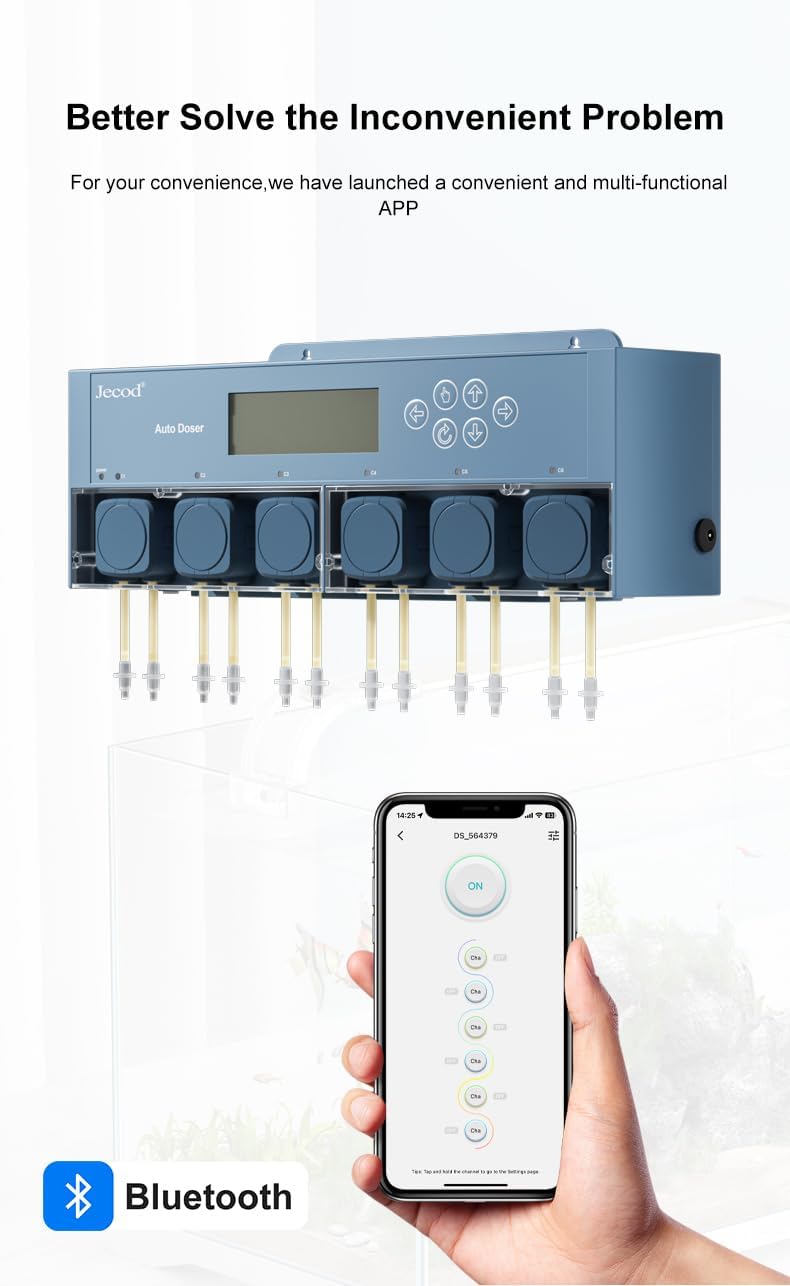
Image 6.1: The Doser 5.6 being controlled wirelessly via the Jebao smartphone application.

Image 6.2: Detailed views of the Jebao app interface for setting day intervals, channel schedules, and dosing volumes.
6.2. Manual Control
The Doser 5.6 also features a visual LCD display and control buttons for direct manual operation:
- Use the navigation buttons (up, down, left, right, enter) located on the unit's front panel to access menus and adjust settings.
- Follow the on-screen prompts on the LCD display to configure dosing parameters such as start time, stop time, and volume for each channel.
- The LCD display provides real-time information on the pump's status and current settings.

Image 6.3: Front view of the Doser 5.6, highlighting the LCD display and manual control buttons.
7. Maintenance
- Tube Inspection: Regularly inspect all dosing tubes for blockages, kinks, or signs of wear. Replace any damaged tubes promptly to ensure accurate dosing.
- Cleaning: Periodically clean the pump heads and the exterior of the unit to prevent salt creep or residue buildup, which can affect performance. Use a damp cloth; avoid harsh chemicals.
- Supplement Containers: Ensure supplement containers are clean and free from contaminants. Refill them before they run completely dry to prevent air from entering the dosing lines.
- Power Adapter: Check the power adapter and cable for any signs of damage or fraying. Replace if necessary.
8. Troubleshooting
| Problem | Possible Cause | Solution |
|---|---|---|
| Pump not turning on | No power, faulty adapter | Check power connection and AC adapter. Ensure the power outlet is functional. |
| Bluetooth connection issues | Bluetooth disabled, out of range, app error | Ensure Bluetooth is enabled on your device and the pump is within range. Restart the app and the dosing pump if necessary. |
| Inaccurate dosing volume | Air bubbles, blocked tubes, incorrect calibration, low supplement levels | Calibrate the pump heads according to the app or manual instructions. Check for air bubbles or blockages in the dosing lines. Ensure supplement levels in containers are sufficient. |
| Pump head stuck or not dosing | Debris, wear, or damage to pump head | Inspect the pump head for debris or damage. Clean or replace the pump head if necessary. |
| Programming lost | Power interruption, internal error | Re-enter settings via the app or manual controls. Ensure a stable power supply. |
9. Specifications
- Model: Doser 5.6
- Channels: 6
- Power Input: DC 12V 12W
- Maximum Flow Rate: 50 Liters Per Minute
- Maximum Lifting Height: 1.5 Meters (4.9 feet)
- Product Dimensions (L x W x H): 11.8 x 3.9 x 3.1 inches
- Item Weight: 2 Pounds
- Material: Stainless Steel (internal components), Plastic (housing)
- Color: Blue
10. Warranty and Support
For specific warranty information, terms, and conditions, please refer to the documentation included with your product or visit the official Jebao website. Keep your purchase receipt as proof of purchase for any warranty claims.
For technical support, troubleshooting assistance beyond this manual, or inquiries about replacement parts, please contact Jebao customer service through their official channels. Contact information can typically be found on the manufacturer's website or in the product packaging.