
1. Product Overview
The GPD Win Mini 2025 is a compact handheld gaming PC designed for portable gaming and productivity. It features a powerful AMD Ryzen 7 8840U processor, AMD Radeon 780M GPU, and a high-refresh-rate touchscreen display, offering a versatile computing experience.
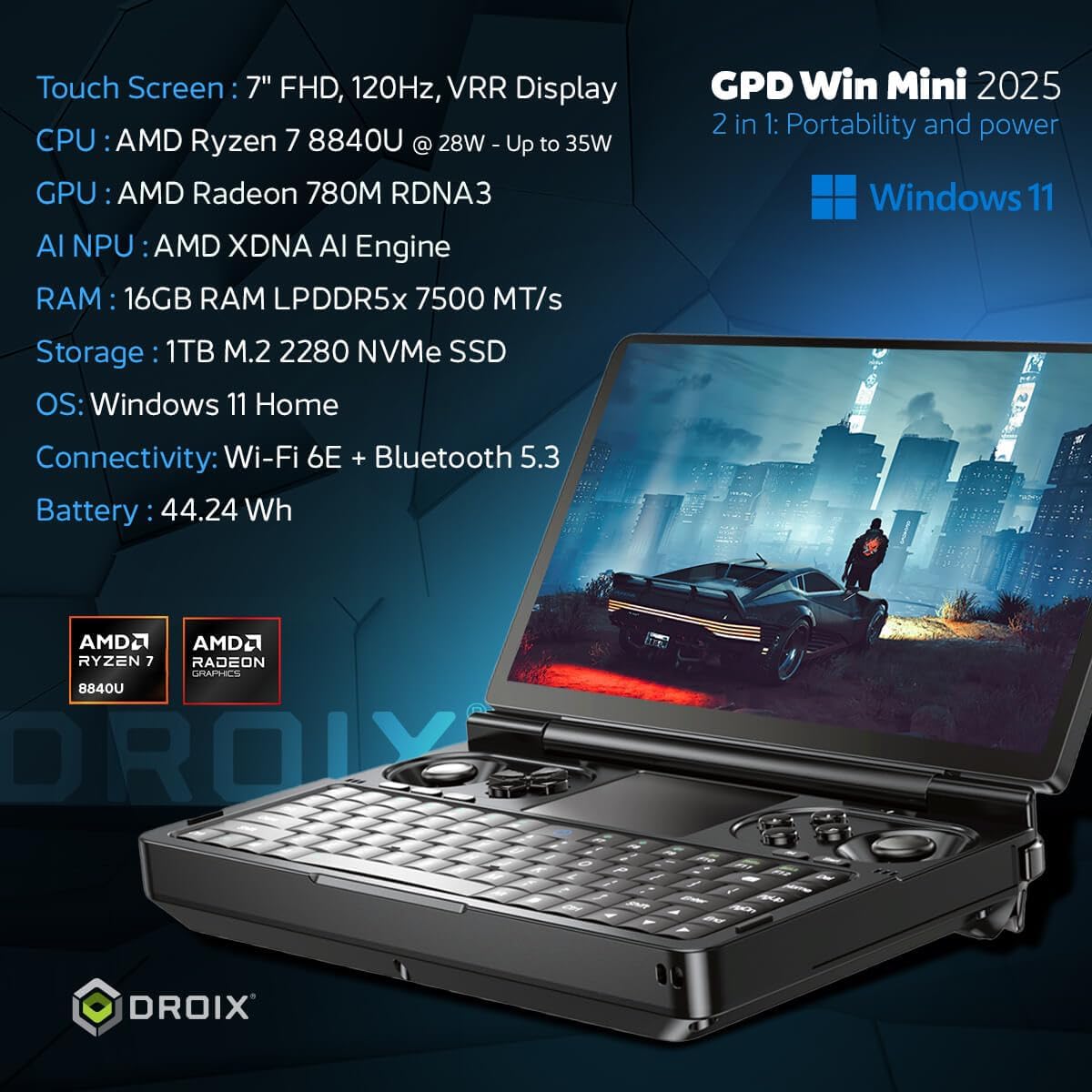
Image 1.1: GPD Win Mini 2025 showcasing its compact design and core specifications.
Key Features:
- Processor: AMD Ryzen 7 8840U (8 Cores, 16 Threads, up to 5.1GHz)
- Graphics: AMD Radeon 780M GPU (12 Compute Units, up to 2700MHz)
- Display: 7-inch LTPS Touchscreen, 1920x1080 resolution, 60Hz/120Hz refresh rate
- Memory: 16GB LPDDR5X RAM
- Storage: 1TB m.2 PCIe 4.0 NVMe SSD
- Connectivity: Wi-Fi 6E, Bluetooth 5.3, USB4, USB 3.2 Gen 2 Type-C, Micro SD card slot
2. What's in the Box
Upon unboxing your GPD Win Mini 2025, please ensure all the following items are present:
- 1x GPD WIN Mini 2025 Handheld Gaming PC
- 1x Power Adapter
- 1x USB Type-C Cable
- 1x Hand Strap
- 1x USB C to A Adapter
- 1x User Manual (this document)
3. Device Layout and Controls
Familiarize yourself with the physical layout and various ports of your GPD Win Mini 2025.

Image 3.1: Detailed view of the GPD Win Mini 2025's ports and controls.
Key Components:
- 7-inch LTPS Touchscreen: Main display for interaction.
- Integrated Keyboard: QWERTY layout for typing.
- Gamepad Controls: Joysticks, D-pad, action buttons, and shoulder buttons for gaming.
- Precision Touchpad: For mouse input.
- USB4 Type-C Port: High-speed data transfer, video output, and charging.
- USB 3.2 Gen 2 Type-C Port: Additional connectivity.
- USB-A Port: For standard USB peripherals.
- Micro SD Card Slot: For expandable storage.
- Combo Audio Jack: For headphones or headsets.
- Speakers: Built-in dual speakers.
- Exhaust Vent: For cooling the device.
4. Setup Guide
4.1 Initial Charging
- Connect the provided USB Type-C cable to the GPD Win Mini 2025's USB-C charging port.
- Plug the other end of the cable into the power adapter.
- Insert the power adapter into a wall outlet.
- Allow the device to charge fully before its first use. The charging indicator light will show the charging status.
4.2 Powering On
- Press and hold the power button located on the device for a few seconds until the screen illuminates.
- Follow the on-screen prompts to complete the initial Windows 11 setup, including language selection, network connection, and user account creation.
5. Operating Instructions
5.1 Using the Touchscreen
The 7-inch LTPS touchscreen supports multi-touch gestures. Use your fingers to navigate the Windows interface, launch applications, and interact with games.
5.2 Keyboard and Gamepad Input
- Keyboard: The integrated QWERTY keyboard functions like a standard laptop keyboard.
- Gamepad: The built-in gamepad controls are optimized for gaming. Ensure your game supports gamepad input or configure controls as needed.
- Mouse Toggle: Some models may feature a toggle to switch between gamepad and mouse input modes for the joysticks. Refer to the device's specific button layout.
5.3 Connecting Peripherals
- USB Devices: Connect USB-A devices (e.g., mouse, keyboard, external drive) to the USB-A port. Use the USB C to A adapter for additional USB-A connectivity via a USB-C port if needed.
- Bluetooth Devices: Pair Bluetooth peripherals (e.g., headphones, controllers) via Windows Bluetooth settings.
- External Display: Connect an external monitor using a USB-C to HDMI adapter or a compatible USB4 docking station.
5.4 Enhanced Gaming with eGPU
The GPD Win Mini 2025 supports external GPU (eGPU) solutions, such as the GPD G1, to significantly boost gaming performance and enable connection to multiple external displays. The eGPU is sold separately.

Image 5.1: GPD Win Mini 2025 demonstrating eGPU connectivity for improved gaming.
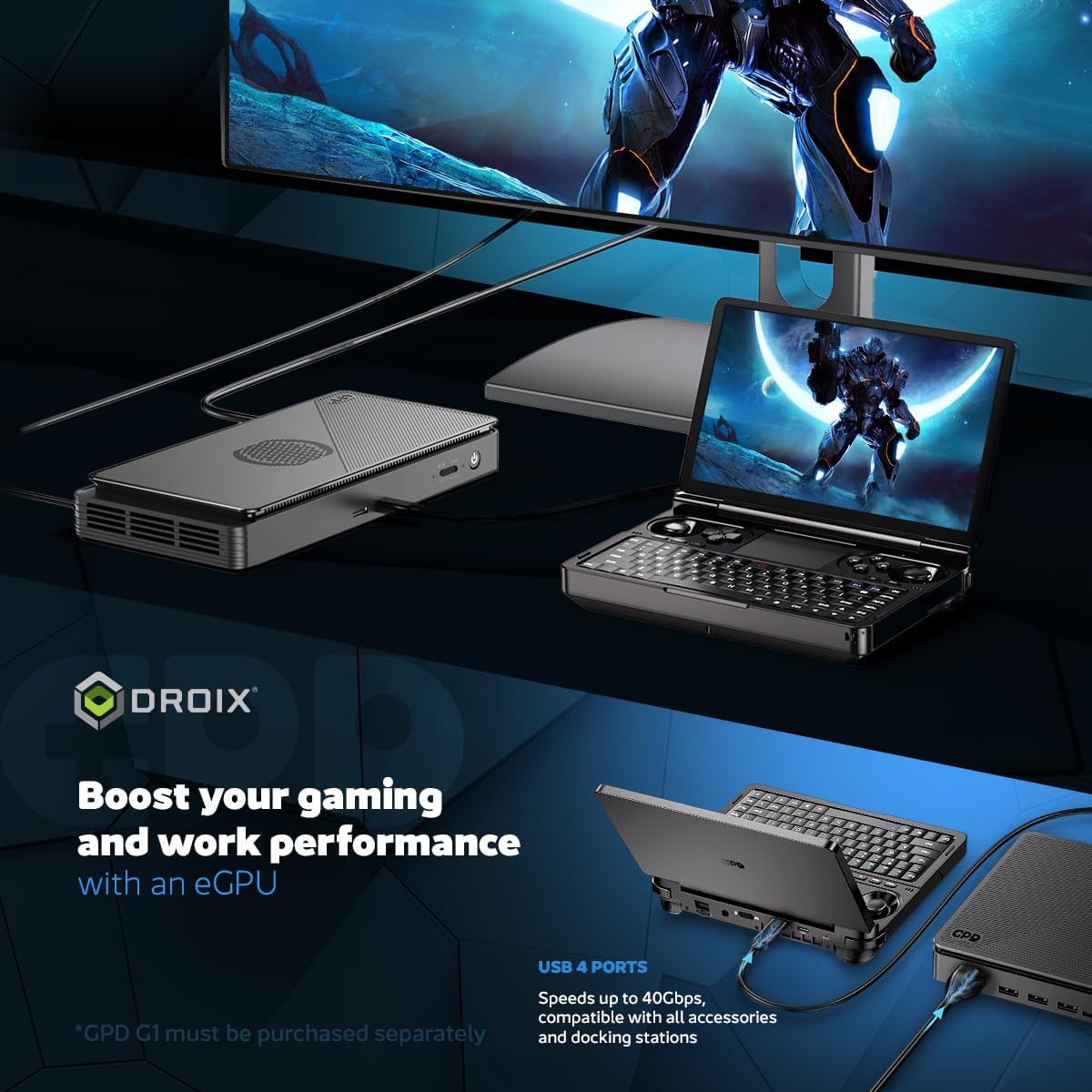
Image 5.2: The GPD Win Mini 2025 boosting performance with an eGPU for both gaming and work.
5.5 Battery Life and Cooling
The device features a 44.24 Wh battery, providing up to 7 hours of light use or up to 2 hours of extreme gaming. An advanced dual cooling system manages heat dissipation effectively.

Image 5.3: Illustration of the GPD Win Mini 2025's battery life and advanced cooling system.
6. Maintenance
6.1 Cleaning the Device
- Use a soft, lint-free cloth to wipe the screen and body. For stubborn smudges, slightly dampen the cloth with water or a screen-safe cleaner.
- Avoid using harsh chemicals, abrasive materials, or excessive moisture.
- Periodically clean the exhaust vents to ensure proper airflow and prevent overheating. Use compressed air if necessary, holding the can upright.
6.2 Battery Care
- To prolong battery life, avoid fully discharging the device frequently.
- Store the device in a cool, dry place when not in use for extended periods, ideally with the battery charged to around 50%.
- Use only the provided power adapter and USB-C cable for charging.
6.3 Software Updates
Regularly check for and install Windows updates to ensure optimal performance, security, and compatibility. You can find these in Windows Settings > Update & Security.
7. Troubleshooting
7.1 Device Not Powering On
- Ensure the device is fully charged. Connect it to the power adapter and wait for at least 15-30 minutes before attempting to power it on again.
- Try a different USB-C port or power outlet to rule out issues with the charging accessories or power source.
- Perform a hard reset by holding the power button for 10-15 seconds.
7.2 Charging Issues
- Verify that the power adapter and USB-C cable are securely connected to both the device and the power outlet.
- Check for any visible damage to the cable or adapter.
- Ensure the charging port on the device is free of debris.
7.3 Performance Issues / Lag
- Close unnecessary background applications to free up RAM and CPU resources.
- Ensure graphics drivers are up to date.
- Check the device's cooling vents for obstructions. Overheating can lead to performance throttling.
- Adjust in-game graphics settings to lower levels if experiencing frame rate drops.
7.4 Wi-Fi or Bluetooth Connectivity Problems
- Restart the device and your router/Bluetooth accessory.
- Ensure Wi-Fi and Bluetooth are enabled in Windows settings.
- Update wireless drivers if available.
7.5 General Software Issues
If you encounter persistent software problems, consider the following:
- Run Windows Troubleshooters for relevant issues (e.g., Internet Connections, Bluetooth).
- Perform a system restore to a previous point if the issue started recently.
- As a last resort, consider reinstalling Windows 11. Back up all important data before proceeding.
8. Specifications
| Feature | Detail |
|---|---|
| Brand | GPD |
| Operating System | Windows 11 Home |
| CPU Model | AMD Ryzen 7 8840U |
| CPU Speed | 5.1 GHz (Max Boost) |
| Graphics Coprocessor | AMD Radeon 780M GPU |
| RAM Memory Installed Size | 16 GB LPDDR5X |
| Memory Storage Capacity | 1 TB NVMe SSD |
| Screen Size | 7 inches |
| Display Resolution | 1920 x 1080 (1080p Full HD) |
| Refresh Rate | 60Hz/120Hz |
| Connectivity Technology | Bluetooth 5.3, USB, Wi-Fi 6E |
| Hardware Interface | USB Type C (USB4, USB 3.2 Gen 2), Micro SD |
| Item Dimensions | 4.29 x 6.61 x 1.02 inches |
| Item Weight | 520 g |
| Additional Features | Precision Touchpad, Joystick, Macro Keys, Analogue Triggers |
| Cooling Method | Active (Advanced Dual Cooling System) |
9. Warranty and Support
For warranty information, please refer to the documentation provided at the time of purchase or contact your retailer. GPD products typically come with a manufacturer's warranty covering defects in materials and workmanship.
For technical support, driver downloads, and frequently asked questions, please visit the official GPD support website or contact their customer service. You may also find assistance on the product's Amazon page:
10. Product Video Review
Watch an official review of the GPD Win Mini 2025 for a comprehensive look at its features and performance.
Video 10.1: A detailed review of the GPD Win Mini 2025, covering its design, performance, and user experience.