
AIPER HAH3
Aiper Pilot X1 Handheld Pool Vacuum Instruction Manual
Model: HAH3
Product Overview
The Aiper Pilot X1 is a cordless handheld pool vacuum designed for efficient cleaning of both inground and above-ground pools, spas, and hot tubs. It features powerful suction, dual cleaning modes for varying water depths, and a flexible head with an extendable pole for comprehensive cleaning.

Image: Aiper Pilot X1 handheld pool vacuum with its telescoping pole, ready for assembly and use.
What's in the Box
- 1 x Aiper Pilot X1 Pool Vacuum
- 1 x Extension Pole (Telescoping Pole)
- 1 x Charger
- 1 x Wall-Mounted Holder
- 2 x Filter Sleeves (Consumables)
- 1 x User Manual

Image: Components included in the Aiper Pilot X1 packaging, showing the vacuum, pole, charger, wall mount, and filter sleeves.
Setup
Initial Charging
Before first use, fully charge the Aiper Pilot X1. The charging time is approximately 2.5 hours. Ensure the charging port is dry before connecting the charger.

Image: The Aiper Pilot X1 charging while mounted on its wall holder, illustrating the quick charge feature.
Assembly
- Attach the telescoping pole to the vacuum handle. Ensure it is securely fastened.
- Select the appropriate filter option based on the debris type in your pool. Use the 360µm filter screen for larger debris (twigs, coarse sand, leaves). For finer particles (fine sand, dust), add the 100µm filter sleeve over the 360µm filter.

Image: Diagram illustrating the two filtration options: a 360µm filter for large debris and a 100µm filter sleeve for fine particles.
Operating Instructions
Cleaning Modes
The Pilot X1 offers dual depth cleaning modes for versatile use:
- Deep Mode (>20 inches / 50cm): Suitable for spas, inground, and above-ground pools, and corners.
- Shallow Mode (≥0.6 feet / 20cm): Ideal for pool steps, lounging areas, and hot tubs.
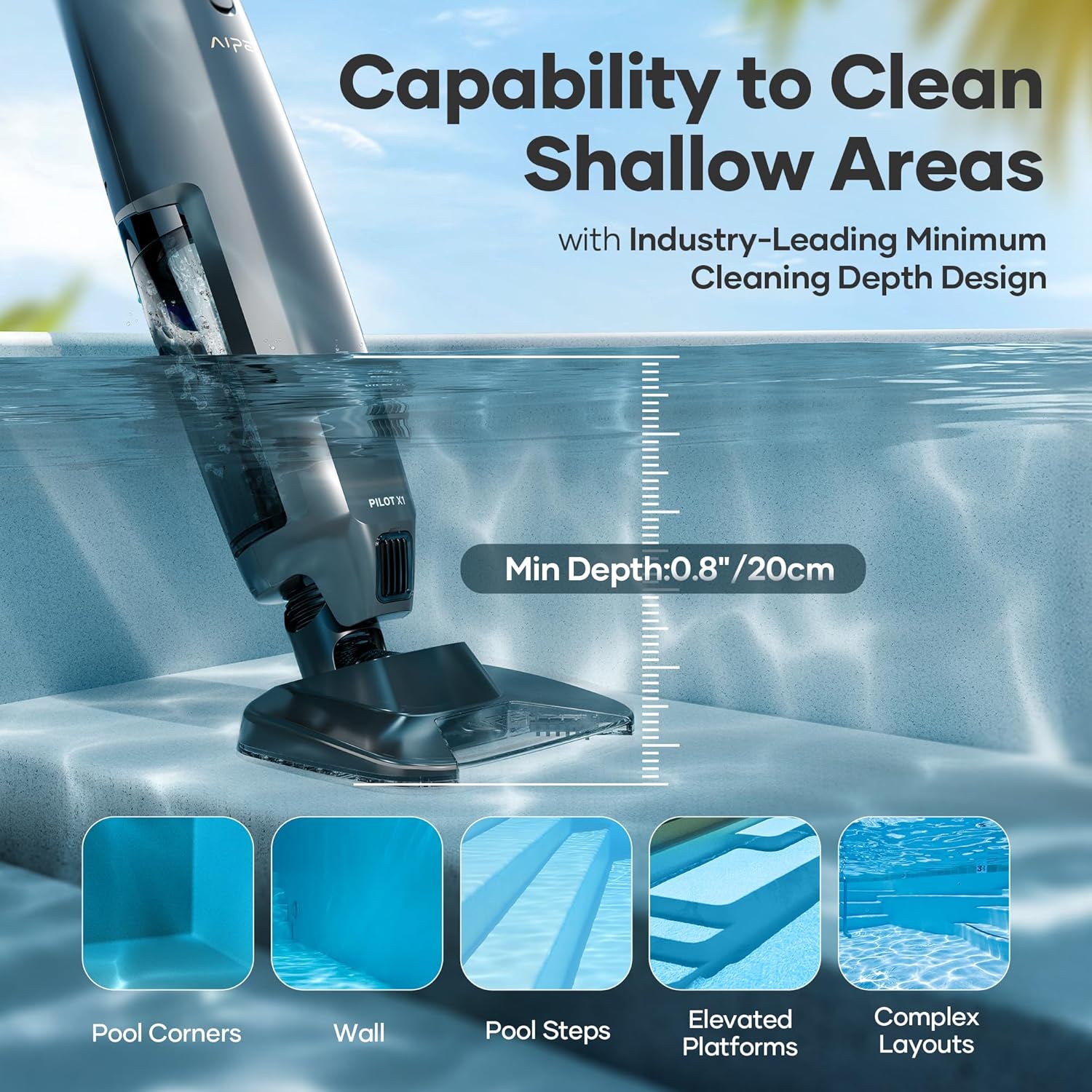
Image: The Aiper Pilot X1 demonstrating its capability to clean shallow areas like pool steps and corners.
Operation Steps
- Submerge the suction head into the pool water.
- Press the one-click activation button to start the vacuum. The 3-color LED indicator will show the current mode (Blue for Deep Water, Green for Shallow Water, Red for Low Battery).
- Move the vacuum slowly back and forth across the pool floor and surfaces to clean. The flexible vacuum head adapts to edges, corners, and curves.
- The telescoping pole extends from 59.05 inches (5 ft) to 98.43 inches (8.3 ft) to reach various areas of the pool.

Image: A person using the Aiper Pilot X1 with its extendable telescoping pole to clean a pool, showing the reach of the device.

Image: An illustration depicting the powerful 1260 GPH (21 GPM) suction of the Aiper Pilot X1, effectively capturing debris from the pool floor.
Maintenance
Debris Bin and Filter Cleaning
- When the debris bin is full, or after each use, remove it from the vacuum.
- Empty the collected debris.
- Rinse the debris bin and filter(s) thoroughly with a water hose.
- Allow all components to dry completely before reattaching them to the vacuum. This prevents clogging and extends the lifespan of the filter.

Image: A hand rinsing the filter basket of the Aiper Pilot X1 under running water, demonstrating ease of maintenance.
Storage
Store the Aiper Pilot X1 in a dry place when not in use to prevent battery and motor damage. The included wall-mounted holder simplifies storage and keeps your pool area organized.

Image: The Aiper Pilot X1 conveniently stored on a wall using its built-in hook, highlighting its space-saving design.
Troubleshooting
This section provides general guidance for common issues. For detailed troubleshooting, please refer to the full user manual or contact Aiper customer support.
| Problem | Possible Cause | Solution |
|---|---|---|
| Vacuum does not turn on. | Low battery or not charged. | Ensure the unit is fully charged before use. Check the LED indicator for battery status. |
| Reduced suction power. | Debris bin is full or filter is clogged. | Empty the debris bin and thoroughly clean the filter and filter sleeve. Ensure no large obstructions are blocking the suction inlet. |
| Debris falls out when lifting vacuum. | Debris bin is overfilled or seal is compromised. | Empty the debris bin more frequently. Ensure the bin is properly seated and sealed. |
| Unit stops working unexpectedly. | Battery depleted or internal issue. | Recharge the unit. If the problem persists after charging, contact Aiper customer support. |
Specifications
| Feature | Detail |
|---|---|
| Model Name | Aiper Pilot X1 |
| Item Model Number | HAH3 |
| Power Source | Battery Powered |
| Battery Type | Lithium-Ion (1 included) |
| Battery Energy Content | 28.08 Watt Hours |
| Charging Time | 2.5 Hours |
| Suction Power | 1260 GPH (21 GPM) |
| Filtration Options | 360µm filter screen, 100µm filter sleeve |
| Debris Bin Capacity | 1 Liter |
| Telescoping Pole Length | 59.05" (5 ft) to 98.43" (8.3 ft) |
| Item Weight | 7 Pounds |
| Product Dimensions | 8.6"L x 8.6"W x 59"H |
| Control Method | App (implied from spec, but manual operation is primary) |
| Special Features | Dual Depth Cleaning, Lightweight, Extendable Pole, Flexible Head |
Warranty and Support
The Aiper Pilot X1 comes with a 12-month limited protection warranty. This warranty covers manufacturing defects and ensures product reliability.
For warranty claims, technical support, or to inquire about complimentary consumable replacements, please contact Aiper customer service directly. You can find more information and contact details on the official Aiper website or through their Amazon store page:
Visit the Official AIPER Store on Amazon

Image: Aiper Care graphic detailing extended one-year warranty and complimentary consumable replacements, alongside various Aiper products.
Related documentsHAH3


Ask a question about this manual
Ask about setup, troubleshooting, compatibility, parts, safety, or missing instructions. Manuals+ will review the question and use this page’s manual context to help answer it.