
1. Safety Instructions
Please read all safety instructions carefully before using the EZVALO Wireless Under Cabinet Lights. Keep this manual for future reference.
- This product is designed for indoor use only. Do not expose to rain, moisture, or extreme temperatures.
- Do not immerse the light or battery in water or any other liquid.
- Use only the provided USB charging cables and ensure the power adapter meets the specified voltage requirements.
- Keep the device away from children and pets.
- Do not attempt to disassemble, repair, or modify the product. This will void the warranty.
- Avoid direct eye exposure to the LED light.
- Ensure the mounting surface is clean, dry, and stable before installation.
- Dispose of batteries according to local regulations. Do not incinerate batteries.
2. Package Contents
Verify that all items listed below are included in your package:
- 2 x EZVALO Wireless Under Cabinet Lights (38cm)
- 3 x Removable Rechargeable Batteries (2200mAh each)
- 2 x USB Charging Cables
- Mounting Hardware (magnets with adhesive backing)
- User Manual
3. Product Overview
The EZVALO Wireless Under Cabinet Light is designed to provide versatile illumination with adjustable color temperature, dimming, and motion sensing capabilities. Its magnetic design allows for easy installation and battery replacement.
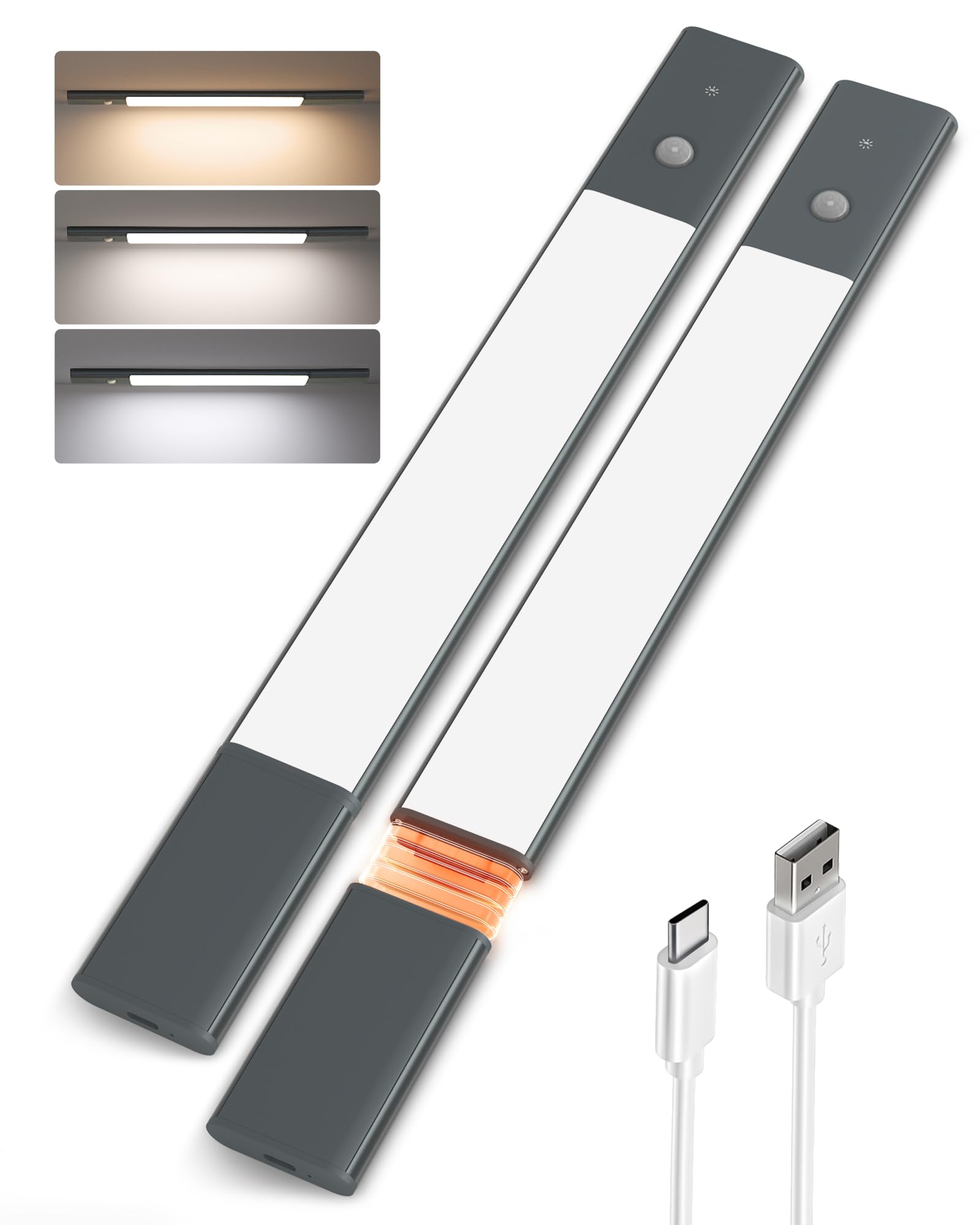
Image 1: EZVALO Wireless Under Cabinet Light. This image displays the main light bar, highlighting its sleek design and the removable battery compartment.
Key Components:
- LED Light Bar: Provides illumination.
- Removable Battery Compartment: Houses the rechargeable battery.
- Touch Switch: Controls power, modes, color temperature, and brightness.
- Motion Sensor: Detects movement for automatic light activation.
- USB Charging Port: For charging the removable battery.
- Magnetic Strips: Integrated into the light for easy mounting.
4. Setup and Installation
4.1. Charging the Battery
Before first use, fully charge the battery.
- Locate the removable battery compartment on the side of the light bar.
- Gently slide out the battery.
- Connect the provided USB charging cable to the battery's charging port and to a standard USB power adapter (not included).
- The indicator light on the battery will show charging status (e.g., red for charging, green for fully charged).
- Once fully charged, reinsert the battery into the light bar, ensuring it clicks securely into place.
4.2. Mounting the Light
The light can be easily mounted using its integrated magnets or the included adhesive magnetic strips.
- For Metal Surfaces: The light has built-in magnets. Simply attach the light directly to any magnetic metal surface (e.g., refrigerator, metal cabinet).
- For Non-Metal Surfaces:
- Clean the desired mounting surface thoroughly to ensure it is free of dust and grease.
- Peel off the protective film from one side of the adhesive magnetic strip.
- Firmly press the adhesive side onto the clean surface and hold for a few seconds.
- Attach the EZVALO light bar to the magnetic strip. The light will securely hold in place.
Recommended Locations: Under cabinets, inside wardrobes, stairwells, bookshelves, display cases, and other dark areas.
5. Operating Instructions
The EZVALO light is controlled via a single touch switch.
5.1. Power On/Off and Mode Selection
Short press the touch switch to cycle through the following modes:
- Mode 1: Always On (Constant Light) - The light remains continuously on.
- Mode 2: Motion Sensor (Day/Night) - The light will turn on automatically when motion is detected in a dark environment. It will turn off after 20 seconds of no motion.
- Mode 3: Motion Sensor (Night Only) - The light will turn on automatically when motion is detected only in a dark environment. It will turn off after 20 seconds of no motion.
- Mode 4: Off - The light is completely off.
5.2. Adjusting Color Temperature
When the light is in any 'On' mode (Always On or Motion Sensor active), double-tap the touch switch to cycle through the three color temperatures:
- Warm White (3500K): Soft, cozy light.
- Neutral White (4200K): Balanced, natural light.
- Cool White (5700K): Bright, energetic light.
5.3. Adjusting Brightness (Dimming)
When the light is in any 'On' mode, press and hold the touch switch to adjust the brightness from 10% to 100%. Release the switch when the desired brightness level is reached.
- Memory Function: The light will remember your last selected brightness level and color temperature when turned back on.
6. Battery Charging and Replacement
The EZVALO light features a removable battery for convenient charging.
6.1. Battery Life
- Approximately 5 hours at maximum brightness in 'Always On' mode.
- Approximately 6 to 18 days in motion sensor mode, depending on usage frequency.
6.2. Charging the Battery
Follow the steps outlined in Section 4.1 to charge the battery. The removable design allows you to charge the battery independently without removing the entire light fixture.
6.3. Replacing the Battery
If you have a spare charged battery, you can quickly swap it out:
- Gently slide out the depleted battery from the light bar.
- Insert a fully charged battery into the compartment, ensuring it is correctly oriented and clicks into place.
7. Maintenance
To ensure optimal performance and longevity of your EZVALO lights:
- Cleaning: Wipe the light surface with a soft, dry cloth. Do not use abrasive cleaners or solvents.
- Storage: If storing the lights for an extended period, ensure the batteries are partially charged (around 50%) and store in a cool, dry place. Recharge every 3-6 months to prevent deep discharge.
- Battery Care: Avoid overcharging or completely draining the battery frequently to prolong its lifespan.
8. Troubleshooting
If you encounter any issues with your EZVALO Wireless Under Cabinet Lights, refer to the table below for common problems and solutions.
| Problem | Possible Cause | Solution |
|---|---|---|
| Light does not turn on. | Battery is depleted or not inserted correctly. | Charge the battery fully and ensure it is securely inserted. |
| Motion sensor is not working. | Incorrect mode selected or ambient light is too bright. | Ensure the light is in Motion Sensor (Day/Night or Night Only) mode. Test in a darker environment for 'Night Only' mode. Ensure the sensor is not obstructed. |
| Light flickers or is dim. | Low battery. | Recharge the battery. |
| Battery not charging. | Faulty USB cable or power adapter. | Try a different USB cable and power adapter. Ensure the battery is correctly connected. |
9. Specifications
- Model: 1
- Dimensions (L x W x H): 37.9 x 8.4 x 1.7 cm (14.9 x 3.3 x 0.7 inches)
- Weight: 510 grams (1.12 lbs)
- Material: Aluminum
- Color: Black
- Battery: 2200mAh Rechargeable (x3 included)
- Input Voltage: 5V DC (via USB)
- Light Source: LED
- Number of LEDs: 6 (per light bar)
- Color Temperatures: 3500K (Warm White), 4200K (Neutral White), 5700K (Cool White)
- Brightness: 10% - 100% Dimmable
- Control Method: Touch Switch
- Sensor Type: Motion Sensor (PIR)
- Motion Detection Range: 120° / 3 meters (approx. 9.8 feet)
- Auto-off Time: 20 seconds (after no motion detected)
- Waterproof Level: Not waterproof (IP20)
- Fixture Type: Under Cabinet Light
- Mounting Type: Magnetic / Adhesive
10. Warranty and Support
EZVALO products are manufactured to high-quality standards. In the unlikely event of any issues or defects, please contact EZVALO customer support directly.
For assistance, product information, or warranty claims, please refer to the contact information provided on your purchase platform or the official EZVALO website. Please have your product model number (Model: 1) and purchase details ready when contacting support.