
1. Introduction
The UGREEN 65856 USB-C Video Capture Card is designed for high-quality video capture and streaming. It supports up to 2K@30Hz video capture and 4K@30Hz HDMI loop-out, making it suitable for various applications including live streaming, gaming, video conferencing, and content creation. This device features 100W Power Delivery (PD) for simultaneous charging of input devices and offers broad compatibility with multiple operating systems and streaming platforms.
2. Product Features
- USB 3.0 2K@30Hz Capture: Supports video capture up to 2K at 30 frames per second (FPS), backward compatible with 1080P at 60FPS via USB 3.0.
- 4K@30Hz HDMI Loop-Out: Provides a 4K@30Hz HDMI loop-out for real-time monitoring without delay. Compatible with HDMI 1.4.
- 100W Power Delivery (PD): Features a USB-C port for 100W fast charging (PD 3.0 protocol) of input devices like Switch and Steam Deck. Note: Does not charge output devices such as PCs, laptops, or Quest 3.
- YUY2 Format Support: Delivers uncompressed video quality, ideal for professional applications. Also supports MJPEG for easier transfer.
- Durable Construction: Aluminum alloy casing for efficient heat dissipation and EMI shielding. Built-in cable with tinned copper conductors for stable signal transmission and low latency.

Image: The capture card supports both YUY2 (uncompressed quality) and MJPEG (compressed for easy transfer) video formats.

Image: Illustration of smooth 60 FPS capture, highlighting reduced latency and improved image quality.
3. Package Contents
The package typically includes:
- UGREEN USB-C Video Capture Card (Model: 65856)
- Instruction Manual
4. System Requirements
The UGREEN 65856 Video Capture Card is designed for broad compatibility:
- Operating Systems: Windows 11/10/8.1/7, MacOS, Linux, Android, iPadOS (version 17 or later for USB-C iPad compatibility).
- Supported Software: OBS Studio, VLC, PotPlayer, QuickTime Player, Streamlabs, XSplit, Wirecast.
- Supported Platforms: YouTube, Facebook, Twitter, Twitch.

Image: The capture card offers driver-free setup and is compatible with various operating systems and streaming applications.
5. Setup Guide
Follow these steps to set up your UGREEN USB-C Video Capture Card:
- Connect Input Device: Connect your video source (e.g., Switch, Steam Deck, phone, laptop) to the USB-C input cable of the capture card.
- Connect Output Device: Connect the USB-A/C output cable of the capture card to your recording/streaming device (e.g., iPad, laptop, PC).
- Connect HDMI Loop-Out (Optional): For real-time monitoring, connect an HDMI cable from the capture card's HDMI Loop-Out port to an external display (TV or monitor).
- Connect Power (Optional but Recommended): If your input device requires charging or for stable operation, connect a power adapter (e.g., 100W PD charger) to the USB-C Charging Port on the capture card. For Nintendo Switch, a 15V/1A or above power adapter is recommended.
- Driver-Free Operation: The device is plug-and-play and typically does not require additional driver installation. Your computer or compatible device should recognize it automatically.
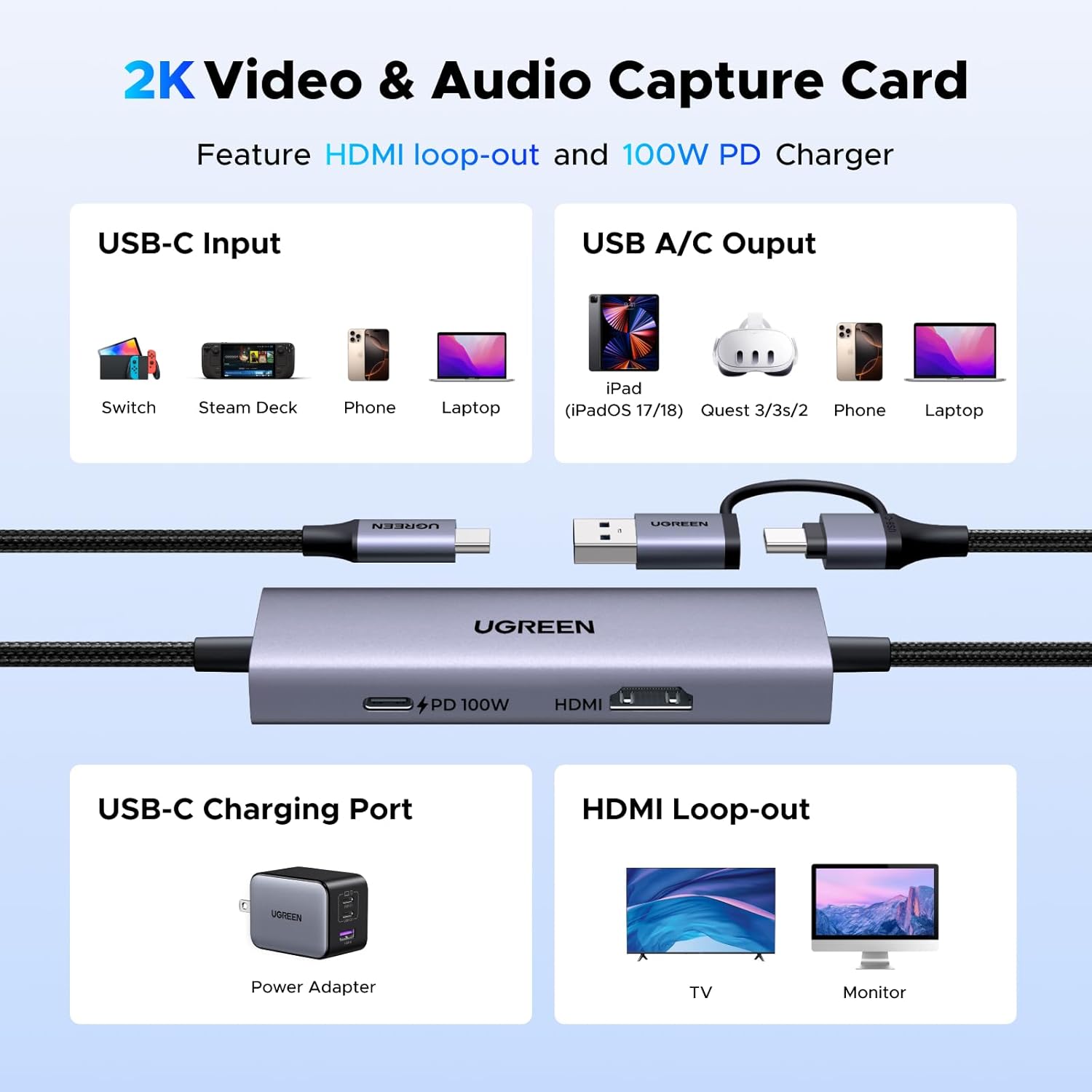
Image: Diagram illustrating the various ports and connections of the UGREEN 2K Video & Audio Capture Card.

Image: Setup example showing the capture card facilitating 2K capture from a Steam Deck to a laptop, with 4K loop-out to an external monitor.
6. Operation Guide
Once connected, you can begin capturing or streaming:
- Launch Streaming/Recording Software: Open your preferred software (e.g., OBS Studio, VLC) on your output device (PC, laptop, iPad).
- Add Video Source: In your software, add a new video capture device source. The UGREEN capture card should appear as an available option.
- Configure Settings: Adjust resolution, frame rate, and other settings within your software as needed. The card supports up to 2K@30Hz capture and 1080P@60FPS.
- Start Streaming/Recording: Initiate your stream or recording session. The HDMI loop-out will display the input signal on your external monitor without delay.

Image: A user immersed in VR gaming, with the UGREEN capture card connected to a Steam Deck and a VR headset, enabling capture of the VR experience.

Image: A user capturing Nintendo Switch gameplay to an iPad, demonstrating simultaneous streaming and charging capabilities. Note: A 15V/1A or above power adapter is required for Switch.
7. Power Delivery Functionality
The UGREEN 65856 capture card includes a dedicated USB-C PD port for power input:
- Supports up to 100W Power Delivery (PD 3.0).
- Designed to charge the input device only (e.g., Nintendo Switch, Steam Deck) while capturing or streaming.
- It does not provide power to output devices such as PCs, laptops, or Meta Quest 3.
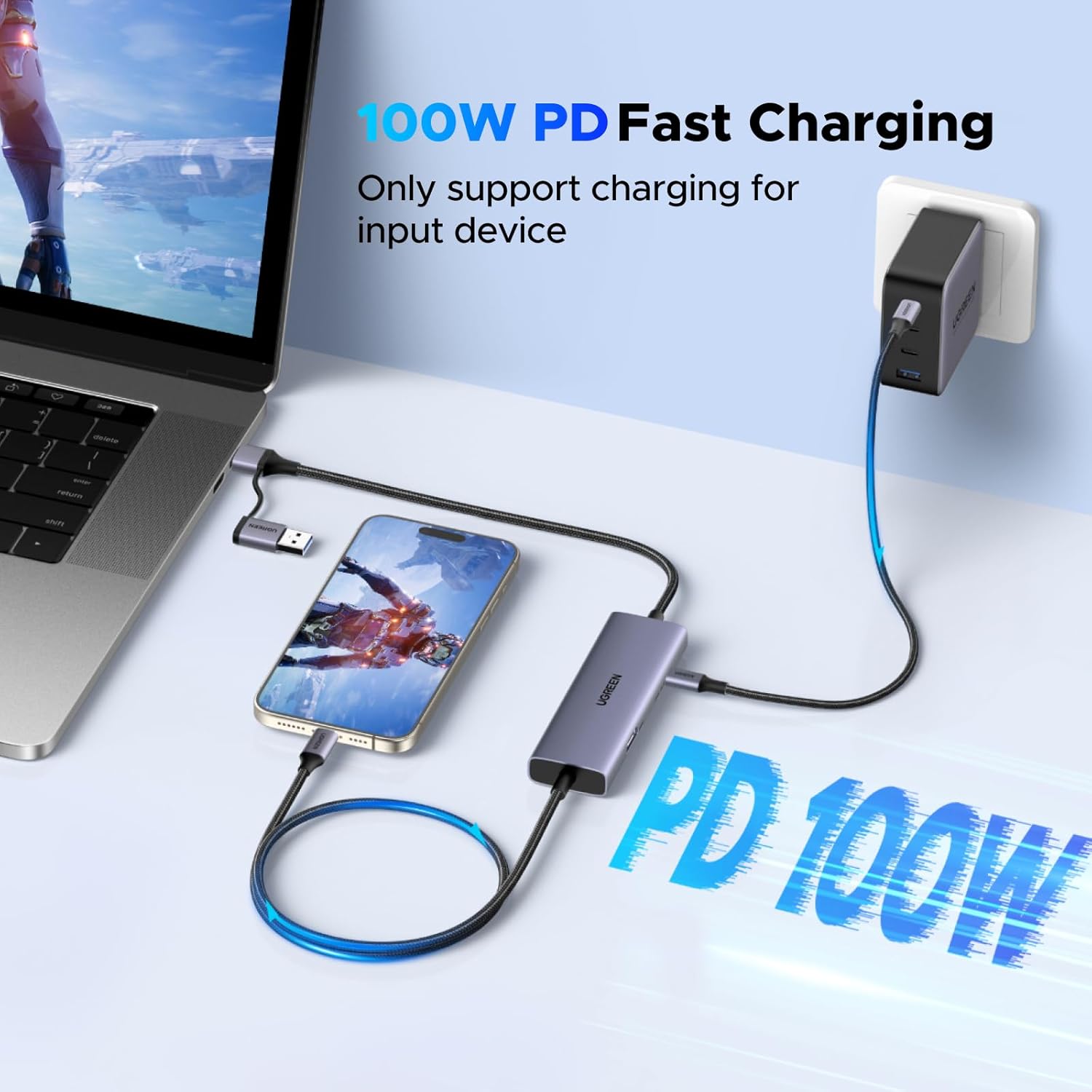
Image: The capture card providing 100W PD fast charging to an input device (phone) while connected to a laptop.
8. Troubleshooting (Q&A)
- Q1: Is this capture card good for VR?
A1: Yes. It is compatible with Meta Quest 3/2 as an output device. - Q2: Can I charge my Switch or Steam Deck while capturing video?
A2: Yes. The capture card supports up to 100W PD pass-through charging for Switch and Steam Deck while it does not charge for output devices such as Quest 3, laptops. - Q3: Can I monitor gameplay while streaming?
A3: Yes. The HDMI loop-out supports up to 4K@30Hz, allowing real-time gameplay monitoring on an external display while streaming or recording. - Q4: Does it work with PS4, PS5, Xbox, or other HDMI consoles?
A4: No. This capture card does not support PS4, PS5, Xbox, or other HDMI-only consoles. It supports USB-C source devices such as Switch, Steam Deck, mobile devices, and VR headsets. - Q5: Does it support OBS with low latency?
A5: Yes. It works seamlessly with OBS Studio and delivers low-latency 2K 30fps capture, making it ideal for live game streaming and real-time recording.
9. Technical Specifications
| Feature | Specification |
|---|---|
| Model Number | 65856 |
| Capture Resolution | Up to 2K@30Hz (2560x1440@30Hz), 1080P@60Hz |
| HDMI Loop-Out Resolution | Up to 4K@30Hz |
| Input Interface | USB-C |
| Output Interface | USB-A / USB-C (via adapter) |
| Power Delivery | 100W PD 3.0 (for input device charging) |
| Video Format Support | YUY2 (uncompressed), MJPEG (compressed) |
| Dimensions | 7.05 x 4.72 x 0.83 inches |
| Item Weight | 6 ounces |
| Material | Aluminum Alloy |
10. Care and Maintenance
- Keep the device in a dry environment and away from direct sunlight.
- Avoid exposing the device to extreme temperatures or humidity.
- Clean the device with a soft, dry cloth. Do not use liquid cleaners or aerosols.
- Do not attempt to disassemble or repair the device yourself. This may void the warranty.
11. Warranty and Support
UGREEN products come with a standard manufacturer's warranty. For detailed warranty information, technical support, or service inquiries, please refer to the official UGREEN website or contact their customer support directly. Please retain your proof of purchase for warranty claims.