Introduction
This instruction manual provides detailed guidance for the installation, operation, and maintenance of your UGREEN 5-Port Gigabit Ethernet Network Switch. Please read this manual thoroughly before using the device to ensure proper functionality and to prevent damage. Keep this manual for future reference.
Package Contents
Verify that all items listed below are present in your package:
- 1 x UGREEN 5-Port Gigabit Ethernet Network Switch (Model CM833)
- 1 x User Guide
- 1 x DC Power Adapter (DC 5V 1A)

Image: The UGREEN 5-Port Gigabit Ethernet Network Switch, its DC power adapter, and the user guide, illustrating the complete package contents.
Product Overview
The UGREEN 5-Port Gigabit Ethernet Network Switch is designed to expand your wired network connectivity, providing high-speed and stable internet access for multiple devices. It features a compact, fanless design for quiet operation and supports wall-mounting for space-saving installation.
Key Features:
- 5 Gigabit RJ45 Ports: Provides 1000Mbps high-speed transmission for each port, ensuring fast and stable wired connections.
- Plug-and-Play: Requires no configuration, allowing for easy setup and immediate network expansion.
- Compact Design: Small and portable, suitable for various environments.
- Wall-Mounting Capability: Equipped with mounting holes for flexible placement and space optimization.
- Fanless Operation: Ensures silent performance, ideal for noise-sensitive areas.
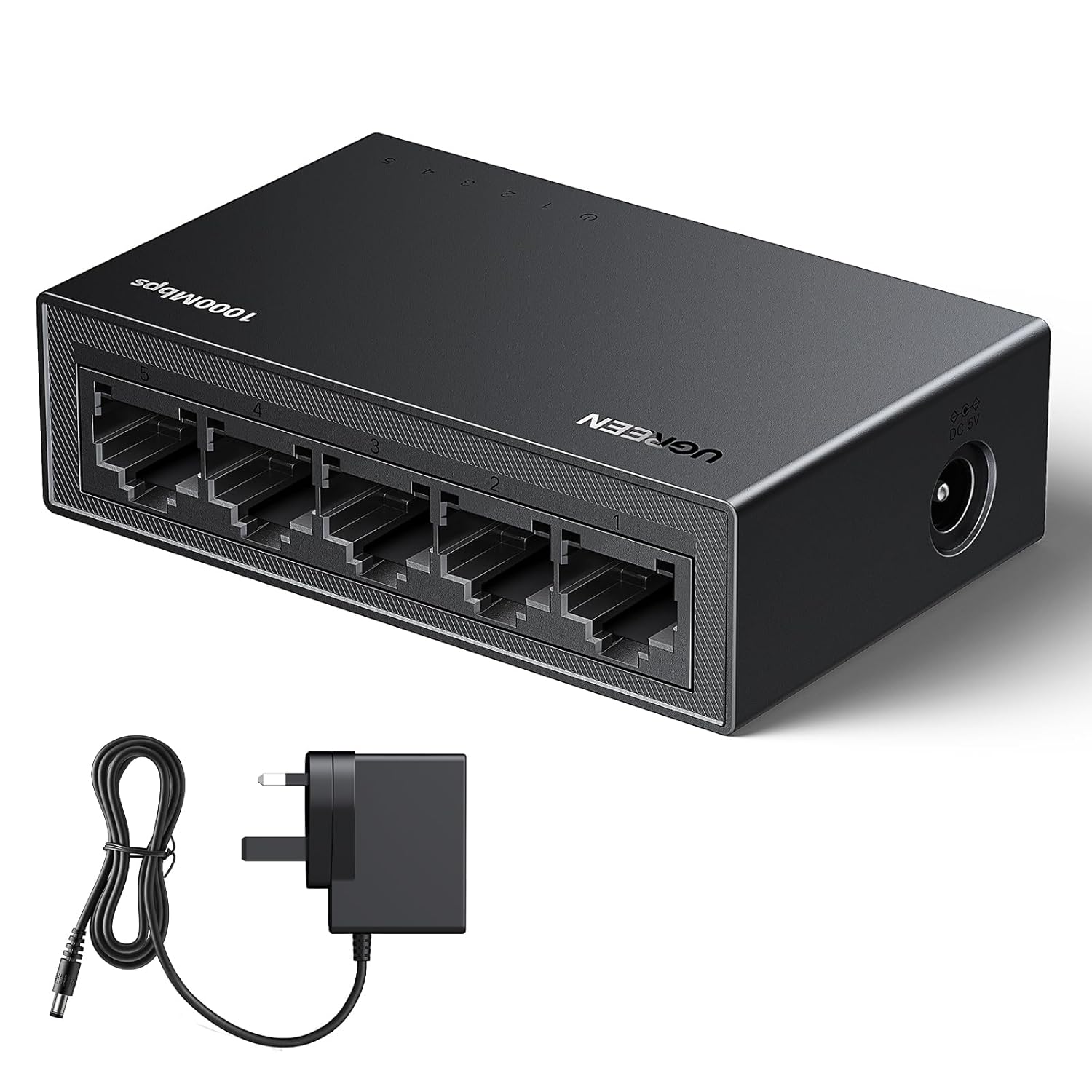
Image: A comprehensive view of the UGREEN 5-Port Gigabit Ethernet Network Switch, showcasing its compact form factor and the included power adapter.
Setup Instructions
Follow these steps to set up your UGREEN Network Switch:
- Connect the Power Adapter: Insert the DC power adapter into the power port on the switch and then plug the adapter into a standard electrical outlet. The power LED indicator on the switch should illuminate.
- Connect to Your Router/Modem: Take an Ethernet cable (not included) and connect one end to an available LAN port on your router or modem. Connect the other end of this cable to any of the 5 RJ45 ports on the UGREEN Network Switch.
- Connect Your Devices: Use additional Ethernet cables to connect your devices (e.g., computers, laptops, gaming consoles, smart TVs, network printers, security cameras) to the remaining RJ45 ports on the UGREEN Network Switch.
- Verify Connection: Once devices are connected, the corresponding LED indicators on the switch for each active port should light up, indicating a successful connection. Your devices should now have wired internet access.

Image: An illustration demonstrating how to expand your network by connecting an internet router to the UGREEN Ethernet Switch, which then distributes the connection to multiple devices such as a TV, game console, computer, and security camera.

Image: This diagram highlights the plug-and-play nature of the switch, indicating that any network port can function as either an upstream or downstream connection, simplifying setup.
Wall-Mounting (Optional):
The switch includes wall-mounting holes for convenient placement. Use appropriate screws (not included) to secure the switch to a wall or other vertical surface, ensuring the ports are accessible.

Image: The UGREEN Ethernet Switch is shown mounted on a wall, demonstrating its space-saving design and how it can be integrated into a home entertainment setup.
Operating Instructions
The UGREEN Network Switch operates automatically once connected. It is a plug-and-play device that requires no software installation or configuration.
- Automatic Negotiation: The switch automatically detects the network speed (10/100/1000Mbps) and duplex mode (half/full) of connected devices.
- LED Indicators: Each RJ45 port has an associated LED indicator. A solid green light typically indicates a stable link, and a blinking light indicates data activity.
- Power On/Off: To power off the device, simply unplug the DC power adapter from the electrical outlet.

Image: A detailed view of the UGREEN 5-Port Gigabit Ethernet Network Switch, emphasizing its 1000Mbps bidirectional transmission rate for high-speed data transfer.
Maintenance
To ensure the longevity and optimal performance of your UGREEN Network Switch, follow these maintenance guidelines:
- Cleaning: Use a soft, dry cloth to clean the exterior of the switch. Do not use liquid cleaners or aerosols.
- Ventilation: Ensure the switch is placed in a well-ventilated area to prevent overheating. Do not block any ventilation openings.
- Environment: Avoid exposing the switch to extreme temperatures, humidity, or direct sunlight.
- Cable Management: Keep Ethernet cables neatly organized to prevent strain on the ports and accidental disconnections.
Troubleshooting
If you encounter issues with your UGREEN Network Switch, refer to the following common problems and solutions:
- No Power:
- Ensure the power adapter is securely connected to both the switch and a working electrical outlet.
- Verify that the power outlet is functional by plugging in another device.
- No Network Connection on a Device:
- Check the Ethernet cable connecting the device to the switch. Ensure it is securely plugged into both ends.
- Verify the LED indicator for that specific port on the switch. If it's off, try a different port or cable.
- Ensure the main Ethernet cable from your router/modem to the switch is properly connected and functioning.
- Restart the connected device, the switch, and your router/modem.
- Slow Network Speed:
- Ensure you are using Cat5e or Cat6 Ethernet cables for Gigabit speeds. Older Cat5 cables may limit speed.
- Check the network settings on your connected device to ensure it is configured for Gigabit Ethernet.
- Test the speed directly from your router/modem to isolate if the issue is with the switch or the internet service provider.
Specifications
| Model Number | CM833 |
| Ports | 5 x 10/100/1000Mbps RJ45 Ports |
| Transmission Rate | 1000Mbps (Gigabit Ethernet) |
| Power Input | DC 5V 1A |
| Dimensions (L x W x H) | 8.3 x 5.2 x 2.4 cm |
| Item Weight | 140 g |
| Special Features | High Speed, Plug & Play, Wall-Mountable, Fanless Design |
| Compatible Devices | Desktop, Laptop, Printer, Router, Tablet, Game Console, Smart TV, Security Camera |

Image: The UGREEN Ethernet Switch is displayed alongside a credit card to illustrate its compact size, measuring 83mm in length and 52mm in width.
Warranty and Support
UGREEN products typically come with a standard manufacturer's warranty. Please refer to the warranty card included in your package or visit the official UGREEN website for detailed warranty terms and conditions.
For technical support, product inquiries, or warranty claims, please contact UGREEN customer service through their official website or the contact information provided in your user guide.
UGREEN Official Website: www.ugreen.com


