
Introduction
This manual provides detailed instructions for the safe and efficient use of your DOOGEE Note58 Pro Smartphone. Please read this manual thoroughly before operating your device to ensure optimal performance and longevity. The DOOGEE Note58 Pro is a 4G smartphone running Android 15, featuring a 6.75-inch HD+ 90Hz display, a 16MP AI camera, an Octa-Core processor, 32GB RAM, 256GB ROM, and a 6250mAh battery.

Image: Front and back view of the DOOGEE Note58 Pro Smartphone, highlighting its display and camera module.
What's in the Box
Upon opening the package, please verify that all the following items are included:
- 1 x DOOGEE Note58 Pro Smartphone
- 1 x USB Type-C cable
- 1 x Charger
- 1 x Pre-applied protective film
- 1 x SIM card ejector pin
- 1 x Packaging box
- 1 x User Manual
- 1 x Protective case

Image: All items included in the DOOGEE Note58 Pro retail package, neatly arranged.
Setup
1. Inserting SIM Cards and MicroSD Card
- Locate the SIM card tray on the side of the device.
- Insert the SIM ejector pin into the small hole next to the tray and push gently until the tray pops out.
- Place your Nano-SIM card(s) and/or MicroSD card into the designated slots on the tray. The DOOGEE Note58 Pro supports either two Nano-SIM cards or one Nano-SIM card and one MicroSD card (up to 2TB).
- Carefully reinsert the tray into the phone.

Image: Diagram showing the flexible dual SIM card tray, allowing for either two SIMs or one SIM and one MicroSD card.
2. Powering On and Initial Configuration
- Press and hold the Power button (located on the side) until the DOOGEE logo appears.
- Follow the on-screen prompts to select your language, connect to a Wi-Fi network, and set up your Google account.
- You will also be guided through setting up security features like fingerprint unlock and facial recognition.
Operating the Device
Basic Navigation
- Touchscreen Interface: Navigate the device using touch gestures such as tap, swipe, pinch-to-zoom, and long-press.
- Power Button: Press to wake/sleep the screen. Press and hold to power off or restart the device.
- Volume Buttons: Adjust media volume, call volume, and notification volume.
Display Features
The DOOGEE Note58 Pro features a large 6.75-inch HD+ IPS Waterdrop Display with a 90Hz refresh rate. This provides a smooth visual experience for scrolling, gaming, and video playback.
- Size: 6.75 inches
- Resolution: 720 x 1600 (HD+)
- Refresh Rate: 90Hz for smoother visuals
- Brightness: 450 cd/m²
- Contrast Ratio: 1500:1
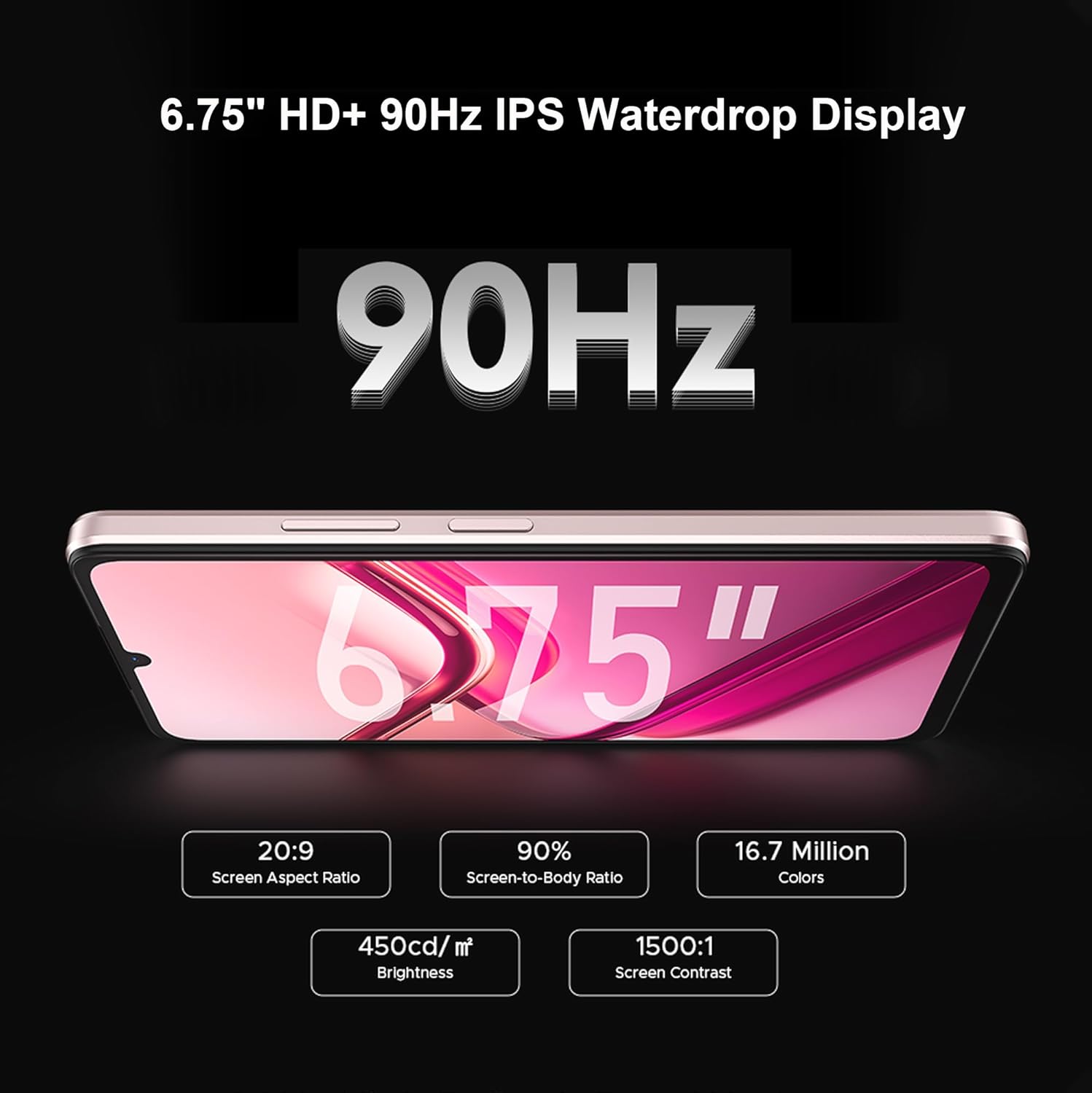
Image: The DOOGEE Note58 Pro display, highlighting its 6.75-inch size and 90Hz refresh rate.
Camera Features
Capture clear and detailed photos with the DOOGEE Note58 Pro's advanced camera system.
- Main Camera: 16MP AI Camera with sensitive lenses and rear flashes.
- Front Camera: 8MP for selfies and video calls.

Image: Detailed view of the DOOGEE Note58 Pro's camera setup, indicating the 16MP main camera and 8MP front camera.
Camera Modes
- Portrait Mode: Creates an attractive bokeh effect for professional-looking portraits.

Image: A sample photo demonstrating the Portrait Mode's depth effect.
- Night Photography: Utilizes multiple exposure times and image fusion to reduce noise, enhancing low-light photos.

Image: A city skyline at night, showcasing the clarity and detail captured by the Night Photography mode.
- Professional Mode: Offers advanced parameter adjustments for photography enthusiasts, including ISO, white balance, and exposure.

Image: Screenshot of the Professional Mode interface, displaying various adjustable camera settings.
- Google Smart Camera: Features like "View search" for identifying objects and "Text extraction and translation" for converting images to text.

Image: An example of the Google Smart Camera's "View search" function, identifying clothing items.

Image: An example of the Google Smart Camera's "Text extraction and translation" feature, translating text from an image.
Performance and Storage
The DOOGEE Note58 Pro is designed for smooth performance and ample storage.
- Processor: UNISOC T7250 Octa-Core processor (12nm, up to 1.8GHz) for efficient multitasking.
- RAM: 32GB RAM (8GB base + up to 24GB expanded RAM) ensures fluid app launches and seamless switching.

Image: Illustration of the 8GB basic RAM with memory extension, allowing up to 32GB total RAM.
- Internal Storage: 256GB ROM for your apps, photos, and videos.
- Expandable Storage: Supports MicroSD cards up to 2TB for additional storage.

Image: Visual representation of the 256GB internal ROM and the option for 2TB expandable storage via MicroSD.
Battery Management
The DOOGEE Note58 Pro is equipped with a high-capacity battery to support extended usage.
- Battery Capacity: 6250mAh for long-lasting power.

Image: An illustration highlighting the large 6250mAh battery capacity of the smartphone.
- Battery Technology: Features innovative battery technology for safe charging and optimal density.

Image: Diagram illustrating the innovative battery technology, including 500 safe charging cycles and 813Wh/L battery density ratio.
- OTG Support: Allows seamless connection with peripherals and can be used for reverse charging other devices.

Image: Two smartphones connected via OTG cable, demonstrating the ability to charge another device.
Connectivity
Stay connected with the DOOGEE Note58 Pro's versatile connectivity options.
- 4G Network Support: Enjoy fast mobile data speeds.
- Dual SIM: Use two SIM cards simultaneously for managing personal and work contacts or different network plans.
- Wi-Fi 5: Supports dual-band (2.4G/5GHz) Wi-Fi for high-speed data transmission, low power consumption, and reduced latency.

Image: A smartphone displaying "WiFi 5" with icons representing its benefits like low power consumption and high data rate.
- NFC: Supports multifunctional NFC for contactless payments (Google Pay) and quick data exchange.

Image: A person using the smartphone for a contactless payment at a point-of-sale terminal, demonstrating NFC functionality.
Security Features
Protect your device and data with the DOOGEE Note58 Pro's integrated security options.
- Facial Recognition: Unlock your phone quickly and securely using your face.
- Side Fingerprint Sensor: A convenient and fast way to unlock your device and authorize payments.

Image: A person using facial recognition to unlock the phone, with an inset showing the side-mounted fingerprint sensor.
- Widevine L1 Support: Enables high-definition streaming from platforms like Netflix, Hulu, and Amazon Prime Video.

Image: A smartphone displaying a high-definition video, indicating support for Widevine L1 for premium streaming quality.
Advanced Android 15 Features
The DOOGEE Note58 Pro runs on the latest Android 15 operating system, offering an optimized and intelligent user experience with various advanced features.

Image: The Android 15 logo, symbolizing the latest operating system and its enhanced features.
- Screen Sensing: Keeps the screen illuminated as long as you are looking at it, preventing it from turning off during important tasks or presentations.

Image: A person watching content on their smartphone, illustrating the Screen Sensing feature that keeps the display active while in use.
- Real-time Subtitles: Automatically generates subtitles for spoken language in real-time, enhancing accessibility. (Note: Real-time subtitles are available for the English language only).

Image: A smartphone screen displaying real-time subtitles during a video, with a note indicating English language support.
- Dual System Mode: Create separate profiles for work and personal use, ensuring your business data remains distinct from personal applications.

Image: Screenshots showing user profiles and separate application environments, demonstrating the Dual System Mode.
- Video Display Enhancement: Improves video quality for more vivid and lifelike colors.

Image: A split-screen comparison of a video, showing "Before" and "After" enhancement, highlighting improved color and clarity.
- Split-screen Mode: Allows users to view and interact with two applications simultaneously on a single screen, enhancing multitasking and work efficiency.

Image: A smartphone screen divided into two sections, running different applications simultaneously, demonstrating the Split-screen Mode.
Specifications
Detailed technical specifications for the DOOGEE Note58 Pro Smartphone.
| Feature | Detail |
|---|---|
| Brand | DOOGEE |
| Model Name | Note58 Pro |
| Operating System | Android 15 |
| Processor | UNISOC T7250 Octa-Core, 1.8 GHz |
| RAM | 32 GB (8GB + up to 24GB expanded) |
| Internal Storage (ROM) | 256 GB |
| Expandable Storage | MicroSD up to 2 TB |
| Display Size | 6.75 inches |
| Display Type | IPS LCD |
| Display Resolution | 720 x 1600 (HD+) |
| Refresh Rate | 90 Hz |
| Main Camera | 16 MP |
| Front Camera | 8 MP |
| Battery Capacity | 6250 mAh (Lithium-ion) |
| Cellular Technology | 2G, 3G, 4G |
| Connectivity | Wi-Fi 5, Bluetooth, NFC |
| Security Features | Facial Recognition, Side Fingerprint Sensor |
| Dimensions | 16.8 x 7.75 x 0.86 cm |
| Weight | 168 grams |
| Model Year | 2025 |

Image: Side profile of the DOOGEE Note58 Pro, detailing its height (168mm), width (77.5mm), and thickness (8.6mm).
Maintenance
To ensure the longevity and optimal performance of your DOOGEE Note58 Pro, follow these maintenance guidelines:
- Screen Care: Use a soft, lint-free cloth to clean the screen. Avoid harsh chemicals.
- Software Updates: Regularly check for and install system updates to benefit from the latest features and security patches.
- Battery Health: Avoid extreme temperatures. Do not let the battery completely drain frequently.
- Storage Management: Periodically clear unnecessary files and apps to maintain optimal performance.
- Physical Protection: Use the provided protective case and screen film to guard against scratches and minor impacts.
Troubleshooting
This section addresses common issues you might encounter with your DOOGEE Note58 Pro.
Device Not Turning On
- Ensure the battery is charged. Connect the charger and wait a few minutes before attempting to power on.
- Press and hold the Power button for at least 10-15 seconds to perform a forced restart.
Poor Camera Quality
- Ensure the camera lens is clean and free from smudges.
- Check lighting conditions. Low light can affect image quality.
- Experiment with different camera modes (e.g., Night Photography, Professional Mode) to suit the environment.
Slow Performance
- Close unused applications running in the background.
- Clear cache data from apps.
- Ensure sufficient free storage space. Consider moving large files to a MicroSD card or cloud storage.
- Restart the device periodically.
Connectivity Issues (Wi-Fi/4G)
- Wi-Fi: Restart your router. Forget and reconnect to the Wi-Fi network on your phone.
- 4G: Ensure your SIM card is properly inserted and activated. Check your mobile data plan. Restart the phone.
Warranty and Support
Your DOOGEE Note58 Pro Smartphone comes with a standard manufacturer's warranty. Please refer to the warranty card included in your package for specific terms and conditions, including warranty period and coverage details.
For technical support, service, or further inquiries, please visit the official DOOGEE website or contact their customer service department. Contact information can typically be found on the DOOGEE official website or in the warranty documentation.
Online Resources: For additional information, FAQs, and software updates, please visit the official DOOGEE support page.


