
1. Introduction
This manual provides detailed instructions for the installation, operation, and maintenance of your aoonav 14.6 inch Android 13 Car Stereo Radio. This unit is designed for Toyota Tundra models from 2021 to 2024, offering an enhanced multimedia and navigation experience. Please read this manual thoroughly before installation and use to ensure proper functionality and safety.
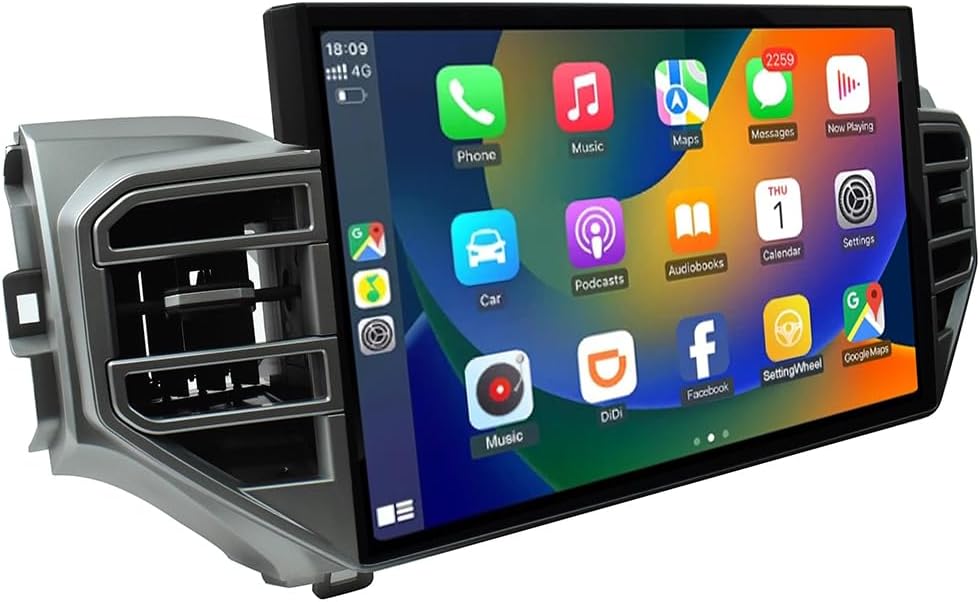
Image 1.1: The aoonav 14.6 inch Android 13 Car Stereo Radio unit.
2. Product Features
- Compatibility: Specifically designed for Toyota Tundra 2021-2024 new body style. Supports retention of original factory rear camera or 360 camera.
- Operating System: Android 13.
- Processor: MTK 8667 Octa-core processor.
- Memory: 4GB RAM + 64GB Internal Storage.
- Display: 14.6 inch QLED HD 2K Capacitive Touch Screen with 1920*720 resolution.
- Audio: Genuine authorized DTS HiFi-level digital sound effects, 48-segment EQ, multi-mode selection of surround sound field, Trubus, virtual center for 5.1 effect, and surround space adjustment.
- Smartphone Integration: Built-in wireless Apple CarPlay and Android Auto functions for seamless access to phone applications.
- Connectivity: Integrated Wi-Fi module for hotspot connection and app downloads. Bluetooth 5.1 for hands-free calls, phone book download, and music streaming.
- Navigation: High-precision GPS + GLONASS for strong satellite search. Supports online and offline maps, including Apple Maps, Google, and Waze.
- Reversing Video: Automatic display of AHD HD camera image when the vehicle is in reverse gear.
3. Setup and Installation
3.1 Compatibility Check
Ensure your vehicle is a Toyota Tundra model manufactured between 2021 and 2024. This unit is designed for the new body style of these models.
3.2 Installation Overview
The installation process is designed to be non-destructive, featuring a plug-and-play design that directly docks with the original car screen cable. This facilitates easy installation and operation.

Image 3.1: Visual comparison of the dashboard before and after installation, showing the larger screen integration.
3.3 Connection Ports
Refer to the diagram below for identification of the various connection ports on the rear of the unit. Proper connection of these ports is crucial for full functionality.

Image 3.2: Rear view of the aoonav unit with labeled connection ports.
- OEM USB: Connects to the vehicle's original USB port.
- OEM 360 Camera: For connecting the factory 360-degree camera system.
- GPS Antenna: Connect the provided GPS antenna for navigation functionality.
- OEM Speaker: Connects to the vehicle's speaker system.
- OEM Power Cable: Main power connection from the vehicle.
- OEM CAN/IEBS/MIC: Connects to the vehicle's CAN bus, IEBS, and microphone systems.
- FM/AM Radio Antenna: Connect the vehicle's radio antenna.
- 4G Antenna: Connect the provided 4G antenna for mobile data connectivity.
- Aftermarket 360 Camera: Dedicated input for an aftermarket 360-degree camera system.
For detailed installation steps, please consult a professional installer or refer to the specific installation guide provided with your product accessories.
4. Operating Instructions
4.1 Basic Operation
The unit features a QLED HD 2K capacitive touch screen. Navigate through menus and applications by tapping, swiping, and pinching gestures similar to a smartphone or tablet.
4.2 Wireless CarPlay & Android Auto
The unit supports both wireless Apple CarPlay and Android Auto. To activate, ensure your smartphone's Bluetooth and Wi-Fi are enabled. Follow the on-screen prompts to pair your device. Once connected, you can access compatible apps, navigation, calls, messages, and music directly from the car stereo display. Voice assistants like Siri or Google Assistant can be used for hands-free operation.

Image 4.1: Wireless CarPlay interface in operation.
4.3 Bluetooth Functionality
Utilize Bluetooth 5.1 for stable connections with your mobile phone. This allows for hands-free calling, synchronization of your phone book, and streaming audio directly to the car stereo.

Image 4.2: Bluetooth connectivity for calls and audio streaming.
4.4 Navigation System
The built-in GPS + GLONASS system provides high-precision navigation. The unit supports both online and offline maps. You can use pre-installed maps or download your preferred navigation applications such as Apple Maps, Google Maps, or Waze from the App Store. Real-time traffic information is available when connected to the internet.

Image 4.3: Navigation function displaying a map.
4.5 Wi-Fi and App Downloads
Connect the unit to the internet via a Wi-Fi hotspot from your phone. Once connected, you can download and install various applications from the App Store, including streaming services like YouTube and Netflix, or social media platforms.

Image 4.4: Wi-Fi and 4G LTE connectivity for online content.
4.6 Reversing Video Display
When the vehicle is shifted into reverse gear, the unit will automatically switch to display the AHD HD reversing camera feed, providing a clear view of the area behind your vehicle.

Image 4.5: Automatic display of reversing camera feed.
5. Maintenance
To ensure the longevity and optimal performance of your aoonav car stereo, follow these general maintenance guidelines:
- Screen Cleaning: Use a soft, lint-free cloth to gently wipe the screen. For stubborn smudges, slightly dampen the cloth with water or a screen-safe cleaner. Avoid harsh chemicals or abrasive materials.
- Software Updates: Periodically check for available software updates to ensure you have the latest features and performance enhancements. Follow on-screen instructions for any update procedures.
- Environmental Conditions: Avoid exposing the unit to extreme temperatures, direct sunlight for prolonged periods, or excessive moisture.
6. Troubleshooting
If you encounter any issues with your aoonav car stereo, please refer to the following common troubleshooting tips:
- Unit Not Powering On: Check all power connections to ensure they are securely seated. Verify the vehicle's fuse related to the stereo system.
- No Audio Output: Confirm speaker connections. Check volume levels on the unit and ensure the mute function is not active. Verify audio settings within the system.
- Blurry Backup Camera Image: Ensure the camera lens is clean and free from obstructions. Check the camera's connection to the head unit. If the issue persists, consider replacing the camera with a compatible AHD 360 camera, as suggested by some users.
- Volume Not as Loud as Original Radio: Check the unit's audio output settings and equalizer. Ensure all audio cables are correctly connected.
- GPS Signal Issues: Ensure the GPS antenna is properly installed and has a clear line of sight to the sky. Check navigation app settings.
- CarPlay/Android Auto Connection Problems: Ensure your phone's operating system is up to date. Try restarting both your phone and the car stereo. Verify Bluetooth and Wi-Fi connections.
For issues not resolved by these steps, or for further technical assistance, please contact aoonav customer support.
7. Specifications
| Feature | Specification |
|---|---|
| Model Name | RM |
| Brand | aoonav |
| Operating System | Android 13 |
| Processor | MTK 8667 Octa-core |
| Memory | 4GB RAM + 64GB ROM |
| Display Size | 14.6 Inches |
| Screen Resolution | 1920*720 (HD 2K) |
| Screen Type | QLED Capacitive Touchscreen |
| Audio Output Mode | Stereo (DTS HiFi-level digital sound effects) |
| Connectivity Technology | Bluetooth 5.1, Wi-Fi, USB, Wireless CarPlay, Android Auto |
| Map Type | Worldwide (Online/Offline support) |
| Vehicle Service Type | Car (Toyota Tundra 2021-2024) |
| Mounting Type | Dashboard Mount |
| Item Weight | 6.6 pounds |
| Product Dimensions | 15 x 4 x 10 inches |
| Included Components | Machine + Accessories |
8. Warranty and Support
aoonav is committed to providing quality products and customer satisfaction. Your product comes with the following support:
- Warranty: One-year warranty period.
- Returns & Replacements: 30-day money-back guarantee and 12-month replacement policy.
- Technical Support: Lifetime technical support and after-sales service.
- Contact: If you have any questions regarding installation, operation, or require technical assistance, please contact us via Amazon or email: autostereo@163.com. We aim to reply within 24 hours.

Image 8.1: aoonav customer support details.