
Introduction
The Holmes DuoBreeze Dual Purple Blade 13-inch Desk Fan is designed to provide efficient cooling for small spaces. This manual provides essential information for the safe and effective operation, maintenance, and troubleshooting of your fan. Please read these instructions thoroughly before use and retain them for future reference.
Product Features
- Dual Blade Design: Features an innovative dual blade system for enhanced air circulation and powerful, consistent cooling.
- Clean Breeze Technology: Equipped with a removable front grill for easy cleaning of the grill, blades, and interior, promoting improved air quality.
- Adjustable Tilt Head: Customize airflow direction with a 45-degree adjustable tilt head.
- Wide-Angle Oscillation: Provides a broader distribution of air with 60-degree automatic oscillation.
- Three Speed Settings: Select from low, medium, or high fan speeds using intuitive control buttons.
- 8-Hour Timer: Set the fan to automatically turn off after 2, 4, or 8 hours for convenience and energy savings.
- Space-Saving Design: Compact size ideal for desks, tabletops, and areas with limited space.
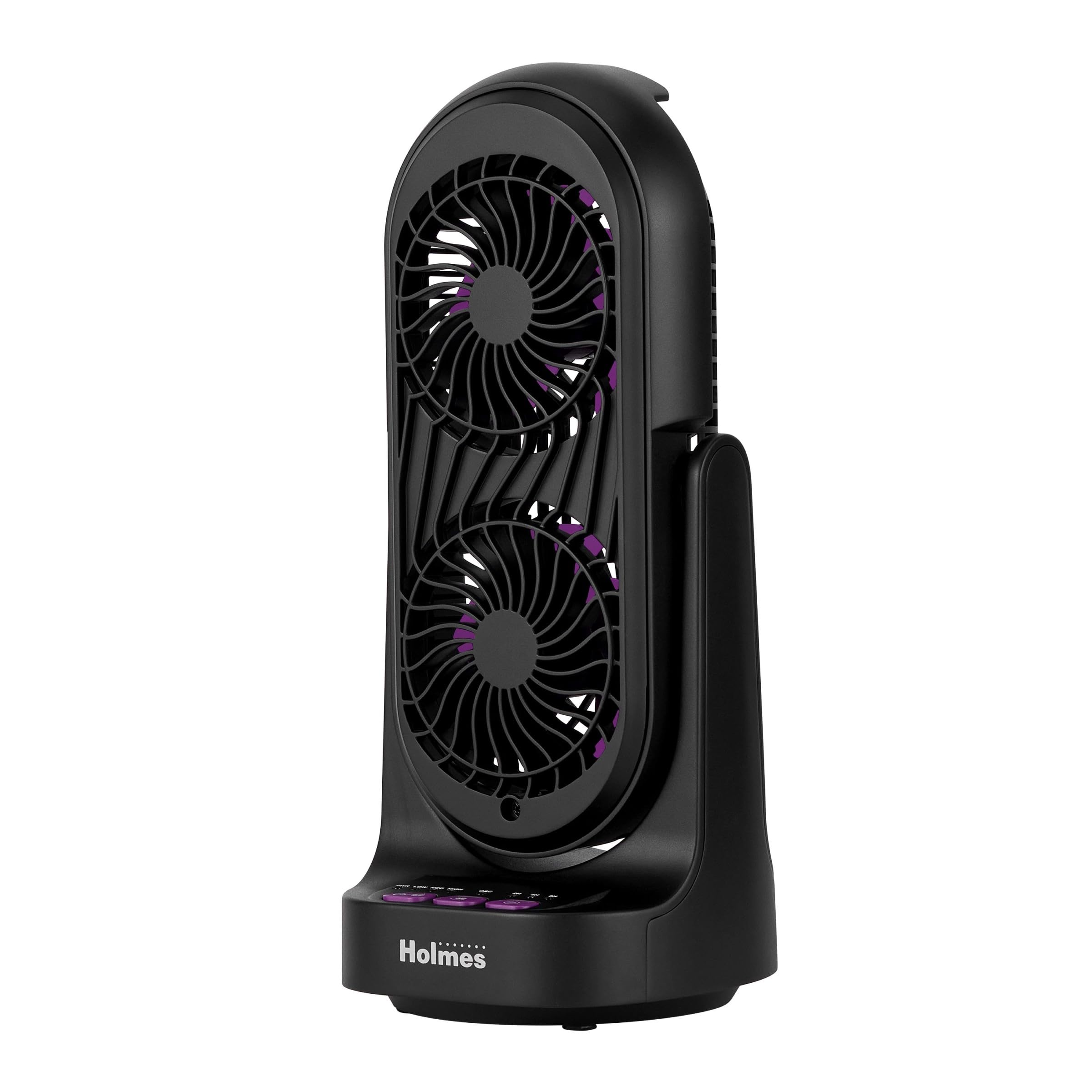
Figure 1: Front and side view of the Holmes DuoBreeze Desk Fan, highlighting its compact dimensions of 13.4 inches in height and 5.9 inches in width/depth.
Video 1: Official product overview demonstrating the Holmes DuoBreeze Dual Purple Blade 13-inch Desk Fan's features, including dual blade design for maximum airflow, 45-degree adjustable head tilt, 60-degree automatic oscillation, 3 speed settings, 2/4/8 hour timer, and removable grill for easy cleaning.
Safety Information
When using electrical appliances, basic safety precautions should always be followed to reduce the risk of fire, electric shock, and injury to persons, including the following:
- Read all instructions before using this fan.
- Use this fan only as described in this manual. Other uses not recommended may cause fire, electric shock, or injury to persons.
- To protect against electrical shock, do not place fan in window, immerse unit, plug or cord in water or spray with liquids.
- Close supervision is necessary when any appliance is used by or near children.
- Unplug from outlet when not in use, when moving fan from one location to another, and before cleaning.
- Do not operate any appliance with a damaged cord or plug, or after the appliance malfunctions or has been dropped or damaged in any manner.
- Do not let cord hang over edge of table or counter, or touch hot surfaces.
- Do not operate in the presence of explosive and/or flammable fumes.
- Do not place fan or any parts near an open flame, cooking or other heating appliance.
- Do not operate fan with a damaged guard or any rotating part.
- Avoid contact with moving parts.
- To disconnect, grip plug and pull from wall outlet. Never yank on cord.
- Always use on a dry, level surface.
Package Contents
- Holmes DuoBreeze Dual Purple Blade 13-inch Desk Fan (Model: 32510555)
- User Manual
- Power Cord (attached)
Setup
The Holmes DuoBreeze Desk Fan requires minimal assembly. Follow these steps to prepare your fan for use:
- Carefully remove the fan from its packaging.
- Place the fan on a stable, level surface.
- Ensure the power cord is easily accessible to a standard electrical outlet.
- Before plugging in, ensure the fan is in the desired position and the tilt head is adjusted as needed.
Operating Instructions
Familiarize yourself with the control panel located on the base of the fan:
- Power Button (PWR): Press to turn the fan ON or OFF.
- Speed Buttons (LOW, MED, HIGH): Press to cycle through the three fan speed settings: Low, Medium, and High.
- Oscillation Button (OSC): Press to activate or deactivate the 60-degree automatic oscillation feature.
- Timer Buttons (2H, 4H, 8H): Press to set the fan to automatically turn off after 2, 4, or 8 hours. Multiple presses will cycle through the available timer options.
Adjusting Tilt: The fan head can be manually tilted up to 45 degrees to direct airflow precisely where needed. Gently push or pull the fan head to adjust its angle.
Maintenance
Regular cleaning helps maintain the fan's performance and air quality.
- Before Cleaning: Always unplug the fan from the electrical outlet.
- Cleaning the Exterior: Use a soft, damp cloth to wipe the exterior surfaces of the fan. Do not use abrasive cleaners or solvents.
- Cleaning the Blades and Interior (Clean Breeze Technology):
- The front grill is removable for easy access to the blades and interior. Refer to the product diagram for grill removal instructions (typically involves unscrewing or unlatching clips).
- Carefully wipe the fan blades and interior surfaces with a soft, dry cloth or a slightly damp cloth.
- Ensure all parts are completely dry before reattaching the front grill and plugging the fan back in.
- Storage: When not in use, store the fan in a cool, dry place, preferably in its original packaging to protect it from dust.
Troubleshooting
If your fan is not operating correctly, consult the following troubleshooting guide:
| Problem | Possible Cause | Solution |
|---|---|---|
| Fan does not turn on. | No power supply. | Ensure the fan is securely plugged into a working electrical outlet. Check the circuit breaker. |
| Weak or no airflow. | Fan blades are dirty or obstructed. | Unplug the fan and clean the blades and grill as described in the Maintenance section. Ensure no objects are blocking the air intake or output. |
| Fan is unusually noisy. | Loose parts or debris inside. | Unplug the fan and inspect for any loose components or foreign objects. Clean thoroughly. If noise persists, contact customer support. |
| Oscillation not working. | Oscillation feature is not activated. | Press the OSC button to activate oscillation. Ensure the fan is on a flat surface. |
Specifications
| Specification | Detail |
|---|---|
| Brand | HOLMES |
| Model Name | Holmes 13" DuoBreeze CleanBreeze Desk Fan with Purple Blades |
| Item Model Number | 32510555 |
| Color | Black/Purple |
| Product Dimensions | 5.9"D x 5.9"W x 13.42"H |
| Item Weight | 2.2 Pounds |
| Power Source | Corded Electric |
| Voltage | 120.0 V |
| Number of Power Levels | 3 |
| Special Features | Adjustable Tilt, Oscillating |
| Noise Level | 50 Decibels |
| Air Flow Capacity | 900 Cubic Feet Per Minute |
| Control Method | Push Button |
| Indoor/Outdoor Usage | Indoor |
| Assembly Required | Yes |
| Specification Met | ETL |
Warranty and Support
This Holmes DuoBreeze Dual Purple Blade 13-inch Desk Fan is backed by a 1-year limited warranty. This warranty covers defects in material or workmanship under normal use.
For warranty claims, technical support, or general inquiries, please contact Holmes customer service. Keep your purchase receipt as proof of purchase for warranty validation.
Customer Service Contact: Please refer to the contact information provided on the product packaging or the official Holmes website for the most up-to-date support details.