
1. Product Overview
The MelGeek MADE68 Pro is a wired, 65% compact gaming keyboard featuring Hall Effect magnetic switches. Designed for competitive gaming, it offers advanced customization and rapid response times.

Figure 1: MelGeek MADE68 Pro Wired Keyboard (Pink)
Key features include adjustable actuation, rapid trigger technology, and a high polling rate for precise input. The keyboard also supports extensive personalization through its web-based HIVE software.

Figure 2: Overview of MelGeek MADE68 Pro Key Features
2. Package Contents
Upon opening the package, please verify that all the following items are included:
- MelGeek MADE68 Pro Wired Keyboard
- USB-C Cable
- Keycap Puller
- Extra Keycaps (for Mac compatibility)
- Quick Guide
- Safety and Warranty Document
- Stickers

Figure 3: MelGeek MADE68 Pro Package Contents
For a visual guide to unboxing, please refer to the official unboxing video:
Video 1: MADE68 Purple Unboxing (Source: MelGeek Seller)
This video demonstrates the unboxing process and shows all included accessories for the MelGeek MADE68 keyboard.
3. Setup Guide
To begin using your MelGeek MADE68 Pro keyboard, follow these steps:
- Connect the provided USB-C cable to the keyboard's port and the other end to an available USB port on your computer.
- The keyboard will automatically be recognized by your operating system.
- Access the MelGeek HIVE software via your web browser (hive.melgeek.com) for full customization and advanced features. Ensure you are using a Chromium-based browser for optimal compatibility.

Figure 4: Connecting the Keyboard
The HIVE software allows you to manage keyboard profiles, lighting, key remapping, and performance settings.
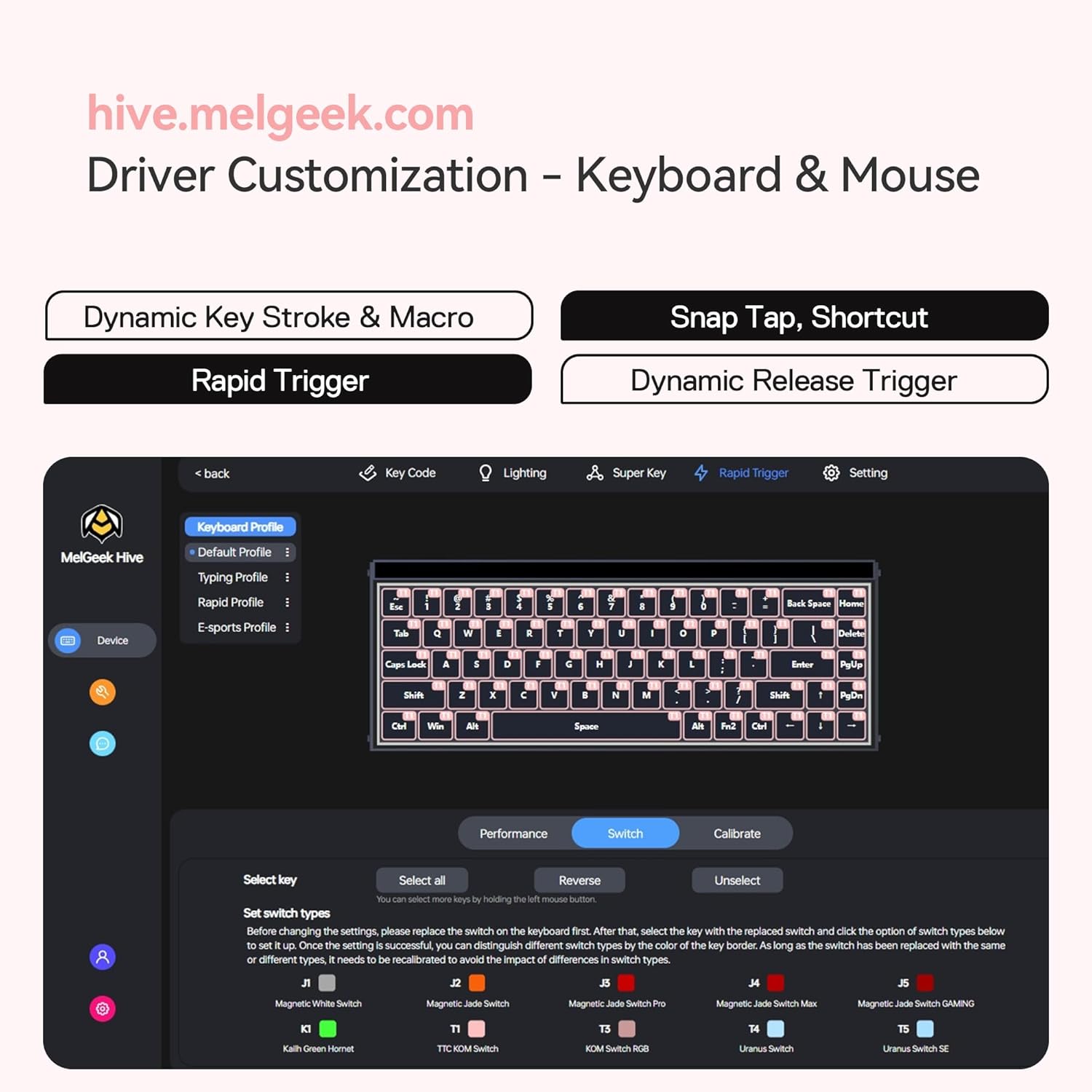
Figure 5: MelGeek HIVE Software Interface
4. Operating Instructions
4.1 Hall Effect Switches and Rapid Trigger
The Hall Effect magnetic switches enable adjustable actuation points from 0.1mm to 4.0mm, allowing you to customize the key sensitivity to your preference. Rapid Trigger technology dynamically activates and resets keys based on your input, eliminating physical contact wear and providing instant response for competitive gaming.

Figure 6: Rapid Trigger Settings in HIVE Software
4.2 Dynamic Keystroke (DKS)
DKS allows you to assign up to four different functions to a single key based on how far the key is pressed. For example, a light press can initiate walking, while a deeper press can trigger running, providing nuanced control in games.
4.3 Snap Tap
Snap Tap ensures that when two opposing directional keys (e.g., A and D) are pressed simultaneously, only the last key pressed is registered. This prevents input conflicts and allows for smoother, more precise movement transitions.
4.4 RGB Lighting Customization
The keyboard features customizable RGB lighting with 16 million color options and 7 lighting modes. The replaceable RGB lightbox panels and side plates allow for further visual personalization. Adjustments can be made via the HIVE software.

Figure 7: RGB Lighting Customization in HIVE Software
Observe the keyboard's features and performance in the following official videos:
Video 2: MADE68 Show Video (Source: MelGeek Seller)
This video highlights various features and the aesthetic appeal of the MelGeek MADE68 keyboard.
Video 3: MADE68 Real Evaluation (Source: MelGeek Seller)
This video provides a detailed evaluation of the MelGeek MADE68 keyboard's performance in a gaming context.
5. Maintenance
To ensure the longevity and optimal performance of your MelGeek MADE68 Pro keyboard, regular maintenance is recommended:
- Cleaning: Use a soft, dry cloth to wipe down the keyboard surface. For deeper cleaning, remove keycaps using the provided keycap puller and use compressed air to clear debris from between switches.
- Switch Replacement: The keyboard features hot-swappable switches, allowing for easy replacement or customization without soldering. Use a switch puller (not included) to carefully remove and insert switches.

Figure 8: Exploded View of Keyboard Components
6. Troubleshooting
If you encounter issues with your MelGeek MADE68 Pro keyboard, consider the following troubleshooting steps:
- Keyboard Not Responding: Ensure the USB-C cable is securely connected to both the keyboard and your computer. Try a different USB port or cable.
- HIVE Software Issues: If the HIVE software is not recognizing the keyboard or settings are not applying, ensure you are using a Chromium-based browser and that your internet connection is stable. Try refreshing the page or restarting your browser.
- Key Actuation Problems: If certain keys are not registering correctly or have inconsistent actuation, use the calibration feature within the HIVE software to re-calibrate the switches.
- RGB Lighting Malfunction: Check lighting settings in the HIVE software. Ensure brightness is not set to zero.
For persistent issues, please refer to the official MelGeek support resources.
7. Specifications
| Feature | Detail |
|---|---|
| Brand | MelGeek |
| Model Number | MADE68 Pro-Pink |
| Connectivity Technology | USB-C |
| Keyboard Description | Gaming |
| Recommended Uses | Multimedia, Everyday Use, Gaming |
| Special Features | Backlit, Programmable Keys, Hot-Swappable |
| Number of Keys | 68 |
| Keyboard Backlighting Color Support | RGB |
| Item Weight | 2.71 pounds |
| Package Dimensions | 13.62 x 6.22 x 2.2 inches |
| Country of Origin | China |
| Date First Available | January 22, 2025 |
8. Warranty Information
The MelGeek MADE68 Pro Wired Keyboard comes with a manufacturer's warranty. For detailed information regarding warranty coverage, terms, and conditions, please refer to the warranty document included in your product packaging or visit the official MelGeek website.
9. Support
For additional support, frequently asked questions, or to contact customer service, please visit the official MelGeek website or their Amazon store page: