
Introduction
Thank you for choosing the TELESIN RGB Magnetic Selfie Light. This compact and versatile lighting solution is designed to enhance your photos and videos with professional-grade illumination. Featuring RGB and CCT modes, magnetic attachment, and a long-lasting rechargeable battery, it is ideal for various content creation scenarios. Please read this manual carefully to ensure proper use and optimal performance of your device.
Product Overview
Key Features:
- Professional RGB LED Phone Video Light: 60 LEDs, 120° beam angle, 600-800 lux at 0.5m, CRI 95+. Includes CCT (2500K-9900K), RGB (0-359°), and Colorful modes. Brightness adjustable from 0%-100%.
- Strong Magnetic Design: Easily attaches to MagSafe-compatible devices or other metal surfaces.
- 2000mAh Rechargeable Battery: Provides up to 2 hours of continuous lighting at maximum brightness. USB Type-C charging.
- Pocket Size & 1/4" Thread Mounting: Compact dimensions (2.6"×2.67"×0.78") with a 1/4" female thread for mounting on light stands or other equipment.
- Wide Compatibility: Compatible with iPhone 12 series and newer (MagSafe), and other non-MagSafe phones using the included metal ring adhesive adapter.
Package Contents:
- Magnetic Smartphone Light x1
- Magnetic Ring x1
- Universal Phone Clamp x1
- User Manual x1
- Type-C Charging Cable x1

Image: Contents of the TELESIN RGB Magnetic Selfie Light package, including the light, magnetic ring, phone clamp, user manual, and USB-C charging cable.

Image: The compact TELESIN RGB Magnetic Selfie Light being placed into a small handbag, illustrating its pocket-sized portability.
Setup
1. Charging the Device:
Before first use, fully charge the TELESIN RGB Magnetic Selfie Light. Connect the included USB Type-C cable to the charging port on the light and to a compatible USB power source. The charging indicator will show the charging status.

Image: Illustration of the TELESIN RGB Magnetic Selfie Light's 2000mAh battery, indicating up to 2 hours of use at maximum brightness and 20 hours at minimum brightness.
2. Attaching to a Device:
The light features a strong magnetic design for easy attachment.
- For MagSafe-compatible devices (iPhone 12 series and newer): Simply align the light with the MagSafe area on your phone. The magnets will securely attach the light.
- For non-MagSafe devices or other surfaces: Use the included magnetic ring adhesive adapter. Peel off the protective film from the adhesive side of the magnetic ring and firmly attach it to the back of your phone or phone case. Once the ring is in place, the light can be magnetically attached to it.
- Using the Universal Phone Clamp: Attach the light to the universal phone clamp via its 1/4" thread. The clamp can then be used to secure the light to various phones or surfaces.

Image: A hand demonstrating the magnetic attachment of the TELESIN RGB Magnetic Selfie Light to the back of a smartphone.

Image: Various usage scenarios for the TELESIN RGB Magnetic Selfie Light, including selfie enhancement, still life illumination, live streaming, and as a night light. An inset shows the free 1/4 interface mobile phone clip.
3. Mounting with 1/4" Thread:
The light includes a 1/4" female thread on its side, allowing it to be mounted on tripods, light stands, or other camera accessories (requires an extra 1/4" cold shoe mount for DSLR cameras).
Operating Instructions
The TELESIN RGB Magnetic Selfie Light offers three primary lighting modes and adjustable brightness.
1. Power On/Off:
Locate the power button on the device. Press and hold to turn the light on or off.
2. Mode Selection:
Cycle through the three available modes by pressing the mode button:
- CCT Mode (Correlated Color Temperature): Adjusts white light from warm to cool. Range: 2500K (warm) to 9900K (cool).
- RGB Mode: Provides full-color spectrum lighting (0-359° hue).
- Colorful Mode: Offers various pre-set dynamic color effects.
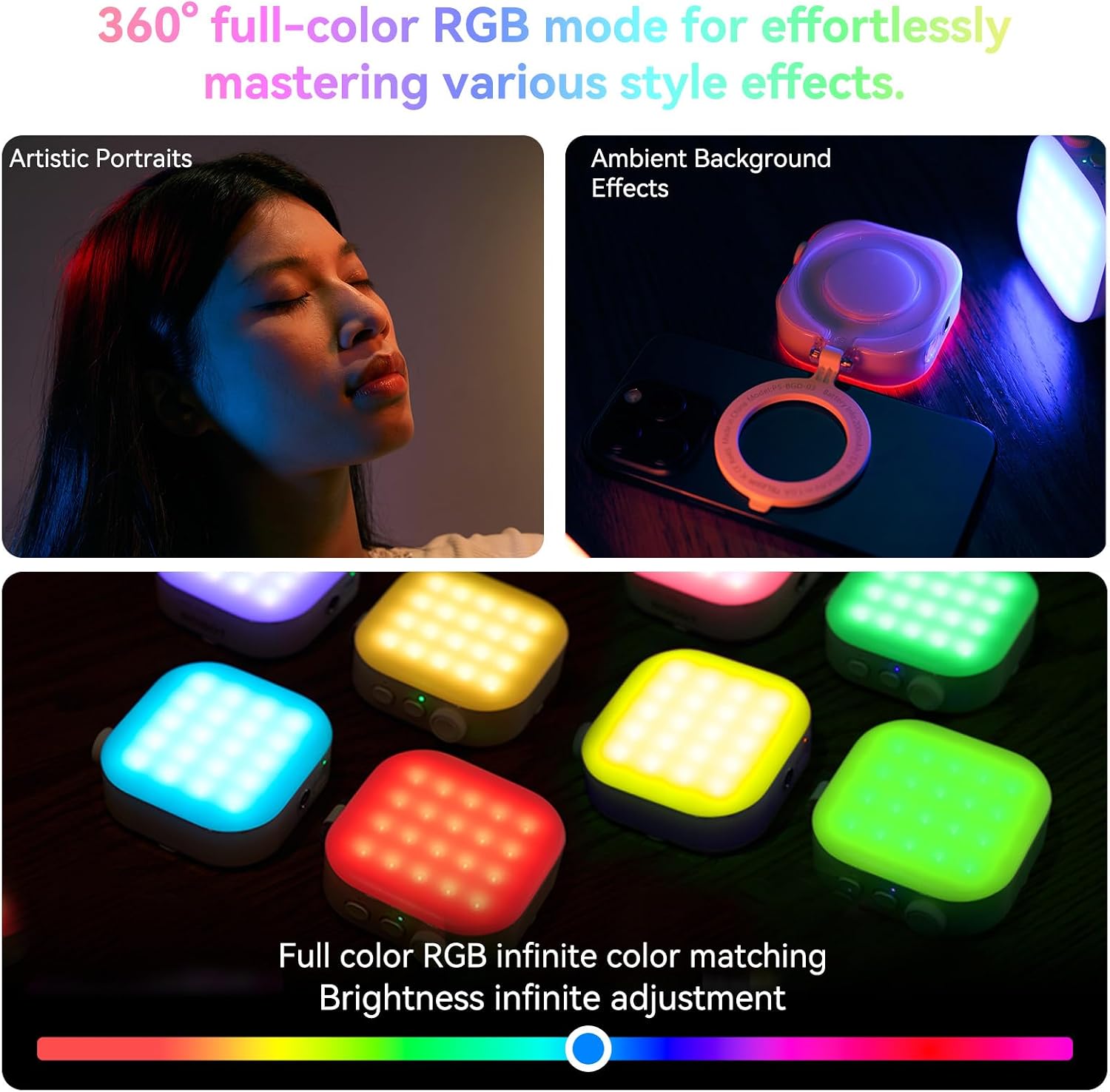
Image: Examples of the 360° full-color RGB mode, showing its application for artistic portraits and ambient background effects, with a color spectrum for infinite color matching and brightness adjustment.

Image: Demonstration of the CCT mode, illustrating adjustable color temperature from 2500K to 9000K, with recommendations for warm skin (4500K) and cold skin (6500K).
3. Brightness Adjustment:
Use the rotary knob to adjust the brightness from 0% to 100% in any mode.
4. Using as a Phone Holder:
When magnetically attached to a phone, the light can also function as a kickstand, allowing for horizontal or vertical screen orientation for viewing or hands-free use.

Image: The TELESIN RGB Magnetic Selfie Light acting as a mobile phone holder, supporting both horizontal and vertical screen orientations.
Maintenance
- Keep the device dry. Do not expose it to moisture or liquids.
- Clean the light with a soft, dry cloth. Do not use harsh chemicals or abrasive cleaners.
- Store the light in a cool, dry place when not in use.
- Avoid dropping or subjecting the device to strong impacts.
- Do not attempt to disassemble or repair the device yourself. Contact customer support for assistance.
Troubleshooting
| Problem | Possible Cause | Solution |
|---|---|---|
| Light does not turn on. | Battery is depleted. | Charge the device using the provided USB Type-C cable. |
| Light is dim or flickers. | Low battery or incorrect brightness setting. | Recharge the battery. Adjust brightness using the rotary knob. |
| Magnetic attachment is weak. | Not a MagSafe-compatible device or magnetic ring not properly installed. | Ensure your device is MagSafe compatible or that the magnetic ring is securely attached and aligned. |
| Cannot change modes or colors. | Incorrect button press or temporary software glitch. | Ensure you are pressing the mode button correctly. Try turning the device off and on again. |
Specifications
| Brand | TELESIN |
| Model | B0DT6W774H |
| Connectivity Technology | USB |
| Hardware Interface | USB Type C |
| LED Count | 60 |
| Beam Angle | 120° |
| Max Illuminance | 600-800 lux (at 0.5m) |
| CRI | 95+ |
| Power | 6W |
| Color Temperature Range | 2500K-9900K |
| RGB Hue Range | 0-359° |
| Battery Capacity | 2000mAh |
| Continuous Lighting Time | Up to 2 hours (at MAX brightness) |
| Charging Time | Approx. 2 hours |
| Dimensions | 2.6" × 2.67" × 0.78" (6.6 × 6.8 × 2.2 CM) |
| Item Weight | 2.82 ounces |
Warranty and Support
For warranty information or technical support, please refer to the official TELESIN website or contact their customer service directly. Keep your purchase receipt for warranty claims.
TELESIN Official Website: www.telesin.cn