
1. Introduction
Thank you for choosing the TELESIN Magnetic RGB Video Light. This portable and versatile lighting solution is designed to enhance your photography and videography with adjustable color temperature, full RGB color, and dimmable brightness. This manual provides essential information for safe operation, setup, and maintenance of your device.
2. Safety Information
- Do not expose the device to water or excessive moisture.
- Avoid disassembling or modifying the device, as this will void the warranty and may cause damage.
- Use only the provided Type-C charging cable or a certified equivalent.
- Keep out of reach of children.
- Do not operate in extreme temperatures.
3. Package Contents
Please verify that all items are present in your package:
- 1 × Magnetic RGB Selfie Light
- 1 × 1/4'' Universal Phone Clip
- 1 × Magnetic Ring
- 1 × Type-C Charging Cable
- 1 × User Manual
4. Product Overview
The TELESIN Magnetic RGB Video Light features a compact design with integrated controls for various lighting modes. It includes a built-in rechargeable battery and multiple attachment options for broad compatibility.

Image: The TELESIN Magnetic RGB Video Light, illustrating its dual functionality as an RGB light and a white light, along with its phone clip and camera mounting capabilities.
5. Setup
5.1 Charging the Device
Before first use, fully charge the device. The light has a built-in 2000mAh battery.
- Connect the provided Type-C charging cable to the charging port on the light.
- Connect the other end of the cable to a USB power source (e.g., laptop, PC, power bank, USB charger).
- The charging indicator will show the charging status. A full charge typically takes approximately 2 hours.

Image: An illustration detailing the 2000mAh battery capacity, indicating 2 hours of maximum brightness usage, 20 hours at minimum brightness, and a 2-hour Type-C charging time.
5.2 Attaching the Light
The light offers multiple attachment methods for various devices:
- Using the 1/4'' Universal Phone Clip: Attach the light to most smartphones, tablets, or laptops using the adjustable clip. Ensure the clip is securely fastened to prevent the light from falling.
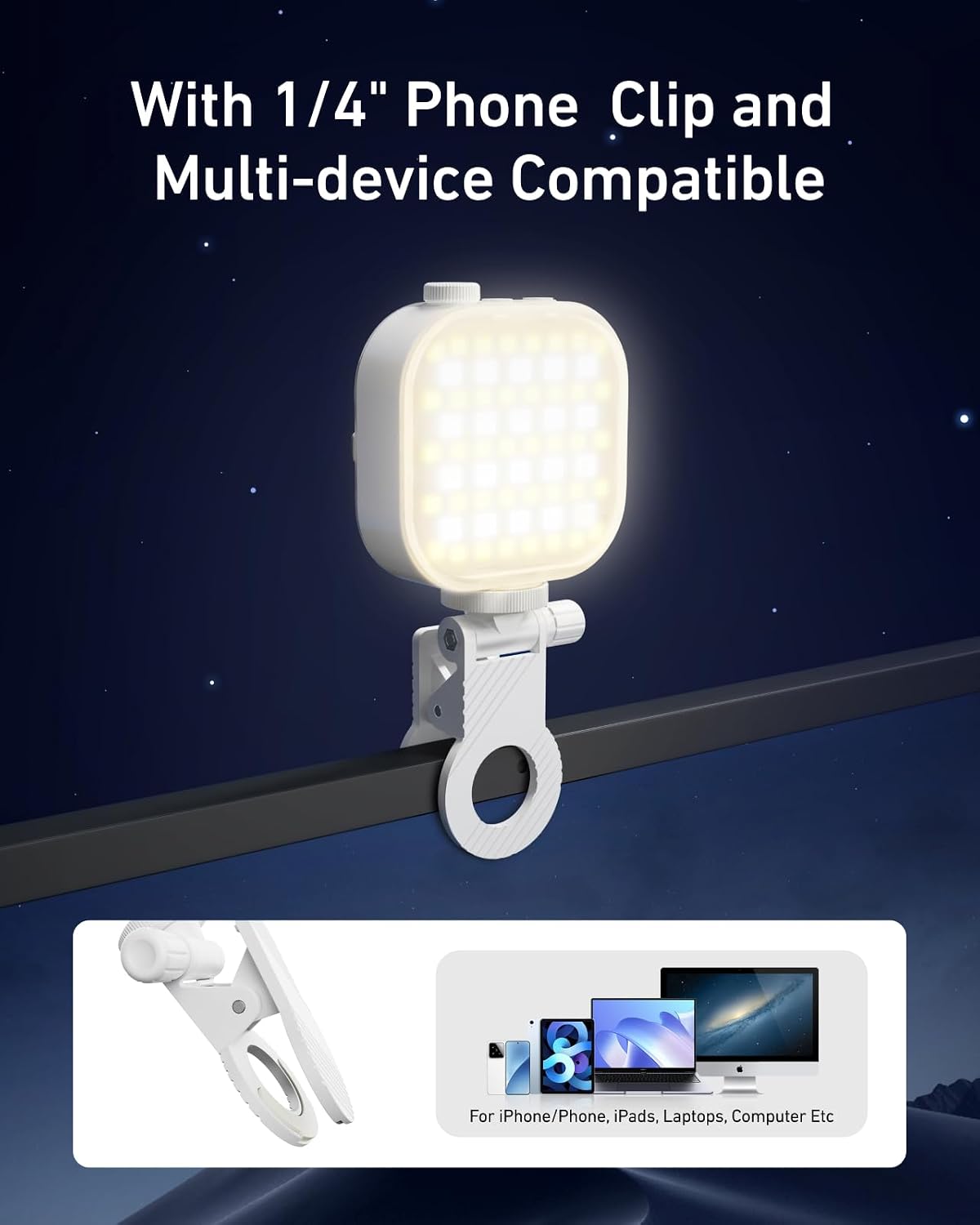
Image: The TELESIN light mounted on a laptop screen via its 1/4-inch phone clip, demonstrating its multi-device compatibility with smartphones, tablets, and computers.
- Magnetic Attachment (for MagSafe devices): The light features a strong magnetic design for direct attachment to MagSafe-compatible devices (e.g., iPhone 12/13/14/15/16 series).

Image: A user magnetically attaching the TELESIN light to an iPhone, highlighting its strong magnetic connection and compatibility with MagSafe iPhones and other phones using an included magnetic ring.
- Using the Magnetic Ring (for non-MagSafe devices): For non-MagSafe phones, attach the included adhesive magnetic ring to the back of your device or case to enable magnetic attachment.
- 1/4" Thread Compatibility: The light includes a 1/4" thread, allowing it to be mounted on cameras, DSLR camcorders, or tripods (requires an additional 1/4" cold shoe mount, not included).
6. Operating Instructions
6.1 Power On/Off
Locate the power button/knob on the device. Press and hold for a few seconds to turn the light on or off. A short press may cycle through modes or confirm selections, depending on the specific control layout.
6.2 Adjusting Lighting Modes
The TELESIN Magnetic RGB Video Light offers three professional lighting modes:

Image: A visual guide to the three primary lighting modes: RGB for full color adjustment, CCT for precise color temperature control, and DIM for brightness regulation.
- CCT Mode (Color Temperature): Adjust the color temperature from 2500K (warm light) to 9000K (cold light). This mode is ideal for matching ambient light or achieving specific skin tones.
- RGB Mode (Full Color): Access 360° full-color lighting. Rotate the control to select any hue from the color spectrum, perfect for creative effects and atmospheric lighting.
- Brightness Adjustment (DIM): In any mode, adjust the brightness level from 10% to 100% using the designated control knob or button.
Refer to the device's physical controls (knobs, buttons) for specific adjustment methods. Typically, a knob allows for continuous adjustment, while buttons may cycle through presets or increment/decrement values.

Image: A visual comparison demonstrating the improved lighting quality and subject illumination when using the TELESIN light in a dim setting, highlighting its effectiveness.
7. Maintenance
7.1 Cleaning
To clean the device, use a soft, dry cloth. Do not use harsh chemicals or abrasive materials, as these may damage the surface or internal components.
7.2 Storage
When not in use, store the light in a cool, dry place, away from direct sunlight and extreme temperatures. If storing for an extended period, ensure the battery is partially charged (around 50%) to prolong its lifespan.
7.3 Battery Care
To maintain battery health, avoid completely draining the battery frequently. Recharge the device regularly, even if it has not been used for a while.
8. Troubleshooting
- Light not turning on: Ensure the battery is charged. Connect the Type-C cable and attempt to power on while charging.
- Light flickering or inconsistent brightness: This may indicate a low battery. Recharge the device. If the issue persists, contact customer support.
- Magnetic attachment not strong enough: Ensure the surface of your device is clean and free of debris. For non-MagSafe devices, verify the magnetic ring is correctly applied and fully adhered.
- Device not charging: Check the Type-C cable and power source. Try a different cable or USB port.
9. Specifications
| Feature | Specification |
|---|---|
| Model Number | PFK-EU-P5-BGD-03 |
| Battery Capacity | 2000mAh |
| Battery Life (Max Brightness) | 2 Hours |
| Color Temperature Range | 2500K - 9000K |
| RGB Hue Adjustment | 0-360° Full Color |
| Brightness Adjustment | 10% - 100% |
| Charging Port | USB Type-C |
| Connectivity Technology | USB |
| Item Weight | 7 ounces |
| Package Dimensions | 6.89 x 3.82 x 1.93 inches |
10. Warranty and Support
TELESIN products come with a standard manufacturer's warranty. For detailed warranty information, product support, or to purchase accessories, please visit the official TELESIN store or contact customer service.
Official TELESIN Store: TELESIN Store on Amazon