
Introduction
Thank you for choosing the SONICAKE Sprint QAM-15 Electric Guitar Amplifier. This portable 15-watt combo amplifier is designed for practice, travel, and small gigs, offering versatile tone control and essential connectivity. This manual provides detailed instructions to help you get the most out of your amplifier.
Key Features:
- Portable & Lightweight Design (approx. 7.45 lbs, 11.5"x11.5"x4.5")
- Dual-Channel Versatility (Clean and Overdrive)
- Enhanced Connectivity (3.5mm Headphone Output, 3.5mm AUX Input)
- Professional Sound Control (3-Band EQ: Treble, Mid, Bass, Gain, Volume)
- Closed-Back Design for High-Quality Audio Output
Safety Instructions
Please read and understand these safety instructions before operating your amplifier. Retain this manual for future reference.
- Power Source: Connect the amplifier only to the specified power supply voltage as indicated on the unit.
- Ventilation: Do not block any ventilation openings. Ensure adequate airflow around the amplifier to prevent overheating.
- Water and Moisture: Do not expose the amplifier to rain, moisture, or any liquids. Do not place objects filled with liquids on the amplifier.
- Heat Sources: Keep the amplifier away from heat sources such as radiators, heat registers, stoves, or other apparatus (including amplifiers) that produce heat.
- Cleaning: Clean only with a dry cloth. Avoid using liquid or aerosol cleaners.
- Servicing: Do not attempt to service this product yourself. Refer all servicing to qualified service personnel.
- Cables: Protect the power cord from being walked on or pinched, particularly at plugs, convenience receptacles, and the point where they exit from the apparatus.
Product Overview

Front view of the SONICAKE Sprint QAM-15 Electric Guitar Amplifier, showcasing its compact design and control panel.
Control Panel Features:

Detailed view of the amplifier's control panel, highlighting each knob and input for user reference.
- INPUT: 1/4" (6.35mm) jack for connecting your electric guitar.
- GAIN: Controls the amount of pre-amplification or distortion. Higher settings increase saturation.
- OD (Overdrive) Button: Toggles between the clean channel and the overdrive channel. Press in for overdrive, out for clean.
- VOL (Volume): Adjusts the overall output volume of the amplifier.
- TRE (Treble): Adjusts the high-frequency response of the amplifier.
- MID (Middle): Adjusts the mid-range frequency response of the amplifier.
- BASS: Adjusts the low-frequency response of the amplifier.
- AUX (Auxiliary) Input: 3.5mm jack for connecting external audio devices (e.g., MP3 player, phone) to play along with backing tracks.
- PHONES (Headphone Output): 3.5mm jack for connecting headphones for silent practice. Mutes the main speaker when in use.
- POWER Switch: Turns the amplifier on or off.
- POWER Indicator LED: Illuminates when the amplifier is powered on.
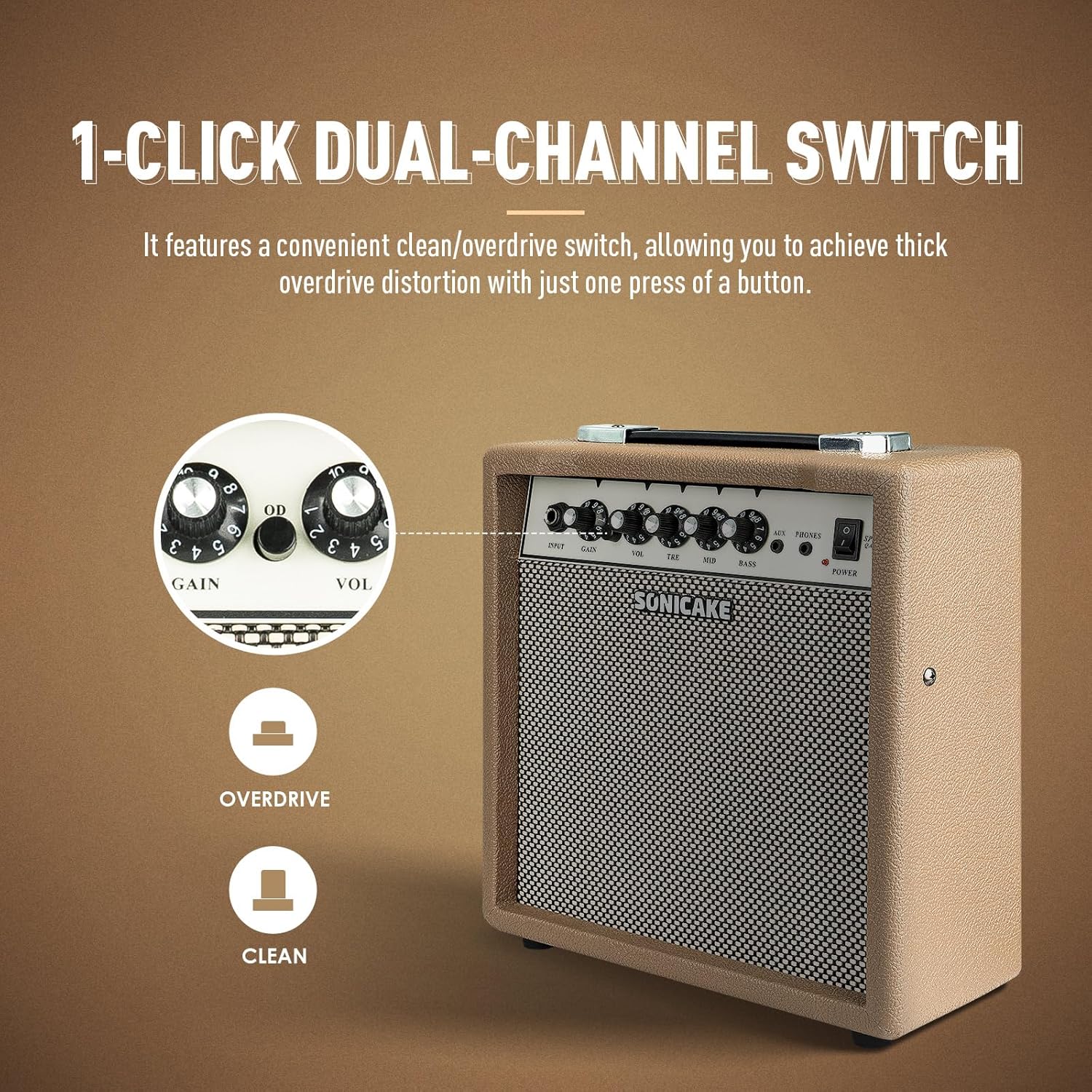
The OD button allows for instant switching between clean and overdrive tones.
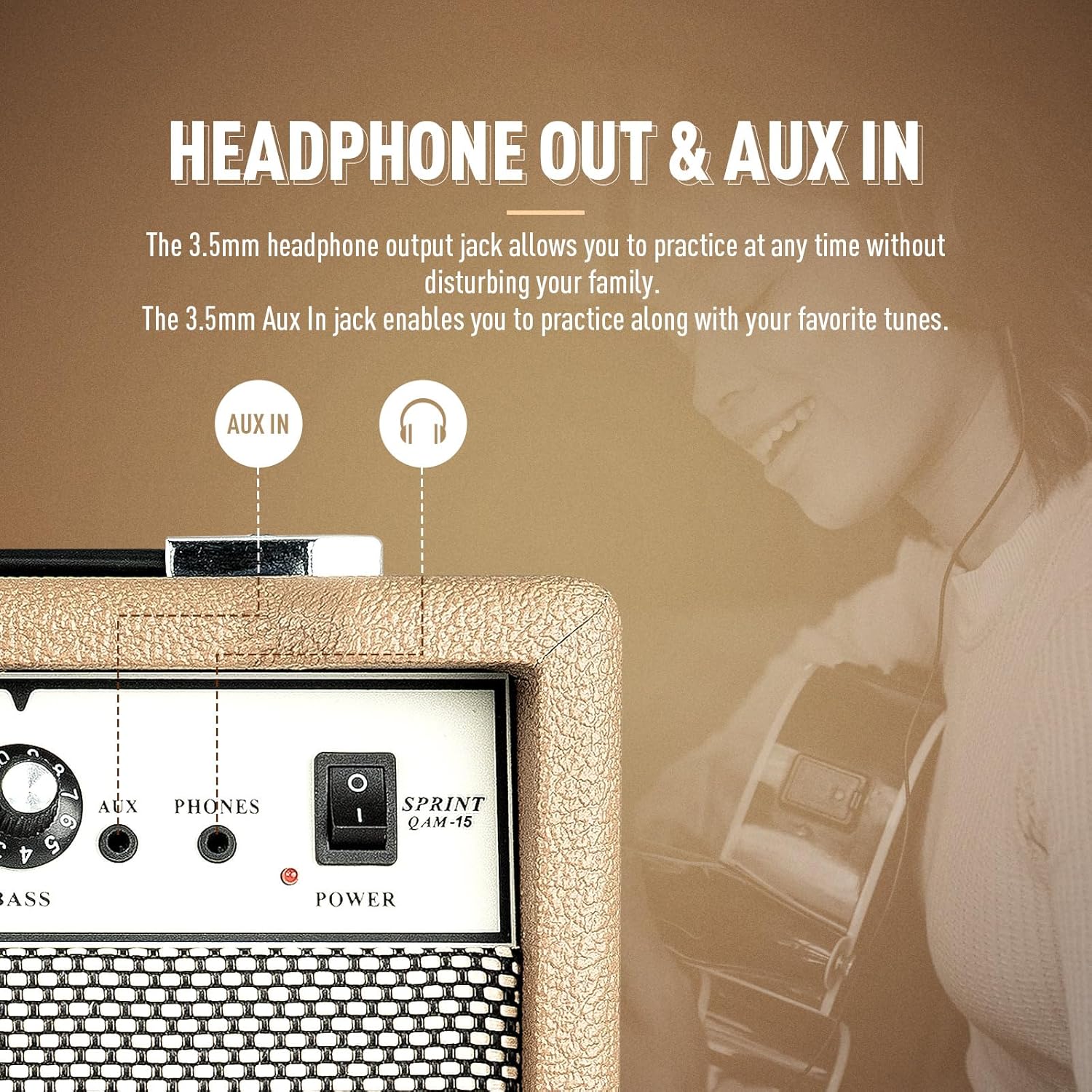
The amplifier features dedicated AUX In and Headphone Out jacks for versatile practice options.
Setup
- Unpacking: Carefully remove the amplifier from its packaging. Inspect for any signs of damage.
- Placement: Place the amplifier on a stable, flat surface. Ensure there is adequate space around the unit for ventilation.
- Power Connection: Connect the provided power cable to the amplifier's power input jack and then to a suitable electrical outlet. Ensure the power switch on the amplifier is in the 'OFF' position before connecting to power.
- Guitar Connection: Connect your electric guitar to the 'INPUT' jack on the amplifier's front panel using a standard 1/4" (6.35mm) instrument cable.
- Initial Settings: Before powering on, set the 'VOL' knob to its minimum position (fully counter-clockwise) and the 'GAIN' knob to a low setting. Set the 'TRE', 'MID', and 'BASS' knobs to their center (12 o'clock) positions.
Operating Instructions
Basic Operation:
- Power On: Flip the 'POWER' switch to the 'ON' position. The power indicator LED will illuminate.
- Adjusting Volume: Slowly turn the 'VOL' knob clockwise to increase the overall output volume to your desired level.
- Power Off: When finished, turn the 'VOL' knob to its minimum position, then flip the 'POWER' switch to the 'OFF' position.
Channel Selection:
The Sprint QAM-15 features two distinct channels: Clean and Overdrive.
- Clean Channel: With the 'OD' button in the 'OUT' position, the amplifier operates in the clean channel, providing a clear, uncolored tone.
- Overdrive Channel: Press the 'OD' button 'IN' to engage the overdrive channel. This adds distortion and sustain to your guitar tone. The 'GAIN' knob becomes more active in this mode.
Tone Control (3-Band EQ):
Use the 'TRE', 'MID', and 'BASS' knobs to shape your amplifier's tone:
- TRE (Treble): Adjusts the brightness and clarity of your sound. Turn clockwise for more sparkle, counter-clockwise for a warmer tone.
- MID (Middle): Controls the presence and punch of your sound. Adjust to cut through a mix or to create a scooped sound.
- BASS: Adjusts the low-end fullness and depth of your sound. Turn clockwise for a thicker, heavier tone, counter-clockwise for a tighter sound.
Gain Control:
The 'GAIN' knob controls the amount of signal sent to the amplifier's pre-amp stage. Higher gain settings result in more distortion and sustain, particularly noticeable in the overdrive channel. Experiment with the 'GAIN' and 'VOL' knobs to find your desired balance of distortion and overall loudness.
Connectivity:
- AUX Input: Connect an external audio device (e.g., smartphone, tablet, MP3 player) to the 'AUX' input using a 3.5mm stereo cable. This allows you to play along with backing tracks or your favorite music through the amplifier's speaker. The volume of the AUX input is controlled by your external device.
- Headphone Output: Connect a pair of headphones to the 'PHONES' output using a 3.5mm stereo plug. This will mute the amplifier's main speaker, allowing for silent practice. The headphone volume is controlled by the amplifier's 'VOL' knob.
Maintenance
- Cleaning: Regularly wipe the amplifier's exterior with a soft, dry, lint-free cloth. Do not use abrasive cleaners, solvents, or waxes.
- Storage: When not in use for extended periods, store the amplifier in a cool, dry place, away from direct sunlight and extreme temperatures.
- Handling: Always carry the amplifier using its handle. Avoid dropping or subjecting the unit to strong impacts.
- Ventilation: Ensure the amplifier's ventilation openings remain clear of dust and debris.
Troubleshooting
If you encounter issues with your SONICAKE Sprint QAM-15 amplifier, refer to the following common problems and solutions:
| Problem | Possible Cause | Solution |
|---|---|---|
| No sound from amplifier. |
|
|
| Sound is distorted or noisy. |
|
|
| AUX input not working. |
|
|
If the problem persists after trying these solutions, please contact SONICAKE customer support or a qualified technician.
Specifications

Dimensions of the SONICAKE Sprint QAM-15 amplifier.
- Model: QAM-15
- Output Wattage: 15 Watts
- Item Weight: Approximately 7.94 pounds (3.6 kg)
- Product Dimensions: 4.53 x 11.42 x 11.42 inches (11.5 x 29 x 29 cm)
- Compatible Devices: Electric Guitar
- Material Type: Plastic
- Color: Beige
Warranty and Support
For detailed warranty information, please refer to the warranty card included with your product or visit the official SONICAKE website. Keep your proof of purchase for warranty claims.
For technical support, product registration, or further inquiries, please visit the official SONICAKE website or contact their customer service department through the contact information provided on their website.

