
1. Introduction
Thank you for choosing the Philips Shaver i9000 Prestige Ultra. This advanced electric shaver is designed to provide an exceptionally close and comfortable shave, whether wet or dry. Featuring Skin IQ Pro technology, the Triple Lift & Cut system, and 360° NanoTech Precision rotary blades, it adapts to your facial contours and beard density for a personalized shaving experience. This manual provides essential information for the safe and effective use, maintenance, and care of your shaver.
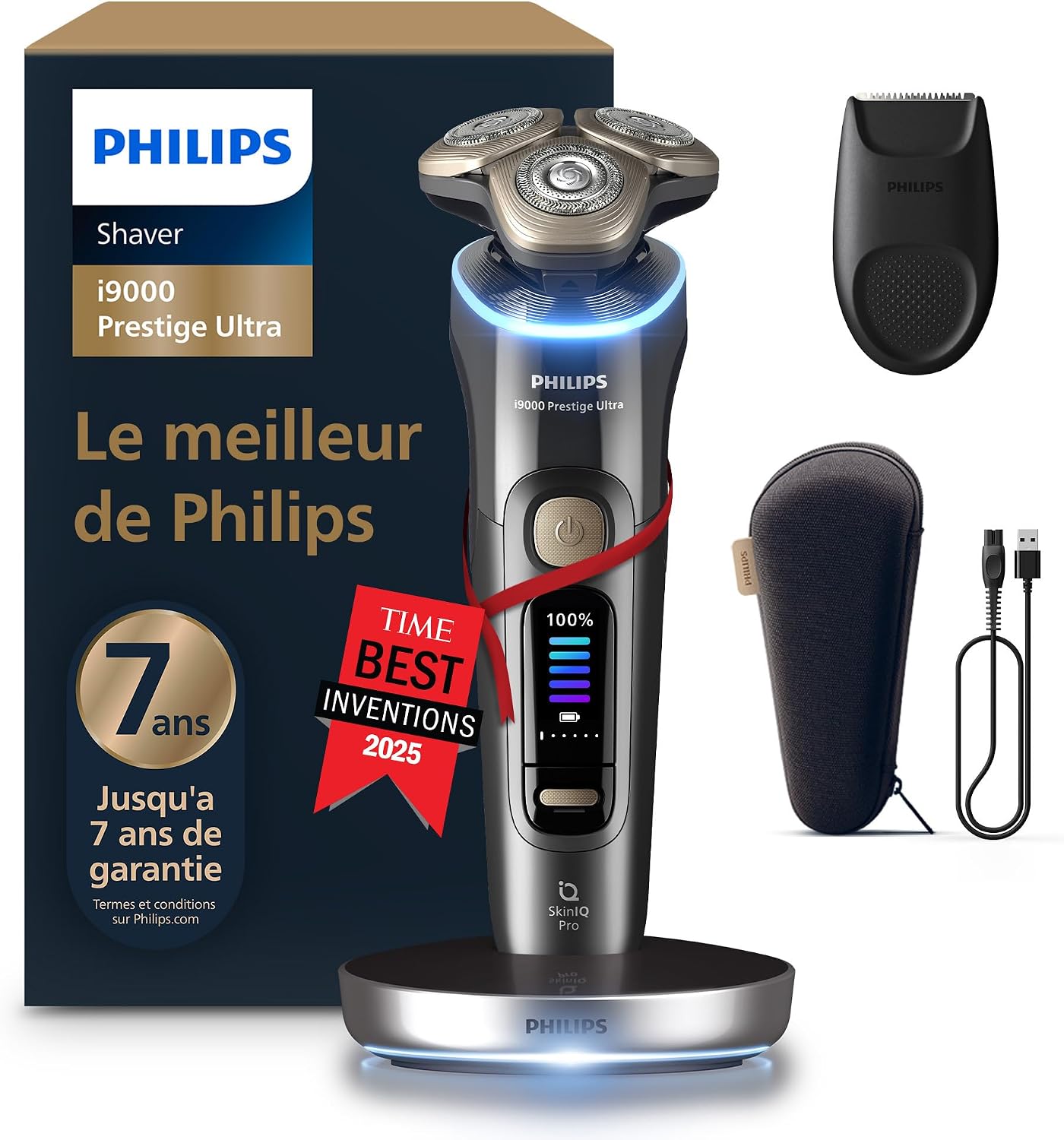
Image 1: Philips Shaver i9000 Prestige Ultra (XP9402/11) with its accessories.
2. Important Safety Information
Please read all safety instructions carefully before using the appliance. Failure to follow these instructions may result in electric shock, fire, or serious injury.
- Warning: Do not use the shaver near water or while charging to avoid the risk of electric shock.
- This appliance is waterproof and can be used in the bath or shower. For safety reasons, the appliance can only be operated cordlessly.
- Do not use the appliance if it is damaged.
- Keep the appliance and its power cord away from heated surfaces.
- This appliance can be used by children aged 8 years and above and persons with reduced physical, sensory or mental capabilities or lack of experience and knowledge if they have been given supervision or instruction concerning use of the appliance in a safe way and understand the hazards involved.
- Children should be supervised to ensure that they do not play with the appliance.
- Cleaning and user maintenance shall not be made by children without supervision.
3. What's in the Box
Your Philips Shaver i9000 Prestige Ultra package includes the following components:
- Philips Shaver i9000 Prestige Ultra (XP9402/11)
- Precision Trimmer attachment
- Charging Base
- Travel Pouch
- USB-A Charging Cable
- User Manual (this document)
Note: A power adapter is not included. You can use any compatible USB wall adapter (e.g., from a smartphone) to charge the device.

Image 2: Package contents of the Philips Shaver i9000 Prestige Ultra.
4. Setup
4.1 Charging the Shaver
- Connect the USB-A charging cable to the charging base.
- Plug the other end of the USB-A cable into a compatible USB power adapter (not supplied) and then into a wall socket.
- Place the shaver onto the charging base. The battery indicator on the shaver will illuminate and show the charging progress.
- A full charge takes approximately 1 hour and provides up to 60 minutes of shaving time.
- For a quick shave, a 5-minute charge provides enough power for one full shave.
4.2 Attaching/Detaching Accessories
To attach the precision trimmer or other accessories, simply pull off the shaving head from the shaver handle and click the desired accessory onto the handle until it locks into place. To detach, pull the accessory off the handle.
5. Operating Instructions
5.1 Shaving
The Philips Shaver i9000 Prestige Ultra can be used for both dry and wet shaving, including in the shower.
- Dry Shaving: Ensure your face is clean and dry. Turn on the shaver and move the shaving heads in small, circular motions over your skin.
- Wet Shaving: Apply shaving foam or gel to your face. Turn on the shaver and move the shaving heads in small, circular motions over your skin. Rinse the shaving heads under warm water during and after shaving to prevent clogging.
The Triple Lift & Cut system gently lifts hairs before cutting them below skin level for a close shave.

Image 3: Illustration of the Triple Lift & Cut system.
The 360° flexible shaving heads adapt dynamically to every curve of your face, ensuring constant skin contact for a precise shave, even in difficult areas like the neck and under the nose.

Image 4: Flexible shaving heads adapting to facial contours.
NanoTech Dual Precision blades are designed to cut hairs in any direction, making the shaver effective on 1, 3, or 7-day beards.

Image 5: NanoTech Dual Precision blades for various beard lengths.
5.2 Skin IQ Pro Technology
The Skin IQ Pro technology offers 5 shaving modes for a personalized experience, providing real-time feedback on pressure and movement for optimal results and skin comfort.
- Intense Mode: For a fast and powerful shave.
- Regular Mode: For everyday shaving.
- Sensitive Mode: For gentle shaving on sensitive skin.
- Foam Mode: Optimized for use with shaving foam or gel.
- Custom Mode: Allows for personalized settings.
The Hydro SkinGlide coating ensures a smooth glide over the skin, reducing friction and maximizing comfort.

Image 6: Skin IQ Pro display and features.
5.3 Using the Precision Trimmer
Attach the precision trimmer to the shaver handle. Use it to trim sideburns, mustaches, or to define beard lines. Move the trimmer gently against the direction of hair growth for best results.
6. Maintenance
6.1 Cleaning the Shaver
Regular cleaning ensures optimal performance and hygiene.
- After each shave, turn off the shaver.
- Open the shaving head unit by pressing the release button.
- Rinse the shaving head unit thoroughly under warm running water.
- Shake off excess water and allow the shaving head unit to air dry before closing it or placing it back on the shaver.
- For a more thorough cleaning, you can detach the individual shaving heads and rinse them separately.
6.2 Replacing Shaving Heads
For continued optimal performance, it is recommended to replace the shaving heads every two years. Replacement heads are available from Philips authorized retailers or the Philips website.
7. Troubleshooting
- Shaver not turning on: Ensure the shaver is charged. If the battery is completely depleted, it may take a few minutes of charging before the shaver responds.
- Poor shaving performance: Clean the shaving heads thoroughly. If performance does not improve, the shaving heads may need to be replaced. Ensure you are using the correct shaving technique (small, circular motions).
- Skin irritation: Ensure your skin is clean before shaving. If wet shaving, use a suitable shaving foam or gel. Try using the 'Sensitive' shaving mode. Allow your skin to adapt to the new shaver for a few weeks.
- Shaver not charging: Check that the charging cable is securely connected to both the charging base and the power adapter, and that the power adapter is plugged into a working wall socket.
For further assistance, please refer to the Warranty and Support section.
8. Specifications
| Model Number | XP9402/11 |
| Dimensions (L x W x H) | 8 x 24.5 x 16 cm |
| Weight | 440 grams |
| Power Source | Battery Powered |
| Battery Type | Integrated Rechargeable Battery |
| Battery Life (Average) | 1 hour (60 minutes) |
| Charging Time | 1 hour for full charge, 5 minutes for quick charge |
| Blade Material | Stainless Steel |
| Special Features | SkinIQ Pro, Triple Lift & Cut, NanoTech Precision |
| Head Type | Flex |
| Recommended Uses | Beard, Moustache, Nose Hair, Face |
9. Warranty and Support
Philips offers a standard warranty for this product. Additionally, upon registration within 90 days of purchase on the Philips website, you may be eligible for an extended warranty of up to 7 years (2 years standard + 5 years extended).

Image 7: Information on product quality, sustainability, and extended warranty.
For detailed warranty terms, product registration, or technical support, please visit the official Philips support website or contact Philips customer service in your region. You can find contact information and FAQs on the Philips website.
Online Support: www.philips.com/support


