
1. Product Overview
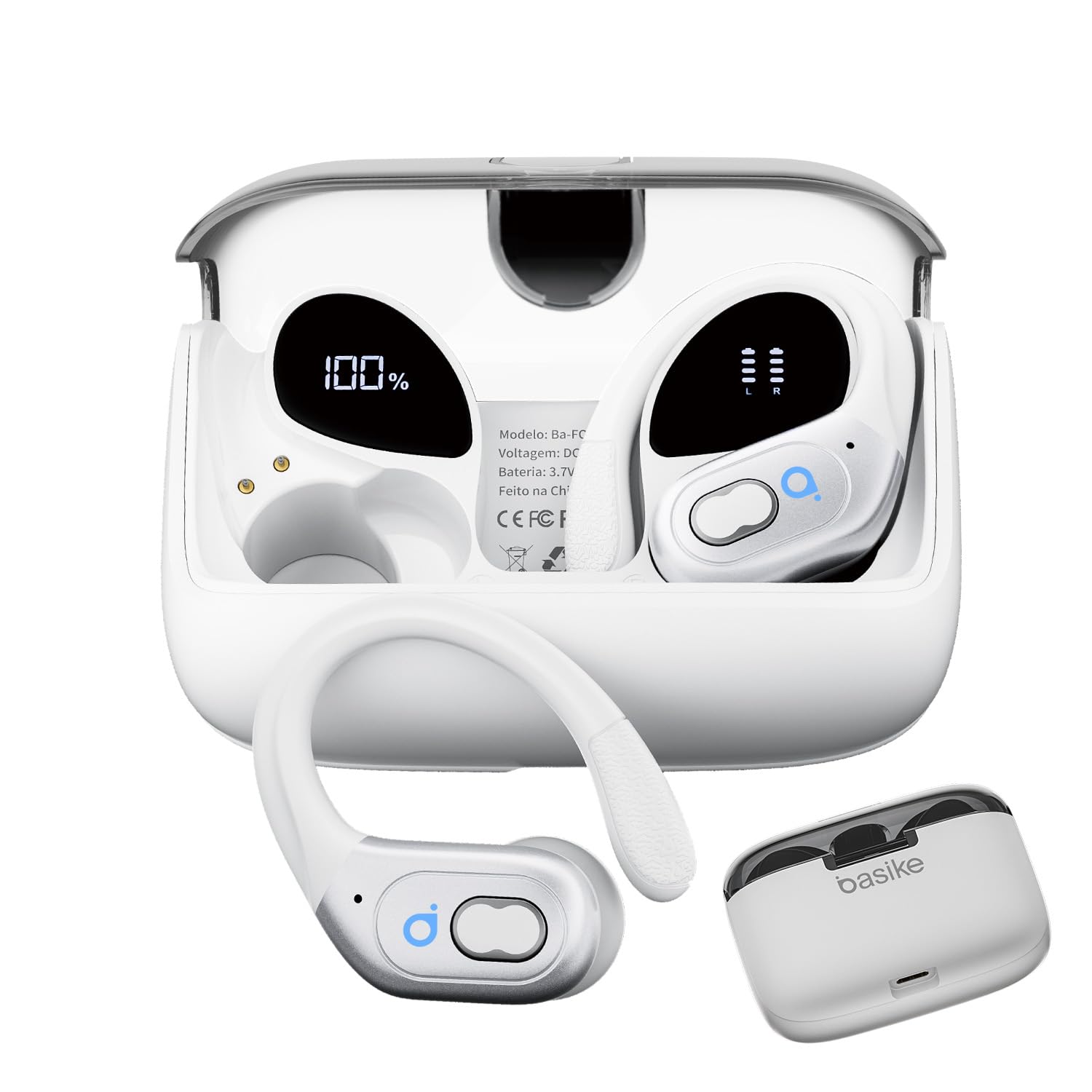
The Basike BA-FON-142 Wireless Bluetooth 5.4 Sport Earbuds are designed for an immersive audio experience and active lifestyles. Featuring advanced Bluetooth 5.4 technology, these earbuds offer stable connectivity and ultra-low latency, making them ideal for music, calls, and gaming. The ergonomic design with skin-friendly silicone ear tips ensures comfort and stability during various activities. With a dual LED digital display, you can easily monitor battery levels.
Key Features:
- 10MM Dual-Layer Dynamic Molecular Composite Diaphragm: Enhances sound quality with AAC/SBC high-resolution audio decoding for a 3D surround HIFI sound field.
- Ergonomic Design: Lightweight and comfortable, adapting to various ear shapes with included silicone ear tips (S, M, L) for secure fit during strenuous activities.
- Bluetooth 5.4 Transmission: Provides stable, smooth, and lag-free connection with improved communication efficiency and anti-interference. Features ultra-low latency for synchronized gaming audio and video.
- Super Battery Life: Up to 8 hours of playback on a single charge, with the 480 mAh charging case extending total usage to 45 hours.
- Faster and More Stable Connection: Automatic connection after initial pairing. Supports various Bluetooth devices (phones, tablets, desktops) within a 15-meter range.
- IPX5 Water and Sweat Resistant: Certified water resistance protects against light rain and sweat, suitable for sports and outdoor use.

Image: Basike BA-FON-142 Wireless Bluetooth 5.4 Sport Earbuds in their charging case, highlighting the TWS and sport-oriented design.
2. Specifications
| Feature | Detail |
|---|---|
| Model Name | FON142-HD65 |
| Wireless Version | 5.4 |
| Speaker Diameter | 10 mm |
| Playback Time (Single Charge) | 7-8 hours |
| Total Playback Time (with Case) | 45 hours |
| Idle Time | 7 hours |
| Charging Time | 1-2 hours |
| Supported Systems | iOS, Android, Windows |
| Water Resistance Level | IPX5 |
| Noise Control | None |
| Frequency Response | 20 KHz |
| Earbud Connector | No Physical Jack |
| Wireless Communication Technology | Bluetooth |
| Compatible Devices | Mobile Phones, Laptops, Tablets |
| Product Weight | 95 Grams |
| Control Method | Remote (Touch) |
| Impedance | 30 Ohms |

Image: Close-up of the Basike BA-FON-142 charging case showing the dual LED digital display for battery capacity and individual earbud charge.

Image: Diagram illustrating the 10MM Dual-Layer Dynamic Molecular Composite Diaphragm and its components for enhanced sound quality.
3. Setup and Pairing
Initial Pairing:
- Ensure the earbuds are charged.
- Open the charging case. The earbuds will automatically enter pairing mode.
- On your device (smartphone, tablet, laptop), go to Bluetooth settings.
- Search for available devices and select "BA-FON-142" to connect.
- Once successfully paired, the earbuds will automatically connect to your device when removed from the case.
Resetting Earbuds:
If you experience connection or function problems, you can reset the earbuds:
- Delete the Bluetooth pairing information for "BA-FON-142" from your phone's settings.
- Place both earbuds back into the charging case to ensure they are charging.
- Remove the earbuds from the case and wait for 20 seconds.
- If the issue persists, repeat the steps.

Image: Illustration of Basike BA-FON-142 Earbuds connecting via Bluetooth 5.4, showing compatibility with various devices.
4. Operating Instructions
The Basike BA-FON-142 earbuds feature intuitive touch controls for easy management of music and calls.
Touch Controls:
- Play/Pause: Single tap (X1) on either L/R earbud.
- Next Track: Double tap (X2) on the R earbud.
- Previous Track: Double tap (X2) on the L earbud.
- Volume Up: Press and hold (2S) on the R earbud.
- Volume Down: Press and hold (2S) on the L earbud.
- Answer/End Call: Single tap (X1) on either L/R earbud.
- Reject Call: Press and hold (2S) on either L/R earbud.
- Activate Voice Assistant (Siri): Triple tap (X3) on either L/R earbud.
- Power On/Off (when not connected): Press and hold (2S/5S) on either L/R earbud.
- Reset: Five taps (X5) on either L/R earbud.

Image: Visual guide to the touch controls on the Basike BA-FON-142 Earbuds, detailing single, double, triple taps, and long presses for various functions.
5. Maintenance
Cleaning:
- Regularly clean the charging contacts on both the earbuds and the charging case to ensure proper charging.
- Use a soft, dry cloth to wipe the earbuds and case.
- Do not use concentrated chemicals or detergents to clean the product.
Ear Tips:
The earbuds come with three interchangeable ear tip sizes (S, M, L) to ensure a comfortable and secure fit. Choose the size that best suits your ears for optimal sound quality and stability.

Image: Basike BA-FON-142 Earbuds highlighting IPX5 water resistance and the three available ear tip sizes (S, M, L).
6. Troubleshooting
Common Issues and Solutions:
- Can be connected, but no sound:
Ensure the volume on both your device and the earbuds is turned up. Try clicking the right earbud to increase volume. - One of the earbuds cannot be charged:
Clean the charging contacts on both the affected earbud and the charging case. Ensure the earbud is properly seated in the case. - One of the earbuds cannot be connected:
Perform a reset of the earbuds as described in the "Resetting Earbuds" section (Section 3).
7. Safety Instructions
- Keep the product away from extremely hot and cold environments, as this will damage the battery and circuit.
- Avoid immersing the product in liquids. While IPX5 rated for splashes, it is not designed for submersion.
- Do not disassemble the product. This may void the warranty and cause damage.
- Do not use concentrated chemicals or harsh detergents to clean the product.
- Use only a 5V/1A power supply for charging. Connecting to a power supply with too high a voltage can cause serious damage.
8. Warranty and Support
Manufacturer's Warranty: 1 year. Basike is not responsible for damages caused by improper use of the product or use with an incompatible electrical device.
For further support or warranty claims, please contact your retailer or visit the official Basike website.