
Introduction
Thank you for choosing the K&F Concept S254A3+BV01 Camera Tripod. This lightweight and portable tripod is designed for versatility and stability, supporting various devices including cameras, cell phones, projectors, webcams, and ring lights. Its innovative pentagonal tube design and 3-way pan head make it ideal for travel, outdoor shoots, and professional video recording or live streaming. Please read this manual carefully to ensure proper setup and operation.
What's in the Box
- K&F Concept Camera Tripod (S254A3+BV01) x1
- Quick Release Plate x1
- Cellphone & Tablet Clip x1
- Remote Control x1
- Tripod Bag x1
- Instruction Manual x1

Image: All components included in the K&F Concept S254A3+BV01 package.
Setup Guide
1. Unfolding the Tripod Legs
To unfold the tripod, release the leg locks and extend each leg to your desired height. The pentagonal tube design ensures stability. Secure the leg locks once extended.

Image: Extending the tripod legs for setup.
2. Attaching the Quick Release Plate to Your Device
The quick release plate allows for easy attachment and detachment of your camera or phone. Screw the 1/4" screw on the quick release plate into the tripod mount of your camera. For smartphones or tablets, use the provided cellphone & tablet clip, which also has a 1/4" screw mount.

Image: Steps for attaching a camera to the quick release plate.
3. Mounting Your Device to the Tripod Head
With the quick release plate attached to your device, simply slide it into the tripod head until it clicks securely into place. Ensure the quick release plate lock knob is tightened to prevent accidental detachment.

Image: Camera securely mounted on the tripod head.
4. Adjusting the Center Column
To increase the tripod's height beyond the leg extensions, loosen the center column locking knob and raise the center column. Tighten the knob once the desired height is reached. The bottom hook of the central shaft can be used to hang additional weight, such as a camera bag, to enhance stability, especially in windy conditions.
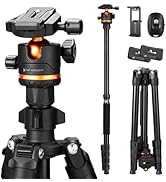
Image: Adjusting the center column height.
Operating Instructions
1. Using the 3-Way Pan Head
The 3-way pan head offers precise control over your camera's movement. Use the handle to adjust horizontal rotation (360°), and the tilt angle from +100° to -70°. Lock the adjustments by tightening the respective knobs on the pan head. This allows for versatile multi-angle photography and videography.
Image: Demonstrating the flexibility of the 3-way pan head.
2. Utilizing the Cellphone & Tablet Clip
The included clip is compatible with most phones (2.1-3.67 inches width) and iPads (4.6-7.8 inches width). Attach the clip to the quick release plate, then secure your device. This allows for stable mobile photography and video recording.

Image: Using the cellphone and tablet clip with the tripod.
3. Using the Bluetooth Remote Control
The remote control allows for convenient remote shooting up to 10 meters away. Pair it with your smartphone via Bluetooth to capture photos or start/stop video recording without touching your device, reducing camera shake.
Image: Bluetooth remote control for remote shooting.
4. Wide Compatibility
This tripod is designed for broad compatibility, supporting various devices including DSLR cameras, mirrorless cameras, smartphones, tablets, projectors, webcams, and ring lights. Its robust design ensures stable support for your equipment.

Image: Examples of devices compatible with the tripod.
Maintenance
To ensure the longevity and optimal performance of your K&F Concept S254A3+BV01 tripod, follow these maintenance guidelines:
- Cleaning: Wipe down the tripod with a soft, dry cloth after each use, especially after outdoor shoots, to remove dust, dirt, or moisture. For stubborn grime, use a slightly damp cloth and then dry thoroughly. Avoid harsh chemicals or abrasive cleaners.
- Lubrication: Periodically check the moving parts, such as leg locks and pan head mechanisms. If they feel stiff, apply a small amount of silicone-based lubricant. Do not over-lubricate.
- Storage: Store the tripod in its provided carry bag in a cool, dry place away from direct sunlight and extreme temperatures. Ensure all parts are clean and dry before storage.
- Inspection: Regularly inspect all screws, knobs, and leg locks for tightness. Tighten any loose components to maintain stability and safety. Check the non-slip rubber mats for wear and tear.
Troubleshooting
If you encounter any issues with your tripod, refer to the following common problems and solutions:
- Issue: Tripod feels unstable or wobbly.
Solution: Ensure all leg locks are fully engaged and tightened. Verify that the center column locking knob is secure. For added stability, hang a weight (e.g., camera bag) from the hook at the bottom of the center column. Check that the non-slip pads are properly rotated to adapt to the ground surface. - Issue: Pan head tilts downward under camera weight.
Solution: Ensure the pan head's tilt adjustment knob is fully tightened. The tripod head supports loads up to 4 kg (8.8 lbs). If your camera setup exceeds this weight, it may cause tilting. - Issue: Quick release plate is difficult to attach or detach.
Solution: Ensure the quick release plate lock knob is fully loosened before attempting to insert or remove the plate. Do not force the plate. - Issue: Cellphone/tablet clip does not fit my device.
Solution: The clip is designed for phones with 2.1-3.67 inches width and iPads with 4.6-7.8 inches width. Verify your device's dimensions. - Issue: Bluetooth remote control not pairing.
Solution: Ensure the remote control has fresh batteries and is turned on. Activate Bluetooth on your smartphone and search for the remote. If issues persist, refer to your smartphone's Bluetooth pairing instructions.
Specifications
| Feature | Detail |
|---|---|
| Product Dimensions | 17.32 x 5.12 x 5.12 inches |
| Item Weight | 2.65 pounds (1200 Grams) |
| Item Model Number | S254A3+BV01 |
| Batteries | 1 Lithium Metal battery required (included) |
| Brand | K&F CONCEPT |
| Color | Black |
| Compatible Devices | Binoculars, Camcorder, Camera, Smartphone |
| Special Feature | Foldable |
| Material | Aluminum |
| Weight Limit | 8.8 Pounds (4 kg) |
| Maximum Height | 172 Centimeters (68 inches) |
| Tripod Head Type | Pan Heads |
Warranty & Support
For warranty information, product registration, or technical support, please visit the official K&F Concept website or contact their customer service directly. Details can typically be found on the product packaging or the manufacturer's website.
Manufacturer: Shenzhen Zhuoer Photograph
Brand Store: Visit the K&F CONCEPT Store on Amazon
Official Product Video
Video: K&F Concept Camera Tripod SMART-PRO Series S254A3+BV01. This video demonstrates the key features and usage of the tripod, including its compact design, setup process, and various functionalities for different devices.